
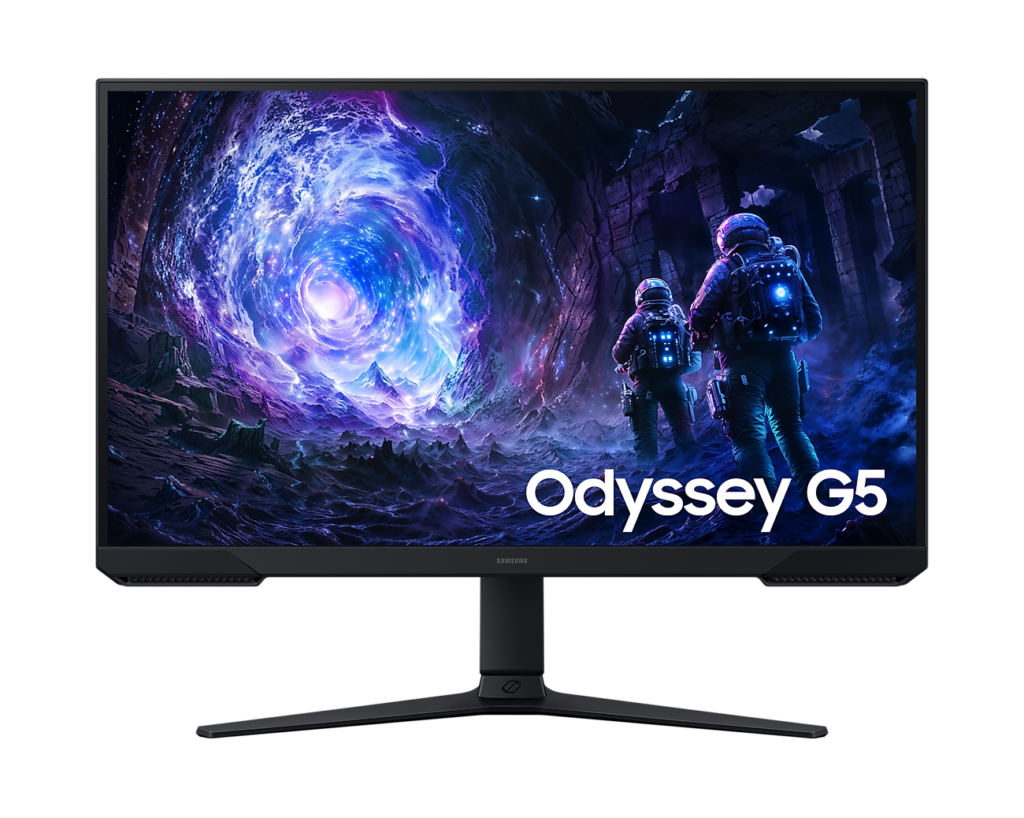
Samsung Odyssey G5 G51F: Specs, Price, Pros & Cons
Most 27-inch 1440p gaming monitors at this level use IPS panels, and the G51F is a deliberate exception. Samsung builds it around a VA panel, the technology that holds back light far better than IPS, so the black of a night-time scene looks black rather than dark gray. That single choice shapes almost everything else about who should buy it.
In its favor, the resolution and screen size sit in the comfortable middle of the market: sharp enough for documents and a browser, large enough to fill your view at normal desk distance, and not so demanding that a mid-range graphics card struggles to keep up. The stand is the surprise. Height, swivel and portrait rotation are unusual at this price, and they matter more over a working year than any figure on the box.
The trade-offs are the ones VA always carries. Viewing angles are narrower, so colors shift if you sit off-center, and fast movement in dark areas can smear, which competitive players notice first. The HDR label describes a signal it can accept rather than a picture it can produce. Brightness is ordinary, and there is no local dimming to make highlights stand out.
It is also bare in the ways budget monitors often are: no speakers, and no USB port that can work as a hub. Samsung publishes no wide-gamut color figures, which tells you photo work is not the brief.
Its natural buyer plays story-led games and watches films in the evening, sits square to the screen, and values deep blacks over the last increment of motion clarity. Anyone who plays fast shooters in bright rooms, or views the screen from an angle, will be happier with an IPS model.
Category strengths
Where the Samsung Odyssey G5 G51F beats the median
- Has height adjustment ?
- Has swivel adjustment ?
- A higher pixel density ?109 ppi vs 93 ppi (median)
- Has pivot adjustment ?
Where the Samsung Odyssey G5 G51F trails the median
- A lower contrast ratio ?3000:1 vs 3500:1 (median)
- A lower color depth ?8 bit vs 10 bit (median)
How this VS Score was computed
Score 49: each known spec is measured against the median of VA gaming monitors, 27 to 31 inches (11 products), then weighted; 50 means level with that median. In classes of six or more, a value beyond the class’s 10th–90th percentile range counts as that limit, so one extreme product cannot set the scale. 69% of the scoreable weight could be used; unknown values, features not applicable to this class and proxies (battery capacity where a rated life exists) add or remove nothing.
| Specification | This product | Cohort median | Score weight | Points moved |
|---|---|---|---|---|
| Height adjustment | Yes | 45% of the class have it | 0.4 | +20.0 |
| Local dimming | No | 29% of the class have it | 0.4 | −19.2 |
| Swivel | Yes | 36% of the class have it | 0.2 | +10.0 |
| Built-in speakers | No | 30% of the class have it | 0.2 | −9.6 |
| Picture-by-picture | No | 33% of the class have it | 0.2 | −9.6 |
| Pixel density | 109 | 93 | 0.5 | +4.5 |
| Contrast ratio | 3,000 | 3,500 | 0.6 | −4.2 |
| Color depth | 8 | 10 | 0.3 | −3.0 |
| Pivot | Yes | 36% of the class have it | 0.02 | +1.0 |
| Screen size | 27 | 27 | 1.2 | +0.0 |
| Resolution | 1440p | 1440p | 1.2 | +0.0 |
| Panel type | VA | VA | 0.8 | +0.0 |
| Response time | 1 | 1 | 0.8 | +0.0 |
| Peak brightness | 300 | 300 | 0.8 | +0.0 |
| HDR | HDR10 | HDR10 | 0.5 | +0.0 |
| Adaptive sync | FreeSync | FreeSync | 0.6 | +0.0 |
| Refresh rate | 180 | 180 | 1.2 | +0.0 |
| HDMI ports | 2 | 2 | 0.4 | +0.0 |
| DisplayPort inputs | 1 | 1 | 0.4 | +0.0 |
Not scored: DCI-P3 coverage (unknown: not scored); Local dimming zones (unknown: not scored); Variable refresh rate (standard for the class (100% have it)); Motion blur reduction (unknown: not scored); Input lag (unknown: not scored); Tilt (standard for the class (100% have it)); USB-C (not applicable: only 0% of this class have it); USB-C power delivery (unknown: not scored); USB hub (not applicable: only 20% of this class have it); Headphone output (standard for the class (91% have it)); KVM switch (not applicable: only 0% of this class have it); Webcam (not applicable: only 0% of this class have it); Microphone (not applicable: only 0% of this class have it); Ethernet (not applicable: only 0% of this class have it).
Editor’s note
The G51F is the VA rung of Samsung's 2026 Odyssey G5 ladder, and its position is stranger than the spec sheet lets on: Samsung's own comparison table shows the IPS-panelled G50F selling alongside it, sometimes for less. That makes the choice unusually clean. This VA version buys you 3000:1 contrast (dark scenes with real depth that the IPS siblings cannot produce) and pays for it with VA's known weaknesses: narrower viewing angles and smearing in dark, fast content. Which trade you prefer decides the SKU.
The stand deserves the headline: Samsung's table specifies a fully adjustable HAS-pivot design (120 mm of height, swivel both ways, and portrait rotation). At this price that is a genuine rarity.
The rest is a competent QHD gaming package. 180 Hz native (DisplayPort 1.4 required, as the two HDMI ports are 2.0), 1 ms MPRT with no GtG figure published, plain FreeSync without Premium or G-Sync certification, and Samsung's gaming toolkit of Black Equalizer and Virtual Aim Point. Brightness is 300 nits with decode-only HDR10.
One technicality from the audit: Samsung lists a single USB-A port, but with no upstream connection anywhere it cannot serve as a hub, so treat this monitor as having no usable USB. No speakers either, and color coverage goes unpublished beyond an NTSC figure, which tells you photo work is not the intent.
With 213 Amazon ratings at 4.5 stars, it is the crowd favorite of this batch. I would still cross-shop the cheaper IPS G50F first, unless deep blacks are specifically what you are after.
Specifications
Quality bars show where each figure sits between the lowest and highest of the 11 VA gaming monitors, 27 to 31 inches this VS Score is measured against.
Picture
Gaming
Ergonomics & design
Connectivity
Features
Sources and verification
Where the specifications come from
- Official product pagesamsung.com
- Retailer listing (cross-check)amazon.com
Verification
- First published
- Specifications last checked
- Sheet completeness
- 35 of 42 specifications verified; the rest show as Unknown and are never estimated or scored
- Page type
- Product specification page — Compiled from the manufacturer’s published specifications and the cited sources; this is not a hands-on test.
- Basis
- Research-based: specifications and editorial text were compiled from the documents listed here and the manufacturer’s published data. We have not tested this unit ourselves; where independent measurements are mentioned they belong to the linked publication.
Where to buy
Prices and availability may change. Check the retailer before buying. We may earn a commission on purchases.
Price history
Monitors with similar specs to the Samsung Odyssey G5 G51F
Ratings & reviews
No reviews yet. Be the first to share your experience.
The bottom line
The Samsung Odyssey G5 G51F earns a VS Score of 49, below the median of the 11 VA gaming monitors, 27 to 31 inches it is measured against (a score of 50 is level with that median).
- Who it’s for
- Dark-scene gamers who want VA contrast at this size and resolution, with a fully adjustable pivot stand that is rare at this price.
- Who should look elsewhere
- Fast-paced competitive players sensitive to VA smear, and spec-sheet shoppers: no GtG figure, plain FreeSync, and no published DCI-P3 or sRGB coverage.
- The trade-off that matters
- The deepest blacks in its class from Samsung's own ladder, where the IPS-panelled G50F sibling often sells for less and handles motion better.
- The main alternative
- Samsung Odyssey G5 G50F is the IPS twin rung: cheaper, G-Sync certified, and the safer default unless contrast is specifically what you want.
The VS Score is calculated from the weighted specifications above, each measured against the median of comparable VA gaming monitors, 27 to 31 inches — a shortlisting guide, not a substitute for your own priorities. See how we score.





