
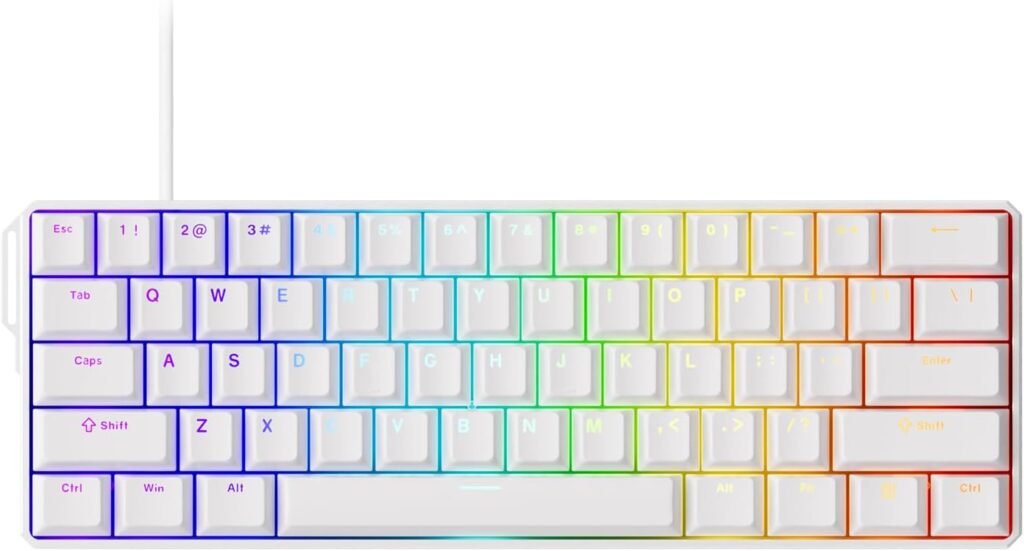
MonsGeek FUN60 Ultra: Specs, Price, Pros & Cons
Hall-effect sensing in the smallest common layout, inside an aluminum case, is the whole proposition of the FUN60 Ultra. MonsGeek aims it at competitive players who want the tuning tricks of a magnetic board and have no use for anything beyond the letters, numbers and modifiers.
Each switch reports how far it has been pressed, and the board turns that into two settings you control: the depth at which a key fires and how quickly it resets as you lift. Those two are the reason magnetic keyboards turn up in shooters. The third trick some rivals add, analog input that turns a key into a joystick axis, is absent, so racing and flight games get ordinary on and off presses from it.
Several details sit above what the price would lead you to expect. The sockets are hot-swap, so a switch can be pulled and replaced without soldering, the board registers every key held at once, and the lighting shines through the legends. It connects by cable, by receiver or over Bluetooth, and a desktop driver or a web page handles the settings. The small layout is both the appeal and the limit. Arrows, the function row and the navigation keys all live on a held layer, which leaves the mouse a wide stretch of desk and makes editing text slower. There is no knob and no USB passthrough, and the case is mounted firmly, so typing sounds harder than on a cushioned enthusiast board.
It makes most sense on a desk used only for games, owned by someone who plays one or two competitive titles seriously and wants tunable actuation without paying for a flagship. Writing and spreadsheet work on the same machine call for a larger layout.
Category strengths
Where the MonsGeek FUN60 Ultra beats the median
- A much higher polling rate ?8,000 Hz vs 1,000 Hz (median)
- Has rapid trigger ?
- Has adjustable actuation ?
Where the MonsGeek FUN60 Ultra trails the median
- No rotary knob ?
How this VS Score was computed
Score 76: each known spec is measured against the median of all keyboards (101 products), then weighted; 50 means level with that median. In classes of six or more, a value beyond the class’s 10th–90th percentile range counts as that limit, so one extreme product cannot set the scale. 48% of the scoreable weight could be used; unknown values, features not applicable to this class and proxies (battery capacity where a rated life exists) add or remove nothing.
| Specification | This product | Cohort median | Score weight | Points moved |
|---|---|---|---|---|
| Polling rate | 8,000 | 1,000 | 0.7 | +35.0 |
| Switch technology | Hall effect | Mechanical | 1 | +33.0 |
| Hot-swappable | Yes | 61% of the class have it | 0.6 | +30.0 |
| Rapid trigger | Yes | 25% of the class have it | 0.5 | +25.0 |
| Adjustable actuation | Yes | 24% of the class have it | 0.4 | +20.0 |
| Rotary knob | No | 53% of the class have it | 0.2 | −9.6 |
| Connection | 3 | 3 | 0.8 | +0.0 |
| Battery capacity | 4,000 | 4,000 | 0.2 | +0.0 |
| Keycap material | PBT | PBT | 0.4 | +0.0 |
| Backlight | RGB | RGB | 0.3 | +0.0 |
Not scored: Actuation force (unknown: not scored); N-key rollover (standard for the class (85% have it)); Analog input (not applicable: only 14% of this class have it); Wired latency (unknown: not scored); Wireless latency (unknown: not scored); Front height (unknown: not scored); Bluetooth devices (unknown: not scored); Battery life (unknown: not scored); USB passthrough (not applicable: only 4% of this class have it); Sound dampening (unknown: not scored); Programmable keys (standard for the class (99% have it)); Media controls (unknown: not scored); Onboard profiles (unknown: not scored); Configuration software (standard for the class (95% have it)).
Editor’s note
The MonsGeek FUN60 Ultra is a gaming keyboard that competes on the specification sheet and mostly wins. It is a 61-key 60% board built around Hall-effect magnetic switches (or TMR sensors, depending on the version you pick), with an 8,000 Hz polling rate, rapid trigger down to 0.01 mm and an actuation point adjustable anywhere from 0.1 mm to 3.4 mm.
That adjustability is the point of a magnetic board. You can set a hair-trigger actuation at the shallow end for movement keys in a shooter and a deeper, more deliberate 2 mm for everything else, and rapid trigger resets the key the instant you start lifting rather than waiting for a fixed release point. The advanced functions are all here too: Dynamic Keystroke, Mod-Tap, Toggle Key and SOCD, configured through either MonsGeek's desktop driver or a web app.
The build is better than the price suggests: an aluminum case and aluminum plate, tray mount, pre-lubed plate-mounted stabilizers, shine-through PBT keycaps and per-key ARGB. The tri-mode version adds 2.4 GHz and Bluetooth on a 4,000 mAh battery. A cheaper wired-only version exists, so check which one a listing is selling.
The caveats are structural. A 60% layout means no function row, no arrow keys and no navigation cluster. Everything lives on a hold-Fn layer, which is fine in games and irritating in spreadsheets. A tray-mounted aluminum case sounds firmer and less cushioned than the gasket-mounted boards enthusiasts favor. MonsGeek also does not publish battery life for the wireless version.
Buy it if you play competitive games, want rapid trigger and per-key actuation tuning, and have no use for a function row. Skip it if the keyboard is mainly for work, you need arrows and a numpad, or you want the softer typing feel of a gasket-mounted board.
Specifications
Quality bars show where each figure sits between the lowest and highest of the 101 keyboards this VS Score is measured against.
Switches & typing
Performance
Layout & size
Connectivity
Build & sound
Features
Sources and verification
Where the specifications come from
- Official product pagemonsgeek.com
- Independent testingrtings.com
Verification
- First published
- Specifications last checked
- Sheet completeness
- 22 of 34 specifications verified; the rest show as Unknown and are never estimated or scored
- Page type
- Product specification page — Compiled from the manufacturer’s published specifications and the cited sources; this is not a hands-on test.
- Basis
- Research-based: specifications and editorial text were compiled from the documents listed here and the manufacturer’s published data. We have not tested this unit ourselves; where independent measurements are mentioned they belong to the linked publication.
Where to buy
Prices and availability may change. Check the retailer before buying. We may earn a commission on purchases.
Price history
Keyboards with similar specs to the MonsGeek FUN60 Ultra

Ratings & reviews
No reviews yet. Be the first to share your experience.
The bottom line
The MonsGeek FUN60 Ultra earns a VS Score of 76, above the median of the 101 keyboards it is measured against (a score of 50 is level with that median).
- Who it’s for
- A competitive player on a budget who wants tunable actuation and rapid trigger in the smallest practical board.
- Who should look elsewhere
- It is not a work keyboard. With no function row, arrows or numpad, spreadsheets and editing become a chore, and gasket-board fans will find the tray mount firm.
- The trade-off that matters
- Buying the right version matters. A cheaper wired-only model shares the name, and the wireless one comes without a published battery rating.
- The main alternative
- Wooting 60HE v2: the reference small magnetic board, adding analog axes for racing and flight games, but wired only.
The VS Score is calculated from the weighted specifications above, each measured against the median of comparable keyboards — a shortlisting guide, not a substitute for your own priorities. See how we score.




