
Logitech Signature K650: Specs, Price, Pros & Cons
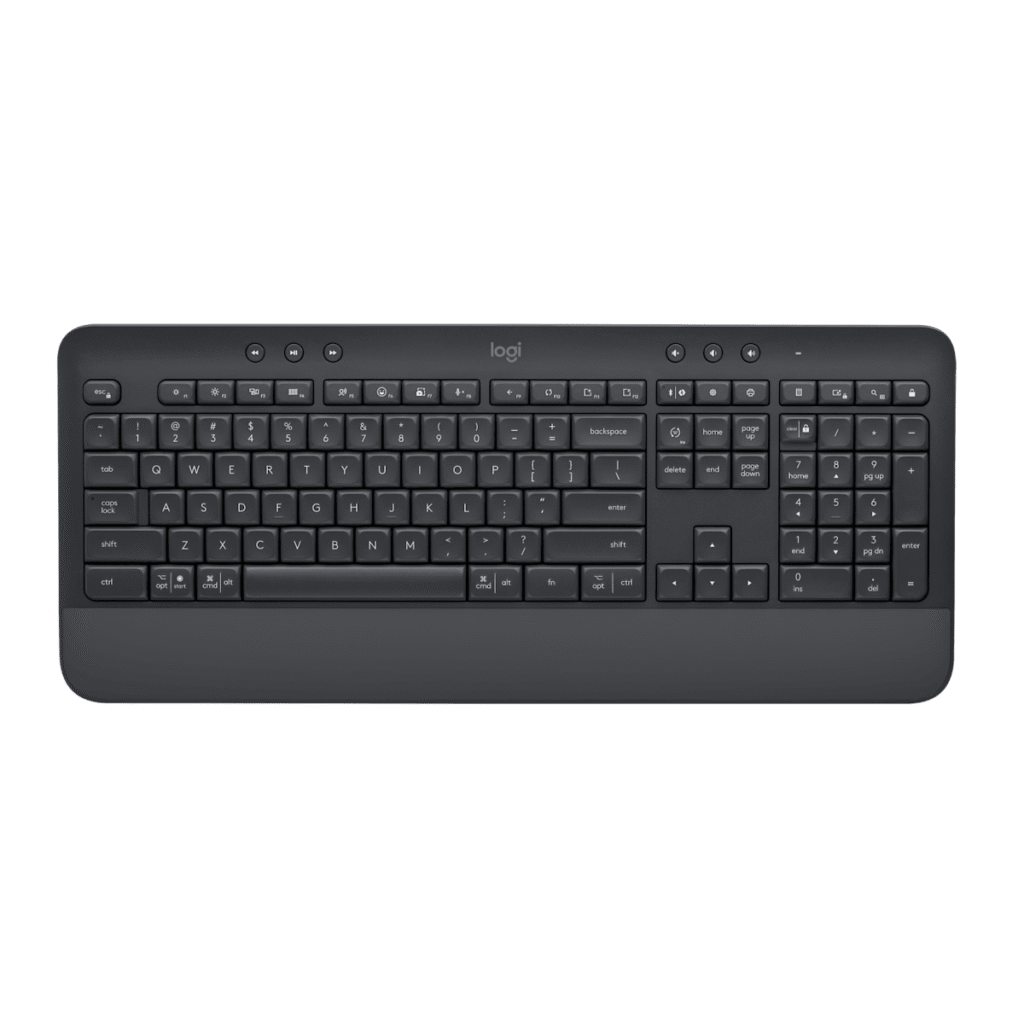
Measure the height before anything else. The Signature K650 stands 24 mm tall, and Logitech's answer is a palm rest molded into the same case, so your hands sit level with the home row. That one decision sets the size, the weight and the kind of desk this keyboard belongs on.
Underneath is a membrane board with plunger keys. Each press has a defined stroke and a soft landing, the traditional desktop feel, and nothing clicks or rattles. The layout is the standard full-size one with a number pad, so there is nothing to learn, and remapping is handled in Logitech's desktop software. It pairs through Logitech's own receiver or over Bluetooth and runs on disposable batteries, so there is nothing to charge and no port to keep clear of dust.
What it leaves out is easy to list. There is no lighting of any kind, the switches are fixed to the board, and the membrane means the feel you get on the first day is the feel you keep. At 700 g, with the rest permanently attached, it is a keyboard you place once and leave, and its footprint on the desk includes the rest.
It suits someone who wants the wrist support of an ergonomic board while keeping the ordinary straight rows of a normal office keyboard. Writers, admin staff and anyone working through long reports at a desk that never moves are its natural owners, along with a laptop owner who wants a proper desktop keyboard at home and has no plans to carry it anywhere.
Category strengths
Where the Logitech Signature K650 trails the median
- No hot-swappable switches ?
- Fewer connection options ?
How this VS Score was computed
Score 23: each known spec is measured against the median of all keyboards (101 products), then weighted; 50 means level with that median. In classes of six or more, a value beyond the class’s 10th–90th percentile range counts as that limit, so one extreme product cannot set the scale. 25% of the scoreable weight could be used; unknown values, features not applicable to this class and proxies (battery capacity where a rated life exists) add or remove nothing.
| Specification | This product | Cohort median | Score weight | Points moved |
|---|---|---|---|---|
| Hot-swappable | No | 61% of the class have it | 0.6 | −28.8 |
| Switch technology | Membrane | Mechanical | 1 | −17.0 |
| Backlight | None | RGB | 0.3 | −14.4 |
| Connection | 2 | 3 | 0.8 | −13.6 |
Not scored: Actuation force (unknown: not scored); N-key rollover (unknown: not scored); Adjustable actuation (unknown: not scored); Analog input (not applicable: only 14% of this class have it); Polling rate (unknown: not scored); Wired latency (unknown: not scored); Wireless latency (unknown: not scored); Rapid trigger (unknown: not scored); Front height (unknown: not scored); Bluetooth devices (unknown: not scored); Battery life (unknown: not scored); Battery capacity (unknown: not scored); USB passthrough (unknown: not scored); Keycap material (unknown: not scored); Sound dampening (unknown: not scored); Programmable keys (unknown: not scored); Media controls (unknown: not scored); Rotary knob (unknown: not scored); Onboard profiles (unknown: not scored); Configuration software (standard for the class (95% have it)).
Editor’s note
The Signature K650 is a full-size wireless keyboard with an integrated palm rest, and it is aimed squarely at people who type all day and are not interested in mechanical keyboards.
The palm rest is the defining feature and it is not detachable, which is the right decision for its audience: it is always in the correct position, and the wrist angle it produces is more comfortable over hours than a bare keyboard on a desk. At 457 mm wide with a full number pad, this is a keyboard that stays where you put it.
The typing action is plunger-style with 3.2 mm of travel, considerably deeper than the scissor switches on Logitech's compact boards, and closer to a traditional keyboard feel. Keys are rated for 20 million presses. It connects over Bluetooth Low Energy or a Logi Bolt receiver, runs about 36 months on two AA batteries, and works across Windows, macOS, Linux, Chrome OS, iPadOS and Android.
The omissions are deliberate rather than accidental. There is no backlight, which rules it out for dim rooms and for anyone who does not touch-type. It is not mechanical, so keyboard enthusiasts will find it soft. And its size means it does not travel.
Buy it as a comfortable, quiet, low-maintenance keyboard for a desk where you write for hours. The palm rest and the battery life are the whole argument.
Look at a backlit keyboard if you work in low light, at a mechanical board if typing feel matters, and at the Pebble Keys 2 K380s if you need something portable.
Specifications
Quality bars show where each figure sits between the lowest and highest of the 101 keyboards this VS Score is measured against.
Switches & typing
Performance
Layout & size
Connectivity
Build & sound
Features
Sources and verification
Where the specifications come from
- Official product pagelogitech.com
- Independent testingrtings.com
Verification
- First published
- Specifications last checked
- Sheet completeness
- 11 of 34 specifications verified; the rest show as Unknown and are never estimated or scored
- Page type
- Product specification page — Compiled from the manufacturer’s published specifications and the cited sources; this is not a hands-on test.
- Basis
- Research-based: specifications and editorial text were compiled from the documents listed here and the manufacturer’s published data. We have not tested this unit ourselves; where independent measurements are mentioned they belong to the linked publication.
Where to buy
Prices and availability may change. Check the retailer before buying. We may earn a commission on purchases.
Price history
Keyboards with similar specs to the Logitech Signature K650
Ratings & reviews
No reviews yet. Be the first to share your experience.
The bottom line
The Logitech Signature K650 earns a VS Score of 23 on the 25% of specifications we could compare like for like — an indication, not a ranking.
- Who it’s for
- A home or office typist who writes for hours, wants a palm rest that is always in place, and never wants to think about charging.
- Who should look elsewhere
- People who work in dim light, keyboard enthusiasts and anyone who carries their keyboard should look elsewhere, because there is no backlight and it is big.
- The trade-off that matters
- The fixed palm rest makes it large. It is always in the right place for your wrists, and it also means the board will never fit a bag or a narrow desk.
- The main alternative
- Logitech MX Keys S: a backlit full-size alternative with scissor keys, for anyone who types in low light.
The VS Score is calculated from the weighted specifications above, each measured against the median of comparable keyboards — a shortlisting guide, not a substitute for your own priorities. See how we score.





