
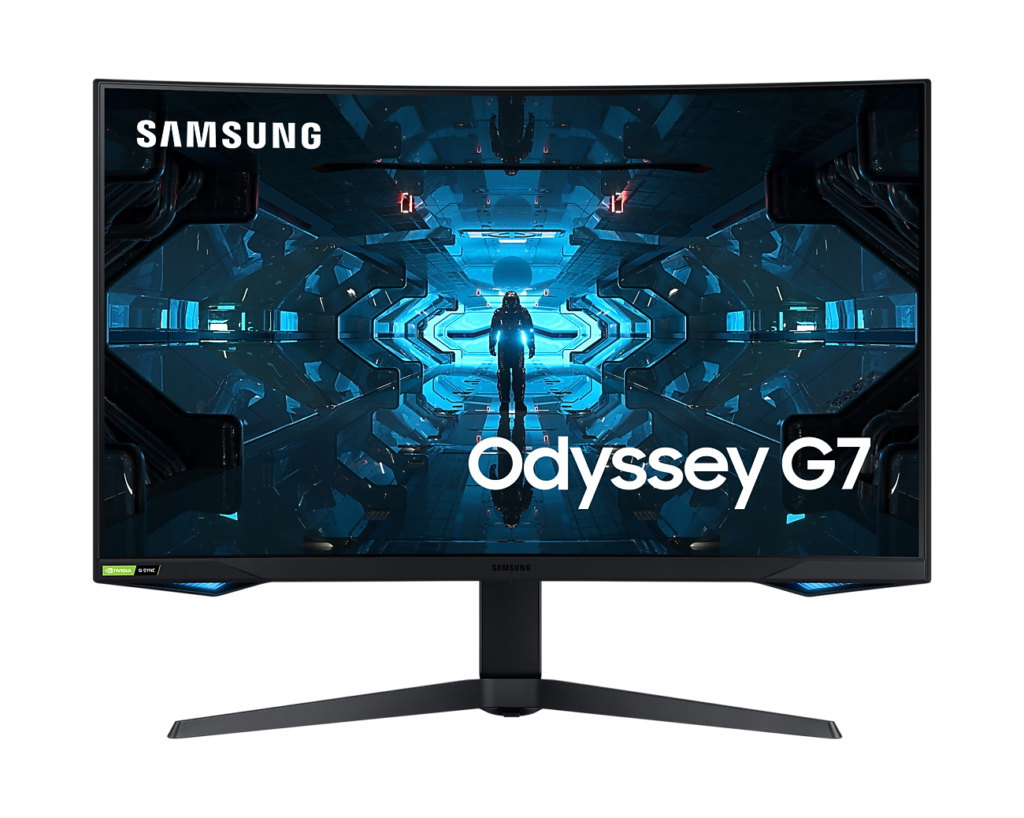
Samsung Odyssey G7 C32G75T: Specs, Features, Pros & Cons
The Odyssey G7 name sits on more than one monitor, and the one on this page is the large curved model with a VA panel. Samsung also sells a flat 4K Odyssey G7 under the code S28AG70. The two share a badge and little else, and retailer listings often print the name without the code, so the model number is worth checking before an order goes through.
This version is also one of the older designs in Samsung's gaming range. It arrived when a strongly curved, high-refresh VA screen was a novelty, and later Odyssey models have moved on to OLED and Mini-LED panels. The question now is whether an older design still earns desk space, and its case rests on contrast, speed and HDR brightness at the price it sells for today.
Two things define it once it is on a desk. The curve is the boldest part of the design and cannot be adjusted away, so it shapes every game and every document on the screen. The refresh ceiling is high enough for fast shooters on a capable PC, and the panel is bright enough in HDR to make a dark game's highlights stand out.
It suits a PC player in a dim room who spends more time in games than in documents and likes a screen that wraps around the view. Buyers who split the screen between a PC and a console, or who plan to put it on a monitor arm, have more to weigh. A curve this deep also adds bulk, so the screen takes up more desk depth than a flat model of the same size.
Category strengths
Where the Samsung Odyssey G7 C32G75T beats the median
- Much higher peak brightness ?600 nits vs 300 nits (median)
- Has height adjustment ?
- More DisplayPort inputs ?2 vs 1 (median)
- A higher refresh rate ?240 Hz vs 180 Hz (median)
- Has swivel adjustment ?
- Has picture-by-picture ?
- A bigger screen ?31.5" (80.01 cm) vs 27" (68.58 cm) (median)
- Has USB hub ?
- Has pivot adjustment ?
Where the Samsung Odyssey G7 C32G75T trails the median
- No motion blur reduction ?
- Fewer HDMI ports ?1 vs 2 (median)
- A lower contrast ratio ?2500:1 vs 3500:1 (median)
How this VS Score was computed
Score 62: each known spec is measured against the median of VA gaming monitors, 27 to 31 inches (11 products), then weighted; 50 means level with that median. In classes of six or more, a value beyond the class’s 10th–90th percentile range counts as that limit, so one extreme product cannot set the scale. 72% of the scoreable weight could be used; unknown values, features not applicable to this class and proxies (battery capacity where a rated life exists) add or remove nothing.
| Specification | This product | Cohort median | Score weight | Points moved |
|---|---|---|---|---|
| Peak brightness | 600 | 300 | 0.8 | +40.0 |
| Adaptive sync | G-Sync Compatible | FreeSync | 0.6 | +30.0 |
| Refresh rate | 240 | 180 | 1.2 | +20.4 |
| Height adjustment | Yes | 45% of the class have it | 0.4 | +20.0 |
| DisplayPort inputs | 2 | 1 | 0.4 | +20.0 |
| Motion blur reduction | No | 80% of the class have it | 0.3 | −14.4 |
| HDR | DisplayHDR 600 | HDR10 | 0.5 | +12.5 |
| Swivel | Yes | 36% of the class have it | 0.2 | +10.0 |
| HDMI ports | 1 | 2 | 0.4 | −10.0 |
| Picture-by-picture | Yes | 29% of the class have it | 0.2 | +10.0 |
| Built-in speakers | No | 27% of the class have it | 0.2 | −9.6 |
| Screen size | 31.5 | 27 | 1.2 | +9.6 |
| Contrast ratio | 2,500 | 3,500 | 0.6 | −8.4 |
| USB hub | Yes | 20% of the class have it | 0.05 | +2.3 |
| Pivot | Yes | 36% of the class have it | 0.02 | +1.0 |
| Resolution | 1440p | 1440p | 1.2 | +0.0 |
| Panel type | VA | VA | 0.8 | +0.0 |
| Color depth | 10 | 10 | 0.3 | +0.0 |
| Response time | 1 | 1 | 0.8 | +0.0 |
| DCI-P3 coverage | 95 | 95.5 | 0.6 | +0.0 |
| Pixel density | 93 | 93 | 0.5 | +0.0 |
Not scored: Local dimming (unknown: not scored); Local dimming zones (unknown: not scored); Variable refresh rate (standard for the class (100% have it)); Input lag (unknown: not scored); Tilt (standard for the class (100% have it)); USB-C (not applicable: only 0% of this class have it); USB-C power delivery (unknown: not scored); Headphone output (standard for the class (91% have it)); KVM switch (not applicable: only 0% of this class have it); Webcam (not applicable: only 0% of this class have it); Microphone (not applicable: only 0% of this class have it); Ethernet (not applicable: only 0% of this class have it).
Editor’s note
The C32G75T is defined by its curve, and that is the first thing to decide about it. At 1000R it is one of the most aggressively curved monitors ever sold. The radius is tighter than most ultrawides, on a screen that is not ultrawide. Samsung's reasoning is that it matches the curvature of the human eye, so every part of the panel sits at a similar distance. In practice people either find that it draws them in or find straight lines bending distracting. If you can see one in person before buying, do.
Underneath it is a strong specification. The VA panel gives 2,500:1 static contrast, which is roughly two and a half times what the IPS panels in this batch manage, so blacks are visibly deeper in a dark room. Quantum dot color covers 95% DCI-P3, and it runs 1440p at 240 Hz with a 1 ms response and DisplayHDR 600, a meaningful step above the 400-tier panels, with brightness that does something in HDR.
The compromise is sharpness. 1440p spread across 31.5 inches works out to roughly 93 pixels per inch, which is noticeably coarser than the same resolution on a 27-inch screen. Text is where you see it, while games hide it well.
Two connectivity limits to note: there is a single HDMI port and it is HDMI 2.0, so the two DisplayPort 1.4 inputs are where the full refresh rate lives, and consoles are the poorer relation here. There is no USB-C and there are no speakers.
Buy it for single-player gaming in a dark room where contrast matters more than pixel density. Skip it if you work with text all day, or if strong curves bother you.
Specifications
Quality bars show where each figure sits between the lowest and highest of the 11 VA gaming monitors, 27 to 31 inches this VS Score is measured against.
Picture
Gaming
Ergonomics & design
Connectivity
Features
Sources and verification
Where the specifications come from
- Official product pagesamsung.com
- Independent testingrtings.com
Verification
- First published
- Specifications last checked
- Sheet completeness
- 34 of 42 specifications verified; the rest show as Unknown and are never estimated or scored
- Page type
- Product specification page — Compiled from the manufacturer’s published specifications and the cited sources; this is not a hands-on test.
- Basis
- Research-based: specifications and editorial text were compiled from the documents listed here and the manufacturer’s published data. We have not tested this unit ourselves; where independent measurements are mentioned they belong to the linked publication.
Monitors with similar specs to the Samsung Odyssey G7 C32G75T

Ratings & reviews
No reviews yet. Be the first to share your experience.
The bottom line
The Samsung Odyssey G7 C32G75T earns a VS Score of 62, above the median of the 11 VA gaming monitors, 27 to 31 inches it is measured against (a score of 50 is level with that median).
- Who it’s for
- A single-player gamer in a dark room who wants deep contrast and bright HDR from a PC, and finds a tight curve absorbing.
- Who should look elsewhere
- Text-heavy work and people put off by bent lines, plus console players, who get the slower of its inputs.
- The trade-off that matters
- The resolution is spread across a large screen, so text looks coarse, a cost that games conceal and spreadsheets expose.
- The main alternative
- LG UltraGear 27GR83Q-B: a smaller flat screen at the same resolution and speed with two full-rate console inputs, sharper for text and paler in the dark.
The VS Score is calculated from the weighted specifications above, each measured against the median of comparable VA gaming monitors, 27 to 31 inches — a shortlisting guide, not a substitute for your own priorities. See how we score.




