
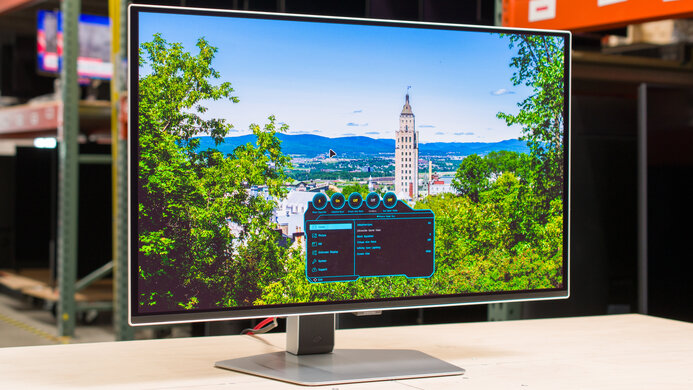
Samsung Odyssey OLED G81SF S27FG810S: Specs, Pros & Cons
Samsung's Odyssey naming is crowded enough that this model is easy to confuse with its siblings, so it is worth being precise: the S27FG810S is the smaller of the two G81SF sizes, and it combines 4K resolution with a 240 Hz OLED panel in the screen size most desks can comfortably hold. That pairing is what defines it.
Putting 4K into a screen this size produces a very fine pixel grid. Text and interface detail look crisp at normal desk distance, and games gain sharpness without the monitor dominating the desk the way a larger panel does. OLED supplies the rest of the appeal: per-pixel blacks, near-instant response and wide viewing angles, so motion stays clean and dark scenes keep their depth.
The same combination makes it demanding. Running native 4K at high frame rates needs a very capable graphics card, and many games will sit well below the panel's ceiling. On the desktop, you will probably need operating-system scaling to make small text readable, which gives back some of the extra workspace the resolution promised. OLED also asks for care with static content. Taskbars and fixed dashboards left on screen for hours are the usual burn-in risk.
The connections are conventional for a gaming screen, with HDMI and DisplayPort inputs and a height-adjustable stand, but there is no USB-C, so a laptop will need a separate cable or dock.
It makes the most sense for someone with a fast PC who wants the sharpest image they can get without moving to a bigger screen, and who mixes games with creative or general work. For all-day office use with fixed layouts, an IPS monitor asks far less of its owner.
Category strengths
Where the Samsung Odyssey OLED G81SF S27FG810S trails the median
- A lower contrast ratio ?1000000:1 vs 1500000:1 (median)
How this VS Score was computed
Score 54: each known spec is measured against the median of OLED gaming monitors, 27 to 31 inches (16 products), then weighted; 50 means level with that median. In classes of six or more, a value beyond the class’s 10th–90th percentile range counts as that limit, so one extreme product cannot set the scale. 58% of the scoreable weight could be used; unknown values, features not applicable to this class and proxies (battery capacity where a rated life exists) add or remove nothing.
| Specification | This product | Cohort median | Score weight | Points moved |
|---|---|---|---|---|
| Resolution | 4K | 1440p | 1.2 | +60.0 |
| USB-C | No | 33% of the class have it | 0.5 | −24.0 |
| Contrast ratio | 1,000,000 | 1,500,000 | 0.6 | −10.2 |
| Headphone output | Yes | 75% of the class have it | 0.2 | +10.0 |
| USB hub | Yes | 73% of the class have it | 0.05 | +2.3 |
| Screen size | 27 | 27 | 1.2 | +0.0 |
| Panel type | OLED | OLED | 0.8 | +0.0 |
| Refresh rate | 240 | 240 | 1.2 | +0.0 |
| Response time | 0.03 | 0.03 | 0.8 | +0.0 |
| DCI-P3 coverage | 99 | 99 | 0.6 | +0.0 |
| HDR | True Black 400 | True Black 400 | 0.5 | +0.0 |
| Adaptive sync | G-Sync Compatible | G-Sync Compatible | 0.6 | +0.0 |
| HDMI ports | 2 | 2 | 0.4 | +0.0 |
| DisplayPort inputs | 1 | 1 | 0.4 | +0.0 |
Not scored: Color depth (unknown: not scored); Peak brightness (unknown: not scored); Pixel density (unknown: not scored); Local dimming (unknown: not scored); Local dimming zones (unknown: not scored); Variable refresh rate (standard for the class (100% have it)); Motion blur reduction (unknown: not scored); Input lag (unknown: not scored); Height adjustment (standard for the class (94% have it)); Tilt (standard for the class (100% have it)); Swivel (standard for the class (88% have it)); Pivot (standard for the class (81% have it)); USB-C power delivery (unknown: not scored); Built-in speakers (not applicable: only 0% of this class have it); KVM switch (unknown: not scored); Webcam (unknown: not scored); Microphone (unknown: not scored); Ethernet (unknown: not scored); Picture-by-picture (unknown: not scored).
Editor’s note
The appeal here is density. At this size the resolution produces a very fine grid, which keeps text sharp and game detail clean while retaining OLED's fast response, deep blacks and wide viewing angles. It suits a normal-depth desk where a larger panel would feel overwhelming.
The combination is demanding. Native resolution at the full refresh rate requires an elite PC even in lighter games, and small text will usually need operating-system scaling, which reduces the practical workspace advantage. Check how your main applications handle scaling before committing, and look at text rendering in person if you can.
OLED remains vulnerable to uneven wear from static content, so panel-care features, varied use and local warranty terms matter more here than they would on an IPS monitor. Full-screen brightness is also a limit of the technology rather than a strength, so bright full-screen HDR is not what this panel does best.
Consider it for premium mixed gaming, sharp desktop use, and buyers who specifically prefer the smaller size. Skip it for static office dashboards, for systems that will rarely push far beyond 120 frames per second at this resolution, or if a bright, sunlit room is where it will live.
Samsung's Odyssey naming is crowded. Check the full model suffix on listings and images: a G80SF, a G80SD or the larger G81SF is not the same product, and specifications from those models should not be read across to this one.
Specifications
Quality bars show where each figure sits between the lowest and highest of the 16 OLED gaming monitors, 27 to 31 inches this VS Score is measured against.
Picture
Gaming
Ergonomics & design
Connectivity
Features
Sources and verification
Where the specifications come from
- Official product pagesamsung.com
- Independent testingrtings.com
Verification
- First published
- Specifications last checked
- Sheet completeness
- 26 of 42 specifications verified; the rest show as Unknown and are never estimated or scored
- Page type
- Product specification page — Compiled from the manufacturer’s published specifications and the cited sources; this is not a hands-on test.
- Basis
- Research-based: specifications and editorial text were compiled from the documents listed here and the manufacturer’s published data. We have not tested this unit ourselves; where independent measurements are mentioned they belong to the linked publication.
Monitors with similar specs to the Samsung Odyssey OLED G81SF S27FG810S

Ratings & reviews
No reviews yet. Be the first to share your experience.
The bottom line
The Samsung Odyssey OLED G81SF S27FG810S earns a VS Score of 54, above the median of the 16 OLED gaming monitors, 27 to 31 inches it is measured against (a score of 50 is level with that median).
- Who it’s for
- A player with a powerful PC who wants the sharpest OLED image available without moving up to a larger screen, and who mixes games with creative or everyday work.
- Who should look elsewhere
- Anyone running fixed office layouts all day, where OLED wear is a real concern, or a PC that will never come close to the panel's ceiling at native resolution.
- The trade-off that matters
- Very fine detail at a desk-friendly size, bought with a heavy graphics requirement and the care routine every OLED needs.
- The main alternative
- Samsung Odyssey OLED G80SD S32DG80: the larger, established 4K OLED from the same family, if you have the desk depth and want a bigger image rather than a denser one.
The VS Score is calculated from the weighted specifications above, each measured against the median of comparable OLED gaming monitors, 27 to 31 inches — a shortlisting guide, not a substitute for your own priorities. See how we score.





