
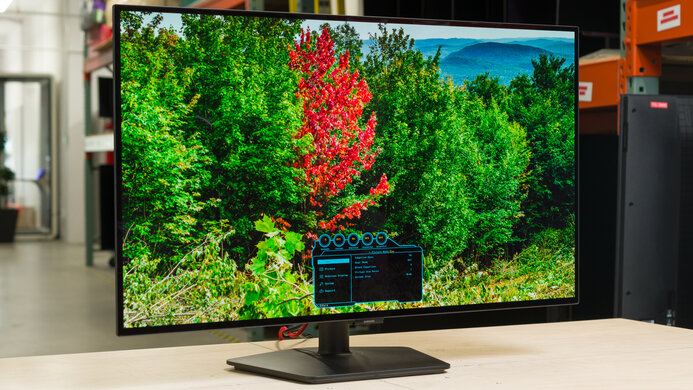
Samsung Odyssey OLED G73SH S32HG732S: Specs, Pros & Cons
Samsung sells so many 32-inch OLED monitors that working out which one you are looking at is the first task. The marketing name is Odyssey OLED G7, the model is the G73SH, and the string on the box, which is the only one worth searching for, is S32HG732S. Earlier G7 panels are different displays with different refresh behavior, and retailer listings mix the generations freely.
Once you have the right one, its defining trick is switchable. The panel runs at 4K and up to 165 Hz for detail and drops to Full HD to reach 330 Hz, and Samsung sells it on doing both. Whether that is worth anything depends on the games you play, and on whether your graphics card can push several hundred frames a second even at the lower resolution.
The fast mode spreads Full HD, a quarter of the panel's pixels, across the same 32 inches. Every extra frame is paid for in detail, and at arm's length on a screen this wide the softer image shows in small text and distant targets alike. A competitive player who never touches the 4K mode would get the same speed from a smaller, sharper panel.
Pixels switch almost instantly, black is a pixel turned off, and a static taskbar or game HUD is the kind of image that wears an OLED unevenly over the years, so hiding or moving it is part of owning one. Samsung also puts a factory calibration report in the box and lists the panel as Pantone Validated, a sign that the 4K mode is meant for photo work as well as games.
Category strengths
Where the Samsung Odyssey OLED G73SH S32HG732S beats the median
- A higher refresh rate ?330 Hz vs 240 Hz (median)
Where the Samsung Odyssey OLED G73SH S32HG732S trails the median
- No USB-C ?
- No USB hub ?
How this VS Score was computed
Score 49: each known spec is measured against the median of OLED gaming monitors, 32 inches and up (13 products), then weighted; 50 means level with that median. In classes of six or more, a value beyond the class’s 10th–90th percentile range counts as that limit, so one extreme product cannot set the scale. 63% of the scoreable weight could be used; unknown values, features not applicable to this class and proxies (battery capacity where a rated life exists) add or remove nothing.
| Specification | This product | Cohort median | Score weight | Points moved |
|---|---|---|---|---|
| USB-C | No | 77% of the class have it | 0.5 | −24.0 |
| Refresh rate | 330 | 240 | 1.2 | +22.8 |
| Built-in speakers | No | 40% of the class have it | 0.2 | −9.6 |
| USB hub | No | 85% of the class have it | 0.05 | −2.2 |
| Pivot | Yes | 64% of the class have it | 0.02 | +1.0 |
| Screen size | 32 | 32 | 1.2 | +0.0 |
| Resolution | 4K | 4K | 1.2 | +0.0 |
| Panel type | OLED | OLED | 0.8 | +0.0 |
| Response time | 0.03 | 0.03 | 0.8 | +0.0 |
| Peak brightness | 1,300 | 1,300 | 0.8 | +0.0 |
| Contrast ratio | 1,500,000 | 1,500,000 | 0.6 | +0.0 |
| DCI-P3 coverage | 98.5 — capped at the class’s lower range (99) | 99 | 0.6 | +0.0 |
| HDR | True Black 400 | True Black 400 | 0.5 | +0.0 |
| Adaptive sync | G-Sync Compatible | G-Sync Compatible | 0.6 | +0.0 |
| HDMI ports | 1 — capped at the class’s lower range (2) | 2 | 0.4 | +0.0 |
| DisplayPort inputs | 1 | 1 | 0.4 | +0.0 |
Not scored: Color depth (unknown: not scored); Pixel density (unknown: not scored); Local dimming (unknown: not scored); Local dimming zones (unknown: not scored); Variable refresh rate (standard for the class (100% have it)); Motion blur reduction (unknown: not scored); Input lag (unknown: not scored); Height adjustment (standard for the class (100% have it)); Tilt (standard for the class (100% have it)); Swivel (standard for the class (100% have it)); USB-C power delivery (unknown: not scored); Headphone output (standard for the class (89% have it)); KVM switch (unknown: not scored); Webcam (unknown: not scored); Microphone (unknown: not scored); Ethernet (unknown: not scored); Picture-by-picture (unknown: not scored).
Editor’s note
Samsung lists a 1,300-nit peak, measured on a highlight that covers 1.5% of the screen. The typical figure is 275 nits, and the True Black 400 certification is the honest guide to HDR here: bright glints and explosions against dark scenes, while a full white page stays modest. In a sunny room the screen will look dimmer than that headline number suggests.
One HDMI 2.1 port and one DisplayPort 1.4 make up the inputs. A gaming PC and a console fill them, and a work laptop then has nowhere to plug in. There is no USB hub, no USB-C and no speaker, only a headphone jack, which leaves it a plain gaming screen for a monitor sold on serving two kinds of player.
The stand rises 105 mm, swivels both ways and pivots to portrait, which a screen this size needs if it is going to sit at the right height on an ordinary desk. Samsung's UK store also covers burn-in from normal use under the standard warranty, excluding commercial use. Terms like that vary by country, and they are worth reading before the box is opened.
LG's UltraGear 32GS95UE runs the same switch at 240 Hz in 4K and 480 Hz in Full HD, so the faster esports mode belongs to the LG. For me the Samsung makes its case on the stand and the written burn-in cover, and it needs both to justify picking it over the LG.
Specifications
Quality bars show where each figure sits between the lowest and highest of the 13 OLED gaming monitors, 32 inches and up this VS Score is measured against.
Picture
Gaming
Ergonomics & design
Connectivity
Features
Sources and verification
Where the specifications come from
- Official product pagesamsung.com
- Independent testingrtings.com
Verification
- First published
- Specifications last checked
- Sheet completeness
- 27 of 42 specifications verified; the rest show as Unknown and are never estimated or scored
- Page type
- Product specification page — Compiled from the manufacturer’s published specifications and the cited sources; this is not a hands-on test.
- Basis
- Research-based: specifications and editorial text were compiled from the documents listed here and the manufacturer’s published data. We have not tested this unit ourselves; where independent measurements are mentioned they belong to the linked publication.
Monitors with similar specs to the Samsung Odyssey OLED G73SH S32HG732S
Ratings & reviews
No reviews yet. Be the first to share your experience.
The bottom line
The Samsung Odyssey OLED G73SH S32HG732S earns a VS Score of 49, below the median of the 13 OLED gaming monitors, 32 inches and up it is measured against (a score of 50 is level with that median).
- Who it’s for
- One PC that runs cinematic single-player games at full resolution and fast esports in the reduced mode, backed by a deep desk and a strong graphics card.
- Who should look elsewhere
- Days of static text work, and players who stick to one kind of game, where a dedicated panel serves better for less.
- The trade-off that matters
- The fast mode runs at Full HD on a big screen, so the extra speed comes with visibly softer detail in every esports session.
- The main alternative
- MSI MPG 321URX QD-OLED: a conventional OLED of the same size and resolution with USB-C laptop charging and a KVM, for buyers who never need the esports mode.
The VS Score is calculated from the weighted specifications above, each measured against the median of comparable OLED gaming monitors, 32 inches and up — a shortlisting guide, not a substitute for your own priorities. See how we score.





