
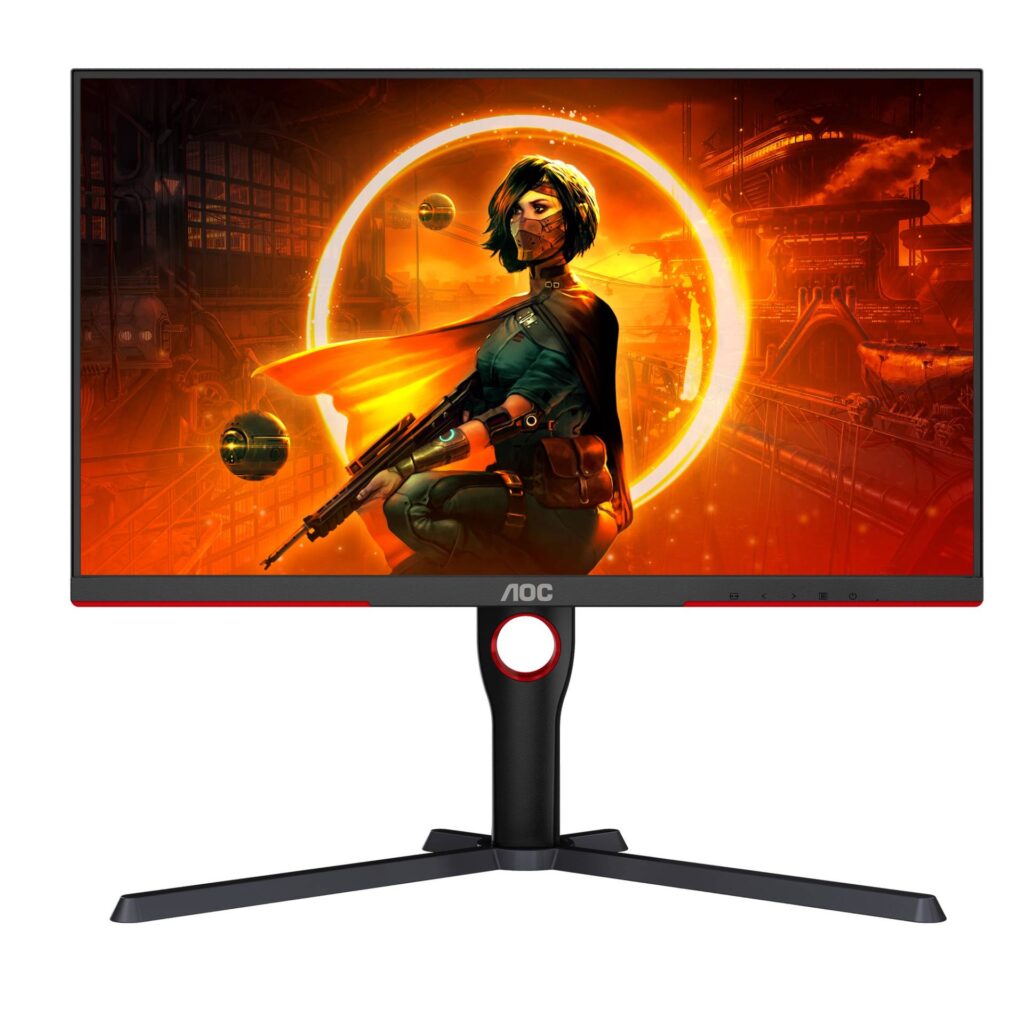
AOC Q27G3XMN: Specs, Features, Pros & Cons
AOC has since added the Q27G40XMN at this size, and this is the older of the two. It remains a useful reference for what a zoned mini-LED backlight can do when the rest of the monitor is built to a strict budget.
At heart it is a QHD high-refresh gaming screen with a VA panel, a type that already has deeper native blacks than IPS, behind which sits a backlight split into zones that dim independently. That combination is what lets it show HDR with real separation between bright highlights and dark surroundings, something most monitors at this price only claim on the box. The gaming side is competent, with adaptive sync covering the usual range of frame rates.
The trade-offs are exactly where a budget design would put them. The ports are basic and there is no single-cable laptop connection, the resolution suits games better than crisp text, and any zoned backlight shows a faint glow around bright objects on a dark background. VA panels also tend to smear in fast, dark scenes, which competitive players notice more than anyone else.
The person it suits best watches films and plays atmospheric single-player games in a dim room, runs one PC, and wants HDR that looks like HDR without paying for OLED. Anyone who mostly plays fast online shooters, or who works on spreadsheets all day, will get more from a quick IPS panel bought with the same money, and should skip this particular kind of compromise.
Category strengths
Where the AOC Q27G3XMN beats the median
- Much higher peak brightness ?1,000 nits vs 300 nits (median)
- Has local dimming ?
- Has height adjustment ?
- Has swivel adjustment ?
- A higher pixel density ?109 ppi vs 93 ppi (median)
- A higher contrast ratio ?4000:1 vs 3500:1 (median)
- Has pivot adjustment ?
How this VS Score was computed
Score 62: each known spec is measured against the median of VA gaming monitors, 27 to 31 inches (11 products), then weighted; 50 means level with that median. In classes of six or more, a value beyond the class’s 10th–90th percentile range counts as that limit, so one extreme product cannot set the scale. 66% of the scoreable weight could be used; unknown values, features not applicable to this class and proxies (battery capacity where a rated life exists) add or remove nothing.
| Specification | This product | Cohort median | Score weight | Points moved |
|---|---|---|---|---|
| Peak brightness | 1,000 | 300 | 0.8 | +40.0 |
| Local dimming | Yes | 29% of the class have it | 0.4 | +20.0 |
| Height adjustment | Yes | 45% of the class have it | 0.4 | +20.0 |
| HDR | DisplayHDR 1000 | HDR10 | 0.5 | +19.0 |
| Swivel | Yes | 36% of the class have it | 0.2 | +10.0 |
| Pixel density | 109 | 93 | 0.5 | +4.5 |
| Contrast ratio | 4,000 | 3,500 | 0.6 | +4.2 |
| Pivot | Yes | 36% of the class have it | 0.02 | +1.0 |
| Screen size | 27 | 27 | 1.2 | +0.0 |
| Resolution | 1440p | 1440p | 1.2 | +0.0 |
| Panel type | VA | VA | 0.8 | +0.0 |
| Color depth | 10 | 10 | 0.3 | +0.0 |
| Response time | 1 | 1 | 0.8 | +0.0 |
| Adaptive sync | FreeSync | FreeSync | 0.6 | +0.0 |
| Refresh rate | 180 | 180 | 1.2 | +0.0 |
| HDMI ports | 2 | 2 | 0.4 | +0.0 |
| DisplayPort inputs | 1 | 1 | 0.4 | +0.0 |
Not scored: DCI-P3 coverage (unknown: not scored); Local dimming zones (too few comparable peers (2, need 3)); Variable refresh rate (standard for the class (100% have it)); Motion blur reduction (unknown: not scored); Input lag (unknown: not scored); Tilt (standard for the class (100% have it)); USB-C (not applicable: only 0% of this class have it); USB-C power delivery (unknown: not scored); USB hub (not applicable: only 20% of this class have it); Built-in speakers (unknown: not scored); Headphone output (standard for the class (91% have it)); KVM switch (unknown: not scored); Webcam (unknown: not scored); Microphone (unknown: not scored); Ethernet (not applicable: only 0% of this class have it); Picture-by-picture (unknown: not scored).
Editor’s note
The Q27G3XMN offers real local dimming at a price where that is still rare, and that is why it belongs in the conversation despite costing less than most HDR monitors.
It is a VA panel with a mini-LED backlight divided into 336 independently controlled zones, and it is certified DisplayHDR 1000 at 1,000 nits peak. VA already starts with a native contrast of 4,000:1, about four times a typical IPS panel, and the zones let it go darker still where the picture is dark. The result is an HDR image with genuine punch at a price where rivals ship DisplayHDR 400, which is a badge rather than a feature.
The gaming specification is sound: 180 Hz over DisplayPort, 1 ms response and FreeSync Premium Pro from 48 Hz up to that rate. AOC rates the panel for 1.07 billion colors, and the matte anti-glare coating handles a lit room well.
The economies are all in the periphery, and they are honest ones. HDMI is version 2.0 with no 2.1 port. There is no USB-C and no USB hub, and resolution is 1440p at 109 ppi, well short of 4K. The stand does adjust fully, including pivot.
VA's own weakness is worth knowing: dark-scene smearing in fast motion is more visible than on IPS or OLED.
Buy it if HDR impact per dollar is the goal and you accept a plain connection panel. Buy an IPS or OLED if you work with dark, fast-moving content, or need USB-C.
Specifications
Quality bars show where each figure sits between the lowest and highest of the 11 VA gaming monitors, 27 to 31 inches this VS Score is measured against.
Picture
Gaming
Ergonomics & design
Connectivity
Features
Sources and verification
Where the specifications come from
- Official product pageaoc.com
Verification
- First published
- Specifications last checked
- Sheet completeness
- 31 of 42 specifications verified; the rest show as Unknown and are never estimated or scored
- Page type
- Product specification page — Compiled from the manufacturer’s published specifications and the cited sources; this is not a hands-on test.
- Basis
- Research-based: specifications and editorial text were compiled from the documents listed here and the manufacturer’s published data. We have not tested this unit ourselves; where independent measurements are mentioned they belong to the linked publication.
Monitors with similar specs to the AOC Q27G3XMN
Ratings & reviews
No reviews yet. Be the first to share your experience.
The bottom line
The AOC Q27G3XMN earns a VS Score of 62, above the median of the 11 VA gaming monitors, 27 to 31 inches it is measured against (a score of 50 is level with that median).
- Who it’s for
- A budget buyer who plays single-player games and watches films in a dim room, and wants HDR highlights that visibly stand out rather than a badge on the box.
- Who should look elsewhere
- Competitive players bothered by dark-scene smearing, and anyone who needs a laptop cable, a hub or sharper text for work. An IPS or OLED model serves them better.
- The trade-off that matters
- The zoned backlight gives it contrast far beyond its price class, but VA's slower dark transitions mean fast motion in shadowy scenes leaves visible trails.
- The main alternative
- AOC Q27G40XMN: AOC's newer take on the same formula, brighter and higher-contrast on paper, and the one to take if the price gap is small.
The VS Score is calculated from the weighted specifications above, each measured against the median of comparable VA gaming monitors, 27 to 31 inches — a shortlisting guide, not a substitute for your own priorities. See how we score.





