
Logitech Pebble Mouse 2 M350s: Specs, Price, Pros & Cons
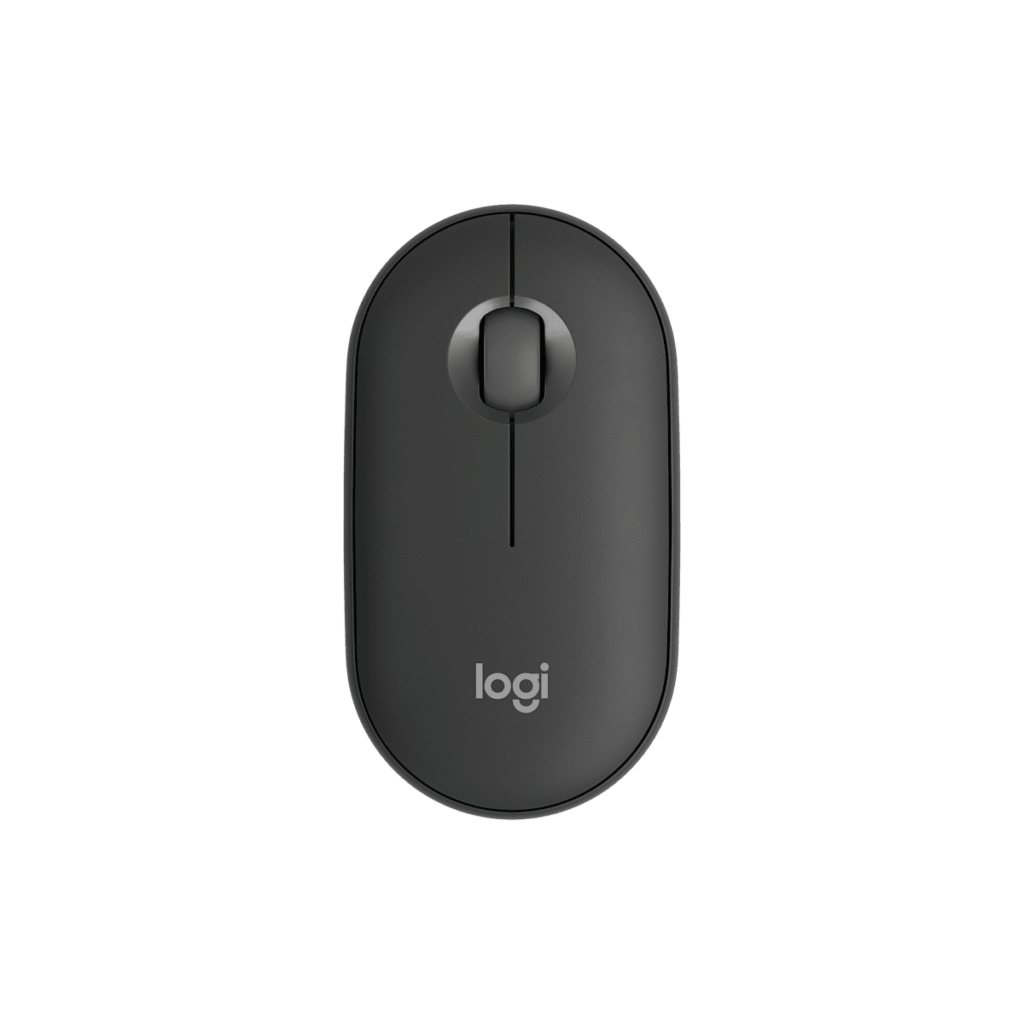
Left-handers can pick up the Pebble Mouse 2 M350s without a second thought, because the flat, symmetrical shell has no thumb side at all. Three buttons sit on top, the wheel sits between them, and the mouse works the same in either hand.
It is Logitech's slim travel mouse, 58.7 mm across and low enough to slide into a laptop sleeve beside the computer. The shape is closer to a smooth stone than a sculpted mouse, and it is light enough to forget in a bag. A single AA cell powers it, so there is no charging port and nothing to plug in. Connection runs through Bluetooth or a Logitech receiver, which lets the mouse work with a laptop, a tablet or a phone, and the switches are quiet by design, for rooms where a click would be heard.
Its other figures show what the mouse was never meant to do. Its tracking speed is 20 IPS, far from the figures gaming mice quote, and its acceleration rating of 10 G is well under anything built for games. The switches are rated for 3 million clicks, low by gaming standards and enough for a pointer that clicks through documents and slides. Polling is slow, too. Comfort is the other cost. A flat shell leaves the hand little to rest on, and there are no side buttons for back and forward, so a browser means reaching for the keyboard.
The M350s suits a student, a commuter or a second desk where a small, quiet mouse is used for an hour at a time. It is not built to be anyone's only mouse for a full working week.
Category strengths
Where the Logitech Pebble Mouse 2 M350s beats the median
- A slightly lighter build ?80.4 g vs 89 g (median)
Where the Logitech Pebble Mouse 2 M350s trails the median
- A much lower max sensitivity ?4,000 DPI vs 25,600 DPI (median)
- A much lower max tracking speed ?20 IPS vs 650 IPS (median)
- A much lower max acceleration ?10 G vs 50 G (median)
- Fewer buttons ?3 vs 6 (median)
- A much lower switch lifespan ?3 million clicks vs 80 million clicks (median)
How this VS Score was computed
Score 38: each known spec is measured against the median of all mice (81 products), then weighted; 50 means level with that median. In classes of six or more, a value beyond the class’s 10th–90th percentile range counts as that limit, so one extreme product cannot set the scale. 51% of the scoreable weight could be used; unknown values, features not applicable to this class and proxies (battery capacity where a rated life exists) add or remove nothing.
| Specification | This product | Cohort median | Score weight | Points moved |
|---|---|---|---|---|
| Max sensitivity | 4,000 | 25,600 | 1 | −42.0 |
| Max tracking speed | 20 — capped at the class’s lower range (400) | 650 | 0.8 | −15.2 |
| Switch lifespan | 3 — capped at the class’s lower range (15) | 80 | 0.2 | −8.2 |
| Weight | 80.4 | 89 | 1 | +5.0 |
| Buttons | 3 — capped at the class’s lower range (5) | 6 | 0.6 | −4.8 |
| Max acceleration | 10 — capped at the class’s lower range (40) | 50 | 0.4 | −4.0 |
| Polling rate | 125 — capped at the class’s lower range (1,000) | 1,000 | 0.8 | +0.0 |
| Connection | 2 | 2 | 0.8 | +0.0 |
Not scored: Adjustable lift-off distance (unknown: not scored); Grip styles (unknown: not scored); Horizontal scrolling (unknown: not scored); Free-spin scroll wheel (unknown: not scored); Click latency (unknown: not scored); Debounce adjustment (unknown: not scored); Wireless polling rate (unknown: not scored); USB-C charging (unknown: not scored); Battery life (unknown: not scored); Battery capacity (unknown: not scored); Quick charge (unknown: not scored); Wireless charging (unknown: not scored); Onboard memory (unknown: not scored); Software customization (standard for the class (97% have it)); Adjustable weights (unknown: not scored); RGB lighting (unknown: not scored).
Editor’s note
The Pebble Mouse 2 M350s is designed around two things people complain about: noise and portability. It is a slim, flat mouse that slips into a laptop sleeve, and its buttons are quiet by design rather than as an afterthought, a real consideration in a shared office, a library or a lecture.
Battery life is the other headline. A single AA cell runs it for up to 24 months, so there is no charging routine at all, and when it finally stops you swap a battery and carry on. It connects over Bluetooth or a Logi Bolt receiver, so it works with a tablet, a phone or a computer, and Logi Options+ allows the middle button to be remapped.
The specification makes the intended use clear. Tracking runs to 4000 DPI with a 125 Hz report rate. That is good for documents, browsing and presentations, and not intended for gaming, where both figures would be limiting. There are three buttons, so this is not a mouse for people who rely on side buttons for navigation.
At 106.7 mm long and 26.6 mm tall it is small and flat, which is right in a bag and less comfortable for a full day of desk work than a contoured mouse.
Buy it as a travel or second mouse, for a student, or for anyone who works in quiet spaces.
Look at a full-size ergonomic mouse if this is your only mouse and you use it all day, and at a gaming mouse if response time matters at all.
Specifications
Quality bars show where each figure sits between the lowest and highest of the 81 mice this VS Score is measured against.
Sensor & tracking
Design & handling
Switches & latency
Connectivity
Battery
Features
Sources and verification
Where the specifications come from
- Official product pagelogitech.com
- Independent testingrtings.com
Verification
- First published
- Specifications last checked
- Sheet completeness
- 16 of 34 specifications verified; the rest show as Unknown and are never estimated or scored
- Page type
- Product specification page — Compiled from the manufacturer’s published specifications and the cited sources; this is not a hands-on test.
- Basis
- Research-based: specifications and editorial text were compiled from the documents listed here and the manufacturer’s published data. We have not tested this unit ourselves; where independent measurements are mentioned they belong to the linked publication.
Where to buy
Prices and availability may change. Check the retailer before buying. We may earn a commission on purchases.
Price history
Mice with similar specs to the Logitech Pebble Mouse 2 M350s

Ratings & reviews
No reviews yet. Be the first to share your experience.
The bottom line
The Logitech Pebble Mouse 2 M350s earns a VS Score of 38, below the median of the 81 mice it is measured against (a score of 50 is level with that median).
- Who it’s for
- A student or laptop user in quiet places who wants a flat mouse that slides into a sleeve and runs for ages on one battery.
- Who should look elsewhere
- People who use it all day as their only mouse, rely on back and forward buttons, or play games.
- The trade-off that matters
- What lets it vanish into a bag also gives the hand little to rest on over a long session.
- The main alternative
- Razer Pro Click Mini: also small and quiet on AA cells, with a tilting free-spin wheel and more buttons
The VS Score is calculated from the weighted specifications above, each measured against the median of comparable mice — a shortlisting guide, not a substitute for your own priorities. See how we score.




