
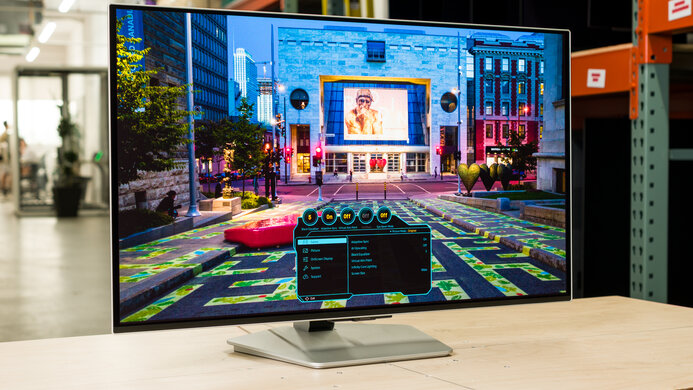
Samsung Odyssey OLED G80SH S32HG802S: Specs, Pros & Cons
Thirty-two-inch QD-OLED monitors have gone from novelty to crowded category in a little over two years, and the Odyssey OLED G80SH is Samsung's second attempt at the format. What moves it forward from the earlier G80SD and from most rivals is plumbing rather than picture: a full-bandwidth DisplayPort connection that can carry the panel's top refresh rate without compression, and a type-C input with enough power delivery to run a laptop over a single cable.
The panel belongs to the same family most of its competitors use, so the fundamentals are shared. Blacks are true black, motion is essentially free of blur, color coverage suits creative work, and the pixel density at this size makes text comfortably sharp at desk distance without heavy scaling. It also carries a higher True Black HDR tier than the first-generation models, which shows up as slightly brighter highlights in HDR games and films.
That makes it a candidate for the single screen on a high-end desk: work during the day from a laptop over one cable, games in the evening from a powerful desktop, and a console on one of the remaining inputs. The full-bandwidth link only pays off with a recent graphics card that supports it. Older cards fall back to compression, which works well enough that you are unlikely to notice.
The usual caveats of the technology remain. Full-screen brightness is modest next to a good LCD, reflections depend on the room, and static interface elements need burn-in precautions, which suits mixed use better than spreadsheets from morning to night. Anyone whose workday is dominated by fixed windows, or whose graphics card cannot drive this resolution at speed, should weigh a conventional LCD before paying extra for the OLED panel.
Category strengths
Where the Samsung Odyssey OLED G80SH S32HG802S trails the median
- Lower peak brightness ?1,000 nits vs 1,300 nits (median)
How this VS Score was computed
Score 51: each known spec is measured against the median of OLED gaming monitors, 32 inches and up (13 products), then weighted; 50 means level with that median. In classes of six or more, a value beyond the class’s 10th–90th percentile range counts as that limit, so one extreme product cannot set the scale. 66% of the scoreable weight could be used; unknown values, features not applicable to this class and proxies (battery capacity where a rated life exists) add or remove nothing.
| Specification | This product | Cohort median | Score weight | Points moved |
|---|---|---|---|---|
| USB-C | Yes | 77% of the class have it | 0.5 | +25.0 |
| Peak brightness | 1,000 | 1,300 | 0.8 | −9.6 |
| Built-in speakers | No | 40% of the class have it | 0.2 | −9.6 |
| HDR | True Black 500 | True Black 400 | 0.5 | +5.0 |
| Pivot | Yes | 64% of the class have it | 0.02 | +1.0 |
| Screen size | 32 | 32 | 1.2 | +0.0 |
| Resolution | 4K | 4K | 1.2 | +0.0 |
| Panel type | OLED | OLED | 0.8 | +0.0 |
| Refresh rate | 240 | 240 | 1.2 | +0.0 |
| Response time | 0.03 | 0.03 | 0.8 | +0.0 |
| Contrast ratio | 1,500,000 | 1,500,000 | 0.6 | +0.0 |
| DCI-P3 coverage | 99 | 99 | 0.6 | +0.0 |
| Pixel density | 140 | 140 | 0.5 | +0.0 |
| Adaptive sync | G-Sync Compatible | G-Sync Compatible | 0.6 | +0.0 |
| HDMI ports | 2 | 2 | 0.4 | +0.0 |
| DisplayPort inputs | 1 | 1 | 0.4 | +0.0 |
| USB-C power delivery | 98 — capped at the class’s upper range (90) | 90 | 0.05 | +0.0 |
Not scored: Color depth (unknown: not scored); Local dimming (unknown: not scored); Local dimming zones (unknown: not scored); Variable refresh rate (standard for the class (100% have it)); Motion blur reduction (unknown: not scored); Input lag (unknown: not scored); Height adjustment (standard for the class (100% have it)); Tilt (standard for the class (100% have it)); Swivel (standard for the class (100% have it)); USB hub (standard for the class (85% have it)); Headphone output (standard for the class (89% have it)); KVM switch (unknown: not scored); Webcam (unknown: not scored); Microphone (unknown: not scored); Ethernet (unknown: not scored); Picture-by-picture (unknown: not scored).
Editor’s note
The 32-inch Odyssey OLED G80SH combines 4K resolution with a 240 Hz OLED panel, aiming at buyers who want sharp desktop text, high-detail games, and fast motion from one screen. The 0.03 ms-class pixel response, DisplayHDR True Black support, wide viewing angles, and DisplayPort 2.1 connectivity make it a serious match for a high-end GPU rather than a console-only display.
Driving both at once is demanding, and many games will need upscaling or reduced settings. OLED also requires sensible treatment of static taskbars, HUDs, and productivity windows. Samsung includes panel-care controls and covers burn-in under stated normal-use warranty terms in some regions, but warranty wording must be checked locally. The glossy or glare-managed surface still reflects room conditions.
Official specifications list a flat 32-inch OLED panel, 3840×2160 resolution, roughly 300-nit typical brightness, 1000-nit small-window HDR peak, and 1,500,000:1 stated contrast. Port bandwidth, DSC behavior, adaptive-sync range, stand adjustment, USB hub, and regional accessories should be verified on the exact LS32HG802S suffix.
Choose the G80SH for mixed high-end PC gaming and detailed desktop use where 4K clarity matters. Skip it for budget GPUs, all-day static signage, or buyers prioritizing maximum full-screen brightness. Do not confuse it with 27-inch G80SH or older G80SD models: photos, firmware, energy labels, and prices must match S32HG802S.
A 32-inch 4K OLED also demands a capable graphics card if high-refresh gaming is the goal. Desktop owners should enable sensible screen-protection features, hide static elements where practical, and check text rendering at their normal viewing distance. Productivity-first buyers working with static interfaces all day may be more comfortable with a high-quality IPS or Mini-LED display.
Specifications
Quality bars show where each figure sits between the lowest and highest of the 13 OLED gaming monitors, 32 inches and up this VS Score is measured against.
Picture
Gaming
Ergonomics & design
Connectivity
Features
Sources and verification
Where the specifications come from
- Official product pagesamsung.com
- Independent testingrtings.com
Verification
- First published
- Specifications last checked
- Sheet completeness
- 29 of 42 specifications verified; the rest show as Unknown and are never estimated or scored
- Page type
- Product specification page — Compiled from the manufacturer’s published specifications and the cited sources; this is not a hands-on test.
- Basis
- Research-based: specifications and editorial text were compiled from the documents listed here and the manufacturer’s published data. We have not tested this unit ourselves; where independent measurements are mentioned they belong to the linked publication.
Monitors with similar specs to the Samsung Odyssey OLED G80SH S32HG802S
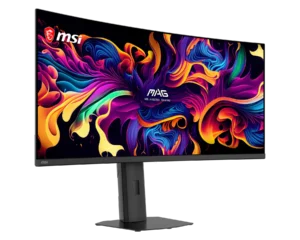
Ratings & reviews
No reviews yet. Be the first to share your experience.
The bottom line
The Samsung Odyssey OLED G80SH S32HG802S earns a VS Score of 51, above the median of the 13 OLED gaming monitors, 32 inches and up it is measured against (a score of 50 is level with that median).
- Who it’s for
- A high-end desk mixing laptop work and serious PC gaming on one large, sharp screen. Full-bandwidth video and single-cable laptop charging set it apart from older rivals.
- Who should look elsewhere
- Buyers with older graphics cards, all-day static office work, or rooms flooded with daylight. Those uses expose the costs of the panel technology without its benefits.
- The trade-off that matters
- The most complete connectivity in its class, carrying the usual burn-in care and modest full-screen brightness.
- The main alternative
- Dell U3225QE: an LCD of the same size and resolution with Thunderbolt docking, better suited to static workdays than to fast gaming.
The VS Score is calculated from the weighted specifications above, each measured against the median of comparable OLED gaming monitors, 32 inches and up — a shortlisting guide, not a substitute for your own priorities. See how we score.





