
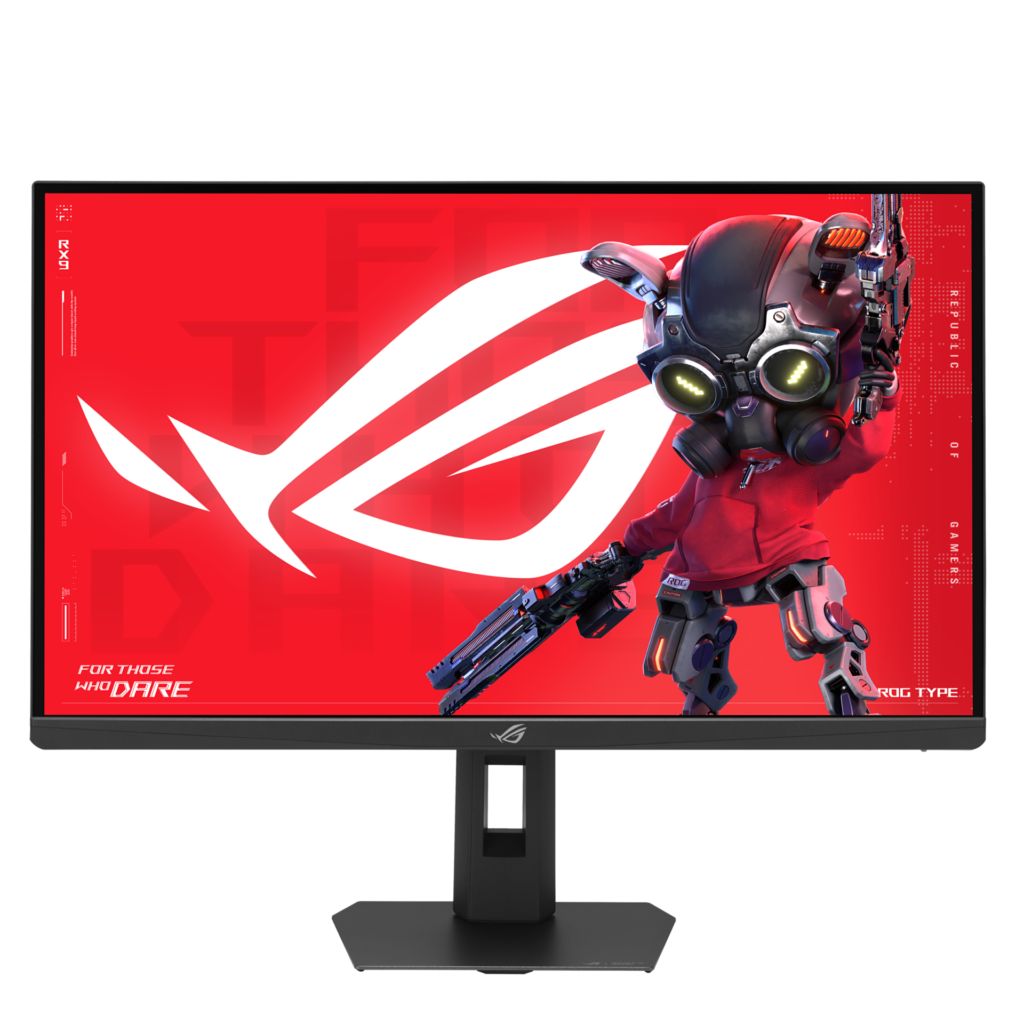
ASUS ROG Strix Pulsar XG27AQNGV: Specs, Price, Pros & Cons
Backlight strobing and variable refresh rate have usually been an either/or. Strobing sharpens motion by blanking the backlight between frames, but it wants a fixed cadence, so most monitors make you switch off adaptive sync to use it. G-SYNC Pulsar is NVIDIA's attempt to end that trade, varying the strobe with the frame rate instead of fighting it, and it needs a hardware G-SYNC processor inside the monitor to do it. That module, more than the panel, is what this display is selling.
Underneath sits a fast but conventional QHD LCD of the familiar size, running at 360 Hz with a one millisecond gray-to-gray rating and ninety percent DCI-P3 coverage. Static contrast is the ordinary thousand-to-one this panel type gives you, and there is no local dimming. ASUS quotes a five hundred nit HDR peak while claiming no DisplayHDR tier at all, and without dimming zones or deeper blacks that peak has nowhere useful to go. Treat HDR here as something the panel accepts rather than something it performs.
The spec tab undersells the stand, oddly. Its mechanical section lists tilt and a VESA pattern and stops there, while the product page a click away gives height travel of a hundred and ten millimeters, swivel both ways and a full ninety degree pivot. The connectivity is two HDMI 2.1 inputs, one DisplayPort 1.4 with stream compression and a three port USB-A hub. There is a headphone jack and no speakers, and no type-C input at all, so a laptop needs its own power.
This is a monitor for someone chasing motion clarity in competitive shooters who has an NVIDIA card and will feed it frames. Buy it for color work or for HDR and the money goes to a processor you are not using.
Category strengths
Where the ASUS ROG Strix Pulsar XG27AQNGV beats the median
- A much higher refresh rate ?360 Hz vs 180 Hz (median)
- Higher peak brightness ?500 nits vs 400 nits (median)
- Has USB hub ?
Where the ASUS ROG Strix Pulsar XG27AQNGV trails the median
- Slightly narrower DCI-P3 colour coverage ?90 % vs 95 % (median)
How this VS Score was computed
Score 55: each known spec is measured against the median of IPS gaming monitors, 27 to 31 inches (29 products), then weighted; 50 means level with that median. In classes of six or more, a value beyond the class’s 10th–90th percentile range counts as that limit, so one extreme product cannot set the scale. 74% of the scoreable weight could be used; unknown values, features not applicable to this class and proxies (battery capacity where a rated life exists) add or remove nothing.
| Specification | This product | Cohort median | Score weight | Points moved |
|---|---|---|---|---|
| USB-C | No | 24% of the class have it | 0.5 | −24.0 |
| Refresh rate | 360 — capped at the class’s upper range (240) | 180 | 1.2 | +20.4 |
| Height adjustment | Yes | 79% of the class have it | 0.4 | +20.0 |
| Adaptive sync | G-Sync | G-Sync Compatible | 0.6 | +15.0 |
| Motion blur reduction | Yes | 67% of the class have it | 0.3 | +15.0 |
| Peak brightness | 500 | 400 | 0.8 | +10.4 |
| Swivel | Yes | 64% of the class have it | 0.2 | +10.0 |
| Built-in speakers | No | 31% of the class have it | 0.2 | −9.6 |
| HDR | HDR10 | DisplayHDR 400 | 0.5 | −6.0 |
| USB hub | Yes | 50% of the class have it | 0.05 | +2.3 |
| DCI-P3 coverage | 90 | 95 | 0.6 | −1.8 |
| Pivot | Yes | 75% of the class have it | 0.02 | +1.0 |
| Screen size | 27 | 27 | 1.2 | +0.0 |
| Resolution | 1440p | 1440p | 1.2 | +0.0 |
| Panel type | IPS | IPS | 0.8 | +0.0 |
| Color depth | 10 | 10 | 0.3 | +0.0 |
| Response time | 1 | 1 | 0.8 | +0.0 |
| Contrast ratio | 1,000 | 1,000 | 0.6 | +0.0 |
| Pixel density | 109 | 109 | 0.5 | +0.0 |
| HDMI ports | 2 | 2 | 0.4 | +0.0 |
| DisplayPort inputs | 1 | 1 | 0.4 | +0.0 |
Not scored: Local dimming (not applicable: only 17% of this class have it); Local dimming zones (unknown: not scored); Variable refresh rate (standard for the class (100% have it)); Input lag (unknown: not scored); Tilt (standard for the class (100% have it)); USB-C power delivery (unknown: not scored); Headphone output (standard for the class (86% have it)); KVM switch (not applicable: only 0% of this class have it); Webcam (not applicable: only 0% of this class have it); Microphone (not applicable: only 0% of this class have it); Ethernet (not applicable: only 0% of this class have it); Picture-by-picture (not applicable: only 14% of this class have it).
Editor’s note
Whether this monitor is worth its money comes down to one question: do you see strobing artifacts, and do you care? Motion clarity technology is the most subjective thing in displays. Some people find backlight strobing transformative and never turn it off. Others notice the brightness cost, find the crosstalk distracting and go back to a plain high refresh rate within a week. Nothing in a spec sheet tells you which of those you are, and this display asks you to pay a hardware premium on the assumption that you are the first kind.
The dependency is worth being blunt about. The strobing behavior that justifies the price needs an NVIDIA card. Buy this with a Radeon and you have bought a competent 1440p IPS panel at a price set by a processor you cannot switch on, and there are faster-feeling 1440p monitors for less money if that is where you land.
I like that ASUS did not chase a DisplayHDR badge it could not honor, and the stand is good, where this category usually ships an afterthought. The omissions are consistent (no speakers, no USB-C, no built-in KVM), and the port selection is a gaming monitor's, not a docking station's.
If image quality matters more to you than motion at this size and money, an OLED is the better answer and it is not close. Our own listing for the LG 27GX704A-B is the obvious comparison: the same size and resolution, far better contrast and color volume, at the cost of a lower refresh ceiling and the usual OLED caveats about static interface elements.
Specifications
Quality bars show where each figure sits between the lowest and highest of the 29 IPS gaming monitors, 27 to 31 inches this VS Score is measured against.
Picture
Gaming
Ergonomics & design
Connectivity
Features
Sources and verification
Where the specifications come from
- Official product pagerog.asus.com
- Independent testingrtings.com
Verification
- First published
- Specifications last checked
- Sheet completeness
- 38 of 42 specifications verified; the rest show as Unknown and are never estimated or scored
- Page type
- Product specification page — Compiled from the manufacturer’s published specifications and the cited sources; this is not a hands-on test.
- Basis
- Research-based: specifications and editorial text were compiled from the documents listed here and the manufacturer’s published data. We have not tested this unit ourselves; where independent measurements are mentioned they belong to the linked publication.
Where to buy
Prices and availability may change. Check the retailer before buying. We may earn a commission on purchases.
Price history
Monitors with similar specs to the ASUS ROG Strix Pulsar XG27AQNGV
Ratings & reviews
No reviews yet. Be the first to share your experience.
The bottom line
The ASUS ROG Strix Pulsar XG27AQNGV earns a VS Score of 55, above the median of the 29 IPS gaming monitors, 27 to 31 inches it is measured against (a score of 50 is level with that median).
- Who it’s for
- A competitive player on an NVIDIA GPU strong enough to push high frame rates in the games they play, who has tried backlight strobing before and knows it suits their eyes.
- Who should look elsewhere
- Anyone on an AMD or Intel graphics card, who cannot use the feature that sets the price. Also wrong for color work and for anyone hoping for real HDR, because the contrast and the absence of dimming zones rule both out.
- The trade-off that matters
- The money goes into a motion clarity processor. You get sharper movement than a normal LCD and exactly the same ordinary contrast, so dark scenes look no better than on displays costing considerably less.
- The main alternative
- LG 27GX704A-B: the same size and resolution with a self-emissive panel, trading the higher refresh ceiling and the strobing for vastly better contrast and a far more convincing HDR presentation.
The VS Score is calculated from the weighted specifications above, each measured against the median of comparable IPS gaming monitors, 27 to 31 inches — a shortlisting guide, not a substitute for your own priorities. See how we score.





