
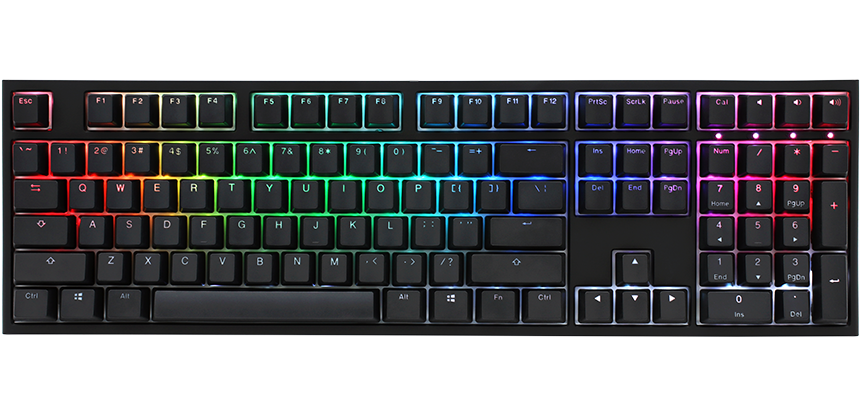
Ducky One 2: Specs, Features, Pros & Cons
Every Ducky One 2 on sale today is old stock or second-hand, because Ducky has taken the model out of its catalog, and any fault after purchase is yours to fix.
It was the full-size member of the One 2 range, a wired mechanical board with genuine Cherry MX switches, doubleshot PBT keycaps and RGB backlighting, and Ducky has since replaced it with the One 3. The keycap plastic is the part owners still point to. Doubleshot PBT carries its legends as a second layer of plastic molded into the cap, so the letters survive years of use and the surface does not polish.
All of its settings live on the keyboard. Macros, onboard profiles and a mouse-control layer are recorded through key combinations, media controls sit on a function layer, and DIP switches underneath change a handful of system behaviors. Plug it into a new computer and it behaves the same way with nothing installed, and full N-key rollover registers every key in a crowded chord. Three things date it. The switches are soldered, so changing them means a soldering iron. A cable is the only way to connect it. And the case has no sound dampening inside, which leaves it louder and more hollow than the foam-filled boards that followed it.
Its width and weight suit a desk it will never leave. The buyer it fits spots one cheap in a used listing, wants keycaps and a case that will outlast the next computer or two, and has no use for wireless, magnetic switches or software. A warranty and sockets for other switches both mean buying the current One 3 instead.
Category strengths
Where the Ducky One 2 trails the median
- No hot-swappable switches ?
- Fewer connection options ?
- No sound dampening ?
- No rotary knob ?
- No configuration software ?
How this VS Score was computed
Score 22: each known spec is measured against the median of all keyboards (101 products), then weighted; 50 means level with that median. In classes of six or more, a value beyond the class’s 10th–90th percentile range counts as that limit, so one extreme product cannot set the scale. 44% of the scoreable weight could be used; unknown values, features not applicable to this class and proxies (battery capacity where a rated life exists) add or remove nothing.
| Specification | This product | Cohort median | Score weight | Points moved |
|---|---|---|---|---|
| Hot-swappable | No | 61% of the class have it | 0.6 | −28.8 |
| Connection | 1 | 3 | 0.8 | −26.4 |
| Rapid trigger | No | 25% of the class have it | 0.5 | −24.0 |
| Adjustable actuation | No | 24% of the class have it | 0.4 | −19.2 |
| Sound dampening | No | 76% of the class have it | 0.3 | −14.4 |
| Rotary knob | No | 53% of the class have it | 0.2 | −9.6 |
| Configuration software | No | 95% of the class have it | 0.2 | −9.6 |
| Switch technology | Mechanical | Mechanical | 1 | +0.0 |
| Keycap material | PBT | PBT | 0.4 | +0.0 |
| Backlight | RGB | RGB | 0.3 | +0.0 |
Not scored: Actuation force (unknown: not scored); N-key rollover (standard for the class (85% have it)); Analog input (not applicable: only 14% of this class have it); Polling rate (unknown: not scored); Wired latency (unknown: not scored); Wireless latency (unknown: not scored); Front height (unknown: not scored); Bluetooth devices (unknown: not scored); Battery life (unknown: not scored); Battery capacity (unknown: not scored); USB passthrough (not applicable: only 4% of this class have it); Programmable keys (standard for the class (99% have it)); Media controls (standard for the class (97% have it)); Onboard profiles (standard for the class (89% have it)).
Editor’s note
The Ducky One 2 is the keyboard that built the brand's reputation, and years after it was discontinued it is still the reference point people compare cheaper boards against.
The appeal was never a feature list. It was that Ducky put doubleshot PBT keycaps, genuine Cherry MX switches and a properly rigid case into a keyboard at a price where rivals were fitting ABS caps and clones. Those keycaps do not go shiny, and the legends cannot wear off because they are molded rather than printed. Ten years of use looks like one.
Everything configurable lives on the board. Ducky Macro V2.0 records macros directly into six onboard profiles, a Fn layer covers media keys and a mouse-control mode, and four DIP switches on the underside handle Windows-key lock, rollover and a couple of layout swaps. There is no software to install, which means nothing to break and nothing left behind on a work machine.
Know what you are buying, though. This is a full-size 440 mm board weighing 1.1 kg, and it will take up a desk. Switches are soldered, so the One 3 is the one to look at if you want to swap them later. There is no wireless option, no sound dampening inside the case, and no modern gaming conveniences such as adjustable actuation or rapid trigger.
The bigger practical issue is availability. Ducky has removed the One 2 from its catalog entirely, so anything you find is old stock or second-hand, and there is no warranty path.
Buy one if you find it cheap and want a keyboard that outlives the computer. Buy a One 3 instead if you want hot-swap sockets and current support.
Specifications
Quality bars show where each figure sits between the lowest and highest of the 101 keyboards this VS Score is measured against.
Switches & typing
Performance
Layout & size
Connectivity
Build & sound
Features
Sources and verification
Where the specifications come from
- Independent testingrtings.com
Verification
- First published
- Specifications last checked
- Sheet completeness
- 21 of 34 specifications verified; the rest show as Unknown and are never estimated or scored
- Page type
- Product specification page — Compiled from the manufacturer’s published specifications and the cited sources; this is not a hands-on test.
- Basis
- Research-based: specifications and editorial text were compiled from the documents listed here and the manufacturer’s published data. We have not tested this unit ourselves; where independent measurements are mentioned they belong to the linked publication.
Keyboards with similar specs to the Ducky One 2
Ratings & reviews
No reviews yet. Be the first to share your experience.
The bottom line
The Ducky One 2 earns a VS Score of 22, below the median of the 101 keyboards it is measured against (a score of 50 is level with that median).
- Who it’s for
- A buyer who finds one cheap and wants a keyboard that will outlast several computers without ever installing software.
- Who should look elsewhere
- Anyone who wants hot-swap sockets, a warranty or a quieter case should buy something current instead.
- The trade-off that matters
- It is discontinued, so the only copies are old stock or used, and a fault means repairing it yourself.
- The main alternative
- Ducky One 3: the current successor with hot-swap sockets and internal foam, for a buyer who wants warranty support.
The VS Score is calculated from the weighted specifications above, each measured against the median of comparable keyboards — a shortlisting guide, not a substitute for your own priorities. See how we score.





