
Lenovo Legion M220: Specs, Price, Pros & Cons
Everything the Legion M220 does is set with its own buttons, because Lenovo ships no app for it. DPI steps, lighting and button behavior come from the hardware alone, and that one decision explains both why the mouse is cheap and who it will frustrate.
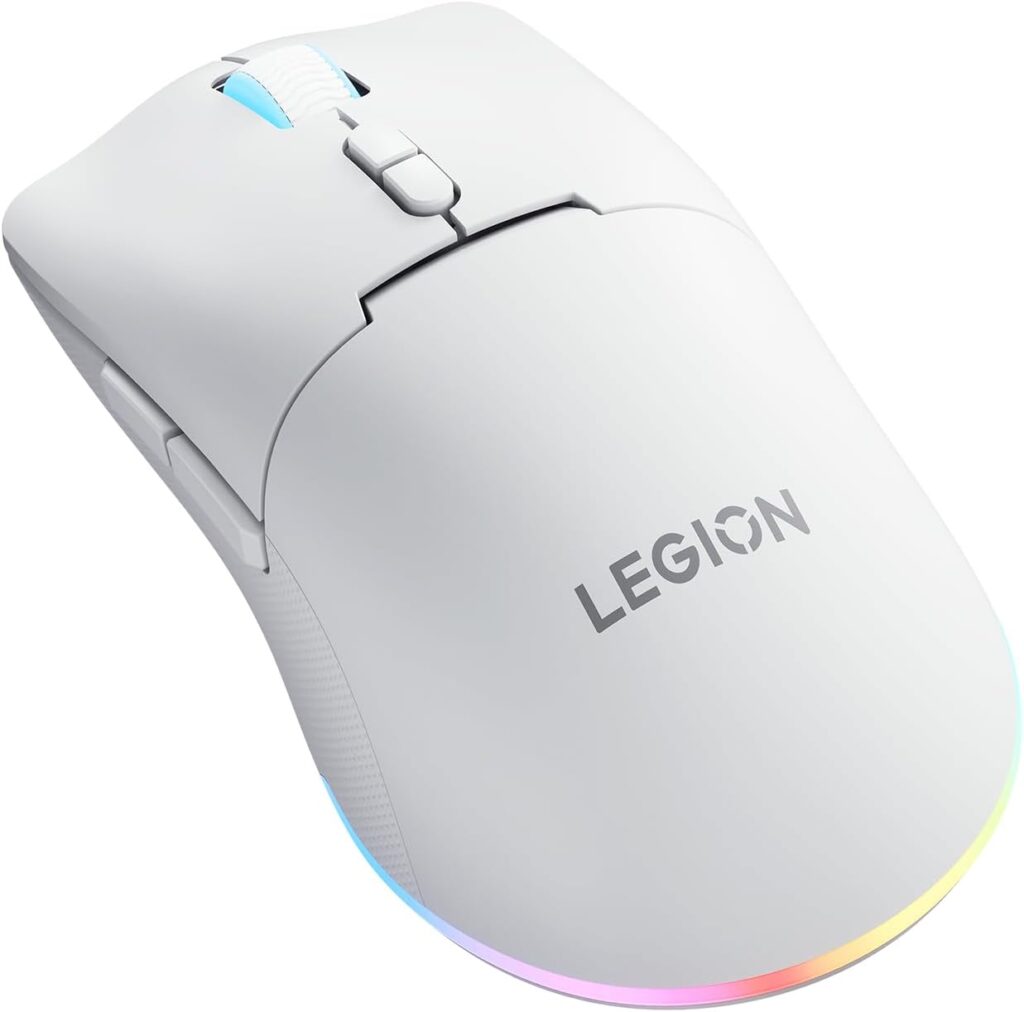
It is Lenovo's entry wireless gaming mouse. Its body is symmetrical and on the large side, with seven buttons, a shape Lenovo describes as made for a palm grip, and two zones of lighting around the wheel and the base. It connects three ways, by cable, by a dongle or by Bluetooth, and it charges over USB-C. The wired mode doubles as a fallback when the battery runs low during a session. The price shows in the sensor and the battery. Resolution tops out well short of flagship gaming mice and is set in fixed steps by a switch, and the rated endurance is modest, though it covers several evenings of play with the lighting off.
No software also means no per-game profiles, no remapping and no way to change how quickly a click registers. A player who has never opened a mouse app loses nothing, and a player who has will miss it on the first day.
The M220 fits a first gaming PC, a console setup where a mouse is used now and then, or a spare that lives in a laptop bag. Its weight puts it well away from the ultralight shells that competitive shooters now use. Buyers who want to tune a mouse will outgrow it, and buyers who want to plug something in and forget it may keep it for years.
Category strengths
Where the Lenovo Legion M220 beats the median
- More connection options ?
- Has RGB lighting ?
- More buttons ?7 vs 6 (median)
Where the Lenovo Legion M220 trails the median
- A much lower max sensitivity ?5,000 DPI vs 25,600 DPI (median)
- No software customization ?
- Shorter battery life ?100 h vs 150 h (median)
- Fewer supported grip styles ?
- A much lower switch lifespan ?20 million clicks vs 80 million clicks (median)
- A slightly heavier build ?95 g vs 89 g (median)
How this VS Score was computed
Score 40: each known spec is measured against the median of all mice (81 products), then weighted; 50 means level with that median. In classes of six or more, a value beyond the class’s 10th–90th percentile range counts as that limit, so one extreme product cannot set the scale. 55% of the scoreable weight could be used; unknown values, features not applicable to this class and proxies (battery capacity where a rated life exists) add or remove nothing.
| Specification | This product | Cohort median | Score weight | Points moved |
|---|---|---|---|---|
| Max sensitivity | 5,000 | 25,600 | 1 | −40.0 |
| Connection | 3 | 2 | 0.8 | +20.0 |
| USB-C charging | Yes | 67% of the class have it | 0.3 | +15.0 |
| Software customization | No | 97% of the class have it | 0.3 | −14.4 |
| Battery life | 100 | 150 | 0.8 | −13.6 |
| Grip styles | 1 | 2 | 0.4 | −10.0 |
| RGB lighting | Yes | 46% of the class have it | 0.2 | +10.0 |
| Horizontal scrolling | No | 45% of the class have it | 0.2 | −9.6 |
| Free-spin scroll wheel | No | 34% of the class have it | 0.2 | −9.6 |
| Switch lifespan | 20 | 80 | 0.2 | −7.4 |
| Buttons | 7 | 6 | 0.6 | +4.8 |
| Weight | 95 | 89 | 1 | −3.0 |
Not scored: Max tracking speed (unknown: not scored); Max acceleration (unknown: not scored); Polling rate (unknown: not scored); Adjustable lift-off distance (unknown: not scored); Click latency (unknown: not scored); Debounce adjustment (unknown: not scored); Wireless polling rate (unknown: not scored); Battery capacity (unknown: not scored); Quick charge (unknown: not scored); Wireless charging (not applicable: only 14% of this class have it); Onboard memory (unknown: not scored); Adjustable weights (not applicable: only 2% of this class have it).
Editor’s note
The Lenovo Legion M220 is Lenovo's entry-level wireless gaming mouse. You get tri-mode connectivity (2.4 GHz dongle, Bluetooth, or the included 1.8-meter braided USB-C cable), which is a feature that until recently was reserved for mice at twice the price. The optical sensor tops out at 5,000 DPI across five fixed steps (400 to 5,000), which sounds modest next to the 26,000-DPI numbers on flagship mice but is more than most people ever use.
The shape is a symmetrical medium-large body that Lenovo says is optimized for palm grip, with seven buttons and two RGB zones around the scroll wheel and base. At 95 grams with the battery it is no featherweight, and that is the clearest marker of its class: the ultralight crowd is elsewhere. Battery life is the strong suit. Lenovo rates it at about 100 hours with the lighting off, and a full charge takes around two hours over USB-C. The main switches are rated for 20 million clicks and the wheel for 300,000 cycles, both reasonable figures at this price.
What you give up is the software layer. There is no companion app, so DPI steps, button mapping and lighting are whatever the hardware offers: a five-level DPI switch and an onboard lighting toggle. For a first gaming mouse, a console-adjacent setup, or a spare for a laptop bag, that simplicity is arguably a feature. Anyone who wants per-game profiles, adjustable debounce or a sub-60-gram chassis is shopping in a different aisle.
At its price the M220 undercuts almost every tri-mode gaming mouse, and as long as the weight and the fixed DPI ladder fit how you play, it is an easy recommendation for the budget slot.
Specifications
Quality bars show where each figure sits between the lowest and highest of the 81 mice this VS Score is measured against.
Sensor & tracking
Design & handling
Switches & latency
Connectivity
Battery
Features
Sources and verification
Where the specifications come from
- Official product pagelenovo.com
- Datasheet or manualpcsupport.lenovo.com
- Retailer listing (cross-check)amazon.com
Verification
- First published
- Specifications last checked
- Sheet completeness
- 22 of 34 specifications verified; the rest show as Unknown and are never estimated or scored
- Page type
- Product specification page — Compiled from the manufacturer’s published specifications and the cited sources; this is not a hands-on test.
- Basis
- Research-based: specifications and editorial text were compiled from the documents listed here and the manufacturer’s published data. We have not tested this unit ourselves; where independent measurements are mentioned they belong to the linked publication.
Where to buy
Prices and availability may change. Check the retailer before buying. We may earn a commission on purchases.
Price history
Mice with similar specs to the Lenovo Legion M220
Ratings & reviews
No reviews yet. Be the first to share your experience.
The bottom line
The Lenovo Legion M220 earns a VS Score of 40, below the median of the 81 mice it is measured against (a score of 50 is level with that median).
- Who it’s for
- First-time or budget buyers who want tri-mode wireless, long battery life and RGB without spending flagship money.
- Who should look elsewhere
- Competitive players chasing low weight, high polling rates or software profiles. There is no companion app.
- The trade-off that matters
- Tri-mode connectivity and long battery life, in exchange for 95 g and a fixed five-step DPI ladder.
- The main alternative
- Logitech G305 LIGHTSPEED
The VS Score is calculated from the weighted specifications above, each measured against the median of comparable mice — a shortlisting guide, not a substitute for your own priorities. See how we score.





