Keychron K2 Ultra 8K: Specs, Features, Pros & Cons
The 75% wireless market is crowded, and only two things genuinely separate this board. The first is that its 8,000 Hz polling applies over the 2.4 GHz dongle, not merely over the cable — most wireless keyboards at any price still poll at 1,000 Hz.
If you play competitive shooters and refuse to be tethered, that is a real and rare advantage. Note that the Bluetooth mode most people use day to day runs far slower.
Category strengths
Where the Keychron K2 Ultra 8K beats the average
- A much higher polling rate ?8,000 Hz vs 3,800 Hz (avg)
- A much lower wired latency ?0.13 ms vs 0.6 ms (avg)
- A much lower wireless latency ?0.13 ms vs 2.56 ms (avg)
- More connection options ?
- Has hot-swappable switches ?
- Has n-key rollover ?
- Has sound dampening ?
- A bigger battery ?4,000 mAh vs 3,406.43 mAh (avg)
- Has configuration software ?
- Has media controls ?
Where the Keychron K2 Ultra 8K trails the average
- Much shorter battery life ?760 h vs 1,517.29 h (avg)
- No rapid trigger ?
- No rotary knob ?
- No adjustable actuation ?
- No analog input ?
- A slightly higher front height ?22.85 mm vs 21.62 mm (avg)
- No USB passthrough ?
- Fewer Bluetooth devices ?3 vs 3.05 (avg)
- A slightly heavier actuation force ?45 g vs 44.65 g (avg)
Editor’s note
The 75% wireless market is crowded, and only two things genuinely separate this board.
The first is that its 8,000 Hz polling applies over 2.4 GHz wireless, not merely over the cable. Most wireless keyboards at any price still poll at 1,000 Hz, and Keychron is explicit that the 0.125 ms interval holds in both wired and 2.4 GHz modes. If you play competitive shooters and refuse to be tethered, that is a real and rare advantage.
The second is the firmware. This runs ZMK rather than QMK/VIA, configured entirely in a browser through Keychron Launcher with nothing to install. Whether that is a plus depends on you: it is far friendlier for a first-time remapper, and a step backwards if you already have QMK muscle memory.
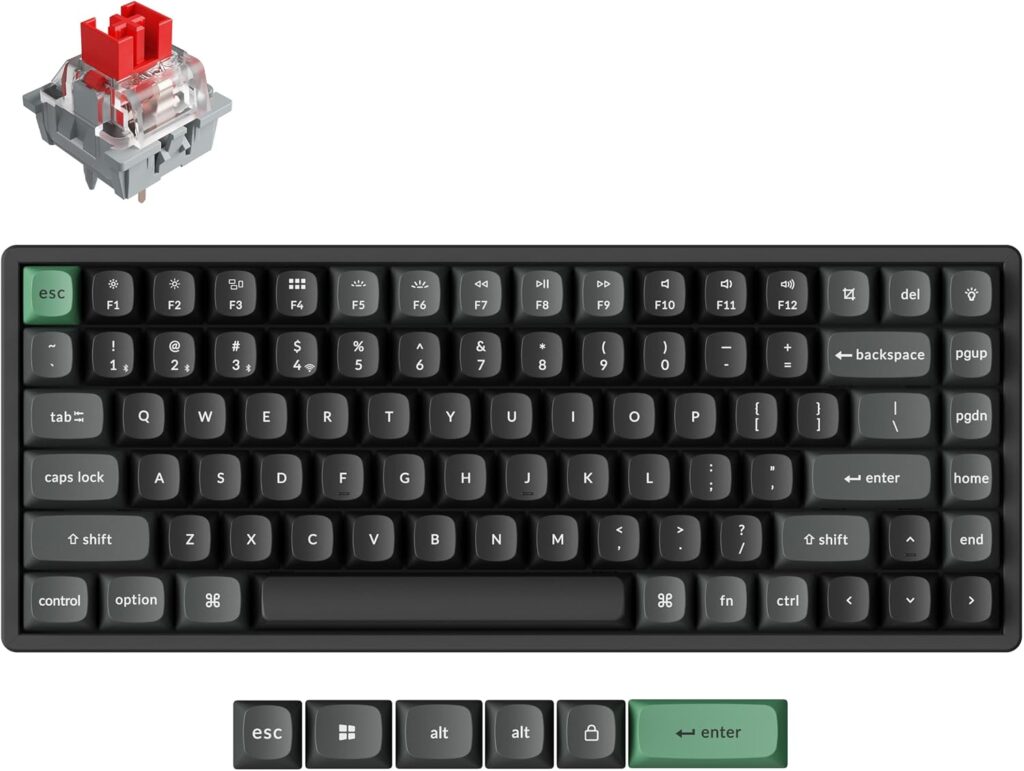
The build is what you would hope at $119.99 — CNC aluminium frame, hot-swap sockets, double-shot PBT keycaps, screw-in stabilisers and a full foam stack — and both Mac and Windows keycaps are in the box with a physical OS toggle.
Two caveats that catch buyers. The 8,000 Hz headline does not apply to Bluetooth, which polls at 125 Hz; over Bluetooth you have effectively bought a 125 Hz keyboard. And the quoted 760 hours of battery is with the backlight off — switch the lighting on and that number falls sharply.
One more trap worth naming: the K2 HE is one letter away in a search box and is a completely different keyboard. If you want rapid trigger, adjustable actuation or analog input, those are Hall-effect features and this board does not have them; its switches are ordinary mechanical with fixed 2.0 mm travel.
At $119.99 with all three switch options at the same price, it is well judged. Just buy it for the 2.4 GHz link, not the Bluetooth one.
Specifications
Quality bars are generated automatically against 95 other keyboards.
Switches & typing
The key switch technology; later types are generally more responsive.
The specific switch used (e.g. Cherry MX Red).
The force needed to register a key; lower is lighter to type on.
Swap switches without soldering.
Registers every simultaneous keypress.
Set the actuation point per key (analog / Hall-effect boards).
Keys report their travel depth for variable gamepad-style input and multi-stage actions.
Performance
How often the keyboard reports input; higher can reduce latency.
End-to-end keypress latency over a wired connection; lower is better.
End-to-end keypress latency over the fastest wireless mode; lower is better.
Resets a key dynamically as it moves, enabling faster repeated inputs.
Layout & size
The keyboard size and layout.
The number of keys.
The overall width.
The overall depth.
The front case height without keycaps; lower boards can reduce wrist extension.
The keyboard's weight.
Connectivity
The supported connection types.
How many paired devices it can switch between.
Battery life for wireless models.
The rated capacity of the internal battery.
A built-in USB port for other devices.
Build & sound
Keycap plastic; PBT resists shine and wear better than ABS.
The case material (e.g. aluminium, ABS plastic).
The switch plate material, which influences stiffness and typing sound.
How larger keys are stabilised (e.g. screw-in PCB or plate-mounted).
The plate / PCB mounting style (e.g. gasket mount).
Internal foam or dampening for a quieter, fuller sound.
The per-key lighting.
Features
Remap keys and record macros.
Dedicated volume and playback controls.
A control knob for volume or custom actions.
Stores layouts on the board itself.
Companion configuration software (e.g. VIA / QMK).
Specs last verified August 21, 202632 of 34 specs verified (94%)Unverified specs show as Unknown — never estimated, never scored
Keyboards with similar specs to the Keychron K2 Ultra 8K
Ratings & reviews
No reviews yet. Be the first to share your experience.
The bottom line
The Keychron K2 Ultra 8K earns a VS Score of 55, a solid mid-pack result among the 96 keyboards we compare here.
- Who it’s for
- Players who want a wireless 75% that genuinely polls at 8,000 Hz over its 2.4 GHz dongle, and Mac-and-Windows users who will use the physical OS toggle and the second keycap set in the box.
- Who should look elsewhere
- Anyone who intends to game over Bluetooth, where it polls at 125 Hz. Also wrong if you want rapid trigger, adjustable actuation or analog input — those need Hall-effect switches, so look at the K2 HE instead.
- The trade-off that matters
- Wireless polling rate against wireless convenience. The headline 8K figure holds only on the 2.4 GHz dongle; the Bluetooth mode most people use day to day runs sixty-four times slower.
- The main alternative
- Keychron K2 HE — the same 75% shell family with Hall-effect switches, adjustable actuation and rapid trigger, if analog features matter more than 8K polling.
The VS Score is calculated from the weighted specifications above, measured against every other keyboards we track — a shortlisting guide, not a substitute for your own priorities. See how we score.