
MageGee GK960: Specs, Price, Pros & Cons
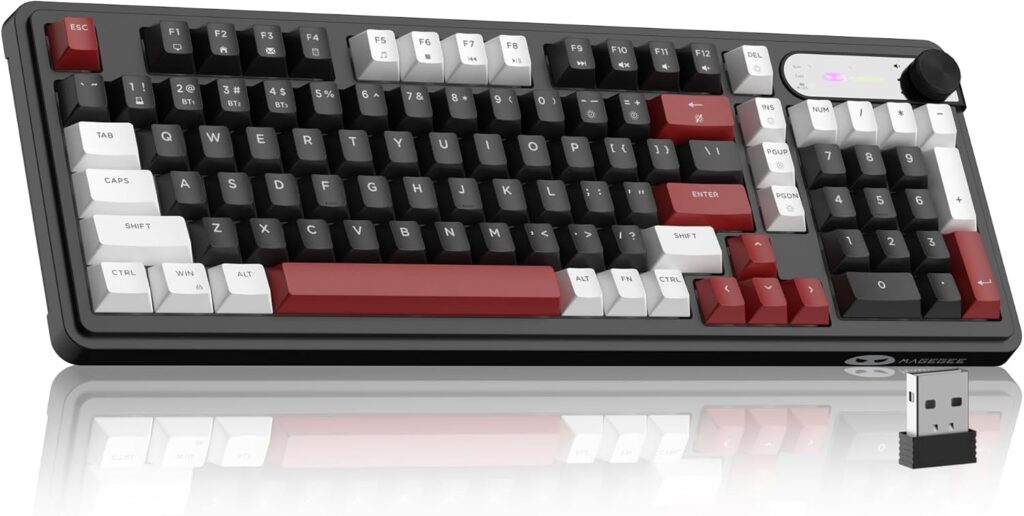
A number pad pressed up against the arrow keys, with almost no gap between them, is how the MageGee GK960 fits full-size functions into a board narrower than a standard office keyboard. It is a budget wireless membrane keyboard dressed in the language of gaming boards, with a knob in the top corner and lighting glowing up from under the keys.
The connection list is longer than the price suggests. A cable, a receiver and Bluetooth are all supported, and the Bluetooth side remembers three devices, so a desktop, a laptop and a tablet can take turns with it. The battery has one oddity. The cell is large for any keyboard, yet the rated runtime is short next to most wireless boards, so the capacity alone will not tell you how often it needs the cable. Anyone planning to run it wireless all week should expect to plug it in more often than the battery size implies.
What it gives up follows from the price. The membrane switches are soldered in place and cannot be changed, the board does not register many simultaneous keys, and there is no USB passthrough for a mouse receiver. The knob and the media keys are the extras.
The compact numeric layout suits a small desk where a full-size keyboard would push the mouse too far out, and a buyer who enters figures often enough to miss a number pad on a smaller board. Office work, school assignments and casual games are the natural load. The shape of the right-hand cluster takes a few days to learn, since the arrows and the keypad share less space than usual.
Category strengths
Where the MageGee GK960 trails the median
- No hot-swappable switches ?
- No n-key rollover ?
- Much shorter battery life ?100 h vs 325 h (median)
How this VS Score was computed
Score 26: each known spec is measured against the median of all keyboards (101 products), then weighted; 50 means level with that median. In classes of six or more, a value beyond the class’s 10th–90th percentile range counts as that limit, so one extreme product cannot set the scale. 49% of the scoreable weight could be used; unknown values, features not applicable to this class and proxies (battery capacity where a rated life exists) add or remove nothing.
| Specification | This product | Cohort median | Score weight | Points moved |
|---|---|---|---|---|
| Hot-swappable | No | 61% of the class have it | 0.6 | −28.8 |
| N-key rollover | No | 85% of the class have it | 0.5 | −24.0 |
| Rapid trigger | No | 25% of the class have it | 0.5 | −24.0 |
| Battery life | 100 | 325 | 0.6 | −21.0 |
| Adjustable actuation | No | 24% of the class have it | 0.4 | −19.2 |
| Switch technology | Membrane | Mechanical | 1 | −17.0 |
| Rotary knob | Yes | 53% of the class have it | 0.2 | +10.0 |
| Connection | 3 | 3 | 0.8 | +0.0 |
| Bluetooth devices | 3 | 3 | 0.3 | +0.0 |
| Backlight | RGB | RGB | 0.3 | +0.0 |
Not scored: Actuation force (unknown: not scored); Analog input (not applicable: only 14% of this class have it); Polling rate (unknown: not scored); Wired latency (unknown: not scored); Wireless latency (unknown: not scored); Front height (unknown: not scored); Battery capacity (capacity is a proxy; the rated battery life is scored instead); USB passthrough (not applicable: only 4% of this class have it); Keycap material (unknown: not scored); Sound dampening (unknown: not scored); Programmable keys (unknown: not scored); Media controls (standard for the class (97% have it)); Onboard profiles (unknown: not scored); Configuration software (unknown: not scored).
Editor’s note
The detail worth knowing before you order is in MageGee's own photographs: the legends are front-printed and the lettering is not transparent. So this is an RGB keyboard whose letters do not light up. The glow comes from around and beneath the keycaps, which looks good in a dim room but does nothing to help you find a key in the dark. If backlit legends are the reason you want a lit keyboard, this is the wrong one.
The rest is a lot of keyboard for the money. It is a 98-key layout (a full numpad squeezed into roughly a 96 percent footprint) with a control knob at the top right for volume and lighting modes, media shortcuts along the function row, and tri-mode connectivity over USB-C, 2.4 GHz and Bluetooth, with three Bluetooth devices assigned to shortcut keys. The 4,000 mAh battery is unusually large for a keyboard at this price, and MageGee rates it at 100 hours.
The part I would be careful about is the branding. It is sold as a gaming keyboard and described as creamy, a word borrowed from the mechanical keyboard world, but the switches are membrane and there is no n-key rollover. For typing and general use that is fine, and quiet. For games where you hold several keys at once, missing rollover is a real limitation rather than a specification quibble. MageGee also publishes no polling rate or latency figures, so there is nothing to compare on responsiveness.
Taken as what it is (a big, quiet, wireless office keyboard with a numpad, a knob and some lighting, at a price where mechanical boards do not exist), it is reasonable value. Taken as a gaming keyboard, it is not one, and the marketing should not persuade you otherwise.
Specifications
Quality bars show where each figure sits between the lowest and highest of the 101 keyboards this VS Score is measured against.
Switches & typing
Performance
Layout & size
Connectivity
Build & sound
Features
Sources and verification
Where the specifications come from
- Retailer listing (cross-check)amazon.com
Verification
- First published
- Specifications last checked
- Sheet completeness
- 21 of 34 specifications verified; the rest show as Unknown and are never estimated or scored
- Page type
- Product specification page — Compiled from the manufacturer’s published specifications and the cited sources; this is not a hands-on test.
- Basis
- Research-based: specifications and editorial text were compiled from the documents listed here and the manufacturer’s published data. We have not tested this unit ourselves; where independent measurements are mentioned they belong to the linked publication.
Where to buy
Prices and availability may change. Check the retailer before buying. We may earn a commission on purchases.
Price history
Keyboards with similar specs to the MageGee GK960

Ratings & reviews
No reviews yet. Be the first to share your experience.
The bottom line
The MageGee GK960 earns a VS Score of 26, below the median of the 101 keyboards it is measured against (a score of 50 is level with that median).
- Who it’s for
- Someone who wants a large wireless keyboard with a full numpad, a control knob and some lighting on a very small budget, mostly for typing and office work across a couple of devices.
- Who should look elsewhere
- Gamers. There is no n-key rollover, so simultaneous key presses will drop, and the switches are membrane despite the gaming branding. Also not for anyone who needs to read the legends in the dark, because the lettering is not backlit.
- The trade-off that matters
- A lot of hardware for very little money (98 keys, a knob, tri-mode wireless and a large battery) against membrane switches, no n-key rollover, no published polling rate or latency, and RGB that lights the board but not the letters.
- The main alternative
- Keychron B6 Pro: a full-size tri-mode membrane board from a keyboard-first brand, with proper remapping software behind it. You give up the RGB and the knob entirely and it costs more, but you gain build quality and configurability.
The VS Score is calculated from the weighted specifications above, each measured against the median of comparable keyboards — a shortlisting guide, not a substitute for your own priorities. See how we score.




