
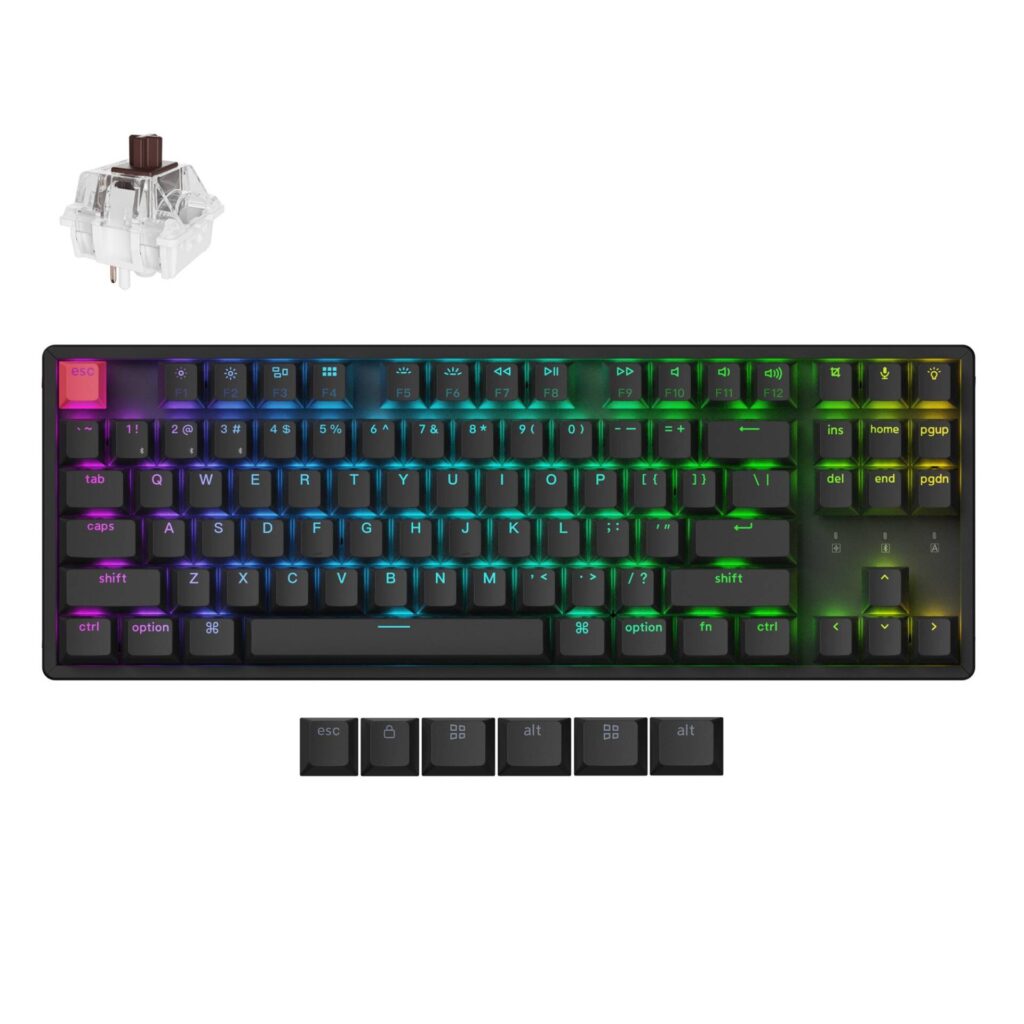
Keychron K8 Version 2 (Aluminum Frame): Specs, Pros & Cons
Keychron's naming is the first obstacle. There is a K8, a K8 Pro, a K8 Max, a K8 Ultra and this K8 Version 2, and they are not a ladder of one design: they differ in wireless, polling, firmware and case. Version 2 is itself offered with either a plastic or an aluminum frame, and this is the aluminum one.
The layout is an 87-key tenkeyless with Mac modifiers native and a Windows keycap set supplied in the box, so neither platform is the afterthought. Keycaps are double-shot PBT in Cherry profile, the circuit board is hot-swappable, and three-angle feet let you set the incline. It connects by cable or over Bluetooth to as many as three devices.
Keychron sells this board configured rather than finished. Switch type, backlight color and frame material are all chosen at the point of purchase, which is unusual at this price and means two people describing their K8 Version 2 may not own the same keyboard. It is worth reading a listing line by line before comparing it against another one, because a cheaper price is usually a different configuration rather than a better deal.
Two things to weigh. At around 950 g this is heavier than plenty of full-size keyboards despite having no numeric pad, so tenkeyless here buys you desk space and not portability. It is a board that stays where you put it. And the wireless is Bluetooth alone, with no 2.4 GHz receiver in the box, which is entirely fine for typing and office work and unsuitable for anything where input latency forms part of the activity. Decide which of those two uses is the real one before you spend the money.
Category strengths
Where the Keychron K8 Version 2 (Aluminum Frame) trails the median
- Fewer connection options ?
- Shorter battery life ?190 h vs 325 h (median)
- No rotary knob ?
- A slightly higher front height ?21.74 mm vs 20.2 mm (median)
How this VS Score was computed
Score 42: each known spec is measured against the median of all keyboards (101 products), then weighted; 50 means level with that median. In classes of six or more, a value beyond the class’s 10th–90th percentile range counts as that limit, so one extreme product cannot set the scale. 57% of the scoreable weight could be used; unknown values, features not applicable to this class and proxies (battery capacity where a rated life exists) add or remove nothing.
| Specification | This product | Cohort median | Score weight | Points moved |
|---|---|---|---|---|
| Hot-swappable | Yes | 61% of the class have it | 0.6 | +30.0 |
| Rapid trigger | No | 25% of the class have it | 0.5 | −24.0 |
| Adjustable actuation | No | 24% of the class have it | 0.4 | −19.2 |
| Connection | 2 | 3 | 0.8 | −13.6 |
| Battery life | 190 | 325 | 0.6 | −12.6 |
| Rotary knob | No | 53% of the class have it | 0.2 | −9.6 |
| Front height | 21.74 | 20.2 | 0.2 | −0.8 |
| Switch technology | Mechanical | Mechanical | 1 | +0.0 |
| Polling rate | 1,000 | 1,000 | 0.7 | +0.0 |
| Bluetooth devices | 3 | 3 | 0.3 | +0.0 |
| Keycap material | PBT | PBT | 0.4 | +0.0 |
| Backlight | RGB | RGB | 0.3 | +0.0 |
Not scored: Actuation force (unknown: not scored); N-key rollover (standard for the class (85% have it)); Analog input (not applicable: only 14% of this class have it); Wired latency (unknown: not scored); Wireless latency (unknown: not scored); Battery capacity (capacity is a proxy; the rated battery life is scored instead); USB passthrough (not applicable: only 4% of this class have it); Sound dampening (unknown: not scored); Programmable keys (standard for the class (99% have it)); Media controls (standard for the class (97% have it)); Onboard profiles (standard for the class (89% have it)); Configuration software (standard for the class (95% have it)).
Editor’s note
The K8 Version 2 is the keyboard Keychron has been selling in one form or another for years, and the second revision is mostly about what happens underneath: a hot-swappable board running QMK, configured through Keychron's Launcher web app. If you have ever wanted to remap a key or build a macro without installing anything, that is the headline here, and it works on macOS, Windows and Linux alike.
The aluminum-frame version carries a full 150 g more than the plastic one, and that heft plus the three-angle feet makes it sit firmly. Keycaps are double-shot PBT in Cherry profile (the right material at this price and better than the ABS on a lot of competitors), and switches are Keychron's own Super Brown tactiles which, because the board is hot-swap, you are not married to.
Two things to know before ordering. First, wireless is Bluetooth 5.2 only (no receiver dongle), and Keychron quotes a 90 Hz polling rate in Bluetooth mode against 1000 Hz wired. For typing and office work that is irrelevant. For competitive games you would use the cable. Second, the 4000 mAh battery is rated at around 190 hours with the backlight off but roughly 100 hours with RGB at its lowest setting, so the lighting roughly halves your time between charges.
The thing I would weigh most is whether you want a TKL at all. If you do, and you want hot-swap, PBT caps and a properly cross-platform layout without spending Q-series money on an all-metal case, this is the sensible middle of Keychron's range. Anyone who never touches the arrow cluster gets the same formula in less desk from the K2 Version 3.
Specifications
Quality bars show where each figure sits between the lowest and highest of the 101 keyboards this VS Score is measured against.
Switches & typing
Performance
Layout & size
Connectivity
Build & sound
Features
Sources and verification
Where the specifications come from
- Official product pagekeychron.com
- Datasheet or manualkeychron.com
- Retailer listing (cross-check)amazon.com
Verification
- First published
- Specifications last checked
- Sheet completeness
- 27 of 34 specifications verified; the rest show as Unknown and are never estimated or scored
- Page type
- Product specification page — Compiled from the manufacturer’s published specifications and the cited sources; this is not a hands-on test.
- Basis
- Research-based: specifications and editorial text were compiled from the documents listed here and the manufacturer’s published data. We have not tested this unit ourselves; where independent measurements are mentioned they belong to the linked publication.
Keyboards with similar specs to the Keychron K8 Version 2 (Aluminum Frame)

Ratings & reviews
No reviews yet. Be the first to share your experience.
The bottom line
The Keychron K8 Version 2 (Aluminum Frame) earns a VS Score of 42, below the median of the 101 keyboards it is measured against (a score of 50 is level with that median).
- Who it’s for
- People who want a solid, cross-platform tenkeyless with hot-swap switches and QMK remapping through a browser, without paying for an all-aluminum case. Mac owners especially, because the Mac legends ship on the board.
- Who should look elsewhere
- Competitive gamers who need low-latency wireless, because the only wireless is Bluetooth, at a fraction of the wired polling rate. Also not for anyone who wants a quiet board, since Keychron lists no sound dampening for this model.
- The trade-off that matters
- Value and flexibility against wireless performance: the full enthusiast checklist at a mid-range price, against Bluetooth-only wireless and a battery the lighting cuts roughly in half.
- The main alternative
- Keychron K8 Ultra 8K: the same TKL layout a tier up, adding a wireless receiver and 8000 Hz polling for gaming. It costs more, and if you never game on it, the Version 2 is the better buy.
The VS Score is calculated from the weighted specifications above, each measured against the median of comparable keyboards — a shortlisting guide, not a substitute for your own priorities. See how we score.




