MCHOSE L7 Ultra: Specs, Features, Pros & Cons
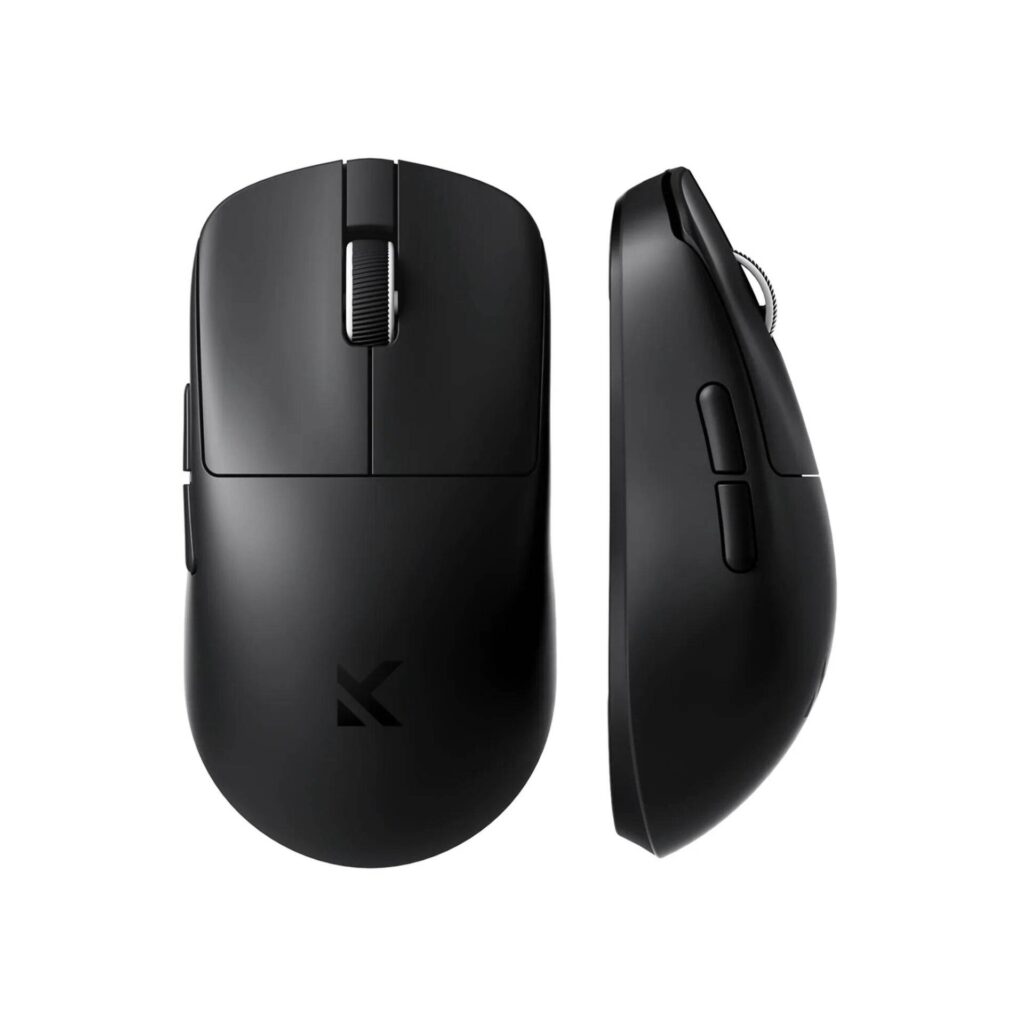
The L7 Ultra is the small mouse in MCHOSE's L7 series, and its larger sibling, the L7 Ultra+, differs by one character in the name. MCHOSE gives the Ultra 115.62 mm of length, 60.61 mm of width and 36.04 mm of height at 39 g, and lists the L7 Pro at the same size and weight. The Ultra+ is 119.6 mm long, weighs 48 g and carries twice the battery.
A PixArt PAW3950 sensor runs to 42,000 DPI, rated at 750 IPS and 50 G, polling reaches 8,000 Hz over both the cable and the 2.4 GHz receiver, and the clicks use Kailh Black Green Dot optical switches. A Bluetooth mode covers a laptop without the dongle. MCHOSE has put its money into the parts a buyer compares in a table, which is a rational strategy for a newer brand.
MCHOSE's size guide recommends the L7 series for claw and fingertip grips, and the short, low shell gives a large hand in a palm grip little to rest on. MCHOSE does not publish a button count or say whether the shape suits left-handed players.
Software updates, spare feet and warranty handling over several years are less proven with a newer maker like MCHOSE than with Logitech or Razer, and none of that shows on a spec sheet. A buyer who keeps a mouse for five years is betting on the company as much as on the sensor.
Category strengths
Where the MCHOSE L7 Ultra beats the median
- A much higher polling rate ?8,000 Hz vs 1,000 Hz (median)
- A much higher wireless polling rate ?8,000 Hz vs 1,000 Hz (median)
- A much higher max sensitivity ?42,000 DPI vs 25,600 DPI (median)
- A much lighter build ?39 g vs 89 g (median)
- More connection options ?
- A much higher switch lifespan ?150 million clicks vs 80 million clicks (median)
- A higher max tracking speed ?750 IPS vs 650 IPS (median)
Where the MCHOSE L7 Ultra trails the median
- A much smaller battery ?250 mAh vs 500 mAh (median)
How this VS Score was computed
Score 78: each known spec is measured against the median of all mice (83 products), then weighted; 50 means level with that median. In classes of six or more, a value beyond the class’s 10th–90th percentile range counts as that limit, so one extreme product cannot set the scale. 58% of the scoreable weight could be used; unknown values, features not applicable to this class and proxies (battery capacity where a rated life exists) add or remove nothing.
| Specification | This product | Cohort median | Score weight | Points moved |
|---|---|---|---|---|
| Polling rate | 8,000 | 1,000 | 0.8 | +40.0 |
| Weight | 39 — capped at the class’s lower range (49.5) | 89 | 1 | +40.0 |
| Max sensitivity | 42,000 | 25,600 | 1 | +32.0 |
| Wireless polling rate | 8,000 | 1,000 | 0.5 | +25.0 |
| Connection | 3 | 2 | 0.8 | +20.0 |
| USB-C charging | Yes | 68% of the class have it | 0.3 | +15.0 |
| Max tracking speed | 750 | 650 | 0.8 | +6.4 |
| Battery capacity | 250 | 500 | 0.2 | −5.0 |
| Switch lifespan | 150 — capped at the class’s upper range (100) | 80 | 0.2 | +2.6 |
| Max acceleration | 50 | 50 | 0.4 | +0.0 |
| Grip styles | 2 | 2 | 0.4 | +0.0 |
Not scored: Adjustable lift-off distance (unknown: not scored); Buttons (unknown: not scored); Horizontal scrolling (unknown: not scored); Free-spin scroll wheel (unknown: not scored); Click latency (unknown: not scored); Debounce adjustment (unknown: not scored); Battery life (unknown: not scored); Quick charge (unknown: not scored); Wireless charging (unknown: not scored); Onboard memory (unknown: not scored); Software customization (standard for the class (98% have it)); Adjustable weights (unknown: not scored); RGB lighting (unknown: not scored).
Editor’s note
MCHOSE fits a 250 mAh cell and publishes no battery life. For a sense of scale, Razer rates its own Viper V4 Pro at 180 hours at 1,000 Hz and 45 hours at 8,000 Hz, and a light mouse with a small cell meets its cable far more often at 8,000 Hz. Running the L7 Ultra at 1,000 or 2,000 Hz day to day, and saving 8,000 Hz for wired play, is the practical answer.
The switch rating is the strongest number MCHOSE prints: 150 million clicks for the Kailh optical switches, half again as high as Razer's rating for the V4 Pro. MCHOSE's product page also shows an Omron tile, while its spec table and the L7 manual both name Kailh.
MCHOSE's spec table calls the mouse tri-mode, and the manual's mode switch has a Bluetooth position, so a work laptop can take it without giving up a USB port.
Before ordering, check that the listing names the L7 Ultra and not the Ultra+, because the larger one changes both the fit and the weight.
Specifications
Quality bars show where each figure sits between the lowest and highest of the 83 mice this VS Score is measured against.
Sensor & tracking
Design & handling
Switches & latency
Connectivity
Battery
Features
Sources and verification
Where the specifications come from
- Official product pagemchose.store
Verification
- First published
- Specifications last checked
- Sheet completeness
- 21 of 34 specifications verified; the rest show as Unknown and are never estimated or scored
- Page type
- Product specification page — Compiled from the manufacturer’s published specifications and the cited sources; this is not a hands-on test.
- Basis
- Research-based: specifications and editorial text were compiled from the documents listed here and the manufacturer’s published data. We have not tested this unit ourselves; where independent measurements are mentioned they belong to the linked publication.
Mice with similar specs to the MCHOSE L7 Ultra
Ratings & reviews
No reviews yet. Be the first to share your experience.
The bottom line
The MCHOSE L7 Ultra earns a VS Score of 78, above the median of the 83 mice it is measured against (a score of 50 is level with that median).
- Who it’s for
- A claw or fingertip player who already knows the small, low shape suits them and can sort out software quirks without help.
- Who should look elsewhere
- Palm-grip users with large hands should look elsewhere, and so should anyone who wants software and spare parts from a brand with a long record.
- The trade-off that matters
- The brand is the gamble. The hardware is current, but nobody knows how long the software, spares and warranty handling will hold up.
- The main alternative
- Razer Viper V4 Pro: a light competitive mouse from an established brand that publishes its battery figure, for buyers who want support to last.
The VS Score is calculated from the weighted specifications above, each measured against the median of comparable mice — a shortlisting guide, not a substitute for your own priorities. See how we score.