
Dell Alienware AW3225QF: Specs, Features, Pros & Cons
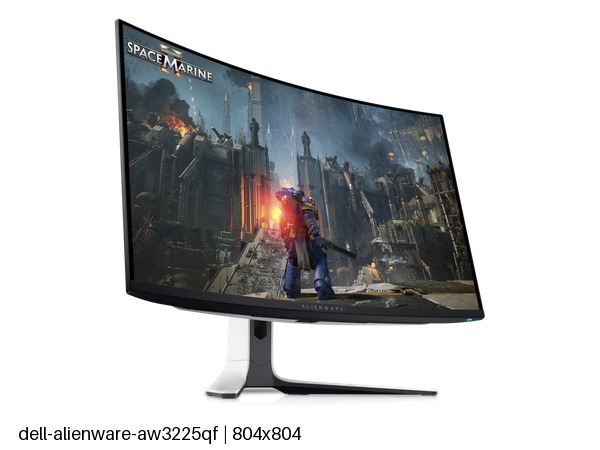
The large high-resolution OLED gaming monitor has become a crowded category, and most of its members are close relatives: ASUS, MSI and Samsung all sell flat models built around the same class of panel. Alienware's contribution is the one that bends. A curve is common on ultrawides but rare on a screen of standard proportions, and it is the design decision that sets this monitor apart from its rivals.
What a curve does on a screen of this shape is subtle. It brings the edges of the picture slightly toward the eyes, so the whole image sits at a more even distance for someone centered in front of it. It does less for anyone watching from the side, and it is a mild hindrance to work that depends on straight lines, such as architectural drawings, page layout or photo editing, where a flat panel shows geometry as it is.
This was also one of the first models of its type, and the category has moved on since. Newer rivals add dual modes, higher refresh rates or brighter panels, so its appeal now rests on the curve and on a mature, well-understood design rather than on being the newest thing on the shelf.
Two practical limits follow from the shape. A curved screen sits awkwardly next to a flat second monitor, so a two-display desk looks and works better with matching panels. And wall mounting is possible but less tidy than with a flat display, since the curve stands proud of the wall.
It remains a strong pick for a desk built around one player and one powerful desktop, and a harder one to justify anywhere else.
Category strengths
Where the Dell Alienware AW3225QF beats the median
- A higher pixel density ?140 ppi vs 111 ppi (median)
- Has picture-by-picture ?
Where the Dell Alienware AW3225QF trails the median
- No headphone output ?
- A lower contrast ratio ?1000000:1 vs 1500000:1 (median)
- No pivot adjustment ?
How this VS Score was computed
Score 52: each known spec is measured against the median of OLED gaming monitors, 27 to 31 inches (16 products), then weighted; 50 means level with that median. In classes of six or more, a value beyond the class’s 10th–90th percentile range counts as that limit, so one extreme product cannot set the scale. 72% of the scoreable weight could be used; unknown values, features not applicable to this class and proxies (battery capacity where a rated life exists) add or remove nothing.
| Specification | This product | Cohort median | Score weight | Points moved |
|---|---|---|---|---|
| Resolution | 4K | 1440p | 1.2 | +60.0 |
| USB-C | No | 33% of the class have it | 0.5 | −24.0 |
| Motion blur reduction | No | 22% of the class have it | 0.3 | −14.4 |
| Contrast ratio | 1,000,000 | 1,500,000 | 0.6 | −10.2 |
| Picture-by-picture | Yes | 50% of the class have it | 0.2 | +10.0 |
| Headphone output | No | 75% of the class have it | 0.2 | −9.6 |
| Pixel density | 140 | 111 | 0.5 | +6.5 |
| USB hub | Yes | 73% of the class have it | 0.05 | +2.3 |
| Pivot | No | 81% of the class have it | 0.02 | −1.0 |
| KVM switch | No | 33% of the class have it | 0.02 | −1.0 |
| Screen size | 31.6 — capped at the class’s upper range (27) | 27 | 1.2 | +0.0 |
| Panel type | OLED | OLED | 0.8 | +0.0 |
| Color depth | 10 | 10 | 0.3 | +0.0 |
| Refresh rate | 240 | 240 | 1.2 | +0.0 |
| Response time | 0.03 | 0.03 | 0.8 | +0.0 |
| Peak brightness | 1,000 | 1,000 | 0.8 | +0.0 |
| DCI-P3 coverage | 99.3 | 99 | 0.6 | +0.0 |
| HDR | True Black 400 | True Black 400 | 0.5 | +0.0 |
| Adaptive sync | G-Sync Compatible | G-Sync Compatible | 0.6 | +0.0 |
| HDMI ports | 2 | 2 | 0.4 | +0.0 |
| DisplayPort inputs | 1 | 1 | 0.4 | +0.0 |
Not scored: Local dimming (not applicable: only 0% of this class have it); Local dimming zones (unknown: not scored); Variable refresh rate (standard for the class (100% have it)); Input lag (unknown: not scored); Height adjustment (standard for the class (94% have it)); Tilt (standard for the class (100% have it)); Swivel (standard for the class (88% have it)); USB-C power delivery (unknown: not scored); Built-in speakers (not applicable: only 0% of this class have it); Webcam (not applicable: only 0% of this class have it); Microphone (not applicable: only 0% of this class have it); Ethernet (not applicable: only 0% of this class have it).
Editor’s note
The AW3225QF is the curved one, and the curve is the point, but check the back panel before you commit, because two ordinary things are missing.
There is no USB-C. On a monitor at this price that means no single-cable laptop connection and no charging, so a laptop needs HDMI or DisplayPort plus a separate power brick and a separate USB cable to the hub. And there is no headphone output at all, which is more awkward than it sounds on a monitor with no speakers either: your headphones have to go back to the PC.
What you get in exchange is a 31.6-inch 4K QD-OLED at 240 Hz with a 1700R curve, which is pronounced enough to be felt at desk distance and does draw you into a game more than a flat panel. Response is 0.03 ms, color coverage 99.3% DCI-P3, HDR is True Black 400 with 1,000 nits peak, and it is G-Sync Compatible from 48 Hz up to the full rate. Pixel density is 140 ppi.
The stand tilts, swivels and adjusts for height but does not pivot. That is reasonable, since nobody rotates a curved panel.
The semi-gloss coating and the slow static-element retention risk are the standard OLED terms.
Buy it if you game more than you work, want the curve, and connect a desktop by DisplayPort. Buy the MSI instead if a laptop shares the desk: its USB-C, KVM and headphone jack are the difference between a monitor and a workstation hub.
Specifications
Quality bars show where each figure sits between the lowest and highest of the 16 OLED gaming monitors, 27 to 31 inches this VS Score is measured against.
Picture
Gaming
Ergonomics & design
Connectivity
Features
Sources and verification
Where the specifications come from
- Official product pagedell.com
Verification
- First published
- Specifications last checked
- Sheet completeness
- 38 of 42 specifications verified; the rest show as Unknown and are never estimated or scored
- Page type
- Product specification page — Compiled from the manufacturer’s published specifications and the cited sources; this is not a hands-on test.
- Basis
- Research-based: specifications and editorial text were compiled from the documents listed here and the manufacturer’s published data. We have not tested this unit ourselves; where independent measurements are mentioned they belong to the linked publication.
Monitors with similar specs to the Dell Alienware AW3225QF
Ratings & reviews
No reviews yet. Be the first to share your experience.
The bottom line
The Dell Alienware AW3225QF earns a VS Score of 52, above the median of the 16 OLED gaming monitors, 27 to 31 inches it is measured against (a score of 50 is level with that median).
- Who it’s for
- A dedicated gaming desk with a desktop PC, where the curve adds immersion and no laptop ever needs to plug in.
- Who should look elsewhere
- Mixed work setups built around a laptop, and anyone who wants to plug headphones into the monitor. There is nowhere to do it.
- The trade-off that matters
- It is a gaming screen first and a desk hub not at all: the picture is top class, while the connectivity falls short of what the price suggests.
- The main alternative
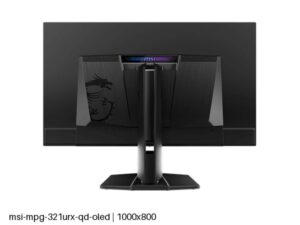
- MSI MPG 321URX QD-OLED: a flat rival from the same panel class with single-cable laptop docking, a built-in switch for two computers and a headphone jack, for desks shared with a laptop.
The VS Score is calculated from the weighted specifications above, each measured against the median of comparable OLED gaming monitors, 27 to 31 inches — a shortlisting guide, not a substitute for your own priorities. See how we score.





