
Keychron Q11 Ultra 8K: Specs, Price, Pros & Cons
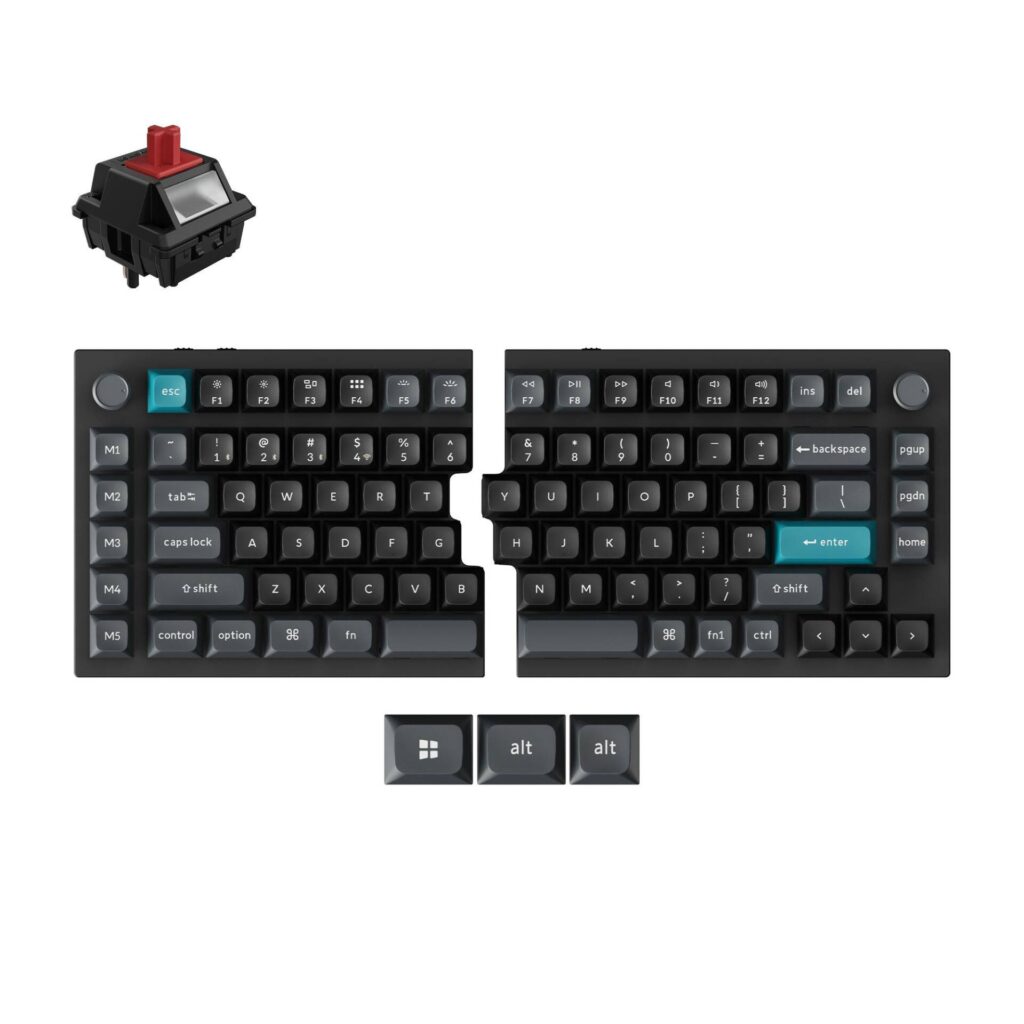
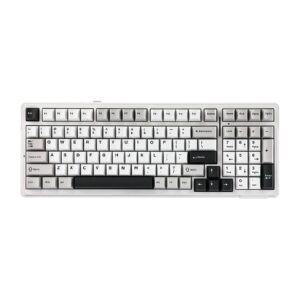
Of the Ultra boards, the Q11 is the one that comes apart. Keychron takes the 75% layout of the Q1, cuts it down the middle and gives each half its own battery and its own wireless link, so the two pieces can sit at shoulder width with nothing strung between them.
It keeps the parts of the Q range that define the family: an aluminum case, a double-gasket mount, hot-swap sockets, PBT caps and the same fast dongle polling as the one-piece models. What it adds is a column of five macro keys down the outer edge of each half, handy for shortcuts such as copy and paste that would otherwise need a second layer.
Profile is the other difference. The Q11 has the lowest front edge in Keychron's lineup, with a shallow slope, so the wrists sit flatter than on the taller Q1. Push the halves together and it looks much like any other 75% board, down to the aluminum case.
Its intended owner has wrist or shoulder strain and spends long days typing. A split rewards that person over weeks, not on the first afternoon, and the learning curve falls hardest on anyone whose hands have wandered across the center of the keyboard for years.
The cost of two wireless halves shows up in battery life, where the Q11 trails every other Ultra board, and each half has to be charged on its own. A fully contoured split such as the MoErgo Glove80 goes further for wrist pain. This one stays much closer to an ordinary keyboard, and that makes it the gentler first step.
Category strengths
Where the Keychron Q11 Ultra 8K beats the median
- A much higher polling rate ?8,000 Hz vs 1,000 Hz (median)
- A lower front height ?11.27 mm vs 20.2 mm (median)
Where the Keychron Q11 Ultra 8K trails the median
- Much shorter battery life ?160 h vs 325 h (median)
How this VS Score was computed
Score 56: each known spec is measured against the median of all keyboards (101 products), then weighted; 50 means level with that median. In classes of six or more, a value beyond the class’s 10th–90th percentile range counts as that limit, so one extreme product cannot set the scale. 59% of the scoreable weight could be used; unknown values, features not applicable to this class and proxies (battery capacity where a rated life exists) add or remove nothing.
| Specification | This product | Cohort median | Score weight | Points moved |
|---|---|---|---|---|
| Polling rate | 8,000 | 1,000 | 0.7 | +35.0 |
| Hot-swappable | Yes | 61% of the class have it | 0.6 | +30.0 |
| Rapid trigger | No | 25% of the class have it | 0.5 | −24.0 |
| Adjustable actuation | No | 24% of the class have it | 0.4 | −19.2 |
| Battery life | 160 | 325 | 0.6 | −15.0 |
| Sound dampening | Yes | 76% of the class have it | 0.3 | +15.0 |
| Rotary knob | Yes | 53% of the class have it | 0.2 | +10.0 |
| Front height | 11.27 | 20.2 | 0.2 | +8.0 |
| Switch technology | Mechanical | Mechanical | 1 | +0.0 |
| Connection | 3 | 3 | 0.8 | +0.0 |
| Bluetooth devices | 3 | 3 | 0.3 | +0.0 |
| Keycap material | PBT | PBT | 0.4 | +0.0 |
| Backlight | RGB | RGB | 0.3 | +0.0 |
Not scored: Actuation force (unknown: not scored); N-key rollover (standard for the class (85% have it)); Analog input (not applicable: only 14% of this class have it); Wired latency (unknown: not scored); Wireless latency (unknown: not scored); Battery capacity (capacity is a proxy; the rated battery life is scored instead); USB passthrough (not applicable: only 4% of this class have it); Programmable keys (standard for the class (99% have it)); Media controls (standard for the class (97% have it)); Onboard profiles (standard for the class (89% have it)); Configuration software (standard for the class (95% have it)).
Editor’s note
The Q11 Ultra 8K solves the problem that made earlier split keyboards awkward: the cable between the halves. Both sides now sync wirelessly and independently, so you can push them as far apart as your shoulders want without a wire looping across the desk. Snapped together they read as a fairly normal 75% board.
Splitting a keyboard is a bigger adjustment than people expect. Your hands have to stop crossing the center line, and if you learned to type informally you will discover you have been hitting B or Y with the wrong hand for years. Give it two weeks before judging. Once it clicks, the shoulder position is more comfortable than any tented one-piece board.
Note the battery figure carefully, because it is the one place the Q11 falls behind its siblings. Keychron rates it at up to 160 hours with 8K polling on 2.4 GHz and the backlight off, against 660 hours for the Q1 and Q3. Two radios and two halves cost power. That is still weeks of normal use, but it is a quarter of what the rest of the range manages, and each half charges separately.
Physically it is the lowest-profile board in the lineup at 11.27 mm at the front with a 2.8 degree angle, which suits the ergonomic brief: less wrist extension than the 20 mm Q1. It carries the same aluminum construction, double-gasket mount, hot-swap sockets and five macro keys down each outer edge.
This is the right pick if you have wrist or shoulder discomfort, work long typing days, and are willing to relearn some habits. It is the wrong pick if you share the machine with others, game competitively on a layout that assumes a one-piece board, or want the longest battery life in the range.
Specifications
Quality bars show where each figure sits between the lowest and highest of the 101 keyboards this VS Score is measured against.
Switches & typing
Performance
Layout & size
Connectivity
Build & sound
Features
Sources and verification
Where the specifications come from
- Official product pagekeychron.com
Verification
- First published
- Specifications last checked
- Sheet completeness
- 31 of 34 specifications verified; the rest show as Unknown and are never estimated or scored
- Page type
- Product specification page — Compiled from the manufacturer’s published specifications and the cited sources; this is not a hands-on test.
- Basis
- Research-based: specifications and editorial text were compiled from the documents listed here and the manufacturer’s published data. We have not tested this unit ourselves; where independent measurements are mentioned they belong to the linked publication.
Where to buy
Prices and availability may change. Check the retailer before buying. We may earn a commission on purchases.
Price history
Keyboards with similar specs to the Keychron Q11 Ultra 8K
Ratings & reviews
No reviews yet. Be the first to share your experience.
The bottom line
The Keychron Q11 Ultra 8K earns a VS Score of 56, above the median of the 101 keyboards it is measured against (a score of 50 is level with that median).
- Who it’s for
- Someone with wrist or shoulder strain who types long days and will put up with relearning which hand hits which key.
- Who should look elsewhere
- Shared computers and competitive players are poor fits, and so is anyone who wants the longest battery life in the Keychron range.
- The trade-off that matters
- Two wireless halves drain faster than one board, and each half charges on its own, so charging becomes a small recurring chore.
- The main alternative
- MoErgo Glove80: a fully contoured split with thumb clusters, for wrist pain that a flat split does not fix.
The VS Score is calculated from the weighted specifications above, each measured against the median of comparable keyboards — a shortlisting guide, not a substitute for your own priorities. See how we score.





