
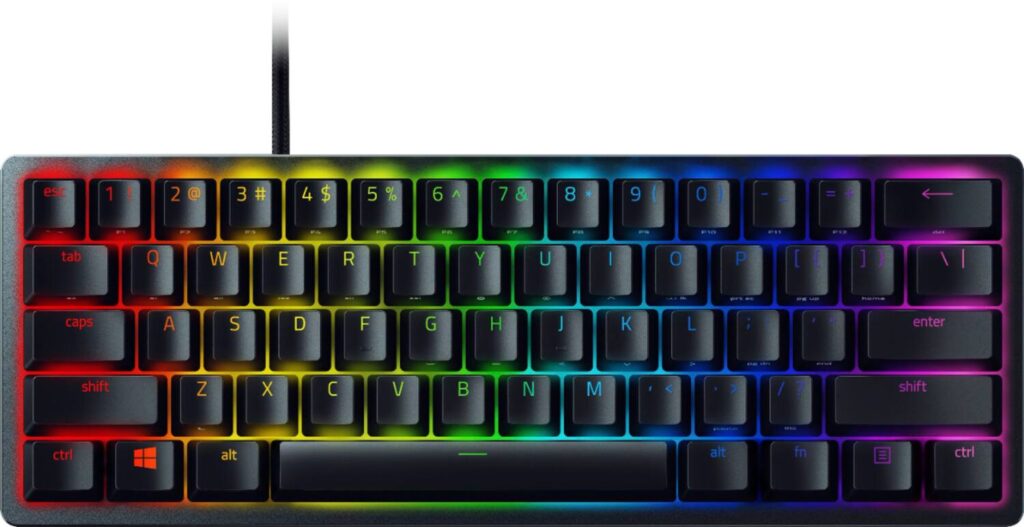
Razer Huntsman Mini: Specs, Features, Pros & Cons
A wired compact board with Razer's optical switches, the Huntsman Mini was built for players who want the mouse to have the desk. It keeps the letters, the number row and the modifiers, puts the rest behind a function key, and leaves a long stretch of empty desk to its right.
It belongs to an earlier generation of Razer boards, and that shows in what the switches can do. They are fixed optical switches with a set actuation point, so none of the adjustable depth or rapid reset of the newer Huntsman models is here. This version uses the clicky purple switch, and a linear version of the same keyboard is sold separately, which suits a quieter room.
The materials hold up better than the age suggests. The keycaps are doubleshot PBT, which resists the shine that ABS picks up, and the top plate is aluminum. Every key registers when several are held at once, the lighting is RGB, and the keys can be reprogrammed. The cable detaches, so the board goes into a bag without a fight. Its limits come from the same small body. Arrows, the function row and navigation keys need two fingers, and the layer never disappears from daily work. The switches are soldered in, there is no sound dampening inside, and a cable is the only connection.
Shooter players on cramped desks, who keep the keyboard for games and carry it to a friend's place or a LAN now and then, are its natural owners. Working hours in documents on the same machine make the missing keys irritating, and a housemate may find the clicky switches louder than they would like.
Category strengths
Where the Razer Huntsman Mini trails the median
- No hot-swappable switches ?
- Fewer connection options ?
- No sound dampening ?
- No rotary knob ?
How this VS Score was computed
Score 28: each known spec is measured against the median of all keyboards (101 products), then weighted; 50 means level with that median. In classes of six or more, a value beyond the class’s 10th–90th percentile range counts as that limit, so one extreme product cannot set the scale. 46% of the scoreable weight could be used; unknown values, features not applicable to this class and proxies (battery capacity where a rated life exists) add or remove nothing.
| Specification | This product | Cohort median | Score weight | Points moved |
|---|---|---|---|---|
| Hot-swappable | No | 61% of the class have it | 0.6 | −28.8 |
| Connection | 1 | 3 | 0.8 | −26.4 |
| Rapid trigger | No | 25% of the class have it | 0.5 | −24.0 |
| Adjustable actuation | No | 24% of the class have it | 0.4 | −19.2 |
| Switch technology | Optical | Mechanical | 1 | +17.0 |
| Sound dampening | No | 76% of the class have it | 0.3 | −14.4 |
| Rotary knob | No | 53% of the class have it | 0.2 | −9.6 |
| Actuation force | 45 | 45 | 0.4 | +0.0 |
| Keycap material | PBT | PBT | 0.4 | +0.0 |
| Backlight | RGB | RGB | 0.3 | +0.0 |
Not scored: N-key rollover (standard for the class (85% have it)); Analog input (not applicable: only 14% of this class have it); Polling rate (unknown: not scored); Wired latency (unknown: not scored); Wireless latency (unknown: not scored); Front height (unknown: not scored); Bluetooth devices (unknown: not scored); Battery life (unknown: not scored); Battery capacity (unknown: not scored); USB passthrough (not applicable: only 4% of this class have it); Programmable keys (standard for the class (99% have it)); Media controls (standard for the class (97% have it)); Onboard profiles (standard for the class (89% have it)); Configuration software (standard for the class (95% have it)).
Editor’s note
The Huntsman Mini asks you to give up forty percent of a keyboard, and whether that trade works depends almost entirely on what you do at your desk when you are not gaming.
What you lose is the function row, the arrow cluster, the navigation keys and the numpad, leaving 61 keys. All of it is still reachable through a function layer, and Razer did the sensible thing by side-printing those secondary functions on the front face of the keycaps, so you can read them without memorizing a manual. It works better than you would expect. It still slows you down in a spreadsheet, and it never fully stops being a small tax on everyday work.
What you gain is desk space and portability. At roughly 293 by 103 millimeters with a detachable USB-C cable, it leaves your mouse arm an enormous amount of room, which is the real reason competitive players buy 60% boards.
Be careful with the switches. This is the Clicky Optical version, Razer's purple switch: light at 45 grams, fast at 1.5 millimeters, and loud. If you share a room, an office or a voice channel, look at the Linear version instead: the same keyboard, a very different neighbor.
The build is better than the price suggests in some ways and dated in others. Doubleshot PBT keycaps will not go shiny, and the aluminum top plate is rigid. But this is a 2020 design: there is no sound-dampening foam, so it sounds harder and more hollow than modern boards, and the switches are soldered, so there is no swapping them later.
Buy it for a cramped desk or a bag you travel with. Skip it if you type all day, or share your space.
Specifications
Quality bars show where each figure sits between the lowest and highest of the 101 keyboards this VS Score is measured against.
Switches & typing
Performance
Layout & size
Connectivity
Build & sound
Features
Sources and verification
Where the specifications come from
- Official product pagerazer.com
- Independent testingrtings.com
Verification
- First published
- Specifications last checked
- Sheet completeness
- 23 of 34 specifications verified; the rest show as Unknown and are never estimated or scored
- Page type
- Product specification page — Compiled from the manufacturer’s published specifications and the cited sources; this is not a hands-on test.
- Basis
- Research-based: specifications and editorial text were compiled from the documents listed here and the manufacturer’s published data. We have not tested this unit ourselves; where independent measurements are mentioned they belong to the linked publication.
Keyboards with similar specs to the Razer Huntsman Mini
Ratings & reviews
No reviews yet. Be the first to share your experience.
The bottom line
The Razer Huntsman Mini earns a VS Score of 28, below the median of the 101 keyboards it is measured against (a score of 50 is level with that median).
- Who it’s for
- A competitive player on a cramped desk who wants the most mouse room possible and rarely opens a spreadsheet.
- Who should look elsewhere
- Anyone who types all day or shares a room should avoid this clicky version, and heavy users of arrows and function keys will tire of the layer.
- The trade-off that matters
- Every missing key becomes a held combination, so editing and navigation stay slower for as long as you own it.
- The main alternative
- Wooting 60HE v2: the same small footprint with magnetic switches and rapid trigger, for players who want to tune actuation.
The VS Score is calculated from the weighted specifications above, each measured against the median of comparable keyboards — a shortlisting guide, not a substitute for your own priorities. See how we score.





