
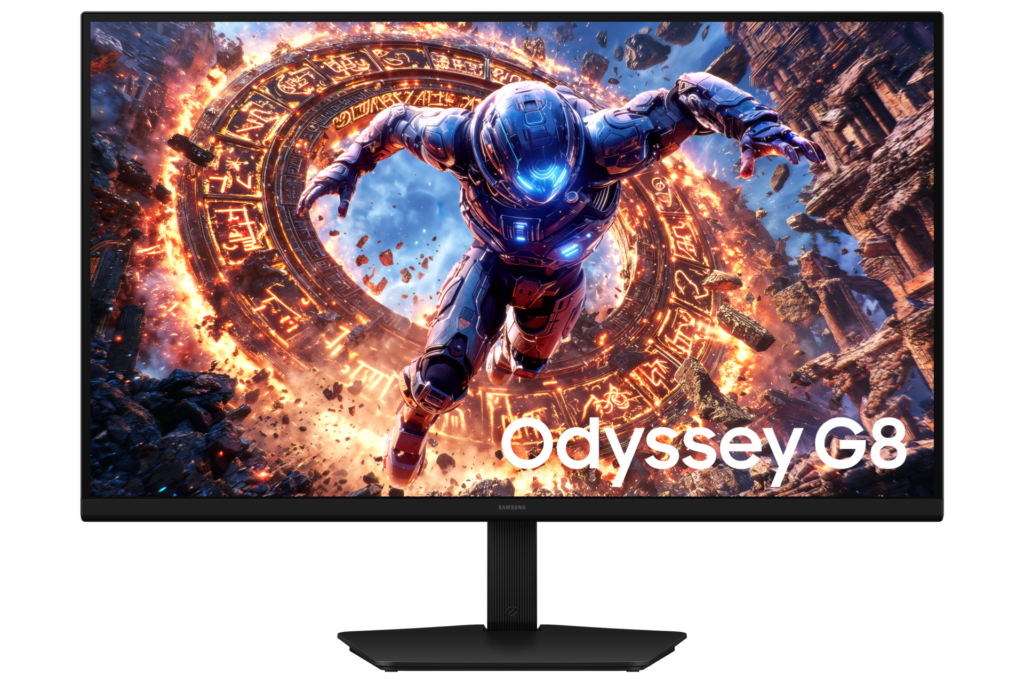
Samsung Odyssey G80HS S32HG80: Specs, Features, Pros & Cons
Apple's Pro Display XDR set the reference for a sharp large screen: 6K across a 32-inch panel, at a refresh rate meant for editing and nothing faster. This Odyssey brings a similar pixel density to a gaming monitor, and that density is what separates it from the rest of the Odyssey range.
Density decides how text looks. On a typical gaming monitor, letters show faint stepped edges when you lean in. Here they look close to print, which matters to anyone who spends the working day in code, layouts, spreadsheets or photos and wants the same screen for games once the work is done. Mac owners will recognize the level from Apple's own displays, since macOS draws text most cleanly at around this density.
Samsung adds a dual-mode switch that trades resolution for speed, so competitive shooters get a faster picture on the same panel at a lower resolution. The panel is IPS, which keeps colors steady when you look from an angle, and as an LCD it has none of the burn-in worries that come with OLED.
That choice has a cost in a dark room. Blacks look gray next to an OLED or a Mini-LED screen with local dimming, so films and night scenes lose some depth. It also asks a lot of the computer behind it, since pushing this many pixels at a high refresh rate is serious work for any graphics card.
The connections favor a desktop tower that doubles as a gaming PC. A laptop can drive it too, but it needs a separate cable for the picture, the peripherals and its own power.
Category strengths
Where the Samsung Odyssey G80HS S32HG80 beats the median
- A much higher pixel density ?224 ppi vs 109 ppi (median)
- Has USB hub ?
Where the Samsung Odyssey G80HS S32HG80 trails the median
- No motion blur reduction ?
- A slightly lower refresh rate ?165 Hz vs 180 Hz (median)
How this VS Score was computed
Score 53: each known spec is measured against the median of IPS gaming monitors, 27 to 31 inches (29 products), then weighted; 50 means level with that median. In classes of six or more, a value beyond the class’s 10th–90th percentile range counts as that limit, so one extreme product cannot set the scale. 70% of the scoreable weight could be used; unknown values, features not applicable to this class and proxies (battery capacity where a rated life exists) add or remove nothing.
| Specification | This product | Cohort median | Score weight | Points moved |
|---|---|---|---|---|
| Resolution | 8K | 1440p | 1.2 | +45.6 |
| USB-C | No | 24% of the class have it | 0.5 | −24.0 |
| Height adjustment | Yes | 79% of the class have it | 0.4 | +20.0 |
| Motion blur reduction | No | 67% of the class have it | 0.3 | −14.4 |
| Pixel density | 224 — capped at the class’s upper range (163) | 109 | 0.5 | +12.5 |
| Swivel | Yes | 64% of the class have it | 0.2 | +10.0 |
| Built-in speakers | No | 31% of the class have it | 0.2 | −9.6 |
| HDR | HDR10 | DisplayHDR 400 | 0.5 | −6.0 |
| Refresh rate | 165 | 180 | 1.2 | −4.8 |
| USB hub | Yes | 50% of the class have it | 0.05 | +2.3 |
| Pivot | Yes | 75% of the class have it | 0.02 | +1.0 |
| Screen size | 31.5 — capped at the class’s upper range (27) | 27 | 1.2 | +0.0 |
| Panel type | IPS | IPS | 0.8 | +0.0 |
| Color depth | 10 | 10 | 0.3 | +0.0 |
| Response time | 1 | 1 | 0.8 | +0.0 |
| Peak brightness | 400 | 400 | 0.8 | +0.0 |
| Contrast ratio | 1,000 | 1,000 | 0.6 | +0.0 |
| Adaptive sync | G-Sync Compatible | G-Sync Compatible | 0.6 | +0.0 |
| HDMI ports | 2 | 2 | 0.4 | +0.0 |
| DisplayPort inputs | 1 | 1 | 0.4 | +0.0 |
Not scored: DCI-P3 coverage (unknown: not scored); Local dimming (unknown: not scored); Local dimming zones (unknown: not scored); Variable refresh rate (standard for the class (100% have it)); Input lag (unknown: not scored); Tilt (standard for the class (100% have it)); USB-C power delivery (unknown: not scored); Headphone output (standard for the class (86% have it)); KVM switch (not applicable: only 0% of this class have it); Webcam (not applicable: only 0% of this class have it); Microphone (not applicable: only 0% of this class have it); Ethernet (not applicable: only 0% of this class have it); Picture-by-picture (not applicable: only 14% of this class have it).
Editor’s note
The G80HS is Samsung trying to end the resolution-versus-speed argument, and it comes closer than most. The native panel is 6K (6144 by 3456), and it runs at 165 Hz, which is not a combination that existed at sane money until recently. That works out to about 224 pixels per inch, so text is sharp rather than merely adequate.
The clever part is Dual Mode. Drop to 3K and the panel runs at 330 Hz, so the same screen is a high-resolution workstation display during the day and a fast competitive one in the evening.
Two things to plan for. The first is your graphics card: driving 6K at that rate is a serious ask, and the monitor uses DisplayPort 2.1 to do it, so an older card will leave you living in the reduced-resolution mode you were told was the fallback. The second is contrast. This is a Fast IPS panel at 1,000:1 with a 400-nit peak, and while it accepts HDR10 and HDR10+ signals, there is no local dimming here, so treat HDR as compatibility rather than an experience.
Connectivity is good but has one gap. Alongside DisplayPort 2.1 there are two HDMI 2.1 ports and a USB hub, but the hub runs off a USB-B upstream port, and there is no USB-C at all, so this cannot dock a laptop down one cable, and there are no speakers either.
Buy it if you want one screen that is sharp and fast and you have the GPU to feed it. Skip it if you watch or work in the dark and want contrast.
Specifications
Quality bars show where each figure sits between the lowest and highest of the 29 IPS gaming monitors, 27 to 31 inches this VS Score is measured against.
Picture
Gaming
Ergonomics & design
Connectivity
Features
Sources and verification
Where the specifications come from
- Official product pagesamsung.com
- Independent testingrtings.com
Verification
- First published
- Specifications last checked
- Sheet completeness
- 34 of 42 specifications verified; the rest show as Unknown and are never estimated or scored
- Page type
- Product specification page — Compiled from the manufacturer’s published specifications and the cited sources; this is not a hands-on test.
- Basis
- Research-based: specifications and editorial text were compiled from the documents listed here and the manufacturer’s published data. We have not tested this unit ourselves; where independent measurements are mentioned they belong to the linked publication.
Monitors with similar specs to the Samsung Odyssey G80HS S32HG80
Ratings & reviews
No reviews yet. Be the first to share your experience.
The bottom line
The Samsung Odyssey G80HS S32HG80 earns a VS Score of 53, above the median of the 29 IPS gaming monitors, 27 to 31 inches it is measured against (a score of 50 is level with that median).
- Who it’s for
- Someone who works on detailed documents or images by day and plays competitive games at night, with a current graphics card on DisplayPort.
- Who should look elsewhere
- Dark-room film and photo work, and laptop owners after a single cable. Contrast stays at ordinary IPS levels, and there is no USB-C port.
- The trade-off that matters
- Native resolution at speed needs a very strong card, and an older one spends its life in the lower-resolution mode, wasting the density you paid for.
- The main alternative
- ASUS ROG Strix 5K XG27JCG: a smaller dual-mode monitor with similar density and a USB-C input, for a desk with less room.
The VS Score is calculated from the weighted specifications above, each measured against the median of comparable IPS gaming monitors, 27 to 31 inches — a shortlisting guide, not a substitute for your own priorities. See how we score.





