
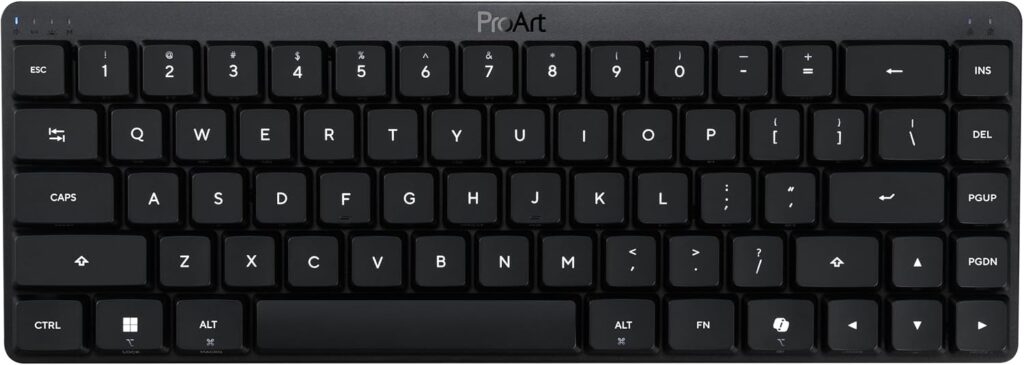
ASUS ProArt Wireless Keyboard KD300: Specs, Pros & Cons
A touch strip along the top edge of the ASUS ProArt KD300 does the job a volume knob does on most keyboards, sliding through volume, media and lighting with a finger. That detail sets the tone. This is a creator's accessory from the ProArt line, the range ASUS sells to photographers and video editors, and it trades the usual gaming hardware for a slim metal shape.
The body is aluminum and magnesium with a gasket mount and silicone foam inside, so the typing sound is damped on purpose. Under the caps sit low-profile optical switches, soldered in place, and the board talks to a computer by cable, by its receiver or over Bluetooth. Through the receiver it polls at 1,000 Hz, the rate a typical office or editing desk needs. A hardware switch flips the layout between PC and Mac, and it can hold several paired devices at once.
Settings live in ASUS Gear Link, which runs in a web browser instead of an installed app, and profiles are saved on the keyboard so they travel with it to another computer. Keys can be remapped, and the RGB backlight can be dimmed or turned off to stretch the battery.
The layout is the part to think about before anything else. It is a 65% board, so the number pad and the whole function row are gone, and anyone who leans on F-key shortcuts in editing software will be reaching for a modifier more often. The switches cannot be swapped, and ASUS lists no n-key rollover. The natural buyer is finishing a ProArt desk around a color-managed monitor and the matching mouse, who wants the keyboard to look and behave like part of that set.
Category strengths
Where the ASUS ProArt Wireless Keyboard KD300 trails the median
- No hot-swappable switches ?
- No n-key rollover ?
- No rotary knob ?
How this VS Score was computed
Score 37: each known spec is measured against the median of all keyboards (101 products), then weighted; 50 means level with that median. In classes of six or more, a value beyond the class’s 10th–90th percentile range counts as that limit, so one extreme product cannot set the scale. 52% of the scoreable weight could be used; unknown values, features not applicable to this class and proxies (battery capacity where a rated life exists) add or remove nothing.
| Specification | This product | Cohort median | Score weight | Points moved |
|---|---|---|---|---|
| Hot-swappable | No | 61% of the class have it | 0.6 | −28.8 |
| N-key rollover | No | 85% of the class have it | 0.5 | −24.0 |
| Rapid trigger | No | 25% of the class have it | 0.5 | −24.0 |
| Adjustable actuation | No | 24% of the class have it | 0.4 | −19.2 |
| Switch technology | Optical | Mechanical | 1 | +17.0 |
| Sound dampening | Yes | 76% of the class have it | 0.3 | +15.0 |
| Rotary knob | No | 53% of the class have it | 0.2 | −9.6 |
| Polling rate | 1,000 | 1,000 | 0.7 | +0.0 |
| Connection | 3 | 3 | 0.8 | +0.0 |
| Battery capacity | 4,000 | 4,000 | 0.2 | +0.0 |
| Backlight | RGB | RGB | 0.3 | +0.0 |
Not scored: Actuation force (unknown: not scored); Analog input (not applicable: only 14% of this class have it); Wired latency (unknown: not scored); Wireless latency (unknown: not scored); Front height (unknown: not scored); Bluetooth devices (unknown: not scored); Battery life (unknown: not scored); USB passthrough (not applicable: only 4% of this class have it); Keycap material (unknown: not scored); Programmable keys (standard for the class (99% have it)); Media controls (standard for the class (97% have it)); Onboard profiles (standard for the class (89% have it)); Configuration software (standard for the class (95% have it)).
Editor’s note
ASUS built the KD300 for a specific desk: a color-managed monitor, the matching MD301 mouse, and an Adobe subscription. It is the rare mechanical keyboard aimed at creators rather than gamers, and most of its choices make sense the moment you accept that framing.
The board itself is well made. A 26.8 mm-slim aluminum and magnesium chassis, a gasket mount with two layers of silicone foam, low-profile optical switches rated for 80 million presses, and tri-mode connectivity across up to five devices with a hardware PC/Mac toggle. Instead of a volume knob there is a touch panel along the top edge that handles volume, media and lighting. Battery claims are strong if you keep the RGB off (up to 16 months on 2.4 GHz) and collapse to about 100 days at full brightness, which is the honest way to read any such figure.
The compromises: it is a 65% layout, so the function row and numpad are gone, which is an odd fit for Adobe work where F-keys and numeric entry earn their keep. The switches are not hot-swappable. Bluetooth polls at only 133 Hz, so use the dongle. Configuration happens in a browser through ASUS Gear Link, with no local app, and ASUS lists only Windows 11 and recent macOS as supported.
The part that would make me hesitate is simpler: the price. At Amazon's price you are shopping against the Logitech MX Mechanical, Keychron's aluminum boards and NuPhy's Air75, all with function rows.
I would buy the KD300 to complete a ProArt desk, where the finish, the toggle and Gear Link click together. As a standalone keyboard, the 65% layout at a high price is a niche taste.
Specifications
Quality bars show where each figure sits between the lowest and highest of the 101 keyboards this VS Score is measured against.
Switches & typing
Performance
Layout & size
Connectivity
Build & sound
Features
Sources and verification
Where the specifications come from
- Official product pageasus.com
- Retailer listing (cross-check)amazon.com
Verification
- First published
- Specifications last checked
- Sheet completeness
- 25 of 34 specifications verified; the rest show as Unknown and are never estimated or scored
- Page type
- Product specification page — Compiled from the manufacturer’s published specifications and the cited sources; this is not a hands-on test.
- Basis
- Research-based: specifications and editorial text were compiled from the documents listed here and the manufacturer’s published data. We have not tested this unit ourselves; where independent measurements are mentioned they belong to the linked publication.
Keyboards with similar specs to the ASUS ProArt Wireless Keyboard KD300
Ratings & reviews
No reviews yet. Be the first to share your experience.
The bottom line
The ASUS ProArt Wireless Keyboard KD300 earns a VS Score of 37, below the median of the 101 keyboards it is measured against (a score of 50 is level with that median).
- Who it’s for
- ProArt desk owners and Adobe-centric creators who want a slim, quiet mechanical board that pairs across five devices and matches the MD301 mouse.
- Who should look elsewhere
- Spreadsheet and shortcut-heavy workers, because the 65% layout drops the function row and numpad, which is an odd sacrifice on a keyboard sold for creative work.
- The trade-off that matters
- A slim, high-end metal build against a 65% layout at a steep street price. You pay flagship money and still lose the F-keys.
- The main alternative
- Logitech MX Mechanical keeps the full layout and multi-device pairing for less, if the ProArt styling and Gear Link integration are not the draw.
The VS Score is calculated from the weighted specifications above, each measured against the median of comparable keyboards — a shortlisting guide, not a substitute for your own priorities. See how we score.





