
Corsair K55 RGB PRO XT: Specs, Features, Pros & Cons
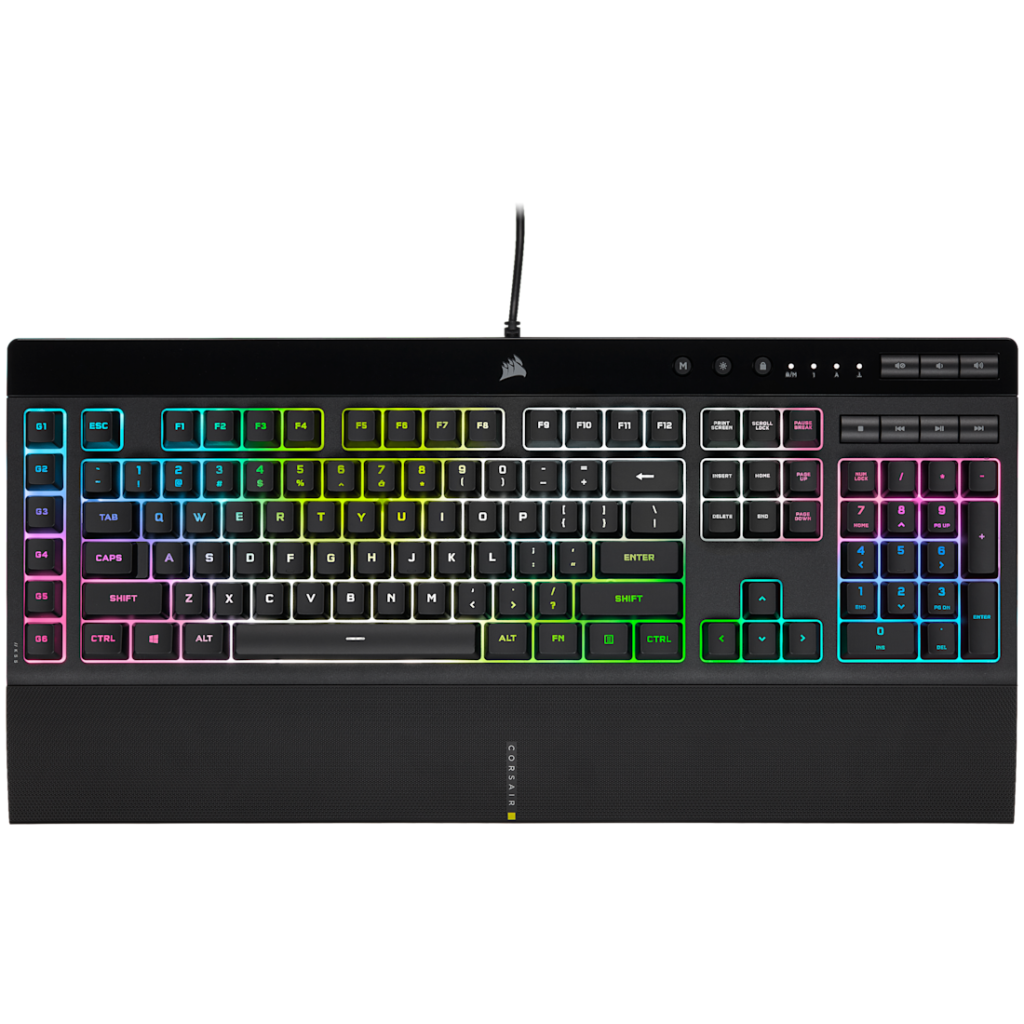
Rubber domes sit under the keys of the K55 RGB PRO XT, the membrane mechanism of an ordinary office keyboard, and everything Corsair adds on top is aimed at gamers and streamers on a tight budget.
It sits at the entry end of Corsair's full-size range, below the mechanical K70 CORE, and its extras are what separate it from a plain office board. There is per-key RGB lighting, a column of six macro keys that hook into Elgato's Stream Deck software, a detachable wrist rest and a splash-resistance rating for the drink that eventually tips over. The macro column adds to the width of an already wide full-size board.
The rest of the spec sheet is plain and sensible. It polls at a standard 1,000 Hz over its cable, stores profiles on the keyboard so macros go with it to another computer, and has dedicated media controls for volume and playback. Three things are missing that most keyboards in the category now have. There are no hot-swap sockets, since a membrane board has no switches to swap. There is no full N-key rollover, so the board registers a limited number of simultaneous presses. And the cable is the only way to connect it, with no receiver and no Bluetooth pairing.
Its buyer wants the macro column and the spill protection more than a better keystroke, and has a desk deep and wide enough for a large board with a wrist rest attached. Scene changes and sound effects on a stream can live on those six keys instead of a separate panel. Long typing sessions expose the soft, slightly vague press within a day.
Category strengths
Where the Corsair K55 RGB PRO XT trails the median
- No hot-swappable switches ?
- Fewer connection options ?
- No n-key rollover ?
- No rotary knob ?
How this VS Score was computed
Score 20: each known spec is measured against the median of all keyboards (101 products), then weighted; 50 means level with that median. In classes of six or more, a value beyond the class’s 10th–90th percentile range counts as that limit, so one extreme product cannot set the scale. 47% of the scoreable weight could be used; unknown values, features not applicable to this class and proxies (battery capacity where a rated life exists) add or remove nothing.
| Specification | This product | Cohort median | Score weight | Points moved |
|---|---|---|---|---|
| Hot-swappable | No | 61% of the class have it | 0.6 | −28.8 |
| Connection | 1 | 3 | 0.8 | −26.4 |
| N-key rollover | No | 85% of the class have it | 0.5 | −24.0 |
| Rapid trigger | No | 25% of the class have it | 0.5 | −24.0 |
| Adjustable actuation | No | 24% of the class have it | 0.4 | −19.2 |
| Switch technology | Membrane | Mechanical | 1 | −17.0 |
| Rotary knob | No | 53% of the class have it | 0.2 | −9.6 |
| Polling rate | 1,000 | 1,000 | 0.7 | +0.0 |
| Backlight | RGB | RGB | 0.3 | +0.0 |
Not scored: Actuation force (unknown: not scored); Analog input (not applicable: only 14% of this class have it); Wired latency (unknown: not scored); Wireless latency (unknown: not scored); Front height (unknown: not scored); Bluetooth devices (unknown: not scored); Battery life (unknown: not scored); Battery capacity (unknown: not scored); USB passthrough (not applicable: only 4% of this class have it); Keycap material (unknown: not scored); Sound dampening (unknown: not scored); Programmable keys (standard for the class (99% have it)); Media controls (standard for the class (97% have it)); Onboard profiles (standard for the class (89% have it)); Configuration software (standard for the class (95% have it)).
Editor’s note
The K55 RGB PRO XT is a membrane board wearing a gaming keyboard's clothes, and whether that bothers you depends entirely on what you expect at the bottom of the gaming-keyboard market. You get per-key RGB that is bright and configurable, six dedicated macro keys with native Elgato Stream Deck integration, a detachable wrist rest, and IP42 splash resistance. That last one is quietly the most practical feature here. This is the keyboard that survives the drink you will eventually knock over.
The compromises are equally plain. Under the caps are rubber domes, so keypresses feel soft and a little vague compared to any mechanical switch, and rollover is 12-key selective rather than full NKRO, which is enough for gaming in practice, but a spec the mechanical competition beats without trying. The chassis is also enormous: 481 mm wide with a macro column on the left edge, which pushes your mouse hand further out and takes real desk space. I would think twice about it on anything smaller than a full-depth desk.
Where it earns its keep is the streaming-on-a-budget niche. The six G keys map directly to Stream Deck actions, so scene switches and sound drops live on the keyboard without buying a separate deck. If that workflow is why you are here, nothing else at this price does it as cleanly.
If you just want a solid all-round gaming keyboard and do not care about macros, the calculus changes. Corsair's own K70 CORE gets you real mechanical switches for not much more, and the typing feel difference is not subtle. It is the difference between a keyboard you tolerate and one you might like.
Buy the K55 RGB PRO XT for the macro column, the spill resistance, and the RGB on a strict budget. Skip it if typing feel ranks anywhere in your top three priorities, because membrane is the one thing no firmware update can fix.
Specifications
Quality bars show where each figure sits between the lowest and highest of the 101 keyboards this VS Score is measured against.
Switches & typing
Performance
Layout & size
Connectivity
Build & sound
Features
Sources and verification
Where the specifications come from
- Official product pagecorsair.com
- Independent testingrtings.com
Verification
- First published
- Specifications last checked
- Sheet completeness
- 21 of 34 specifications verified; the rest show as Unknown and are never estimated or scored
- Page type
- Product specification page — Compiled from the manufacturer’s published specifications and the cited sources; this is not a hands-on test.
- Basis
- Research-based: specifications and editorial text were compiled from the documents listed here and the manufacturer’s published data. We have not tested this unit ourselves; where independent measurements are mentioned they belong to the linked publication.
Keyboards with similar specs to the Corsair K55 RGB PRO XT



Ratings & reviews
No reviews yet. Be the first to share your experience.
The bottom line
The Corsair K55 RGB PRO XT earns a VS Score of 20, below the median of the 101 keyboards it is measured against (a score of 50 is level with that median).
- Who it’s for
- Budget streamers and macro-heavy players: the six G keys with native Elgato Stream Deck integration do scene switching without a separate deck, and IP42 spill resistance suits a crowded desk with a drink on it.
- Who should look elsewhere
- Anyone who cares how a keyboard feels to type on. Rubber domes are soft and vague next to any mechanical switch at a similar street price, and the wide chassis swallows small desks.
- The trade-off that matters
- You are paying for features around the switches rather than the switches themselves: RGB, macros and spill-proofing on a membrane base. Great toolkit, ordinary typing, and no upgrade path.
- The main alternative
- Corsair K70 CORE: drop the macro column and Stream Deck hooks, gain real mechanical switches and a far better feel for not much more money.
The VS Score is calculated from the weighted specifications above, each measured against the median of comparable keyboards — a shortlisting guide, not a substitute for your own priorities. See how we score.





