
Razer Pro Type Ultra: Specs, Price, Pros & Cons
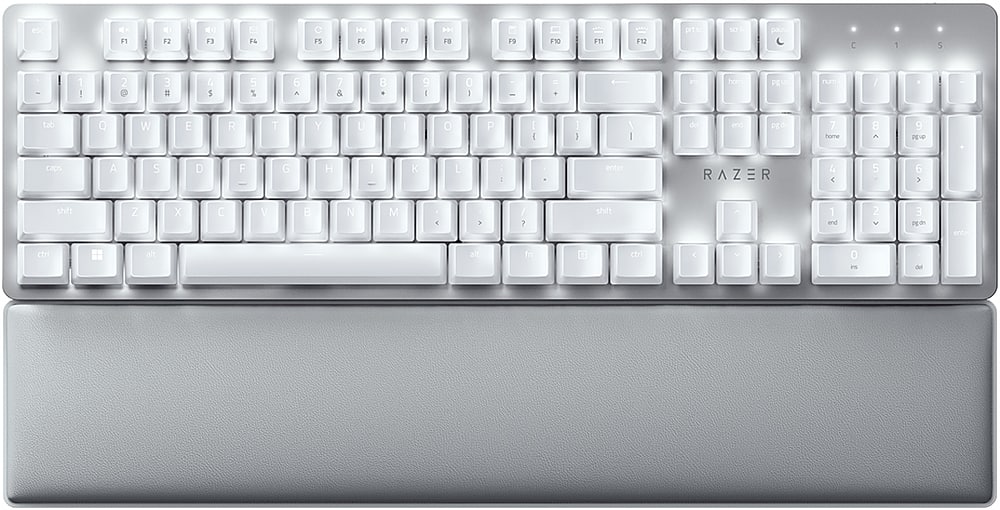
A mechanical keyboard dressed for a study is the Pro Type Ultra's whole idea. Razer put light linear switches, needing 45 g to press, inside a white full-size body with soft-touch keycaps and a leatherette wrist rest, and fitted a white backlight in place of the color lighting on its gaming boards. The layout is full-size, number pad included.
It belongs to Razer's Pro Type office range. The board has since been discontinued, so the listing depends on remaining stock, and the price varies widely from one seller to the next. Connection earns it a place on a busy desk. A cable, Razer's receiver and Bluetooth are all supported, and the Bluetooth side remembers four devices, one more than most keyboards manage. A laptop, a desktop, a tablet and a phone can all stay paired, and switching between them takes a keypress.
Some things show that it was not built for games. Rollover stops short of the full n-key standard, the switches are soldered, and the keycaps are coated ABS, which wears at the fingertips over time. The rated battery life is shorter than most wireless boards even with the backlight off, and much shorter with it on, so the light suits dim evenings more than all-day use.
A shared room, several machines and a wish for mechanical feel without a gaming look describe the desk it was made for. Quiet is part of the pitch, and that is worth checking in person, because the larger keys use stabilizers that can be louder than the switches. Remaining stock at a low price makes it a well-connected office board with a restrained look.
Category strengths
Where the Razer Pro Type Ultra trails the median
- No hot-swappable switches ?
- No n-key rollover ?
- Shorter battery life ?210 h vs 325 h (median)
- No rotary knob ?
How this VS Score was computed
Score 28: each known spec is measured against the median of all keyboards (101 products), then weighted; 50 means level with that median. In classes of six or more, a value beyond the class’s 10th–90th percentile range counts as that limit, so one extreme product cannot set the scale. 57% of the scoreable weight could be used; unknown values, features not applicable to this class and proxies (battery capacity where a rated life exists) add or remove nothing.
| Specification | This product | Cohort median | Score weight | Points moved |
|---|---|---|---|---|
| Hot-swappable | No | 61% of the class have it | 0.6 | −28.8 |
| N-key rollover | No | 85% of the class have it | 0.5 | −24.0 |
| Rapid trigger | No | 25% of the class have it | 0.5 | −24.0 |
| Adjustable actuation | No | 24% of the class have it | 0.4 | −19.2 |
| Battery life | 210 | 325 | 0.6 | −10.8 |
| Keycap material | ABS | PBT | 0.4 | −10.0 |
| Rotary knob | No | 53% of the class have it | 0.2 | −9.6 |
| Backlight | White | RGB | 0.3 | −7.5 |
| Switch technology | Mechanical | Mechanical | 1 | +0.0 |
| Actuation force | 45 | 45 | 0.4 | +0.0 |
| Connection | 3 | 3 | 0.8 | +0.0 |
| Bluetooth devices | 4 — capped at the class’s upper range (3) | 3 | 0.3 | +0.0 |
Not scored: Analog input (not applicable: only 14% of this class have it); Polling rate (unknown: not scored); Wired latency (unknown: not scored); Wireless latency (unknown: not scored); Front height (unknown: not scored); Battery capacity (unknown: not scored); USB passthrough (not applicable: only 4% of this class have it); Sound dampening (unknown: not scored); Programmable keys (standard for the class (99% have it)); Media controls (standard for the class (97% have it)); Onboard profiles (unknown: not scored); Configuration software (standard for the class (95% have it)).
Editor’s note
The Pro Type Ultra was Razer's attempt at an office keyboard, and it succeeds at about three-quarters of what it set out to do. The white finish, soft-touch coated keycaps and plush leatherette wrist rest look and feel far more at home in a study than anything in the company's gaming range, and the decision to fit a white-only backlight instead of Chroma RGB is a welcome piece of restraint.
Connectivity is the strongest part of the design. It runs wired, over Razer's 2.4 GHz HyperSpeed dongle, or over Bluetooth with as many as four paired devices, and moving between them is quick enough to be practical. Razer quotes around 210 hours with the backlight off, which is realistic for office use, but only about 13 hours with it on, so the lighting is best treated as occasional.
The word silent in the marketing deserves scrutiny. The Razer Yellow linear switches themselves are quiet, but reviewers consistently found that the stabilizers under the larger keys rattle audibly, which undercuts the whole premise in a shared room. Try one before committing if noise is the reason you are buying.
Two further caveats are worth knowing. The keycaps are coated ABS rather than PBT, and coatings wear through at the fingertips after a couple of years of heavy use. The board also stops at 10-key rollover, short of full N-key rollover, which is irrelevant for typing but worth noting if you game on it as well.
The product has also been discontinued, so availability is patchy and pricing swings widely between sellers. That can work in your favor if you find remaining stock cheaply.
Buy it if you want a quiet, understated full-size wireless keyboard for a desk you share with other people and you value multi-device switching. Skip it if you want a gaming keyboard, need per-key lighting, or would resent stabilizer rattle on a board sold on silence.
Specifications
Quality bars show where each figure sits between the lowest and highest of the 101 keyboards this VS Score is measured against.
Switches & typing
Performance
Layout & size
Connectivity
Build & sound
Features
Sources and verification
Where the specifications come from
- Official product pagerazer.com
- Independent testingrtings.com
Verification
- First published
- Specifications last checked
- Sheet completeness
- 22 of 34 specifications verified; the rest show as Unknown and are never estimated or scored
- Page type
- Product specification page — Compiled from the manufacturer’s published specifications and the cited sources; this is not a hands-on test.
- Basis
- Research-based: specifications and editorial text were compiled from the documents listed here and the manufacturer’s published data. We have not tested this unit ourselves; where independent measurements are mentioned they belong to the linked publication.
Where to buy
Prices and availability may change. Check the retailer before buying. We may earn a commission on purchases.
Price history
Keyboards with similar specs to the Razer Pro Type Ultra

Ratings & reviews
No reviews yet. Be the first to share your experience.
The bottom line
The Razer Pro Type Ultra earns a VS Score of 28, below the median of the 101 keyboards it is measured against (a score of 50 is level with that median).
- Who it’s for
- A shared study or office where someone wants a restrained full-size wireless board that moves between several computers and a tablet.
- Who should look elsewhere
- Gamers should pass, and so should anyone buying purely for silence, because the larger keys rattle. It is discontinued too, so stock is patchy.
- The trade-off that matters
- The quiet switches are let down by noisy stabilizers, and that matters most to exactly the shared-room buyer this board was designed for.
- The main alternative
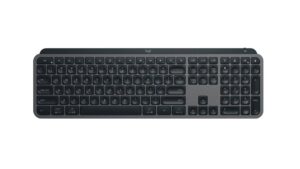
- Logitech MX Keys S: a full-size office board with near-silent scissor keys and multi-device pairing, for a shared room where quiet is the point.
The VS Score is calculated from the weighted specifications above, each measured against the median of comparable keyboards — a shortlisting guide, not a substitute for your own priorities. See how we score.




