
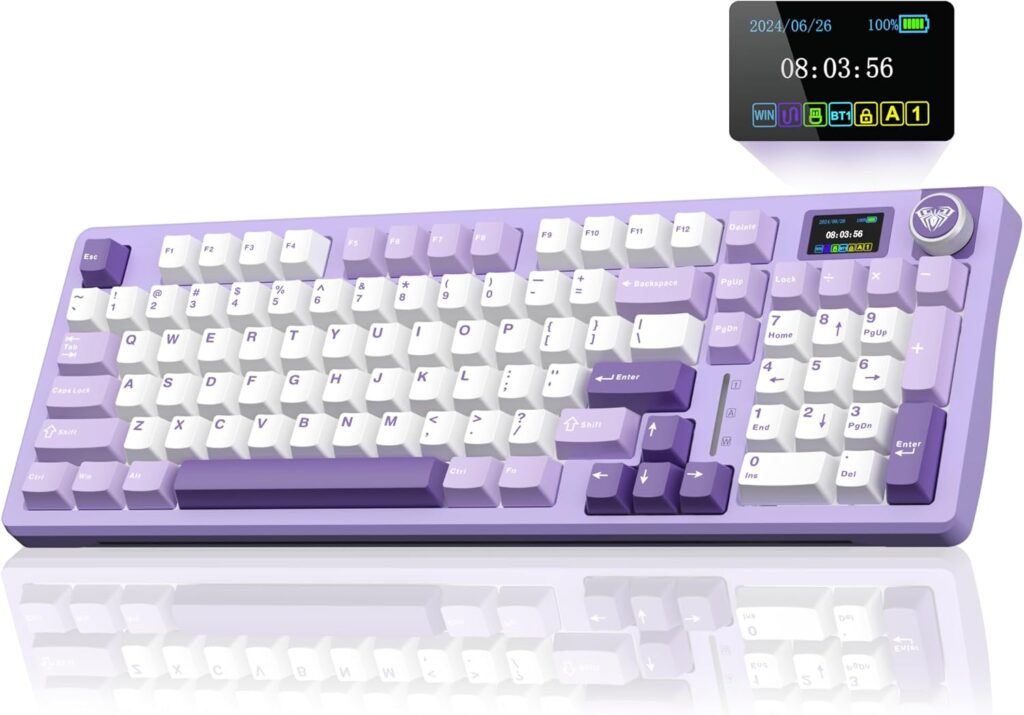
AULA S98 Pro: Specs, Price, Pros & Cons
AULA's S98 Pro keeps a number pad, arrow keys and a function row, drops the cable, and fits all of it into a compressed layout that closes up the gaps a full-size board leaves between its key blocks. That combination shapes daily use more than the little screen or the volume knob on top.
AULA sells on price, and the parts list reads like a summary of what enthusiast boards are built from. The switches sit in hot-swap sockets, so you can pull them out and try another kind without a soldering iron. The case is gasket mounted, with sound dampening inside. It connects three ways, over a cable, a 2.4 GHz receiver or Bluetooth, a wider choice than most keyboards in this category give you.
What it leaves out is the modern gaming list. The switches are conventional mechanical ones with a fixed actuation point, so there is no rapid trigger and no adjustable actuation, and there is no USB passthrough port either. Programmable keys and dedicated media controls are present, and the knob puts volume under one finger. Two further gaps are easy to miss. There is no N-key rollover, so a game that asks for many keys at once can drop one of them. And the board keeps no onboard profiles, which leaves your remaps and RGB lighting tied to AULA's software on whichever computer set them up.
It fits a first mechanical keyboard for someone who still types figures every day, wants the cable gone, and would like to learn which switch feel suits them before paying for a better documented board.
Category strengths
Where the AULA S98 Pro trails the median
- No n-key rollover ?
- No onboard profiles ?
How this VS Score was computed
Score 45: each known spec is measured against the median of all keyboards (101 products), then weighted; 50 means level with that median. In classes of six or more, a value beyond the class’s 10th–90th percentile range counts as that limit, so one extreme product cannot set the scale. 46% of the scoreable weight could be used; unknown values, features not applicable to this class and proxies (battery capacity where a rated life exists) add or remove nothing.
| Specification | This product | Cohort median | Score weight | Points moved |
|---|---|---|---|---|
| Hot-swappable | Yes | 61% of the class have it | 0.6 | +30.0 |
| N-key rollover | No | 85% of the class have it | 0.5 | −24.0 |
| Rapid trigger | No | 25% of the class have it | 0.5 | −24.0 |
| Adjustable actuation | No | 24% of the class have it | 0.4 | −19.2 |
| Sound dampening | Yes | 76% of the class have it | 0.3 | +15.0 |
| Onboard profiles | No | 89% of the class have it | 0.3 | −14.4 |
| Rotary knob | Yes | 53% of the class have it | 0.2 | +10.0 |
| Switch technology | Mechanical | Mechanical | 1 | +0.0 |
| Connection | 3 | 3 | 0.8 | +0.0 |
| Backlight | RGB | RGB | 0.3 | +0.0 |
Not scored: Actuation force (unknown: not scored); Analog input (not applicable: only 14% of this class have it); Polling rate (unknown: not scored); Wired latency (unknown: not scored); Wireless latency (unknown: not scored); Front height (unknown: not scored); Bluetooth devices (unknown: not scored); Battery life (unknown: not scored); Battery capacity (unknown: not scored); USB passthrough (not applicable: only 4% of this class have it); Keycap material (unknown: not scored); Programmable keys (standard for the class (99% have it)); Media controls (standard for the class (97% have it)); Configuration software (standard for the class (95% have it)).
Editor’s note
The S98 Pro is the kind of keyboard that looks impossible on paper: a 96% board with hot-swap sockets, a gasket mount with sound dampening, tri-mode wireless, an LCD screen and a volume knob, for under a hundred dollars. AULA gets there the way budget brands usually do, by spending on the parts you can see and saying as little as possible about the rest.
And AULA says very little. There is no published weight, no dimensions, no polling rate, no actuation force, and I could not even pin down the battery capacity: one AULA page suggests 5,000 mAh, another 8,000 mAh, and the official manual is a scanned picture with no readable text.
What is confirmed is still a lot of keyboard. The hot-swap sockets take both 3-pin and 5-pin switches, the linear switches come pre-lubed with two spares in the box, and you get all three connection modes. The LCD screen is a toy (it shows a clock, a GIF, a mode icon), but the knob is useful, and 735 Amazon buyers rate the board at 4.5 stars.
Two caveats from AULA's own FAQ are worth knowing. Do not charge it from a fast-charging phone adapter (AULA warns this can permanently damage the board), and the configuration software is Windows-only, distributed as a bare download rather than a signed installer.
I would buy this as a first mechanical keyboard, or as a cheap platform for trying switches. If you need a spec sheet you can compare line by line, or Mac software support, the Keychron equivalents publish everything AULA does not.
Specifications
Quality bars show where each figure sits between the lowest and highest of the 101 keyboards this VS Score is measured against.
Switches & typing
Performance
Layout & size
Connectivity
Build & sound
Features
Sources and verification
Where the specifications come from
- Official product pageaulastar.com
- Retailer listing (cross-check)amazon.com
Verification
- First published
- Specifications last checked
- Sheet completeness
- 20 of 34 specifications verified; the rest show as Unknown and are never estimated or scored
- Page type
- Product specification page — Compiled from the manufacturer’s published specifications and the cited sources; this is not a hands-on test.
- Basis
- Research-based: specifications and editorial text were compiled from the documents listed here and the manufacturer’s published data. We have not tested this unit ourselves; where independent measurements are mentioned they belong to the linked publication.
Where to buy
Prices and availability may change. Check the retailer before buying. We may earn a commission on purchases.
Price history
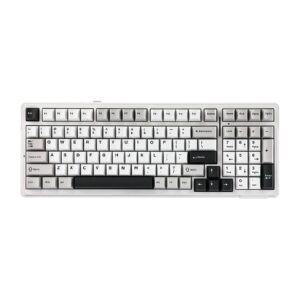
Keyboards with similar specs to the AULA S98 Pro

Ratings & reviews
No reviews yet. Be the first to share your experience.
The bottom line
The AULA S98 Pro earns a VS Score of 45, below the median of the 101 keyboards it is measured against (a score of 50 is level with that median).
- Who it’s for
- A first mechanical keyboard, or a cheap hot-swap platform for trying switches. You get gasket mount, tri-mode wireless and a knob for well under a hundred dollars.
- Who should look elsewhere
- Anyone who compares keyboards by spec sheet. AULA publishes no weight, dimensions, polling rate or confirmed battery figure, and the software is Windows-only.
- The trade-off that matters
- Flagship features at a budget price, paid for in documentation and polish: unknown battery, unsigned software, and a fast-charger warning buried in the FAQ.
- The main alternative
- Keychron K4 Max covers the same 96% wireless hot-swap ground with a fully published spec sheet and proper Mac support, for a little more money.
The VS Score is calculated from the weighted specifications above, each measured against the median of comparable keyboards — a shortlisting guide, not a substitute for your own priorities. See how we score.




