
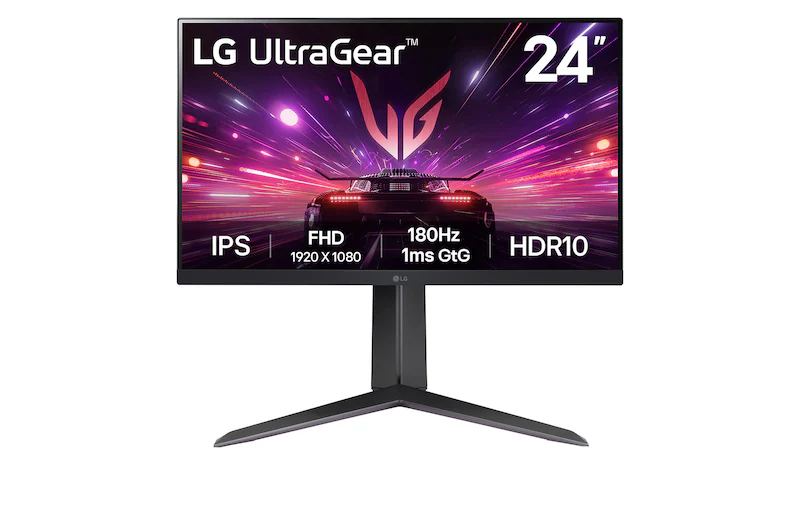
LG UltraGear 24GS65F-B: Specs, Features, Pros & Cons
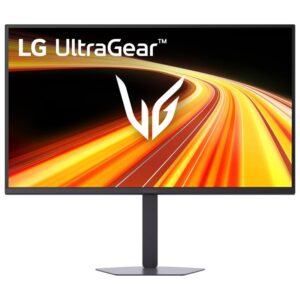
Budget gaming monitors of this size usually save money on the stand first, and this small LG is one of the exceptions. It raises, lowers, tilts and turns into portrait, so the top edge can sit at eye level on a shallow student desk or beside a laptop without a stack of books underneath it.
Beyond the stand, it is a compact Full HD gaming screen from LG's UltraGear line. Many competitive players prefer a smaller screen on purpose, because the whole playing field stays inside a single glance, with no head movement needed to check a minimap or a kill feed. The modest resolution also means an entry-level graphics card can hold the high frame rates the panel is built to show, which is not true of sharper screens at the same refresh rate.
That makes it a good fit for esports players, first builds on a tight budget, and anyone adding a second screen for chat, streaming tools or a guide open beside a game. The panel type holds its colors when viewed from an angle, which helps when the monitor sits off to one side of a main display.
The trade-offs are easy to spot on the spec sheet. HDR is accepted as a signal without doing much for the picture, the video connections stop at one of each common type, and there is no USB hub, no laptop charging and no speaker. A console and a PC can share it on separate inputs, but a household with two consoles will run out of ports. Anyone who mostly watches films or plays slow, cinematic games will get more from a larger screen.
Category strengths
Where the LG UltraGear 24GS65F-B beats the median
- Has pivot adjustment ?
How this VS Score was computed
Score 50: each known spec is measured against the median of IPS gaming monitors, under 27 inches (7 products), then weighted; 50 means level with that median. In classes of six or more, a value beyond the class’s 10th–90th percentile range counts as that limit, so one extreme product cannot set the scale. 65% of the scoreable weight could be used; unknown values, features not applicable to this class and proxies (battery capacity where a rated life exists) add or remove nothing.
| Specification | This product | Cohort median | Score weight | Points moved |
|---|---|---|---|---|
| Height adjustment | Yes | 71% of the class have it | 0.4 | +20.0 |
| Swivel | No | 43% of the class have it | 0.2 | −9.6 |
| Built-in speakers | No | 29% of the class have it | 0.2 | −9.6 |
| Pivot | Yes | 29% of the class have it | 0.02 | +1.0 |
| Screen size | 24 | 24 | 1.2 | +0.0 |
| Resolution | 1080p | 1080p | 1.2 | +0.0 |
| Panel type | IPS | IPS | 0.8 | +0.0 |
| Color depth | 8 | 8 | 0.3 | +0.0 |
| Response time | 1 | 1 | 0.8 | +0.0 |
| Peak brightness | 300 | 300 | 0.8 | +0.0 |
| Contrast ratio | 1,000 | 1,000 | 0.6 | +0.0 |
| HDR | HDR10 | HDR10 | 0.5 | +0.0 |
| Pixel density | 92 | 92 | 0.5 | +0.0 |
| Adaptive sync | G-Sync Compatible | G-Sync Compatible | 0.6 | +0.0 |
| Refresh rate | 180 | 180 | 1.2 | +0.0 |
| HDMI ports | 1 | 1 | 0.4 | +0.0 |
| DisplayPort inputs | 1 | 1 | 0.4 | +0.0 |
Not scored: DCI-P3 coverage (unknown: not scored); Local dimming (not applicable: only 0% of this class have it); Local dimming zones (unknown: not scored); Variable refresh rate (standard for the class (100% have it)); Motion blur reduction (unknown: not scored); Input lag (unknown: not scored); Tilt (standard for the class (100% have it)); USB-C (not applicable: only 14% of this class have it); USB-C power delivery (unknown: not scored); USB hub (not applicable: only 0% of this class have it); Headphone output (standard for the class (86% have it)); KVM switch (not applicable: only 0% of this class have it); Webcam (not applicable: only 0% of this class have it); Microphone (not applicable: only 0% of this class have it); Ethernet (not applicable: only 0% of this class have it); Picture-by-picture (unknown: not scored).
Editor’s note
The 24GS65F-B is a compact 23.8-inch Full HD gaming monitor built for high frame rates and limited desk space. At this size, 1080p remains reasonably sharp at normal viewing distance, while 180 Hz is attainable for a much wider range of GPUs than QHD or 4K. The IPS panel also maintains color and visibility better from off-center positions than many inexpensive VA alternatives.
This is not a serious HDR display despite HDR10 input support. Typical brightness is around 300 nits, contrast is about 1,000:1, and there is no local dimming. HDR may change tone mapping, but it cannot deliver deep blacks or brilliant highlights. The 1 ms setting can require aggressive overdrive, so test the available response modes for overshoot rather than assuming the fastest label is best.
FreeSync and G-Sync compatibility support smoother variable-frame-rate play, and connectivity is simple: one HDMI input, one DisplayPort 1.4 input, and a headphone output. The height-adjustable stand also tilts and pivots, a meaningful advantage over fixed budget stands. There is no swivel, USB hub, USB-C power, speaker system, KVM, webcam, microphone, or Ethernet.
The 24GS65F-B is ideal for competitive 1080p play, a student desk, a secondary display, or a system that cannot sustain high QHD frame rates. It is less suitable for cinematic HDR, large-screen immersion, console owners needing multiple HDMI devices, or laptop owners wanting a single-cable dock. Check the exact 24GS65F-B model and included cables, since LG sells several visually similar 24-inch UltraGear monitors with different refresh rates and stand adjustments.
Specifications
Quality bars show where each figure sits between the lowest and highest of the 7 IPS gaming monitors, under 27 inches this VS Score is measured against.
Picture
Gaming
Ergonomics & design
Connectivity
Features
Sources and verification
Where the specifications come from
- Official product pagelg.com
- Independent testingrtings.com
Verification
- First published
- Specifications last checked
- Sheet completeness
- 34 of 42 specifications verified; the rest show as Unknown and are never estimated or scored
- Page type
- Product specification page — Compiled from the manufacturer’s published specifications and the cited sources; this is not a hands-on test.
- Basis
- Research-based: specifications and editorial text were compiled from the documents listed here and the manufacturer’s published data. We have not tested this unit ourselves; where independent measurements are mentioned they belong to the linked publication.
Monitors with similar specs to the LG UltraGear 24GS65F-B
Ratings & reviews
No reviews yet. Be the first to share your experience.
The bottom line
The LG UltraGear 24GS65F-B earns a VS Score of 50, level with the median of the 7 IPS gaming monitors, under 27 inches it is measured against.
- Who it’s for
- A competitive player on a modest graphics card, a student with a shallow desk, or anyone adding a small second screen who wants a stand that adjusts properly.
- Who should look elsewhere
- Anyone hoping for real HDR, a household with several consoles to connect, or a laptop owner who wants one cable for picture and power. It is also a small screen for films and slow, cinematic games.
- The trade-off that matters
- It keeps the good stand and drops the extras. Ports and HDR are the bare minimum, which is fine on a gaming desk and limiting anywhere else.
- The main alternative
- Dell SE2426HGS, same size and resolution with a faster refresh ceiling, for a player whose graphics card already runs past what this LG can show.
The VS Score is calculated from the weighted specifications above, each measured against the median of comparable IPS gaming monitors, under 27 inches — a shortlisting guide, not a substitute for your own priorities. See how we score.





