
Logitech Signature Slim Solar+ K980 for Mac: Specs & Verdict
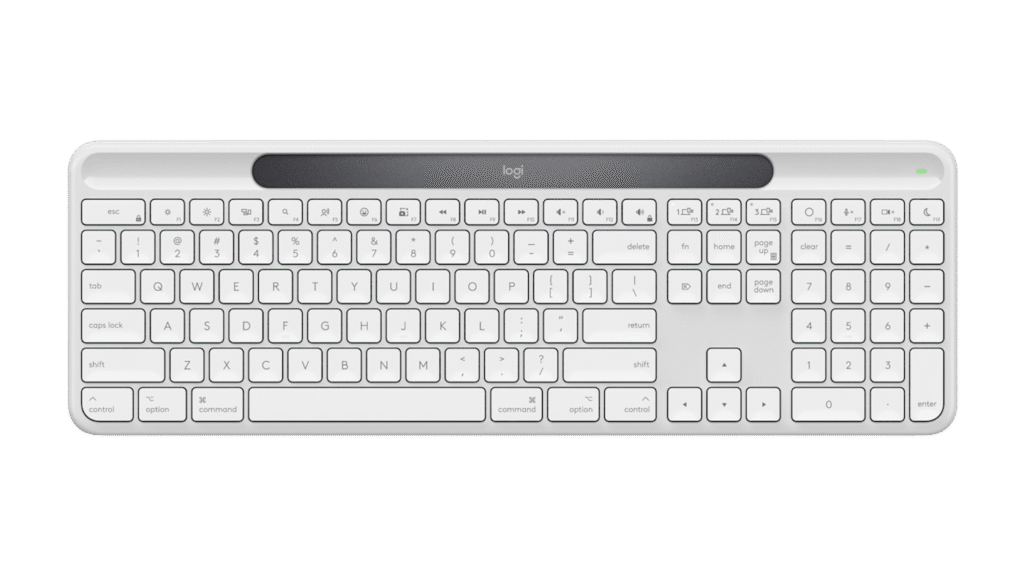
Ordinary room lighting, around 200 lux by Logitech's reckoning, is all the Signature Slim Solar+ K980 needs to keep running. The strip above the function row turns that light into charge for a 70 mAh cell, a tiny battery by keyboard standards, and the arithmetic works because a scissor keyboard with no lights draws very little.
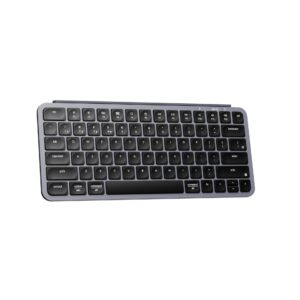
This listing is the Mac edition. It carries Mac legends and the Mac modifier order in an off-white finish, while the graphite model with Windows legends is sold separately under almost the same name. Both share one full-size body with a number pad and a row of media keys, and three Bluetooth pairings let the keyboard move between a laptop, a desktop and a tablet with a keypress.
In Logitech's range it sits beside the MX Keys S, the backlit office board, and the two part ways along one line. The MX lights up and needs a cable now and then, and the K980 stays dark and never asks for one. The scissor keys are firm and short, and the programmable keys can be reassigned in Logitech's software. The switches are membrane underneath, so the feel is fixed for good.
It gives up more than lighting. Bluetooth is the only link, with no cable mode and no receiver in the box, there is no n-key rollover, and the switches cannot be swapped, so games are an afterthought at best. A Mac owner in a bright room who would like one fewer thing to plug in at night is the reader it was made for. Someone who types late with the lamp off will find the solar strip and the unlit keys working against each other.
Category strengths
Where the Logitech Signature Slim Solar+ K980 for Mac trails the median
- No hot-swappable switches ?
- Fewer connection options ?
- No n-key rollover ?
- No sound dampening ?
- No onboard profiles ?
- No rotary knob ?
- A much smaller battery ?70 mAh vs 4,000 mAh (median)
- A heavier actuation force ?60 g vs 45 g (median)
How this VS Score was computed
Score 15: each known spec is measured against the median of all keyboards (101 products), then weighted; 50 means level with that median. In classes of six or more, a value beyond the class’s 10th–90th percentile range counts as that limit, so one extreme product cannot set the scale. 55% of the scoreable weight could be used; unknown values, features not applicable to this class and proxies (battery capacity where a rated life exists) add or remove nothing.
| Specification | This product | Cohort median | Score weight | Points moved |
|---|---|---|---|---|
| Hot-swappable | No | 61% of the class have it | 0.6 | −28.8 |
| Connection | 1 | 3 | 0.8 | −26.4 |
| N-key rollover | No | 85% of the class have it | 0.5 | −24.0 |
| Rapid trigger | No | 25% of the class have it | 0.5 | −24.0 |
| Adjustable actuation | No | 24% of the class have it | 0.4 | −19.2 |
| Switch technology | Membrane | Mechanical | 1 | −17.0 |
| Sound dampening | No | 76% of the class have it | 0.3 | −14.4 |
| Backlight | None | RGB | 0.3 | −14.4 |
| Onboard profiles | No | 89% of the class have it | 0.3 | −14.4 |
| Rotary knob | No | 53% of the class have it | 0.2 | −9.6 |
| Battery capacity | 70 — capped at the class’s lower range (800) | 4,000 | 0.2 | −8.0 |
| Actuation force | 60 | 45 | 0.4 | −4.8 |
| Bluetooth devices | 3 | 3 | 0.3 | +0.0 |
Not scored: Analog input (not applicable: only 14% of this class have it); Polling rate (unknown: not scored); Wired latency (unknown: not scored); Wireless latency (unknown: not scored); Front height (unknown: not scored); Battery life (unknown: not scored); USB passthrough (not applicable: only 4% of this class have it); Keycap material (unknown: not scored); Programmable keys (standard for the class (99% have it)); Media controls (standard for the class (97% have it)); Configuration software (standard for the class (95% have it)).
Editor’s note
The pitch here is a keyboard you never charge. A light strip above the function row trickles power into the small cell from ordinary room light, and Logitech quotes about four months of running in complete darkness once the cell is full. Unless you type in a cave, it should always be on.
I like several quieter decisions too. The cell is user-replaceable, which is rare for Logitech and turns the 10-year lifespan claim into something you can act on. The build mixes recycled ABS with low-carbon aluminum, the full-size layout keeps a proper numpad, and its weight and slim profile are those of an office board. This Off-White version is the Mac SKU with Mac legends, and the graphite Windows sibling is a separate listing.
The compromises are real, and two of them surprised me. First, there is no backlight at all (the obvious casualty of a solar power budget), which undercuts the board's own late-evening credentials. Second, connection is Bluetooth Low Energy only. Amazon's listing claims a Logi Bolt receiver is included. Logitech's own page says it is not. The maker is right, and if you want the Bolt dongle it is a separate purchase.
The typing itself is a 60-gram scissor action, which is firm, quiet and ordinary. Enthusiasts will find nothing here, and they are not who it is for.
At its price I would choose this for a bright home office and a Mac, especially if the ritual of charging yet another device annoys you. If you type in the dark or want any backlight, the MX Keys S does the office job better for similar money.
Specifications
Quality bars show where each figure sits between the lowest and highest of the 101 keyboards this VS Score is measured against.
Switches & typing
Performance
Layout & size
Connectivity
Build & sound
Features
Sources and verification
Where the specifications come from
- Official product pagelogitech.com
- Retailer listing (cross-check)amazon.com
Verification
- First published
- Specifications last checked
- Sheet completeness
- 25 of 34 specifications verified; the rest show as Unknown and are never estimated or scored
- Page type
- Product specification page — Compiled from the manufacturer’s published specifications and the cited sources; this is not a hands-on test.
- Basis
- Research-based: specifications and editorial text were compiled from the documents listed here and the manufacturer’s published data. We have not tested this unit ourselves; where independent measurements are mentioned they belong to the linked publication.
Keyboards with similar specs to the Logitech Signature Slim Solar+ K980 for Mac
Ratings & reviews
No reviews yet. Be the first to share your experience.
The bottom line
The Logitech Signature Slim Solar+ K980 for Mac earns a VS Score of 15, below the median of the 101 keyboards it is measured against (a score of 50 is level with that median).
- Who it’s for
- A bright home office and a Mac, for someone tired of charging peripherals. Room light keeps it topped up and the cell is user-replaceable.
- Who should look elsewhere
- Anyone who types in a dim room. There is no backlight at all, and the solar strip needs a lit room to harvest anything.
- The trade-off that matters
- Never charging it costs you the backlight, the one omission that undermines an otherwise complete office keyboard at this price.
- The main alternative
- Logitech MX Keys S adds the backlight and a rechargeable cell for similar money, and is the better board anywhere the lights go down.
The VS Score is calculated from the weighted specifications above, each measured against the median of comparable keyboards — a shortlisting guide, not a substitute for your own priorities. See how we score.





