
Keychron B33: Specs, Features, Pros & Cons
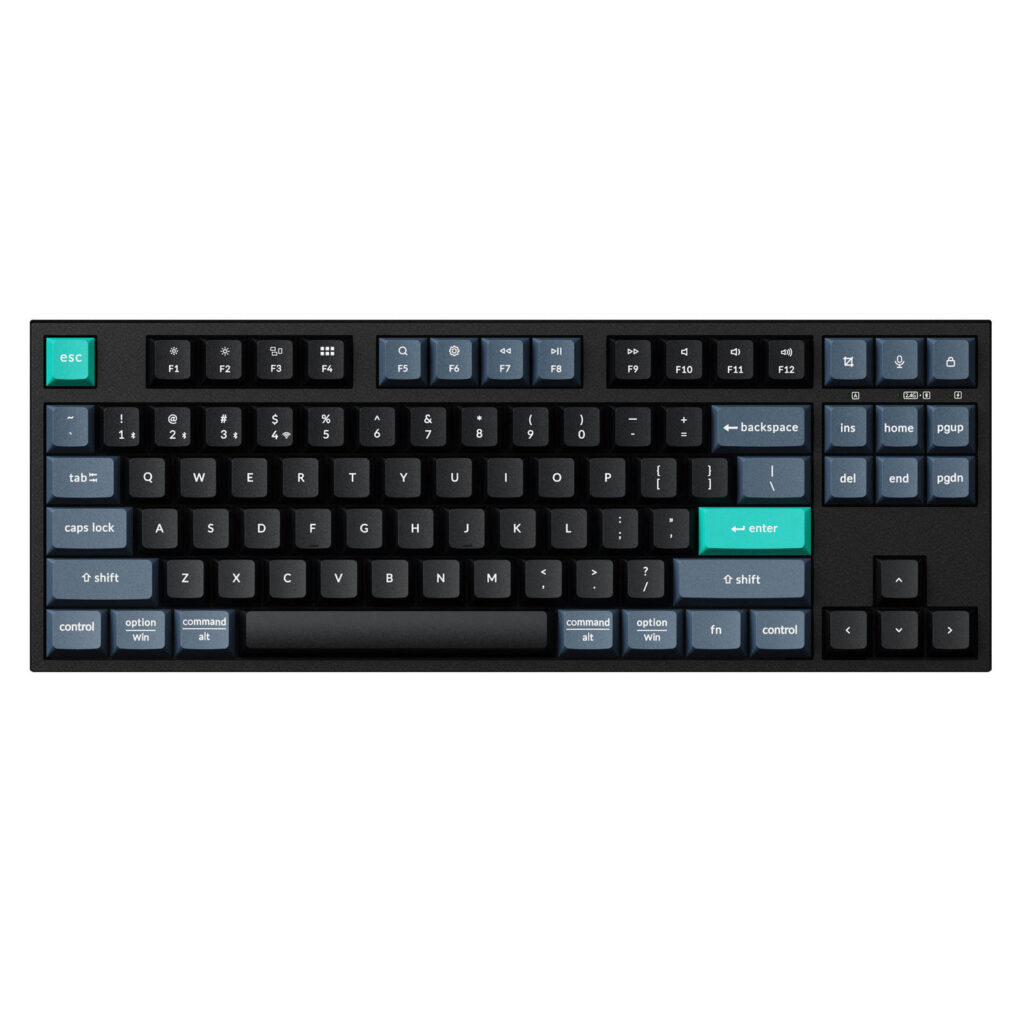
Keychron's B33 drops the number pad and holds on to the F keys, the arrows and the Home and End block, the tenkeyless layout, and it does so on scissor keys instead of the mechanical switches most of the brand's catalog uses.
Scissor keys are the mechanism inside a laptop. Each stroke is short and soft and makes little noise, and the board lies close to the desk, lower at the front than most keyboards in the category. It is light enough to go from a bag to a desk and back without much thought.
Three connection modes let one keyboard serve several computers. A cable, a receiver and Bluetooth with three saved pairings mean an office laptop, a personal machine and a tablet can each keep a slot, and switching between them takes a key press. Remapping runs in Keychron's Launcher in a web browser, so nothing is installed on a work machine. Its drawbacks come in a set of three. The switches are soldered, which is normal for scissor keys and means nothing can be replaced. There is no N-key rollover, so games that ask for many keys at once can drop some. And the case has no sound dampening, though a scissor board makes little noise to dampen. The keycaps and case are ABS, which polishes where fingers land most often.
The buyer it fits sits close to colleagues, spends the day on calls, or keeps a laptop and a tablet side by side on one desk. It is the wrong board for anyone who wants lit keys, a deep keystroke or room to swap switches later.
Category strengths
Where the Keychron B33 beats the median
- A lower front height ?16.48 mm vs 20.2 mm (median)
Where the Keychron B33 trails the median
- No hot-swappable switches ?
- No n-key rollover ?
- No sound dampening ?
- No onboard profiles ?
- No rotary knob ?
- Slightly shorter battery life ?320 h vs 325 h (median)
How this VS Score was computed
Score 25: each known spec is measured against the median of all keyboards (101 products), then weighted; 50 means level with that median. In classes of six or more, a value beyond the class’s 10th–90th percentile range counts as that limit, so one extreme product cannot set the scale. 67% of the scoreable weight could be used; unknown values, features not applicable to this class and proxies (battery capacity where a rated life exists) add or remove nothing.
| Specification | This product | Cohort median | Score weight | Points moved |
|---|---|---|---|---|
| Hot-swappable | No | 61% of the class have it | 0.6 | −28.8 |
| N-key rollover | No | 85% of the class have it | 0.5 | −24.0 |
| Rapid trigger | No | 25% of the class have it | 0.5 | −24.0 |
| Adjustable actuation | No | 24% of the class have it | 0.4 | −19.2 |
| Switch technology | Membrane | Mechanical | 1 | −17.0 |
| Sound dampening | No | 76% of the class have it | 0.3 | −14.4 |
| Backlight | None | RGB | 0.3 | −14.4 |
| Onboard profiles | No | 89% of the class have it | 0.3 | −14.4 |
| Keycap material | ABS | PBT | 0.4 | −10.0 |
| Rotary knob | No | 53% of the class have it | 0.2 | −9.6 |
| Front height | 16.48 | 20.2 | 0.2 | +2.2 |
| Battery life | 320 | 325 | 0.6 | −0.6 |
| Polling rate | 1,000 | 1,000 | 0.7 | +0.0 |
| Connection | 3 | 3 | 0.8 | +0.0 |
| Bluetooth devices | 3 | 3 | 0.3 | +0.0 |
Not scored: Actuation force (unknown: not scored); Analog input (not applicable: only 14% of this class have it); Wired latency (unknown: not scored); Wireless latency (unknown: not scored); Battery capacity (capacity is a proxy; the rated battery life is scored instead); USB passthrough (not applicable: only 4% of this class have it); Programmable keys (standard for the class (99% have it)); Media controls (standard for the class (97% have it)); Configuration software (standard for the class (95% have it)).
Editor’s note
The B33 is Keychron's answer to a question most of its range ignores: what if you want a quiet, thin, cheap keyboard that still works with three devices?
It uses a scissor mechanism rather than mechanical switches, so the travel is short and the noise is closer to a laptop keyboard than a desktop one. If you share an office or take calls, that matters more than any amount of switch discussion. At 550 grams and 16.5 mm at the front it is portable, and the 800 mAh battery is rated for up to 320 hours of wireless use.
Connectivity is the strong point for the money. You get 2.4 GHz over a receiver, Bluetooth 5.2 with three paired devices, and USB-C wired, so it will move between a work laptop, a personal machine and a tablet without repairing. Keychron's Launcher web app handles remapping in a browser with nothing to install, which is unusual at this price.
The TKL layout drops the number pad but keeps the function row, the navigation cluster and full arrows.
There is no backlighting at all, so this is a daylight keyboard. Keychron states outright that it does not support N-key rollover, which will matter to some gamers. The case and keycaps are both ABS, so it will develop shine with use, and polling drops to 125 Hz over Bluetooth against 1000 Hz wired or on the receiver. It is also not hot-swappable: the scissor switches are what you get.
Buy it if you want a quiet, slim, multi-device keyboard and you value silence and battery life over typing feel.
Skip it if you want backlighting, a mechanical feel, or full N-key rollover for gaming. Keychron's own C-series costs similar money and gives you all three, at the price of noise and bulk.
Specifications
Quality bars show where each figure sits between the lowest and highest of the 101 keyboards this VS Score is measured against.
Switches & typing
Performance
Layout & size
Connectivity
Build & sound
Features
Sources and verification
Where the specifications come from
- Official product pagekeychron.com
Verification
- First published
- Specifications last checked
- Sheet completeness
- 27 of 34 specifications verified; the rest show as Unknown and are never estimated or scored
- Page type
- Product specification page — Compiled from the manufacturer’s published specifications and the cited sources; this is not a hands-on test.
- Basis
- Research-based: specifications and editorial text were compiled from the documents listed here and the manufacturer’s published data. We have not tested this unit ourselves; where independent measurements are mentioned they belong to the linked publication.
Keyboards with similar specs to the Keychron B33

Ratings & reviews
No reviews yet. Be the first to share your experience.
The bottom line
The Keychron B33 earns a VS Score of 25, below the median of the 101 keyboards it is measured against (a score of 50 is level with that median).
- Who it’s for
- Someone on calls all day or in a shared office who wants near-silent, thin keys and one board for an office laptop, a home PC and a tablet.
- Who should look elsewhere
- Not for typing in the dark, gaming with several keys held at once, or anyone who cares how a keystroke feels.
- The trade-off that matters
- Silence comes from the scissor keys, and so does the shallow, soft feel that mechanical typists find lifeless.
- The main alternative
- Keychron C1 Pro: a wired mechanical tenkeyless with hot-swap switches and RGB, for someone who wants feel and can live with noise and a cable.
The VS Score is calculated from the weighted specifications above, each measured against the median of comparable keyboards — a shortlisting guide, not a substitute for your own priorities. See how we score.




