
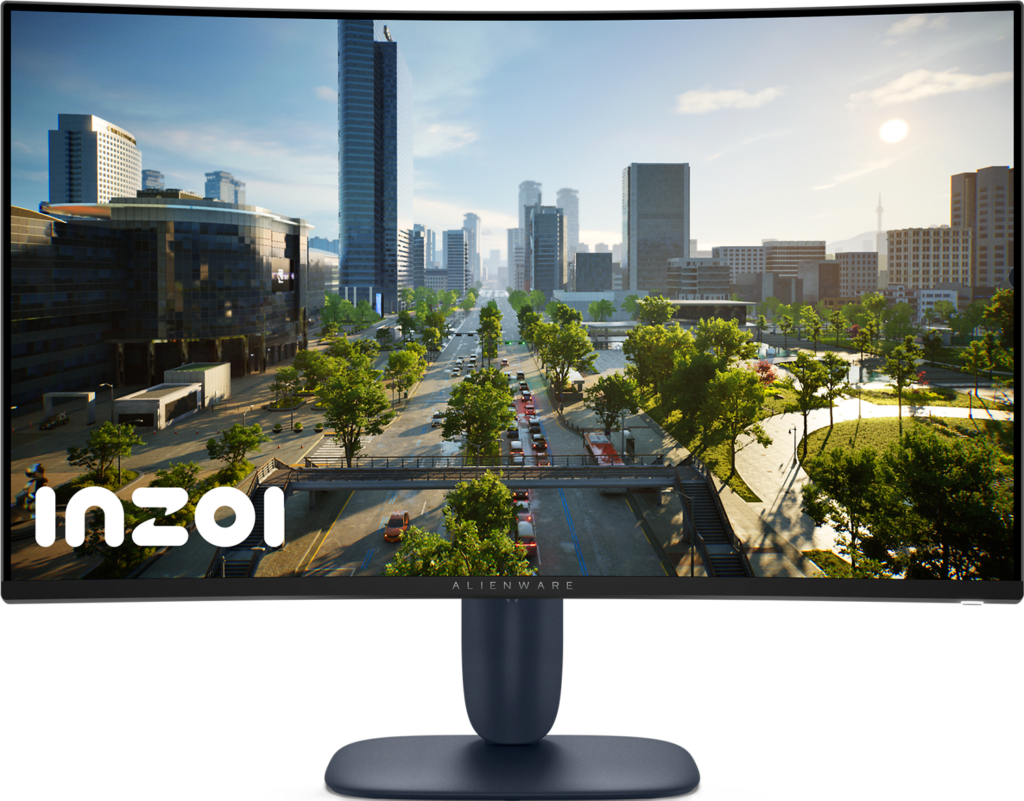
Dell Alienware AW3225DM: Specs, Features, Pros & Cons
Sit at a normal desk distance from this Alienware and the screen fills most of your field of view. It is a large curved gaming monitor at 1440p, the VA-panel sibling of Alienware's OLED models of the same size, and it is aimed at players who want the scale of a big screen without paying for OLED.
That size and resolution make a particular trade. The pixels are spread across more glass than on the usual gaming monitor, so in games the image looks large and fluid, and in a document the letters look softer, with visible edges on small type. That is a fair exchange on a screen used mostly for play at arm's length, and a poor one for a day of spreadsheets.
The same resolution lines the monitor up well with current consoles. Both the PlayStation and the Xbox of this generation can send a signal at this resolution, so a console and a PC can share the screen without either one being scaled to an awkward size. That makes it an easy fit for a gaming corner or a desk that hosts both, and the size keeps a sofa-style seating distance comfortable too.
It also sits at a sensible point in Alienware's range for a first big screen. Buyers get the brand's design, a curve and a panel that favor dark, atmospheric games, and a refresh rate that mid-range hardware can approach at this resolution in many games.
The curve is moderate by gaming standards, enough to bring the edges toward the eyes on a screen this wide without bending straight lines the way the tightest designs do. Buyers who find curved screens distracting will still notice it.
Category strengths
Where the Dell Alienware AW3225DM beats the median
- Has height adjustment ?
- Higher peak brightness ?400 nits vs 300 nits (median)
- Has picture-by-picture ?
- A bigger screen ?31.5" (80.01 cm) vs 27" (68.58 cm) (median)
- Has USB hub ?
Where the Dell Alienware AW3225DM trails the median
- No headphone output ?
- A lower contrast ratio ?3000:1 vs 3500:1 (median)
How this VS Score was computed
Score 51: each known spec is measured against the median of VA gaming monitors, 27 to 31 inches (11 products), then weighted; 50 means level with that median. In classes of six or more, a value beyond the class’s 10th–90th percentile range counts as that limit, so one extreme product cannot set the scale. 74% of the scoreable weight could be used; unknown values, features not applicable to this class and proxies (battery capacity where a rated life exists) add or remove nothing.
| Specification | This product | Cohort median | Score weight | Points moved |
|---|---|---|---|---|
| Height adjustment | Yes | 45% of the class have it | 0.4 | +20.0 |
| Local dimming | No | 29% of the class have it | 0.4 | −19.2 |
| Peak brightness | 400 | 300 | 0.8 | +13.6 |
| Picture-by-picture | Yes | 29% of the class have it | 0.2 | +10.0 |
| Swivel | No | 36% of the class have it | 0.2 | −9.6 |
| Built-in speakers | No | 27% of the class have it | 0.2 | −9.6 |
| Headphone output | No | 91% of the class have it | 0.2 | −9.6 |
| Screen size | 31.5 | 27 | 1.2 | +9.6 |
| HDR | DisplayHDR 400 | HDR10 | 0.5 | +6.5 |
| Contrast ratio | 3,000 | 3,500 | 0.6 | −4.2 |
| USB hub | Yes | 20% of the class have it | 0.05 | +2.3 |
| Pivot | No | 36% of the class have it | 0.02 | −1.0 |
| Resolution | 1440p | 1440p | 1.2 | +0.0 |
| Panel type | VA | VA | 0.8 | +0.0 |
| Color depth | 10 | 10 | 0.3 | +0.0 |
| Refresh rate | 180 | 180 | 1.2 | +0.0 |
| Response time | 1 | 1 | 0.8 | +0.0 |
| DCI-P3 coverage | 95 | 95.5 | 0.6 | +0.0 |
| Pixel density | 93 | 93 | 0.5 | +0.0 |
| Adaptive sync | FreeSync | FreeSync | 0.6 | +0.0 |
| HDMI ports | 2 | 2 | 0.4 | +0.0 |
| DisplayPort inputs | 1 | 1 | 0.4 | +0.0 |
Not scored: Local dimming zones (unknown: not scored); Variable refresh rate (standard for the class (100% have it)); Motion blur reduction (unknown: not scored); Input lag (too few comparable peers (1, need 3)); Tilt (standard for the class (100% have it)); USB-C (not applicable: only 0% of this class have it); USB-C power delivery (unknown: not scored); KVM switch (not applicable: only 0% of this class have it); Webcam (not applicable: only 0% of this class have it); Microphone (not applicable: only 0% of this class have it); Ethernet (not applicable: only 0% of this class have it).
Editor’s note
The Alienware AW3225DM is Alienware's value play: a 31.5-inch 2560×1440 VA panel with a 1500R curve, a 180 Hz refresh rate and a 1 ms response time, sold well below the OLED models that sit above it in the range. Dell markets it as an "Alienware 32", though the panel measures 31.5 inches.
The VA panel is the whole argument. It has a 3000:1 contrast ratio, roughly three times what a comparable IPS gaming monitor manages, so night scenes and dark corridors keep their depth, and 95% DCI-P3 coverage with a 10-bit panel gives color some punch. DisplayHDR 400 and 400 nits of brightness keep HDR modest, and the base image is strong. AMD FreeSync and VESA AdaptiveSync cover 48 Hz up to the full refresh rate, and measured input lag is low.
Two things deserve scrutiny. First, this is VA, not the QD-OLED used in the near-identically named AW3225QF. Expect some dark-scene smearing in fast motion, which is the standard VA trade-off for that contrast. Second, the stand only tilts and adjusts height: no swivel, no pivot. If your desk needs the screen angled toward you, budget for a monitor arm on the 100x100mm VESA mount.
Connectivity is decent for the money: two HDMI 2.1 inputs, DisplayPort 1.4, a USB hub and picture-by-picture. There are no speakers and no headphone output, so audio has to come from the PC.
Buy it if you want a big, high-contrast curved screen for single-player and console gaming without paying OLED prices. Skip it if you play fast competitive shooters where VA smearing costs you, need a fully adjustable stand, or want real HDR impact. Those all point at a different, pricier monitor.
Specifications
Quality bars show where each figure sits between the lowest and highest of the 11 VA gaming monitors, 27 to 31 inches this VS Score is measured against.
Picture
Gaming
Ergonomics & design
Connectivity
Features
Sources and verification
Where the specifications come from
- Datasheet or manualdell.com
- Independent testingrtings.com
Verification
- First published
- Specifications last checked
- Sheet completeness
- 38 of 42 specifications verified; the rest show as Unknown and are never estimated or scored
- Page type
- Product specification page — Compiled from the manufacturer’s published specifications and the cited sources; this is not a hands-on test.
- Basis
- Research-based: specifications and editorial text were compiled from the documents listed here and the manufacturer’s published data. We have not tested this unit ourselves; where independent measurements are mentioned they belong to the linked publication.
Monitors with similar specs to the Dell Alienware AW3225DM
Ratings & reviews
No reviews yet. Be the first to share your experience.
The bottom line
The Dell Alienware AW3225DM earns a VS Score of 51, above the median of the 11 VA gaming monitors, 27 to 31 inches it is measured against (a score of 50 is level with that median).
- Who it’s for
- A console or single-player gamer who wants a large curved screen with deep blacks and would rather not pay for OLED.
- Who should look elsewhere
- Anyone whose desk needs the screen angled or rotated, since the stand only tilts and rises, and fast shooter players bothered by dark smearing.
- The trade-off that matters
- Contrast is the reason to buy it and fast motion is the price, since dark transitions smear in the quick scenes where a shooter needs clarity.
- The main alternative
- Dell Alienware AW3225QF: the curved OLED sibling with a similar name, for clean motion and true blacks at a higher cost.
The VS Score is calculated from the weighted specifications above, each measured against the median of comparable VA gaming monitors, 27 to 31 inches — a shortlisting guide, not a substitute for your own priorities. See how we score.





