
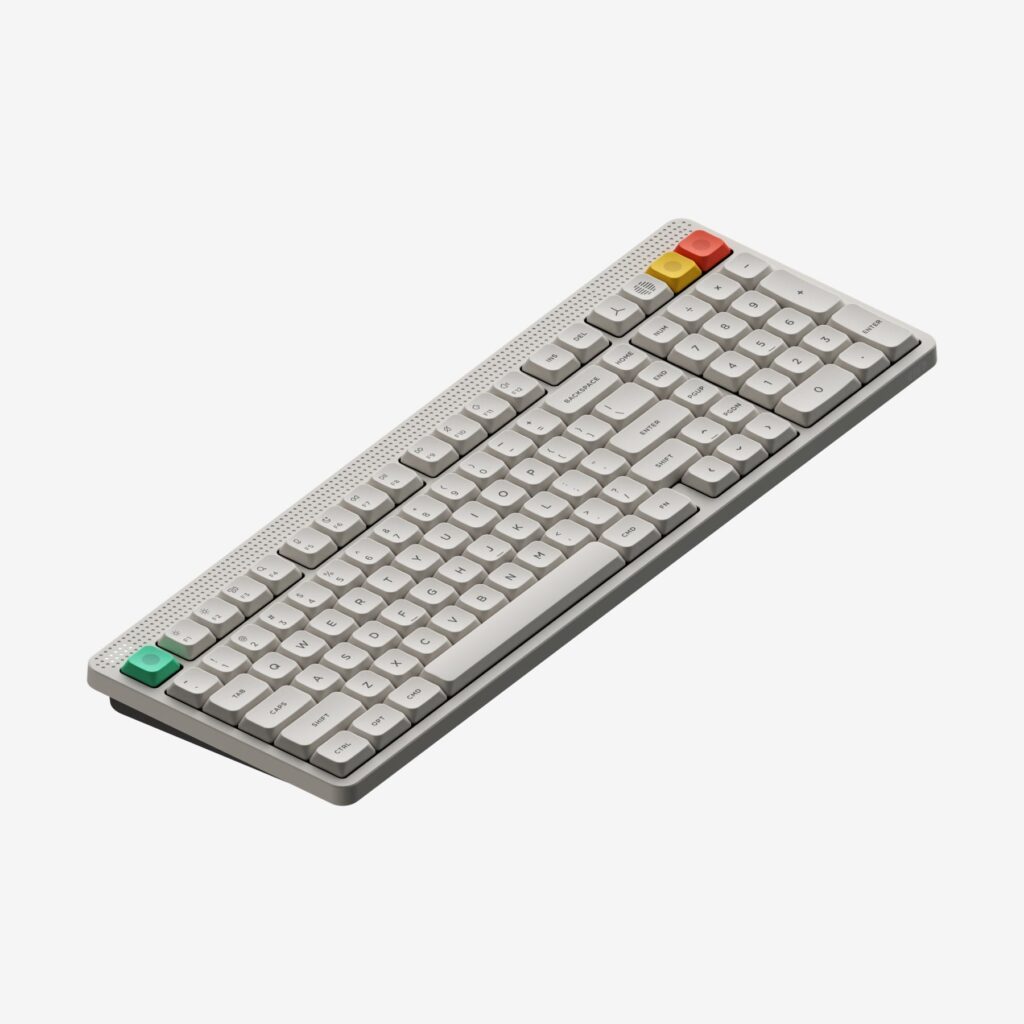
NuPhy Node 100 Low-Profile: Specs, Features, Pros & Cons
Anyone who needs a number pad and prefers short key travel has historically had to choose between them. Low-profile mechanical keyboards almost all stop at compact layouts, so people who work with numbers end up on flat membrane boards by default. The Node 100 exists to close that gap, and closing it is most of the reason to consider it at all.
NuPhy has built it on ideas that usually appear only on much smaller enthusiast keyboards: the plate rests on cushioning rather than bolting to the shell, the switches lift out and can be replaced, and the keycaps are molded PBT rather than printed plastic. Combined with the brand's own short-travel switches, it types with noticeably more definition than a slim office keyboard while sitting at roughly the same height above the desk.
The touch strip is the feature that will decide this keyboard for a lot of people. It replaces the knob or wheel most boards use for volume with a flat panel you slide or tap, paired with a small dot-matrix display showing status at the other end. It is elegant and it works, but a flat surface cannot give your fingers the feedback a physical control does, and it is entirely possible to change something by resting a hand in the wrong place.
Battery figures on keyboards like this deserve reading carefully rather than glancing at. The headline rating assumes the backlighting is switched off, and running the lighting cuts it by more than a factor of ten, which is the difference between charging a few times a year and charging every week or two. Three adjustable typing angles are included, which is more adjustment than most boards this thin bother to offer.
Category strengths
Where the NuPhy Node 100 Low-Profile beats the median
- Much longer battery life ?1,000 h vs 325 h (median)
Where the NuPhy Node 100 Low-Profile trails the median
- No rotary knob ?
How this VS Score was computed
Score 51: each known spec is measured against the median of all keyboards (101 products), then weighted; 50 means level with that median. In classes of six or more, a value beyond the class’s 10th–90th percentile range counts as that limit, so one extreme product cannot set the scale. 55% of the scoreable weight could be used; unknown values, features not applicable to this class and proxies (battery capacity where a rated life exists) add or remove nothing.
| Specification | This product | Cohort median | Score weight | Points moved |
|---|---|---|---|---|
| Hot-swappable | Yes | 61% of the class have it | 0.6 | +30.0 |
| Battery life | 1,000 | 325 | 0.6 | +30.0 |
| Rapid trigger | No | 25% of the class have it | 0.5 | −24.0 |
| Adjustable actuation | No | 24% of the class have it | 0.4 | −19.2 |
| Rotary knob | No | 53% of the class have it | 0.2 | −9.6 |
| Switch technology | Mechanical | Mechanical | 1 | +0.0 |
| Polling rate | 1,000 | 1,000 | 0.7 | +0.0 |
| Connection | 3 | 3 | 0.8 | +0.0 |
| Bluetooth devices | 3 | 3 | 0.3 | +0.0 |
| Keycap material | PBT | PBT | 0.4 | +0.0 |
| Backlight | RGB | RGB | 0.3 | +0.0 |
Not scored: Actuation force (unknown: not scored); N-key rollover (standard for the class (85% have it)); Analog input (not applicable: only 14% of this class have it); Wired latency (unknown: not scored); Wireless latency (unknown: not scored); Front height (unknown: not scored); Battery capacity (capacity is a proxy; the rated battery life is scored instead); USB passthrough (not applicable: only 4% of this class have it); Sound dampening (unknown: not scored); Programmable keys (standard for the class (99% have it)); Media controls (standard for the class (97% have it)); Onboard profiles (unknown: not scored); Configuration software (standard for the class (95% have it)).
Editor’s note
The Node 100 is what happens when a low-profile keyboard refuses to give up the numpad. Full-size layouts are usually thick and heavy. This one is 13.2 mm thick and 787 grams, which puts it closer to a slim office board than to the mechanical keyboards it competes with on feel.
That combination is rarer than it sounds. Most low-profile mechanical boards stop at 75% or TKL, so anyone who needs a numpad and wants short travel usually ends up on a membrane keyboard. The Node 100 uses NuPhy's low-profile Nano switches in hot-swap sockets on a gasket mount, so it types like a proper mechanical board while sitting almost flat.
The touch strip along the top right is the divisive feature. Slide, tap or double-tap it for volume and other functions, with a dot-matrix LED panel opposite showing status. It looks excellent and works fine, but a physical knob gives you feedback a flat panel cannot, and you will occasionally change the volume by brushing it. Whether that is a fair trade is personal.
Battery is generous: a 3,000 mAh cell rated at up to 1,000 hours with the lighting off, dropping to roughly 60 to 100 hours with the RGB running. That gap is worth internalizing: the headline figure assumes you never turn the lights on. Three typing angles at 4, 8 and 11 degrees give more adjustment than most boards at this height.
Sensible for anyone who wants mechanical feel in a low, full-size board (accountants, analysts, anyone entering numbers who still cares how typing feels). Less sensible if you want a rotary knob, if you game competitively and need polling above 1,000 Hz, or if you prefer the deeper travel of a standard-height mechanical keyboard.
Specifications
Quality bars show where each figure sits between the lowest and highest of the 101 keyboards this VS Score is measured against.
Switches & typing
Performance
Layout & size
Connectivity
Build & sound
Features
Sources and verification
Where the specifications come from
- Official product pagenuphy.com
Verification
- First published
- Specifications last checked
- Sheet completeness
- 28 of 34 specifications verified; the rest show as Unknown and are never estimated or scored
- Page type
- Product specification page — Compiled from the manufacturer’s published specifications and the cited sources; this is not a hands-on test.
- Basis
- Research-based: specifications and editorial text were compiled from the documents listed here and the manufacturer’s published data. We have not tested this unit ourselves; where independent measurements are mentioned they belong to the linked publication.
Keyboards with similar specs to the NuPhy Node 100 Low-Profile
Ratings & reviews
No reviews yet. Be the first to share your experience.
The bottom line
The NuPhy Node 100 Low-Profile earns a VS Score of 51, above the median of the 101 keyboards it is measured against (a score of 50 is level with that median).
- Who it’s for
- An accountant, analyst or anyone keying in numbers all day who wants a mechanical feel in a board nearly as low as an office keyboard.
- Who should look elsewhere
- Anyone who wants a physical volume knob, fast polling for competitive games, or the deeper stroke of standard-height switches should pass.
- The trade-off that matters
- The touch strip replaces a knob with a flat panel, which looks clean but gives no feedback and can be nudged by a resting hand.
- The main alternative
- Lofree Flow 2 100: another low-profile board with a numpad, in milled aluminum, if a white backlight is enough.
The VS Score is calculated from the weighted specifications above, each measured against the median of comparable keyboards — a shortlisting guide, not a substitute for your own priorities. See how we score.





