
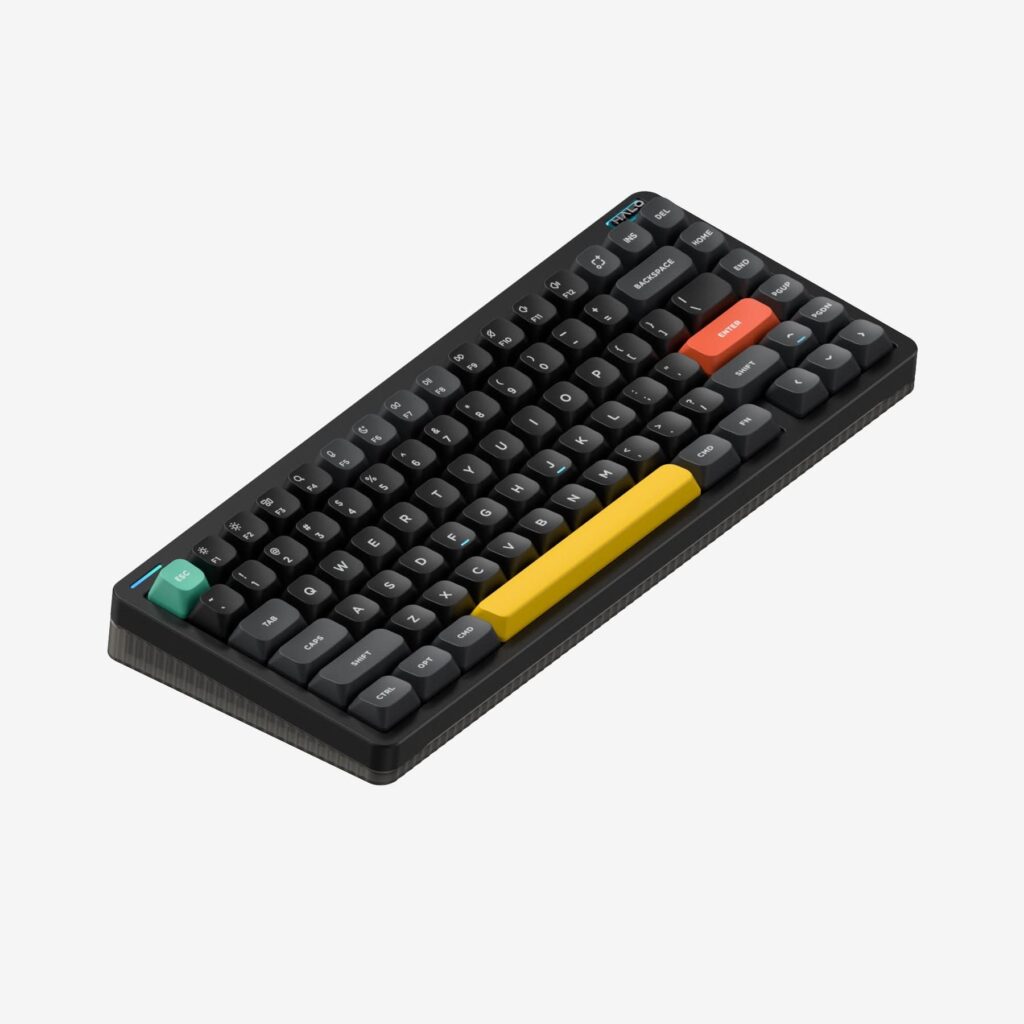
NuPhy Halo75 V2: Specs, Features, Pros & Cons
Light is the first thing NuPhy designed the Halo75 V2 around. A translucent lower case glows from inside, a strip NuPhy calls Halolight runs along the edge, and RGB glows under the caps, all beneath an aluminum top. In a room with the lamps off it looks like no other keyboard on the desk.
Under the show is a full enthusiast build sold ready to use. The board is gasket-mounted with layered dampening, the switches sit in hot-swap sockets, and QMK and VIA open every key to remapping. It connects by cable, by receiver or by Bluetooth, and each mode keeps the standard polling rate except the last.
The compact layout places it in the middle of NuPhy's range. It keeps a function row and real arrow keys and drops the number pad, which leaves more room for the mouse. The Halo96 V2 adds the keypad in a wider case, and the low-profile Air75 V3 covers the same layout for people who want a flatter board. This is a tall, heavy keyboard. The front edge stands a little higher than most, and the weight rules it out for a laptop bag. The lighting also sets the battery life, since running the full display drains it quickly, and there is no rotary knob.
Its natural owner wants a board that feels finished on the first day, will spend an evening in VIA making it their own, and likes a desk that looks built for the evening. Gamers who also write fit that description well. A quiet shared office, where discreet keyboards are the norm, is the wrong home for it.
Category strengths
Where the NuPhy Halo75 V2 trails the median
- No rotary knob ?
- Slightly shorter battery life ?307 h vs 325 h (median)
- A slightly higher front height ?21.3 mm vs 20.2 mm (median)
How this VS Score was computed
Score 48: each known spec is measured against the median of all keyboards (101 products), then weighted; 50 means level with that median. In classes of six or more, a value beyond the class’s 10th–90th percentile range counts as that limit, so one extreme product cannot set the scale. 53% of the scoreable weight could be used; unknown values, features not applicable to this class and proxies (battery capacity where a rated life exists) add or remove nothing.
| Specification | This product | Cohort median | Score weight | Points moved |
|---|---|---|---|---|
| Hot-swappable | Yes | 61% of the class have it | 0.6 | +30.0 |
| Rapid trigger | No | 25% of the class have it | 0.5 | −24.0 |
| Adjustable actuation | No | 24% of the class have it | 0.4 | −19.2 |
| Sound dampening | Yes | 76% of the class have it | 0.3 | +15.0 |
| Rotary knob | No | 53% of the class have it | 0.2 | −9.6 |
| Battery life | 307 | 325 | 0.6 | −1.8 |
| Front height | 21.3 | 20.2 | 0.2 | −0.6 |
| Switch technology | Mechanical | Mechanical | 1 | +0.0 |
| Polling rate | 1,000 | 1,000 | 0.7 | +0.0 |
| Connection | 3 | 3 | 0.8 | +0.0 |
| Backlight | RGB | RGB | 0.3 | +0.0 |
Not scored: Actuation force (unknown: not scored); N-key rollover (standard for the class (85% have it)); Analog input (not applicable: only 14% of this class have it); Wired latency (unknown: not scored); Wireless latency (unknown: not scored); Bluetooth devices (unknown: not scored); Battery capacity (capacity is a proxy; the rated battery life is scored instead); USB passthrough (not applicable: only 4% of this class have it); Keycap material (unknown: not scored); Programmable keys (standard for the class (99% have it)); Media controls (standard for the class (97% have it)); Onboard profiles (standard for the class (89% have it)); Configuration software (standard for the class (95% have it)).
Editor’s note
The NuPhy Halo75 V2 is a well-equipped 75-percent mechanical keyboard that balances compact dimensions with a dedicated function row and arrows. Its 83-key layout works well for gaming, writing, and creative shortcuts without consuming the space of a full-size board. The aluminum top, translucent lower case, Halolight system, and extensive RGB make it visually distinctive, though buyers who prefer an understated office keyboard may find the lighting excessive.
NuPhy combines a PCB gasket mount with multiple sound-dampening layers, hot-swap sockets, POM plate, and high-profile mSA keycaps. QMK/VIA support allows serious remapping, and connections include wired USB-C, Bluetooth 5.0, and 2.4 GHz wireless. Both the wired and dongle modes are rated at 1,000 Hz, and Bluetooth runs at 125 Hz.
The 1,020-gram weight and 21.3-millimeter front height make this a substantial desktop keyboard, too heavy to travel with. Switch choice affects both sound and fatigue, so buyers should not select solely by color. Battery life varies dramatically with lighting: NuPhy reports nine to 91 hours with all lights on and up to 307 hours with lighting off.
This model is ideal for anyone who wants enthusiast features in a prebuilt compact board and are willing to configure it. Anyone who needs a number pad should consider the Halo96 V2, while people seeking a thin, quiet office keyboard should look elsewhere. Confirm the exact switch, color, keycap bundle, and regional layout before purchase.
The translucent case and exposed lighting make dust and fingerprints more noticeable than on a plain opaque keyboard. Owners who dislike maintenance may prefer a simpler finish. SignalRGB support is useful in a coordinated gaming setup, but it should be treated as a bonus. Firmware compatibility and lighting behavior can change over time.
Specifications
Quality bars show where each figure sits between the lowest and highest of the 101 keyboards this VS Score is measured against.
Switches & typing
Performance
Layout & size
Connectivity
Build & sound
Features
Sources and verification
Where the specifications come from
- Official product pagenuphy.com
Verification
- First published
- Specifications last checked
- Sheet completeness
- 29 of 34 specifications verified; the rest show as Unknown and are never estimated or scored
- Page type
- Product specification page — Compiled from the manufacturer’s published specifications and the cited sources; this is not a hands-on test.
- Basis
- Research-based: specifications and editorial text were compiled from the documents listed here and the manufacturer’s published data. We have not tested this unit ourselves; where independent measurements are mentioned they belong to the linked publication.
Keyboards with similar specs to the NuPhy Halo75 V2

Ratings & reviews
No reviews yet. Be the first to share your experience.
The bottom line
The NuPhy Halo75 V2 earns a VS Score of 48, below the median of the 101 keyboards it is measured against (a score of 50 is level with that median).
- Who it’s for
- Someone who wants a finished enthusiast board with a function row and arrows, and is happy to spend an evening setting it up in VIA.
- Who should look elsewhere
- Skip it for a shared office that wants something thin and discreet, or for a laptop bag. The tall case and the weight both rule those out.
- The trade-off that matters
- The lighting is both the reason to buy and the battery drain. Run the full show and you are charging every few days, so you end up choosing between the look and the runtime.
- The main alternative
- NuPhy Halo96 V2: the same build with a number pad for spreadsheet work, at the cost of more desk width.
The VS Score is calculated from the weighted specifications above, each measured against the median of comparable keyboards — a shortlisting guide, not a substitute for your own priorities. See how we score.




