Keychron B40: Specs, Features, Pros & Cons
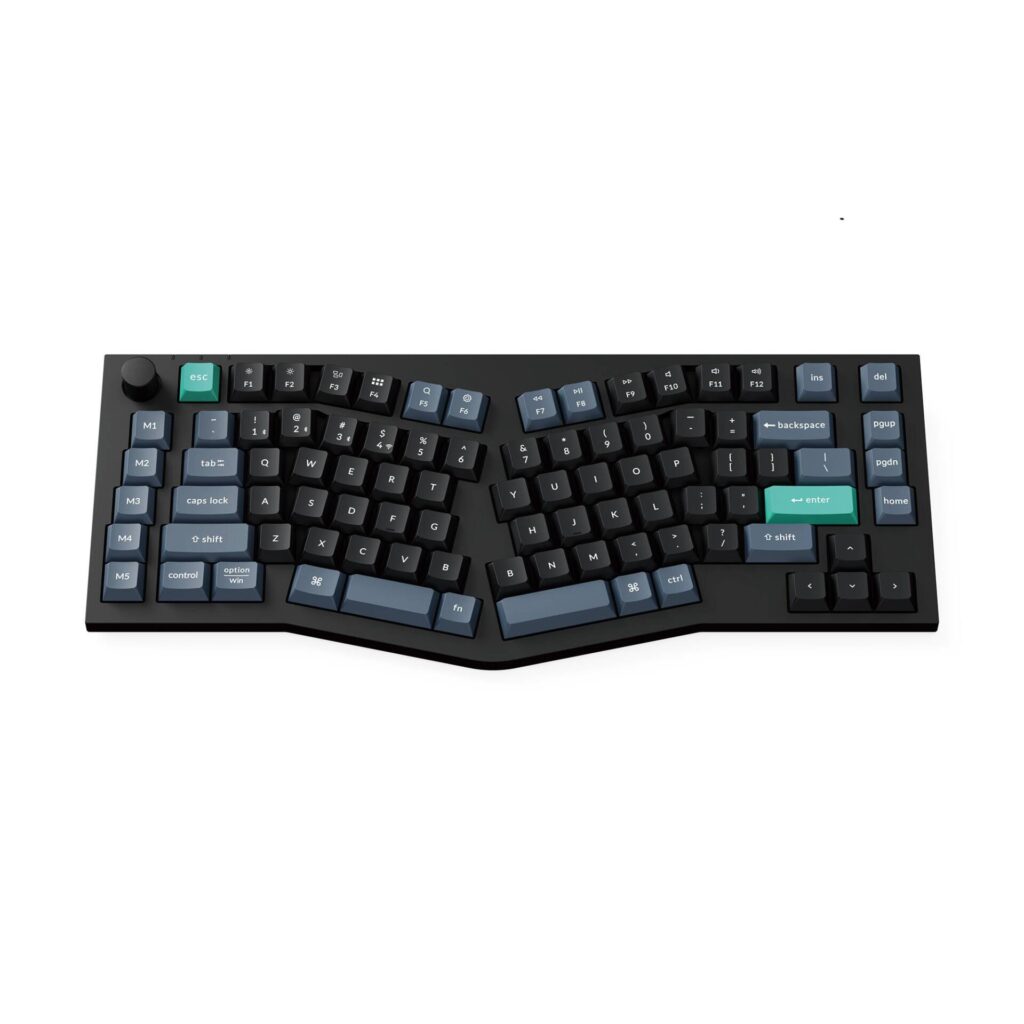
The B40 is Keychron's cheapest route into an Alice layout, and the price is the headline: a split-angle ergonomic keyboard for less than the cost of a decent keycap set. The Alice arrangement angles the two halves of the alphabet inward so the wrists sit straighter, and duplicates the B key so either hand can reach it, an idea that normally appears on enthusiast boards costing several times this.
It is not a mechanical keyboard, and Keychron does not pretend otherwise: the switches are scissor mechanisms, fixed and not hot-swappable, with keycaps Keychron says are 59 percent taller than a typical scissor cap. That puts it in the same family as Keychron's other B-series boards rather than against the mechanical Q and V lines. There is no backlight at all.
The layout is 75 percent with 89 keys, and Keychron adds two things its cheaper B-series boards lack: a knob for volume, brightness or zoom, and a column of five dedicated macro keys down the left edge. Both are configured in the browser-based Keychron Launcher, which also handles remapping, macros and polling rate. There is no QMK or VIA here.
Connectivity is tri-mode (a 2.4 GHz receiver that stows in a slot in the body, Bluetooth 5.2 across three devices, and USB-C), polling at 1,000 Hz wired and wireless but only 125 Hz over Bluetooth. The 800 mAh battery is quoted at 330 hours, and that is a real figure rather than a lights-off one, because there is no lighting to turn off. It weighs 595 grams in an ABS body with ABS caps, offers 6.5 and 9-degree typing angles, and switches between Mac and Windows layouts with a physical toggle.
One gap worth knowing before you clear desk space: Keychron publishes no dimensions for this board anywhere.
Category strengths
Where the Keychron B40 beats the median
- Slightly longer battery life ?330 h vs 313.5 h (median)
Where the Keychron B40 trails the median
- No hot-swappable switches ?
How this VS Score was computed
Score 32: each known spec is measured against the median of all keyboards (101 products), then weighted; 50 means level with that median. In classes of six or more, a value beyond the class’s 10th–90th percentile range counts as that limit, so one extreme product cannot set the scale. 55% of the scoreable weight could be used; unknown values, features not applicable to this class and proxies (battery capacity where a rated life exists) add or remove nothing.
| Specification | This product | Cohort median | Score weight | Points moved |
|---|---|---|---|---|
| Hot-swappable | No | 61% of the class have it | 0.6 | −28.8 |
| Rapid trigger | No | 25% of the class have it | 0.5 | −24.0 |
| Adjustable actuation | No | 24% of the class have it | 0.4 | −19.2 |
| Switch technology | Membrane | Mechanical | 1 | −17.0 |
| Backlight | None | RGB | 0.3 | −14.4 |
| Keycap material | ABS | PBT | 0.4 | −10.0 |
| Rotary knob | Yes | 54% of the class have it | 0.2 | +10.0 |
| Battery life | 330 | 313.5 | 0.6 | +1.8 |
| Polling rate | 1,000 | 1,000 | 0.7 | +0.0 |
| Connection | 3 | 3 | 0.8 | +0.0 |
| Bluetooth devices | 3 | 3 | 0.3 | +0.0 |
Not scored: Actuation force (unknown: not scored); N-key rollover (unknown: not scored); Analog input (not applicable: only 14% of this class have it); Wired latency (unknown: not scored); Wireless latency (unknown: not scored); Front height (unknown: not scored); Battery capacity (capacity is a proxy; the rated battery life is scored instead); USB passthrough (not applicable: only 4% of this class have it); Sound dampening (unknown: not scored); Programmable keys (standard for the class (99% have it)); Media controls (standard for the class (98% have it)); Onboard profiles (unknown: not scored); Configuration software (standard for the class (95% have it)).
Editor’s note
The B40 is the keyboard I would suggest to someone curious about ergonomic layouts who is not ready to spend serious money finding out whether they suit them. Alice boards divide people: the angled halves feel obviously right to some typists within an hour and permanently awkward to others. At this price you can answer that question for yourself, and the scissor switches mean the jump from a laptop keyboard is small.
What you should not expect is a mechanical typing experience. Scissor keys are quiet, shallow and precise, which is why they are in every laptop, but they do not have the depth or the sound people buy mechanical boards for. If that is what you are after, the money is better spent on a mechanical board.
In use, the knob and the five macro keys are what justify choosing this over Keychron's cheaper flat boards. Both are set up in the browser Launcher, which works without installing anything, a genuine advantage on a locked-down work machine.
Two practical notes. Bluetooth polls far slower than the receiver, so use the dongle where responsiveness matters and save Bluetooth for the tablet. And there is no backlight, so a dark room means touch-typing.
The one thing that gives me pause is that Keychron publishes no dimensions at all for this board. An Alice layout is wider than a normal 75 percent, and if desk space is tight you are buying without knowing the footprint. Its same-day sibling, the B39, is the same board with a numpad if you need one.
Specifications
Quality bars show where each figure sits between the lowest and highest of the 101 keyboards this VS Score is measured against.
Switches & typing
Performance
Layout & size
Connectivity
Build & sound
Features
Sources and verification
Where the specifications come from
- Official product pagekeychron.com
Verification
- First published
- Specifications last checked
- Sheet completeness
- 22 of 34 specifications verified; the rest show as Unknown and are never estimated or scored
- Page type
- Product specification page — Compiled from the manufacturer’s published specifications and the cited sources; this is not a hands-on test.
- Basis
- Research-based: specifications and editorial text were compiled from the documents listed here and the manufacturer’s published data. We have not tested this unit ourselves; where independent measurements are mentioned they belong to the linked publication.
Keyboards with similar specs to the Keychron B40
Ratings & reviews
No reviews yet. Be the first to share your experience.
The bottom line
The Keychron B40 earns a VS Score of 32, below the median of the 101 keyboards it is measured against (a score of 50 is level with that median).
- Who it’s for
- Anyone curious whether a split-angle Alice layout suits their wrists, who wants a knob and macro keys and does not need a mechanical feel.
- Who should look elsewhere
- Typists who want mechanical depth and sound, anyone who needs a backlight, and buyers with tight desks, because Keychron publishes no dimensions for this board.
- The trade-off that matters
- An ergonomic layout, a knob and five macro keys at a budget price, in exchange for fixed scissor switches, no lighting and an unpublished footprint.
- The main alternative
- Keychron B11 Pro: the smaller 65% B-series board if desk space matters more than the Alice angle, though it has no knob or macro column and a much smaller battery.
The VS Score is calculated from the weighted specifications above, each measured against the median of comparable keyboards — a shortlisting guide, not a substitute for your own priorities. See how we score.