Why keyboard speed gets so much attention
Keyboard speed sounds simple. You press a key, then the PC reacts. That should be the whole story. Still, keyboard brands now talk about 1000Hz, 4000Hz, 8000Hz, rapid trigger, scan rate, debounce time, input lag, and response time. So it can feel like every normal keyboard became slow overnight.
That is not true.
Polling rate and latency do matter, but they do not matter the same way for every person. They matter most for fast games, esports, rhythm games, and players who care about tight timing. For writing, school work, office tasks, browsing, and casual games, the difference often feels much smaller.
A good 1000Hz keyboard already feels quick for most users. A strong 8000Hz keyboard can feel sharper, but only on the right setup. The keyboard, PC, game, monitor, and connection all play a part. So a bigger number on the box does not always mean a better typing or gaming experience.
What keyboard polling rate means
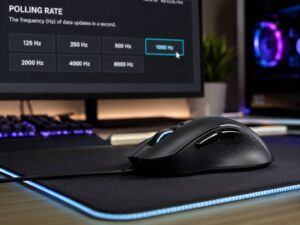
Keyboard polling rate tells you how often your computer checks the keyboard for new input. A 1000Hz keyboard can report up to 1000 times per second. That means one report every 1 millisecond.
An 8000Hz keyboard can report up to 8000 times per second. That means one report every 0.125 milliseconds. On paper, that looks much faster.
Here is the simple math:
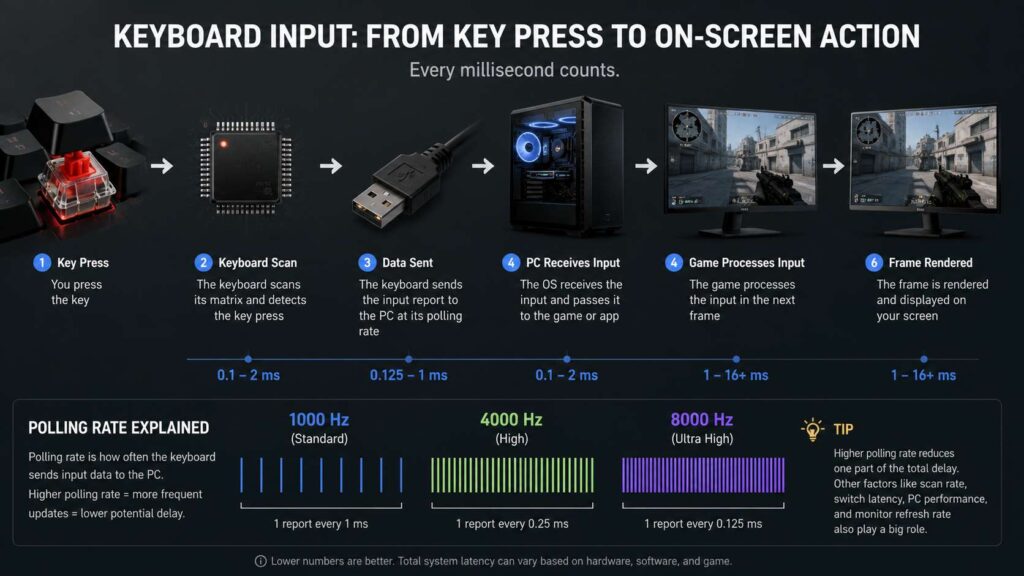
1000Hz = 1 report every 1 ms.
4000Hz = 1 report every 0.25 ms.
8000Hz = 1 report every 0.125 ms.
So yes, a higher polling rate can reduce one part of keyboard delay. Still, polling rate is only one step in the full input chain. The keyboard must detect the key press, process it, send it to the PC, then the game or app must react.
That is why a 1000Hz keyboard with good firmware can feel better than a poorly tuned 8000Hz keyboard. The number helps, but the design matters more.
What keyboard latency means
Keyboard latency means the delay between your key press and the moment your PC receives that input. People often call it keyboard input lag, keyboard response time, or keyboard delay.
These terms overlap, but they do not always mean the same thing. A product page may list polling rate and call the keyboard “low latency.” That does not prove the whole keyboard feels fast.
Real keyboard latency comes from several parts:
The switch.
The keyboard scan rate.
The debounce setting.
The keyboard processor.
The USB or wireless connection.
The PC.
The game or software.
The monitor.
So, a low-latency keyboard needs more than a high polling rate. It needs clean switch behavior, fast scanning, good firmware, and a stable connection.
For most typing tasks, small latency changes feel hard to notice. For fast games, they can help. A late key release can affect movement. A delayed key press can affect a jump, dodge, ability, reload, block, or rhythm hit.
Polling rate and latency are not the same thing
Many buyers treat polling rate and latency like they mean the same thing. They do not.
Polling rate measures how often the keyboard reports to the computer. Latency measures the full delay from press to input.
That difference matters. A keyboard can have high polling but still feel average if the internal scanning is slow. It can also feel worse if the firmware adds delay. Poor wireless handling can add more delay too.
Think of polling rate as the delivery schedule. Think of latency as the full trip. A faster delivery schedule helps, but it does not fix a slow start, a bad route, or a late handoff.
This is why real reviews and latency testing matter. A headline spec tells part of the story. Actual input delay tells more.
What scan rate means
Scan rate is another term that buyers often miss. It refers to how often the keyboard checks its own keys.
Your keyboard has a matrix inside it. The controller checks that matrix again and again to find key presses and releases. A fast scan rate helps the keyboard detect input sooner.
So, polling rate handles the link from keyboard to PC. Scan rate handles the work inside the keyboard.
That difference matters most with high polling keyboards. If a keyboard reports to the PC every 0.125 ms, it should also scan and prepare input fast enough to match that speed. Otherwise, the 8000Hz claim becomes less useful in real play.
This is why some brands talk about “true 8K” polling. They mean the keyboard does not only send reports at a high rate. It also scans keys and prepares data fast enough to make that rate useful.
Debounce time can change the feel
Mechanical switches do not always send one perfect signal. The metal contacts inside the switch can bounce for a tiny moment. The keyboard needs to filter that noise so one press does not register as several presses.
That filter is called debounce.
A longer debounce setting can reduce accidental double presses. Still, it can add delay. A shorter debounce setting can feel faster, but poor tuning can create key chatter.
That is one reason some gaming keyboards use optical or Hall effect switches. These switch types can avoid some contact bounce issues. They can also support fast reset features, such as rapid trigger.
For gaming, debounce matters more than many buyers think. A keyboard with low debounce, clean switches, and fast firmware can feel crisp even at 1000Hz. A keyboard with high debounce can feel slower, even if the box says 8000Hz.
Does 8000Hz polling feel better than 1000Hz?
Sometimes it does. Most users will not feel a clear difference in normal typing.
The math shows a real gap. A 1000Hz keyboard reports every 1 ms. An 8000Hz keyboard reports every 0.125 ms. That saves up to 0.875 ms at the report stage.
That sounds big in marketing. In real use, it is a tiny slice of the full delay chain.
A high-refresh monitor can make this difference easier to feel. A fast PC can help too. Competitive games with sharp movement can show the gain more clearly. So an esports player on a 240Hz, 360Hz, or 500Hz monitor has a better chance of noticing 8000Hz than someone on a basic 60Hz screen.
For casual games, the difference often feels small. For typing, it can feel like nothing changed.
So, 8000Hz is not fake. It just works best in a fast setup that can show the benefit.
Wired, 2.4GHz wireless, and Bluetooth keyboard latency
Connection type affects keyboard latency.
Wired keyboards usually give the most stable input. A USB cable avoids wireless interference, battery limits, sleep delay, and signal drops. Many fast gaming keyboards reach their best polling rate only in wired mode.
2.4GHz wireless can perform well too. Good gaming keyboards use dedicated wireless receivers and fast radio links. Some models reach 1000Hz or higher in 2.4GHz mode. Still, cheaper wireless keyboards may feel slower or less stable.
Bluetooth works well for office work, tablets, laptops, and travel. It saves power and supports many devices. Still, Bluetooth is not the best pick for competitive gaming. It can add delay, and it can feel less steady under pressure.
So, use wired or strong 2.4GHz wireless for serious games. Use Bluetooth for typing, travel, and light use.
Do gamers need a low-latency keyboard?
Gamers benefit most from low keyboard latency. That is true for shooters, fighting games, rhythm games, racing games, and fast platformers.
In games like Counter-Strike 2, Valorant, Fortnite, Apex Legends, osu!, Street Fighter, and Rocket League, timing matters. Fast input can help with movement, strafing, crouch timing, ability use, jumps, and repeated taps.
Still, polling rate is not the only feature that matters. Rapid trigger can matter more for some players. With rapid trigger, the key resets as soon as it moves back up by a set amount. You do not need to wait for a fixed reset point.
That can make movement feel much sharper. It helps players stop, start, and switch direction faster. Hall effect keyboards often lead here, since they can read key travel in fine steps.
For serious gaming, look for a full speed package:
Fast wired or 2.4GHz mode.
1000Hz polling at minimum.
Good scan rate.
Low tested latency.
Rapid trigger for Hall effect boards.
Adjustable actuation.
Stable software.
Good switches.
Reliable firmware.
A keyboard with all of these traits will beat a keyboard that only advertises one big polling number.
Do normal users need high polling keyboards?
Most normal users do not need 4000Hz or 8000Hz keyboard polling. A reliable 1000Hz keyboard already feels fast for daily use.
If you type articles, emails, code, homework, reports, or chat messages, comfort matters more. Layout matters more too. Switch feel, noise, keycap shape, wrist angle, battery life, and build quality will change your day more than 8000Hz polling.
Still, a keyboard should not feel laggy. Some cheap Bluetooth keyboards wake slowly. Some wireless models miss the first key press after sleep. Others feel delayed during quick typing. That kind of lag is annoying, even outside gaming.
So the goal for normal users is not “maximum polling rate.” The goal is stable input with no obvious delay.
This is similar to mouse polling. Many normal users do not need extreme numbers there either. If you want the same idea explained for mice, read Does Mouse Polling Rate Matter for Normal Users?.
1000Hz vs 4000Hz vs 8000Hz on keyboards
The sweet spot for most keyboards is still 1000Hz. It gives a 1 ms report interval, and it works well with almost every PC and game.
4000Hz lowers the report interval to 0.25 ms. That can help some competitive players, but it needs better hardware and firmware.
8000Hz lowers the report interval to 0.125 ms. That is the fastest common polling rate on many modern gaming peripherals. It can feel crisp on a high-end setup, yet the gain over 1000Hz is small for casual use.
The same logic applies to gaming mice, but mice often show polling rate changes more clearly due to constant movement data. For a deeper mouse-focused comparison, see 1000Hz vs 4000Hz vs 8000Hz Polling Rate Mouse.
For keyboards, the benefit is often tied to press and release timing. That makes rapid trigger, scan rate, debounce, and firmware just as important.
Can higher polling rate cause problems?
Yes, it can.
Higher polling sends more reports to the PC. A modern desktop usually handles keyboard polling without trouble. Still, older systems, weak USB hubs, buggy keyboard software, or heavy RGB control apps can create issues.
Some users may notice stutter, dropped input, higher CPU use, or unstable behavior at very high polling rates. This is more common with 4000Hz or 8000Hz devices, mainly on older PCs or laptops.
If that happens, drop the keyboard to 1000Hz and test again. You will still get fast input, and the system may feel more stable.
Battery life can suffer too. High polling makes more sense in wired mode. For wireless keyboards, higher report rates can drain the battery faster.
So, the highest setting is not always the best setting. The best setting is the fastest one that stays stable on your PC.
How to reduce keyboard input lag
Start with the connection. Use wired mode for the lowest and most stable delay. If you need wireless, use the keyboard’s 2.4GHz receiver instead of Bluetooth.
Next, set the polling rate in the keyboard software. Use 1000Hz as your baseline. Test 4000Hz or 8000Hz only if the keyboard and PC support it well.
Then update the firmware. Keyboard makers fix input bugs through firmware updates. A new firmware version can improve stability, key detection, or wireless behavior.
After that, check your keyboard settings. Turn on gaming mode if you play games. Set rapid trigger only if you understand how it changes key behavior. Set actuation distance carefully too. A very sensitive setting can cause accidental presses.
Next, plug the keyboard directly into the PC. Avoid old USB hubs. Avoid monitor USB ports if input feels unstable.
Then check the game. Higher frame rates reduce visible delay. Low-latency modes can help in some titles. A fast keyboard cannot fix a slow game setup by itself.
Finally, check the monitor. A 144Hz, 240Hz, or 360Hz display shows input changes faster than a 60Hz screen. Keyboard speed becomes easier to feel on a faster display.
What to check before buying a gaming keyboard
Do not buy a keyboard only for a huge polling number. Check the full spec list and read real tests.
Look for these details:
Polling rate: 1000Hz is enough for most users. 4000Hz and 8000Hz make more sense for competitive gaming.
Tested latency: Real tests matter more than marketing claims.
Scan rate: Fast scanning helps the keyboard detect presses sooner.
Switch type: Mechanical switches feel great. Optical and Hall effect switches can give faster reset behavior.
Debounce control: Lower debounce can reduce delay, but poor tuning can cause chatter.
Rapid trigger: This matters a lot for fast movement games.
Connection type: Wired gives the most stable speed. Good 2.4GHz wireless can work well. Bluetooth fits light use.
Software: Good software should feel clear, stable, and easy to remove if you do not need it.
Build quality: A fast keyboard still needs good key feel, strong stabilizers, and a layout you like.
A balanced keyboard beats a keyboard with one flashy spec.
What polling rate should you use?
Office users should use the default mode or 1000Hz. Stability and battery life matter more than extreme speed.
Casual gamers should use 1000Hz. It is fast, stable, and easy for most systems to handle.
Competitive gamers should start at 1000Hz, then test 4000Hz or 8000Hz. Keep the higher setting only if the game feels smooth and stable.
Rhythm game players may gain more from higher polling, low debounce, and fast switches. Timing matters a lot in that category.
Laptop users should test carefully. High polling can use more battery and may add extra system load.
For most people, 1000Hz is the safest pick. For serious players with strong hardware, 4000Hz and 8000Hz can make sense.
Final verdict
Keyboard polling rate and latency matter, but they are not magic. Polling rate controls how often the keyboard reports input to your PC. Latency covers the full delay from your finger to the computer.
A 1000Hz keyboard already feels fast for most people. An 8000Hz keyboard can feel sharper in competitive games, especially with a high-refresh monitor and a fast PC. Still, scan rate, debounce, firmware, switch type, wireless mode, and rapid trigger can matter just as much.
For typing and office work, choose comfort, layout, build quality, and stable wireless. For gaming, choose low tested latency, fast scanning, reliable firmware, and the right switch technology.
The best keyboard is not always the one with the largest number. It is the one that feels fast, stable, and comfortable for the way you use it every day.