Quick answer
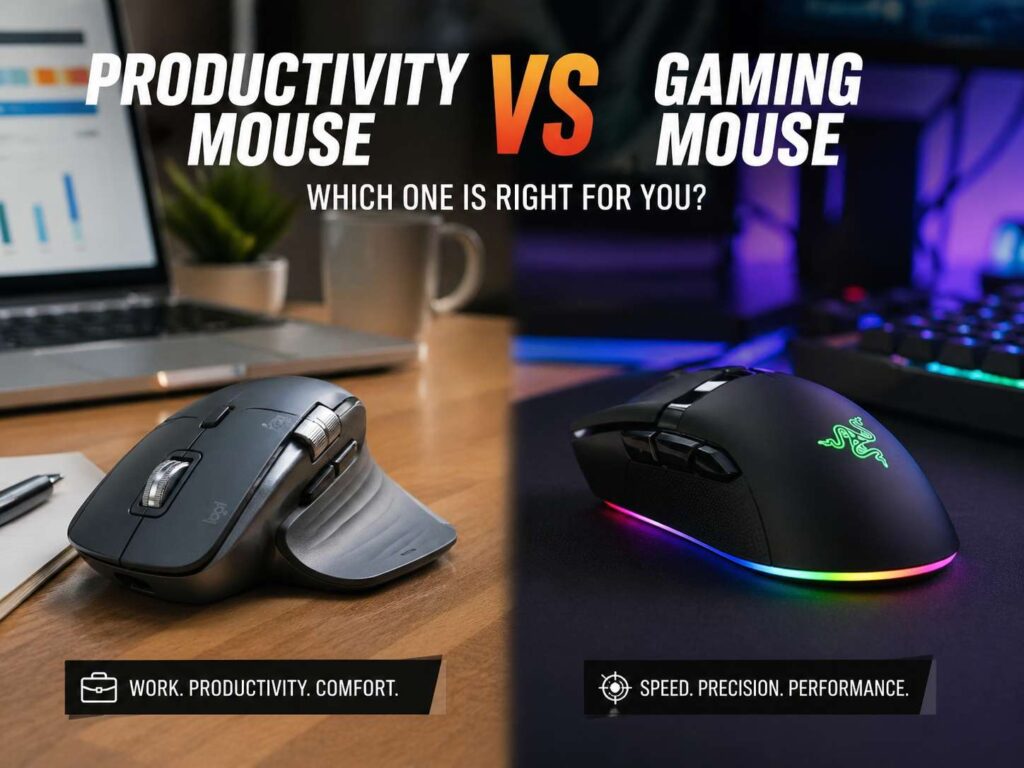
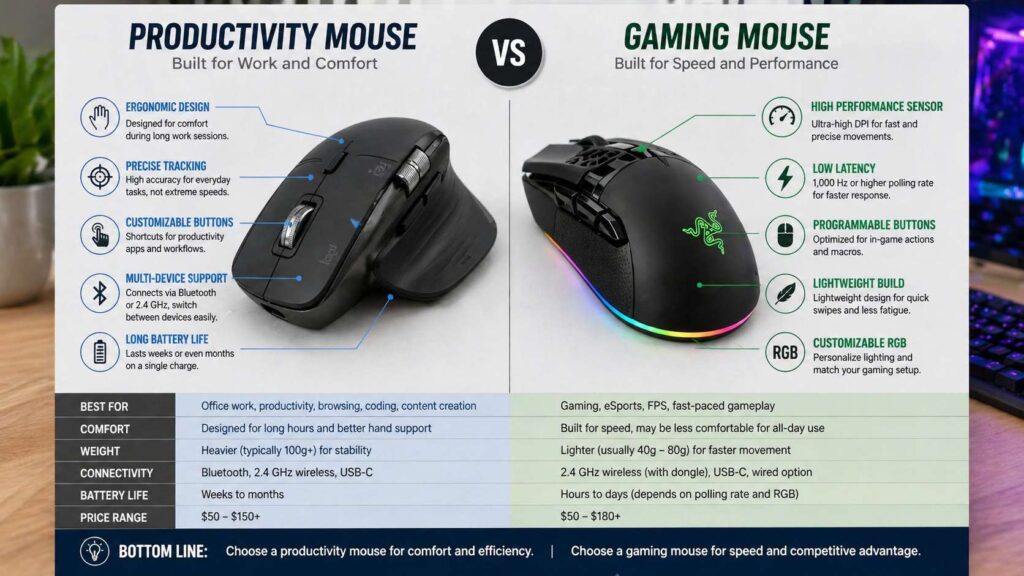
A productivity mouse suits office work, browsing, spreadsheets, editing, research, coding, and long desk sessions. It gives you comfort, shortcuts, better scrolling, and longer battery life.
A gaming mouse suits fast games, quick clicks, low-latency movement, and accurate aim. It usually feels lighter, faster, and more direct.
So, which one should you buy? For work, buy a productivity mouse. For competitive games, buy a gaming mouse. For mixed use, choose the one that fits your main task first.
What is a productivity mouse?
A productivity mouse helps you work faster and feel more comfortable at your desk. It usually has a larger shape, extra buttons, a strong scroll wheel, and support for more than one device.
This type of mouse works well for people who spend hours in browsers, documents, spreadsheets, design tools, code editors, and dashboards. Instead of chasing extreme speed, it focuses on small daily gains.
For example, a good office mouse can help you move back and forward in a browser, copy and paste faster, switch apps, mute calls, scroll through long pages, and move between a laptop and desktop.
That sounds simple, but these features add up. A better scroll wheel alone can save time every day. Extra buttons can cut down repeated keyboard shortcuts. A comfortable shape can make long sessions feel easier on your hand.
For a deeper look at useful work-focused features, read this guide to the best productivity mouse features.
What is a gaming mouse?
A gaming mouse focuses on speed, low weight, fast tracking, and quick clicks. It usually has a lighter body than an office mouse. Many models use a simple shape so players can move them fast across the mousepad.
Gaming mice often include high DPI sensors, 1,000 Hz or higher polling rates, low-latency wireless, and strong main buttons. These features help most in fast games like FPS titles, battle royale games, and competitive multiplayer games.
A gaming mouse does not always feel better for office work, though. Many models skip heavy scroll wheels, thumb rests, and quiet clicks. They do this to reduce weight and improve speed.
So, a gaming mouse is not “better” by default. It is better for a different job. It helps with aim, reaction time, and fast movement. For office work, those gains rarely matter as much as comfort and shortcuts.
For more detail, see this guide to the best FPS gaming mouse features.
Comfort: productivity mice usually win
Comfort matters more than most specs during a full workday. A mouse can have a great sensor and still feel wrong after two hours.
Productivity mice often use larger ergonomic shapes. Many fill the palm more naturally. Some include thumb rests, softer curves, and quieter buttons. As a result, they suit long sessions at a desk.
Gaming mice can feel comfortable too, but their shapes often serve speed first. A low, narrow, lightweight shell helps with fast aim. Still, it may not support your hand as well during eight hours of email, spreadsheets, editing, and browsing.
A vertical mouse takes comfort in another direction. It places the hand in a handshake-like position. This can feel better for some users, especially those who dislike flat mice. Still, a vertical shape feels different at first, so it is not the right pick for everyone.
For office work, comfort should sit near the top of your list. A mouse that fits your hand well will help more than a huge DPI number.
Speed and latency: gaming mice have the edge
Gaming mice win for speed. They usually feel faster, lighter, and more responsive.
This matters in competitive games. A light mouse helps with flick shots. A low-latency connection helps your movement feel more direct. A strong sensor keeps tracking stable during quick swipes.
Polling rate also matters here. A 1,000 Hz mouse reports its position up to 1,000 times per second. Some newer gaming mice go higher. On a fast monitor, a higher polling rate can feel smoother to trained players.
For normal work, that gain is much smaller. A document, spreadsheet, or browser tab does not need extreme polling. You can write, edit, research, and scroll with a standard wireless mouse and still work well.
So, spend money on gaming speed only if you play games that reward it. For office use, spend that money on comfort, battery life, and scroll quality.
Buttons and shortcuts: productivity mice feel more useful at work
Extra buttons can make a mouse much more useful. The difference is how each type uses them.
A productivity mouse often gives you buttons for daily tasks. You can set them for copy, paste, undo, app switch, screenshot, back, forward, zoom, or mute. Some software lets you set different actions for each app.
That means one button can do one thing in your browser, another thing in Excel, and a different thing in a video editor. This feels very handy once you set it up.
Gaming mice also have programmable buttons. Still, those buttons often target fast actions inside games. They help with melee, reload, push-to-talk, weapon swaps, macros, and skill activations.
For work, button placement matters more than button count. Two or three well-placed buttons beat ten buttons you press by accident.
Look for a productivity mouse with:
- Back and forward buttons
- A thumb button or gesture button
- Horizontal scrolling
- Fast scrolling
- App-based shortcuts
- Multi-device switching
- Quiet clicks
Look for a gaming mouse with:
- Clean side buttons
- Low weight
- Strong main clicks
- Stable 2.4 GHz wireless
- A good sensor
- A shape that fits your grip
- 1,000 Hz polling or higher
Scroll wheel: a big win for productivity mice
The scroll wheel looks small, but it changes how a mouse feels every day.
Productivity mice often have better wheels for long pages. Some offer free-spin scrolling, so one flick sends you far down a document or webpage. Others include horizontal scroll, which helps with wide spreadsheets, timelines, and editing tools.
Gaming mice usually use lighter wheels with clear steps. That works well for games, where players need controlled scroll inputs. It can feel less useful during heavy browsing or office work.
For a writer, editor, coder, researcher, accountant, or content manager, scroll quality matters a lot. A better wheel makes long work feel smoother.
So, check the wheel before you buy. If you scroll hundreds of times a day, this feature deserves real attention.
DPI: bigger numbers do not mean a better mouse
DPI means dots per inch. A higher DPI setting moves the pointer farther with less hand movement.
Many buyers think a higher DPI number means better accuracy. That is not true for most users. Office users often feel comfortable between 800 and 2,000 DPI. Large screens or multi-monitor setups can work better with higher settings, but control still matters more.
Gamers often use lower DPI settings than expected. Many FPS players use 400 to 1,600 DPI, then adjust sensitivity inside the game. This gives better control during aim.
So, do not buy a mouse only because it lists 26K, 30K, or 50K DPI. Sensor quality matters, but the number alone does not tell the full story.
A good mouse tracks cleanly, feels stable, and suits your hand. That matters more than a huge DPI claim.
Bluetooth vs 2.4 GHz wireless
Wireless mode makes a real difference.
Bluetooth works well for productivity. It keeps your desk cleaner, works with laptops and tablets, and often lets you switch between several devices. This is useful if you use a work laptop, home PC, and tablet on the same desk.
2.4 GHz wireless works better for gaming. It uses a USB receiver and usually gives lower latency than standard Bluetooth. For fast games, that direct feel matters.
Wired mode still has a place too. It is useful during charging and for people who want a stable connection with no battery worries.
Here is the simple rule:
- Use Bluetooth for work, travel, and multi-device setups
- Use 2.4 GHz wireless for gaming
- Use wired mode for charging or zero battery stress
Battery life and charging
Productivity mice often win on battery life. Many last weeks or months on one charge. They do not need extreme polling rates, so they use less power during daily work.
Gaming mice face a trade-off. Higher polling rates and performance modes drain the battery faster. A gaming mouse can still last a long time at normal settings, but top speed modes use more power.
This matters if you hate charging devices. For work, long battery life feels more useful than ultra-fast polling. For gaming, shorter battery life may feel acceptable if the mouse gives you better aim and lower latency.
USB-C charging is now common on many good mice. That makes charging easier, especially if your keyboard, laptop, or phone already uses USB-C.
Noise: productivity mice are better for shared spaces
Click noise matters more in real life than spec sheets suggest.
A loud mouse can annoy people during calls, late-night work, shared office hours, or study time. Productivity mice often include quiet clicks, so they work better in calm rooms.
Gaming mice usually have sharper clicks. Many players like that crisp feedback. It feels clear and direct during fast play. Still, those clicks can sound loud during normal work.
If you work near other people, quiet clicks deserve a place on your checklist. If you game alone with headphones, click noise matters less.
Weight: gaming mice feel faster
Gaming mice keep getting lighter. Many modern models sit near 50 to 70 grams. A lighter mouse needs less force to move, so it helps with fast aim and quick direction changes.
Productivity mice often weigh more. Larger bodies, bigger batteries, scroll systems, thumb rests, and extra buttons add weight. That extra weight can feel stable during work, but it can feel slow in fast shooters.
Neither option is wrong. A heavier mouse can feel calm and precise for editing or office use. A lighter mouse can feel faster and easier to control in games.
For mixed use, a medium-weight mouse often makes the most sense. It gives you enough speed for gaming and enough comfort for work.
Shape and grip style
Shape matters more than almost any spec.
Palm grip users rest most of the hand on the mouse. They often prefer larger productivity mice or bigger ergonomic gaming mice.
Claw grip users arch their fingers and keep more space under the palm. They often prefer medium gaming mice with a raised back.
Fingertip grip users control the mouse mostly with their fingers. They often prefer smaller and lighter gaming mice.
Hand size matters too. A large productivity mouse can feel clumsy for small hands. A tiny gaming mouse can feel tiring for large hands during long work sessions.
Before buying, check the mouse length, width, and height. Then compare those numbers with your hand size and grip style. This small step can prevent a bad purchase.
Best choice for office work
A productivity mouse is the better choice for most office users. It gives you comfort, long battery life, better scrolling, useful buttons, and easier multi-device control.
It works well for:
- Writing
- Research
- Spreadsheets
- Coding
- Photo editing
- Video editing
- Project work
- Customer support
- Browser-heavy tasks
The right office mouse should feel natural in your hand. It should scroll well. It should have buttons you can use without thinking. It should connect easily to your devices.
For work, those features beat extreme DPI and esports polling rates.
Best choice for gaming
A gaming mouse is the better choice for players who care about speed and control. It suits FPS games, action games, battle royale games, MOBAs, and competitive multiplayer games.
It works well for:
- Fast aim
- Flick shots
- Low-latency clicks
- Quick swipes
- Recoil control
- Fast camera movement
- Long gaming sessions
The right gaming mouse should match your grip style. It should feel light enough for fast movement, but not so small that it strains your hand. It should use a stable 2.4 GHz connection and a sensor that tracks cleanly.
Do not chase RGB first. Do not chase DPI first. Shape, weight, click feel, and sensor tracking matter more.
Best choice for both work and gaming
Many people want one mouse for everything. That is possible, but you need to choose carefully.
If you work most of the day and game at night, pick a productivity mouse with a good sensor and stable wireless. You will enjoy the comfort during work, and it will still handle casual gaming well.
If you game more than you work, pick a gaming mouse with a shape that still feels good for browsing and office tasks. You can add software shortcuts to side buttons and keep the setup simple.
If your time is split evenly, avoid extreme designs. Do not pick a very heavy office mouse. Do not pick an ultra-small esports mouse. Choose a balanced shape, medium weight, solid battery life, and enough buttons for daily tasks.
The best mixed-use mouse feels good after five minutes and still feels good after five hours.
Common buying mistakes
A lot of people buy the wrong mouse after reading only the spec sheet. Avoid these common mistakes:
- Buying the highest DPI mouse for office work
- Using Bluetooth for serious gaming
- Ignoring hand size
- Ignoring grip style
- Buying a heavy mouse for FPS games
- Choosing RGB over comfort
- Paying for 8,000 Hz polling on a basic office setup
- Ignoring scroll wheel quality
- Buying a vertical mouse without checking the shape
- Forgetting software support for Windows or macOS
A mouse is personal hardware. The right one fits your hand, your desk, your screen setup, and your daily tasks.
Final verdict
A productivity mouse is the smarter pick for work, comfort, scrolling, shortcuts, quiet clicks, battery life, and multi-device use.
A gaming mouse is the smarter pick for fast movement, low latency, light weight, quick clicks, and competitive games.
For most office users, a productivity mouse gives better daily value. For serious players, a gaming mouse gives better control. For mixed use, start with your main task, then check shape, weight, wireless mode, buttons, and battery life.
The best mouse is not the one with the biggest numbers. It is the one that feels natural, saves time, and stays comfortable through the full day.