What Is an Ergonomic Keyboard?
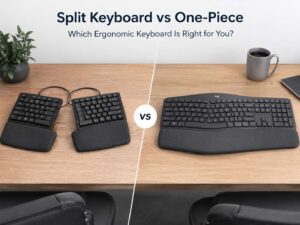
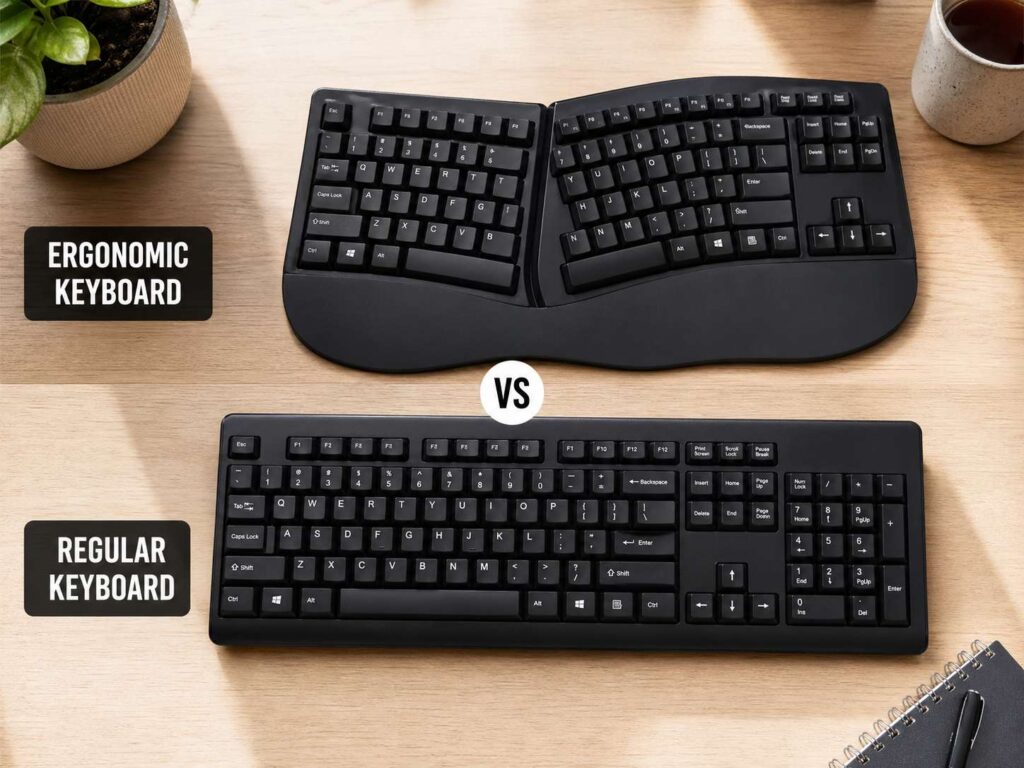
An ergonomic keyboard uses a shaped, split, curved, or tilted design to place your hands in a more relaxed position. It tries to reduce wrist bend, forearm twist, and long reaches across the desk.
Most ergonomic keyboards look different from a standard office keyboard. Some split the keys into two angled zones. Others separate the left and right halves fully. A few models add a raised middle section, often called tenting. That shape lets your palms face inward a little more.
The goal is simple. Your hands should meet the keyboard without strain. Your shoulders should stay relaxed. Your wrists should stay close to straight.
This matters most during long typing sessions. Writers, programmers, students, office workers, and remote workers often spend 6 to 8 hours near a keyboard. Small posture problems can feel minor at first. Then they show up as wrist tension, shoulder tightness, or finger fatigue.
What Is a Regular Keyboard?
A regular keyboard has a flat, straight layout. Most laptop keyboards, office keyboards, and gaming keyboards use this design. It feels familiar, so there is nothing new to learn.
A full-size regular keyboard includes letters, numbers, function keys, arrow keys, navigation keys, and a number pad. That layout works well for spreadsheets, admin tasks, data entry, and many games.
Still, size can create comfort problems. A wide full-size keyboard pushes the mouse farther to the right for right-handed users. That extra reach can make the shoulder work harder during long sessions. For that reason, a tenkeyless, 75 percent, or 65 percent keyboard can feel better.
A regular keyboard is not automatically bad for comfort. A slim model, good desk height, and close mouse placement can make a big difference. Fix the desk setup first, and a standard keyboard may feel fine.
Ergonomic Keyboard vs Regular Keyboard: The Core Difference
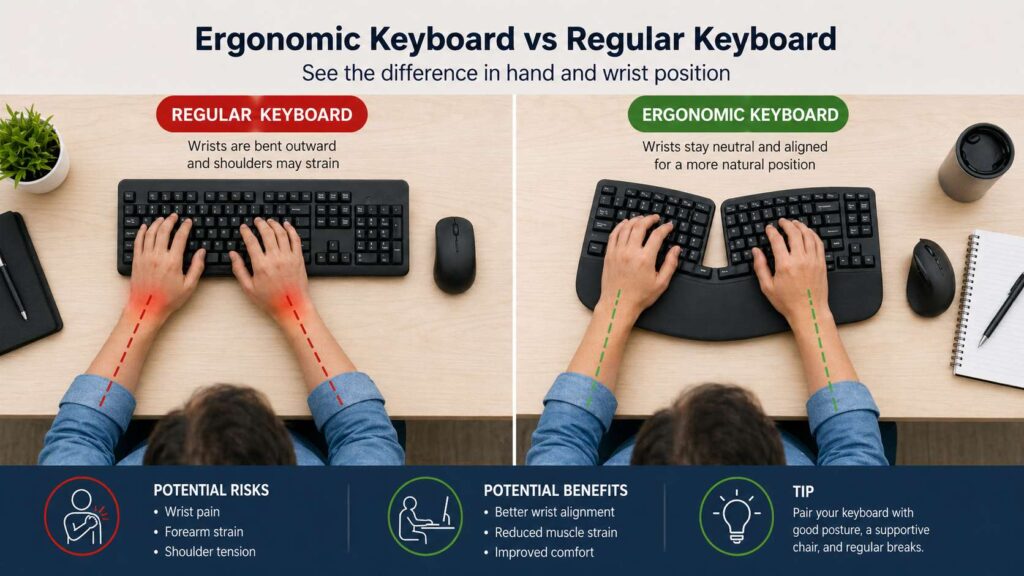
The main difference comes down to hand position. A regular keyboard asks your hands to line up with one straight block of keys. An ergonomic keyboard changes the key angle so your hands can rest in a more natural position.
A flat keyboard can pull your wrists outward. It can also make your forearms rotate down toward the desk. Over a short session, that may not bother you. Over a full workday, it can feel tiring.
By comparison, a split ergonomic keyboard lets each hand sit closer to its own shoulder line. A tented model reduces the flat palm-down position. A compact ergonomic keyboard can also bring the mouse closer to your body.
Still, the regular keyboard has one clear advantage. It feels familiar. You do not need to relearn key positions, and you can move between devices with less friction.
So the choice is not only about comfort. It is also about habit, desk space, typing style, and patience.
Wrist Comfort and Posture
Good keyboard comfort starts with neutral wrists. Your wrists should not bend up, down, or far to the side. Your elbows should stay near your body, and your shoulders should feel loose.
An ergonomic keyboard can help with this. The split shape opens your arms slightly. The tented shape reduces forearm twist. The curved shape can make the keys easier to reach with less finger stretch.
A regular keyboard can still work well with the right setup. Keep it close to your body. Avoid raising the back feet too much. A steep upward tilt can bend your wrists back. Try it flat before you try it tilted.
Palm rests need care too. Use them during pauses, not during active typing. Resting your wrists hard on the desk or pad can add pressure in the wrong spot. Instead, let your hands float lightly over the keys.
Mouse placement matters just as much. A comfortable keyboard setup can still feel bad if the mouse sits too far away. For mouse-heavy work or gaming, it helps to compare your full desk layout. Our guide on ergonomic mouse vs gaming mouse explains how mouse shape can affect comfort, grip, and control.
Typing Speed and Learning Curve
A regular keyboard usually wins on day one. Your fingers know where to go. Shortcuts feel natural. Games and work apps behave as expected.
An ergonomic keyboard often needs adjustment time. A mild split keyboard can feel normal after a few days. A fully split keyboard can take longer. Curved layouts and compact key clusters can slow you down at first.
That does not mean ergonomic keyboards hurt typing speed forever. Speed usually comes back once your hands adapt, and less tense hands can even type faster. Still, the first week can feel awkward.
For an easier start, choose a model with a familiar key layout. Keep the same QWERTY layout. Avoid extreme designs at first. Then practice in short sessions before using it for a full workday.
Work, Gaming, and Daily Use
For office work, an ergonomic keyboard makes a lot of sense. Long email sessions, reports, coding, research, and writing all place heavy demand on the hands. Better hand angles can make these tasks feel easier.
For gaming, the answer changes. Regular mechanical keyboards offer familiar key spacing, fast switches, and wide support for game commands. Compact gaming keyboards also leave more room for low-sensitivity mouse movement.
Still, some ergonomic keyboards work well for gaming. A fixed split model with standard keys can feel close to a normal keyboard. Fully split models can feel odd during fast movement keys, so they suit work better than competitive games.
For daily mixed use, a compact regular keyboard often gives the best balance. It keeps the familiar feel and saves desk space. A 96 percent keyboard, for example, keeps the number pad but uses a tighter layout. Our 96 keyboard size guide explains that layout in plain terms if you want a smaller board without losing too many keys.
Keyboard Size Matters More Than People Think
Many comfort problems come from keyboard width, not only key shape. A full-size board places the number pad on the right. That pushes the mouse outward. Your shoulder then reaches farther again and again.
A tenkeyless keyboard removes the number pad. A 75 percent keyboard keeps many keys but uses less space. A 65 percent keyboard goes smaller and gives even more mouse room.
For users who type numbers all day, a separate number pad can work better than a full-size keyboard. You can place it on the left, move it aside, or pull it close only during spreadsheet work.
This setup helps right-handed mouse users a lot. It lets the mouse sit closer to the body. Then the shoulder stays more relaxed.
Keyboard height also matters. Thick keyboards can raise the hands too much. Low-profile keyboards often feel easier on the wrists, mainly on shallow desks. A wrist rest can help during breaks, but it should not force the hands upward.
Key Features to Look For in an Ergonomic Keyboard
Start with the split angle. A gentle split works best for beginners. It gives better hand position without making the keyboard feel strange.
Next, look at tenting. A small tent angle can reduce forearm twist. Adjustable tenting gives more control, and it helps if your desk height is not perfect.
Check the layout too. A standard layout makes the switch easier. A compact ergonomic keyboard saves space but can hide or move keys you use often.
Switch feel also plays a role. Light switches can reduce finger effort. Heavy switches can feel satisfying, but they can tire your hands during long writing sessions. Quiet switches work better for shared rooms and late-night typing.
Wireless support can make the desk cleaner. Still, wired models give stable input and need no charging. For a work desk, either option works. Pick the one that matches your habits.
Who Should Choose an Ergonomic Keyboard?
An ergonomic keyboard fits people who type for long periods and feel wrist, hand, arm, or shoulder strain. It also suits users who want a more relaxed posture at a fixed desk.
Remote workers can gain a lot from this change. So can writers, developers, editors, designers, support agents, and students. Any task with long typing blocks can expose poor wrist angles.
People with narrow shoulders can benefit from a split board too. A normal keyboard can force the hands inward. A split keyboard lets the arms sit in a straighter line.
Users with a large desk get the most from a fully split keyboard. The two halves need space, and they need careful placement. Users with smaller desks often do better with a fixed split model.
Pain, numbness, tingling, or weakness needs medical advice. A keyboard can improve comfort, but it does not replace a proper check from a qualified health professional.
Who Should Choose a Regular Keyboard?
A regular keyboard suits users who type comfortably already. It also fits gamers, shared workstations, students on a budget, and anyone who switches between many computers.
The biggest advantage is familiarity. You can sit down and work right away. No new layout. No setup time. No learning period.
A compact regular keyboard is often the smartest pick for users who want comfort without a major change. Tenkeyless and 75 percent keyboards give more mouse space. Low-profile models can keep the wrists flatter.
A 96 percent keyboard works well for users who still need a number pad. It keeps most full-size keys but takes less room. That makes it a strong middle choice for spreadsheets, office work, and general home use.
Setup Tips for Better Comfort
Place the keyboard directly in front of your body. Keep the letter area centered, not the whole keyboard body. On full-size keyboards, the number pad can trick you into placing the typing area too far left.
Keep your mouse close. Your elbow should not drift far away from your side. A smaller keyboard or separate number pad helps here.
Set the keyboard around elbow height. Your shoulders should not rise. Your wrists should not bend sharply. A low desk tray can help, but only if it leaves enough room for the mouse.
Take short breaks during long sessions. Stand up, open your hands, and change position. Even a great keyboard cannot make hours of fixed posture feel good.
Final Verdict: Which One Is Better?
An ergonomic keyboard is the better choice for long typing days, wrist comfort, and a more natural hand position. It works best for people who use one desk for work and want more control over their setup.
A regular keyboard is better for familiarity, gaming, lower cost, and easy device switching. It also gives more style, switch, and size choices.
For most people, the best choice sits in the middle. A compact regular keyboard can fix mouse reach and save space. An ergonomic keyboard makes more sense once wrist angle, shoulder reach, or long typing fatigue becomes a real issue.
Pick the keyboard that helps your hands stay relaxed. Then pair it with the right mouse position, desk height, and typing habits. That full setup matters more than the label on the box.