Quick answer
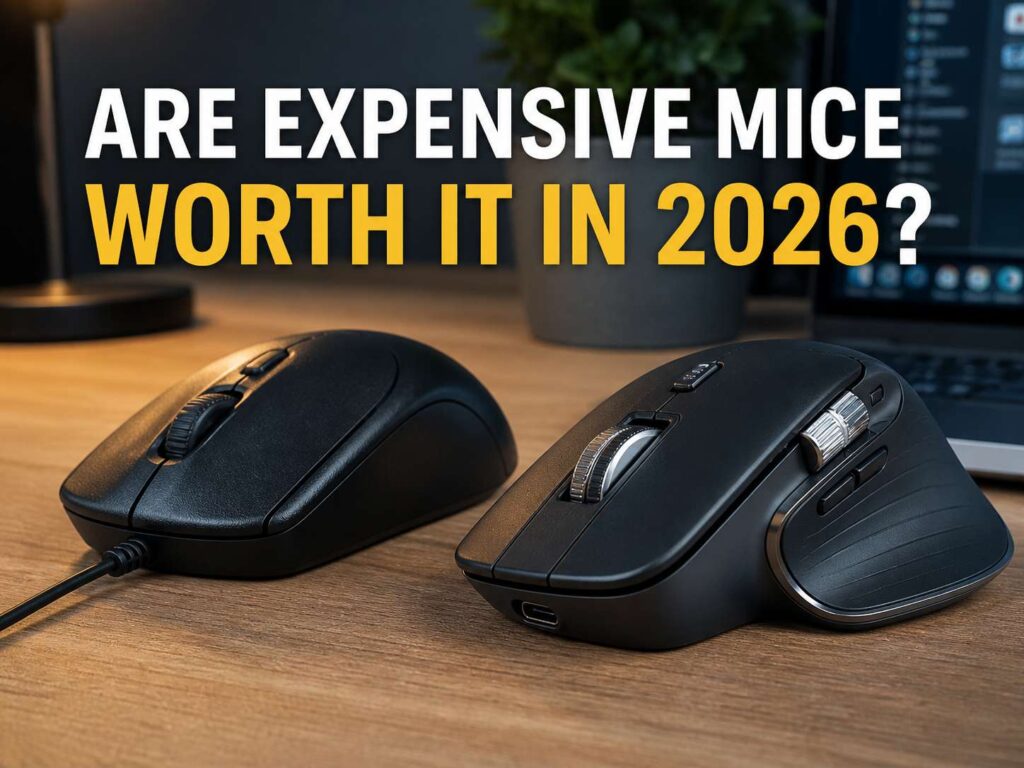
Expensive mice are worth it in 2026 for gamers, heavy office users, designers, editors, and anyone who uses a mouse for long hours each day. A premium mouse can feel better in the hand, track more smoothly, scroll faster, and give you more control through extra buttons and software shortcuts.
Still, not every person needs one. A basic mouse works fine for browsing, emails, school work, streaming, and light laptop use. It clicks, scrolls, and moves the cursor. For many people, that is enough.
So the real question is not “Is an expensive mouse better?” It is “Will I feel the upgrade every day?” If you use a mouse for six to eight hours daily, the answer often changes fast. Comfort, shape, weight, battery life, and scroll quality start to matter more than the price tag.
What counts as an expensive mouse in 2026?
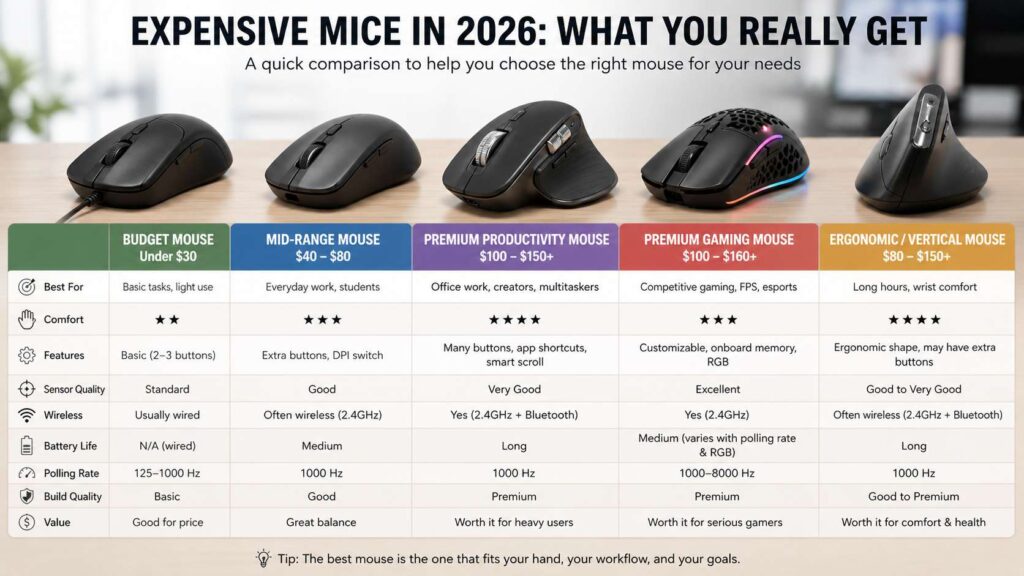
A cheap mouse usually costs under $30. A good mid-range mouse often sits between $40 and $80. An expensive mouse usually starts near $100 and can pass $150, mostly in the gaming and productivity categories.
That higher price buys more than a nicer shell. Premium mice now focus on better sensors, stronger wireless performance, lighter bodies, quieter clicks, faster polling rates, smoother wheels, and better app controls.
For example, a high-end gaming mouse can weigh around 50 to 60 grams. That feels very light in fast games. A premium productivity mouse can weigh more, but it often gives you a sculpted shape, thumb buttons, app profiles, horizontal scrolling, and a wheel built for long pages.
So price alone does not tell the full story. A costly gaming mouse and a costly office mouse solve different problems. One chases speed. The other chases comfort and control.
Cheap vs expensive mouse: where the difference shows
The biggest difference is comfort. A cheap mouse often uses a simple shape that fits many hands well enough. That sounds fine at first. After a few hours, though, the wrong shape can make your fingers, wrist, or shoulder feel tired.
A premium mouse gives you more choice. You can pick a tall ergonomic shape, a low gaming shape, a vertical mouse, a compact travel mouse, or a large mouse with a thumb rest. That choice matters more than it seems.
Then comes tracking. A better mouse usually moves the cursor with less jitter and more control. Small movements feel cleaner. Fast swipes feel more predictable. For gaming, that can help your aim. For office work, it can make spreadsheet cells, design handles, and browser tabs easier to hit.
Build quality also stands out. Better clicks feel cleaner. Side buttons sit in better spots. The scroll wheel often feels smoother and more precise. Plus, the feet glide better on a mouse pad. None of these details feels huge alone, but together they change the daily feel.
Are expensive gaming mice worth it?
Expensive gaming mice are worth it for players who care about aim, fast reaction, low weight, and clean wireless performance. They make the most sense for FPS games, esports games, battle royale games, and any title that rewards quick hand movement.
A premium gaming mouse usually gives you a better sensor, lower weight, faster polling options, better switches, and a shape made for a clear grip style. That can help with flick shots, tracking, recoil control, and fast camera movement.
Still, weight and specs do not beat shape. A 50 gram mouse with the wrong width or hump can feel worse than a 75 gram mouse that fits your hand. Grip style matters too. Palm grip users often like fuller shapes. Claw grip users often want a higher rear hump. Fingertip users often prefer shorter and lighter mice.
So yes, expensive gaming mice are worth it, but only after the shape fits your hand. Do not buy only for DPI, RGB lighting, or the biggest number on the box.
Does 8000 Hz polling rate matter?
Polling rate tells you how often the mouse reports movement to the PC. A 1000 Hz mouse reports up to 1000 times per second. An 8000 Hz mouse reports up to 8000 times per second.
That sounds like a huge jump, and for some gamers it can feel sharper. The gain shows most on high-refresh monitors, fast shooters, and strong PCs. A player using a 240 Hz, 360 Hz, or 500 Hz monitor has a better chance of noticing the difference.
For normal office work, 8000 Hz does not matter much. Your email, browser tabs, WordPress dashboard, and spreadsheets do not need that level of reporting. For casual games, 1000 Hz still feels smooth.
There is one more catch. Higher polling drains battery faster. So a wireless mouse that lasts many days at 1000 Hz can lose a lot of runtime at 4000 Hz or 8000 Hz. For that reason, high polling should be a bonus, not the main reason to buy.
Does DPI matter on an expensive mouse?
DPI means how far the cursor moves on screen compared with hand movement. A higher DPI setting moves the cursor faster. A lower DPI setting gives you slower and finer control.
Many expensive mice advertise huge DPI numbers. Still, you do not need extreme DPI. A setting between 400 and 1600 DPI works for gaming, and 800 to 2400 DPI suits office work.
For daily work, the sensor quality matters more than the maximum DPI label. A good mouse tracks smoothly at your real setting. It should not skip, drift, or feel jumpy. It should also handle your desk or mouse pad well.
If you want a deeper office-focused breakdown, this guide on whether DPI matters on office mice explains why comfort and control often matter more than extreme sensitivity.
So do not pay extra only for a huge DPI number. Pay for stable tracking, easy adjustment, and a cursor that feels natural.
Are expensive productivity mice worth it?
Expensive productivity mice are worth it for people who work at a desk for long hours. They help most in spreadsheets, browsers, CMS tools, design apps, editing apps, coding tools, and project boards.
A premium productivity mouse usually gives you extra buttons, better scrolling, app shortcuts, multi-device pairing, and a shape made for longer use. These features save small amounts of time all day. Then those small moments add up.
For example, a thumb button can go back in the browser. Another button can open search. A side wheel can move across a wide spreadsheet. A fast scroll wheel can fly through long pages, then switch back to precise line-by-line control.
That makes a high-end office mouse feel less like a luxury and more like a work tool. It does not make sense for every desk, but it makes plenty of sense for people who live inside documents, tabs, dashboards, and editing tools.
Comfort matters more than specs
Comfort should come before DPI, polling rate, RGB lighting, and brand hype. A mouse touches your hand for hours. That makes shape the most personal part of the purchase.
A mouse can have a top sensor and still feel wrong. It can feel too narrow, too flat, too tall, too heavy, or too slippery. Your grip style changes the answer too.
Palm grip needs support across more of the hand. Claw grip needs room for finger control. Fingertip grip works better with short, light shapes. Larger hands often need more length and width. Smaller hands often need lower buttons and a shorter body.
Wrist position matters too. A neutral wrist feels better during long desk sessions. A vertical mouse is one way to get there. If wrist comfort is your main concern, read this guide on vertical mice for wrist pain and long desk work before you spend more on a regular shape.
Wireless vs wired mouse in 2026
Wireless mice are no longer only for casual users. Premium 2.4 GHz wireless gaming mice now feel fast enough for serious play. Many office mice also pair with several devices, so you can switch between a desktop, laptop, and tablet.
A wireless mouse gives you a cleaner desk and more freedom. It also works well for travel and hybrid work. Still, you need to charge it or replace batteries.
A wired mouse keeps things simple. No battery. No receiver. No pairing issues. It often costs less too. For a fixed desk setup, that still works well.
So the better pick comes down to use. Choose wireless for a clean desk, travel, and multi-device work. Choose wired for low cost, no charging, and simple reliability.
Where expensive mice waste money
Some premium mice cost more for features that do not improve daily use. RGB lighting can look nice, but it drains battery and does not improve control. Special colors and limited editions can raise the price without changing the feel.
Very high DPI can also distract buyers. A huge sensor number sounds impressive, but your real setting matters more. The same applies to 8000 Hz polling. It helps a narrow group more than the average user.
Software can be useful, but it can also become annoying. A mouse app should make shortcuts, profiles, and updates easy. It should not feel heavy or confusing.
So spend money on the parts you feel: shape, buttons, wheel, wireless quality, battery life, sensor behavior, and warranty. Treat lights and special shells as extras.
Best value range for most buyers
Most people get the best value between $50 and $90. In that range, you can find strong wireless mice, good sensors, comfortable shapes, side buttons, and decent battery life.
A premium mouse above $100 makes sense after you know what you need. Gamers should pay more for lower weight, better shape, stable wireless, and better switches. Office users should pay more for scrolling, comfort, shortcuts, and multi-device support.
A cheap mouse still has a place. It works well for a spare laptop bag, a shared PC, a guest setup, or light browsing. It just does not give the same comfort or control during heavy use.
The best mouse is not always the most expensive one. The best mouse is the one you stop thinking about during work or play.
Buying checklist before you pay more
Check the hand fit first. Your fingers should reach the main buttons without strain. Your thumb should sit near the side buttons without stretching.
Check the weight next. Light mice suit fast gaming. Heavier mice can feel steadier for office work. Neither is better for everyone.
Look at the scroll wheel. A weak wheel ruins long documents and spreadsheets fast. A good wheel feels smooth, precise, and easy to control.
Then check the buttons. Extra buttons should sit where your thumb can reach them. They should not trigger by mistake.
Battery life matters too. Look at the battery rating for the mode you plan to use. High polling and lighting cut runtime.
Software should feel simple. You need easy DPI settings, button remaps, and profiles. You do not need a bloated app for basic tasks.
Finally, check the return policy. A mouse can look perfect online and still feel wrong in your hand.
Final verdict: are expensive mice worth it in 2026?
Expensive mice are worth it in 2026 for people who use them enough to feel the upgrade. Gamers get lighter bodies, better sensors, faster wireless options, and sharper clicks. Office users get better comfort, stronger scrolling, extra controls, and smoother daily work.
For casual users, a budget mouse still makes sense. You do not need a premium sensor to check email. You do not need 8000 Hz polling to browse the web. You do not need ten buttons for simple laptop use.
Still, a mouse is one of the few tech products you touch almost every minute at a desk. That changes the value. If your current mouse feels cramped, slow, heavy, slippery, or tiring, a better one can pay off quickly.
Start with shape. Then look at weight, wheel quality, wireless mode, battery life, and buttons. After that, compare price. That order leads to a better buy than chasing the most expensive model.