A lot of people end up choosing between a 75% keyboard and a TKL keyboard. That is not surprising. These two sizes sit in the middle ground. They save space, keep the keys most people still want, and feel far more practical than a tiny compact board for day to day use.
At first glance, they look almost the same. In real use, they do not feel the same.
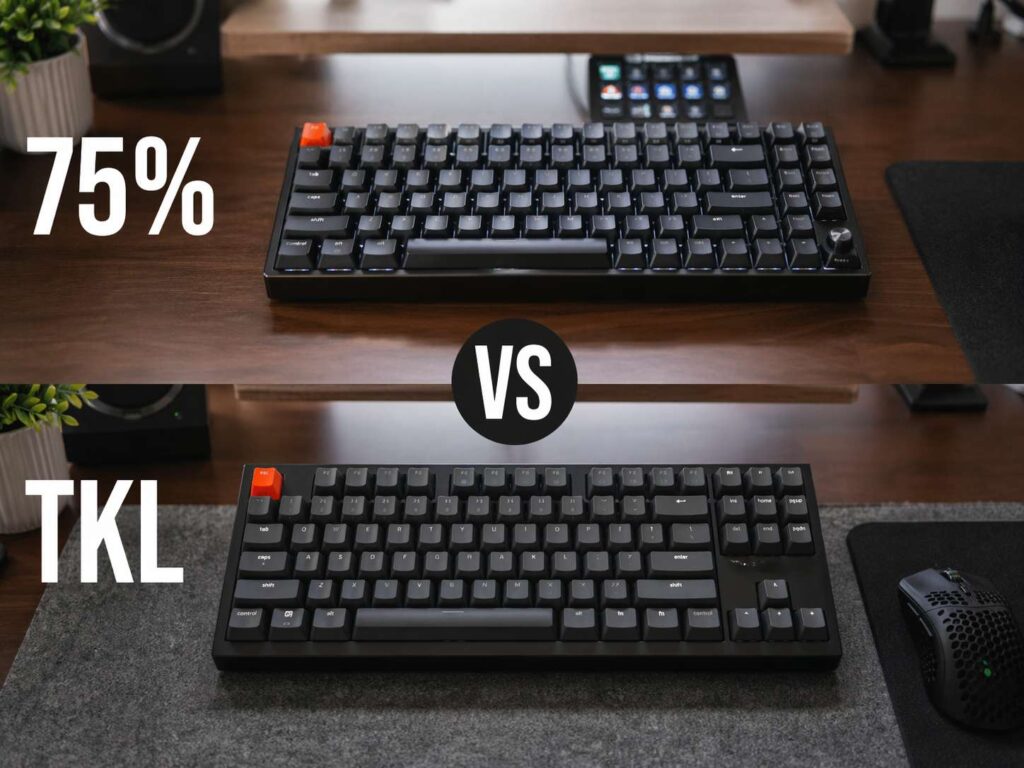
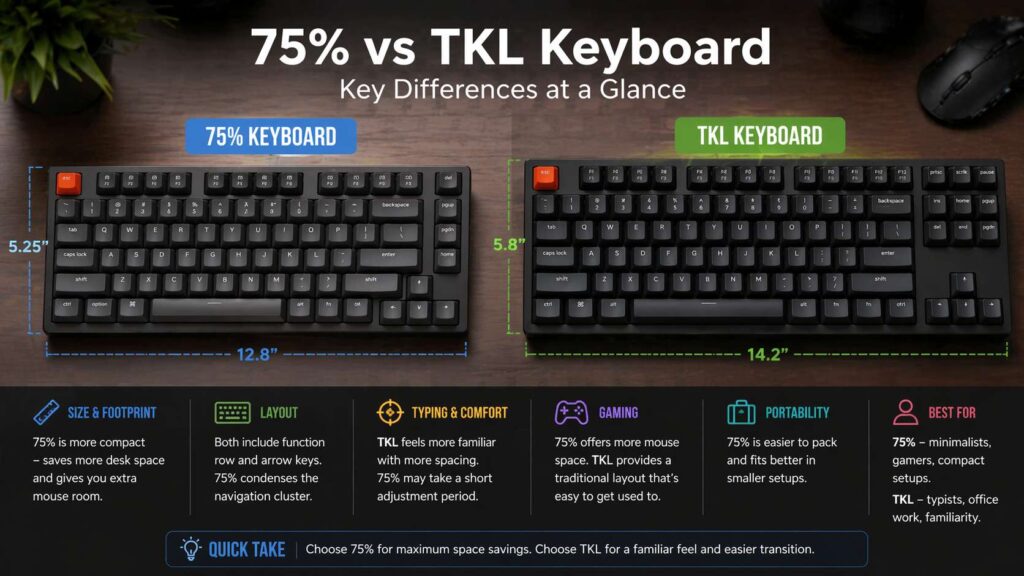
A 75% keyboard packs the keys closer together. A TKL keyboard keeps more space between sections. That one detail changes typing feel, desk space, gaming comfort, and how fast your hands settle in. For many buyers, that is the real difference.
If you want the short answer, here it is. A 75% keyboard works best for people who want a smaller setup and more mouse room. A TKL keyboard works best for people who want a familiar layout with fewer compromises.
Why this comparison matters
Keyboard size affects more than looks. It changes posture, hand movement, desk layout, and how quickly you can find the keys you use every day.
A lot of buyers focus on specs first. They look at switches, wireless support, RGB, hot swap sockets, and battery life. All of that matters. Yet layout comes first. A board can have great features and still feel wrong on your desk.
That is why this choice matters so much. A 75% keyboard and a TKL keyboard can share many of the same core keys, but the daily experience is not identical. One feels tighter and more compact. The other feels calmer and easier to learn.
If you are new to keyboard sizes, it helps to read a simple breakdown of what a TKL keyboard is. That gives you a clear starting point before you compare the two.
What a 75% keyboard gives you
A 75% keyboard keeps the function row, arrow keys, and a compact version of the navigation cluster. The layout squeezes those keys into a tighter frame, so the board takes up less room on your desk.
That is the main reason people buy one.
You get more mouse space. Your setup looks cleaner. Your hands sit closer together. A small desk feels less crowded. For people who play shooters or work in a tight home office, that extra room feels great.
The tradeoff shows up in spacing. The keys sit closer together, so the board feels denser. Some people love that right away. Others need a few days to adjust. The top right area often changes the most. Delete, Page Up, Page Down, Home, or End may sit in a new spot or in a tighter group.
That does not make a 75% keyboard worse. It just gives it a different personality. It feels fast, compact, and modern. Yet it asks your hands to learn a new rhythm.
Laptop users often adapt to this size very quickly. Their hands already know a condensed layout, so the move feels natural.
What a TKL keyboard gives you
TKL stands for tenkeyless. A TKL keyboard removes the numpad from a full size keyboard and keeps almost everything else in a familiar arrangement.
That familiar spacing is the big selling point.
The function row stays on top. The arrow keys sit in their own place. Navigation keys usually keep more breathing room. Your hands find the layout fast, even on the first day. That makes TKL a very safe pick for people who want less desk clutter without giving up comfort.
For office work, coding, writing, and general use, TKL feels easy to trust. You do not need much adjustment time. Muscle memory carries over from a standard desktop keyboard with little friction.
The board is still smaller than full size, so you save a good amount of space. You just do not get the ultra tight footprint of a 75% layout.
Think of TKL as the layout that cuts very little from the familiar desktop feel. That is why so many people land on it and stay there for years.
The biggest difference is spacing, not key count
A lot of comparisons focus on how many keys each board has. That misses the main point. Spacing matters more than raw key count.
On a TKL board, the gaps between sections help your fingers move with less thought. The arrow cluster stands out. The navigation area feels separate. The right side of the board has more air. Long typing sessions often feel smoother for that reason alone.
On a 75% board, the same general tools are still there, but the layout packs them tighter. That brings efficiency and saves room. It can still feel cramped for users who rely on the older desktop layout in their head.
This is where personal habit comes in. Some people want the smallest board that still feels complete. Others want a layout that disappears under their hands. The first group often leans 75%. The second group often leans TKL.
Desk space and mouse room
This category leans toward 75%.
A smaller keyboard leaves more room for your mouse, notebook, audio gear, or just open desk space. That is great for low sensitivity gaming and neat setups. It can help your right arm stay in a more relaxed position too, especially on shallow desks.
That extra room is not a tiny benefit. It changes how your setup feels every single day.
TKL still saves space over full size, and it remains a strong pick for gaming desks. Yet 75% pushes the size down one more step. If you hate wasted desk space, you will notice the difference.
On a large desk, the gap feels smaller. On a compact desk, the gap feels much bigger.
Typing comfort and learning curve
TKL wins for instant comfort.
Most people can move from a full size keyboard to a TKL board and feel at home in minutes. The layout is familiar, the sections are easy to read, and the adjustment period stays short.
A 75% keyboard takes more trust at first. The smaller frame can feel a little busy. You may hit the wrong top right key during the first few days. That fades for many users, but the early difference is real.
This matters most for heavy typing. Writers, editors, coders, and office users often want less friction, not more. A TKL board delivers that familiar flow. A 75% board gives you speed and compactness once your hands adapt.
Neither layout is bad for typing. The better choice depends on your patience and your habits.
Gaming performance
Neither layout wins on pure speed alone.
Switch type, latency, build quality, firmware, and key feel matter more than the size label. A strong 75% board can be great for gaming. A strong TKL board can be just as strong.
Still, layout changes comfort during play.
A 75% keyboard gives you more room for broad mouse movement. That is a real plus in FPS games. A TKL keyboard gives you a bit more separation between groups of keys, and that can help players who use a wide mix of binds and want a cleaner feel.
The gap is not about raw performance. The gap is about what feels better on your desk and under your hands. Some gamers want every spare inch of mouse room. Others want a layout that feels familiar during long sessions. Both views make sense.
Work, spreadsheets, and daily tasks
Work changes the answer for many people.
If your day includes writing, coding, email, browsing, design work, and meetings, both layouts work well. You still get function keys and arrows. That alone makes them far more flexible than ultra compact boards.
Spreadsheet work is a different story. Neither 75% nor TKL is perfect for heavy number entry. A full size board or a separate numpad fits that job better.
For general office work, TKL usually feels easier. The layout stays more open, so Home, End, Delete, and Page Up feel more natural. That matters more than people expect. Those keys come up all day in real work.
A 75% keyboard still handles office use well. It just works best for people who value space and do not mind a denser layout. If your desk is small or your setup moves between home and office, that smaller size is a big plus.
If you are still comparing sizes in general, this guide on the best keyboard layout for most people gives useful context around where 75% and TKL fit in the broader picture.
Portability and setup style
A 75% keyboard is easier to move, easier to pack, and easier to fit into a smaller workspace. That makes it a strong choice for hybrid work, shared desks, and portable setups.
TKL is still portable. It just feels more like a desk first layout.
This part matters more than many people think. Your keyboard does not live in a vacuum. It sits next to your mouse, monitor, lamp, notebook, speakers, and charger. Every inch on your desk has value. A tighter board can make the whole setup feel cleaner.
Then again, a cleaner setup means very little if the layout annoys you every day. That is why TKL stays such a popular choice. It balances comfort and space very well.
Who should buy a 75% keyboard
A 75% keyboard makes sense for people who want a compact board that still keeps function keys and arrows.
It fits small desks very well. It works great for gamers who want more mouse room. It suits laptop users who already like condensed layouts. It feels right in minimalist setups too.
This layout rewards people who care about space and do not mind a short learning period.
Who should buy a TKL keyboard
A TKL keyboard makes sense for people who want a safer choice.
It feels familiar right away. It suits office work very well. It gives you strong balance between space saving and comfort. It works for gaming, typing, coding, and general use with very few surprises.
For first time mechanical keyboard buyers, TKL is often the easiest recommendation.
Final verdict
A 75% keyboard is the smarter pick for people who want the smallest footprint without losing the function row and arrow keys.
A TKL keyboard is the smarter pick for people who want a roomy feel and a layout that makes sense on day one.
That is the real split.
Choose 75% if desk space sits at the top of your list. Choose TKL if comfort and familiarity matter more. Both layouts are good. The better one is the one that fits your desk, your habits, and the way your hands already work.
For many people, TKL feels safer. For many setups, 75% feels sharper. That is why this debate never really goes away.