What a Lightweight Mouse Really Means
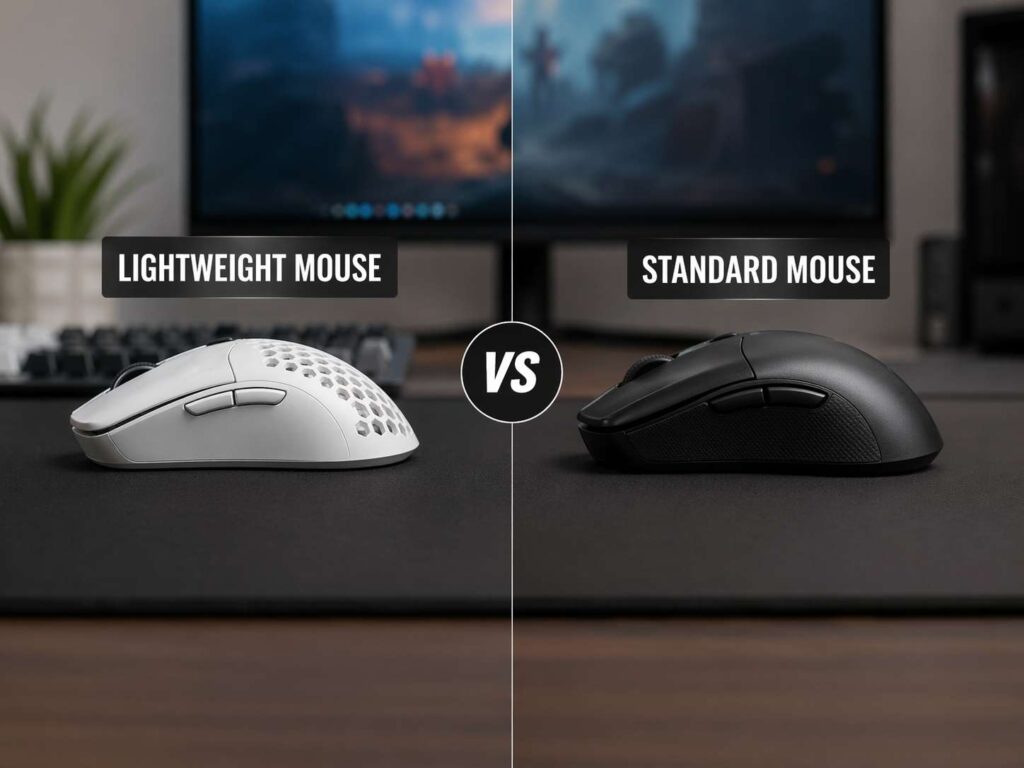
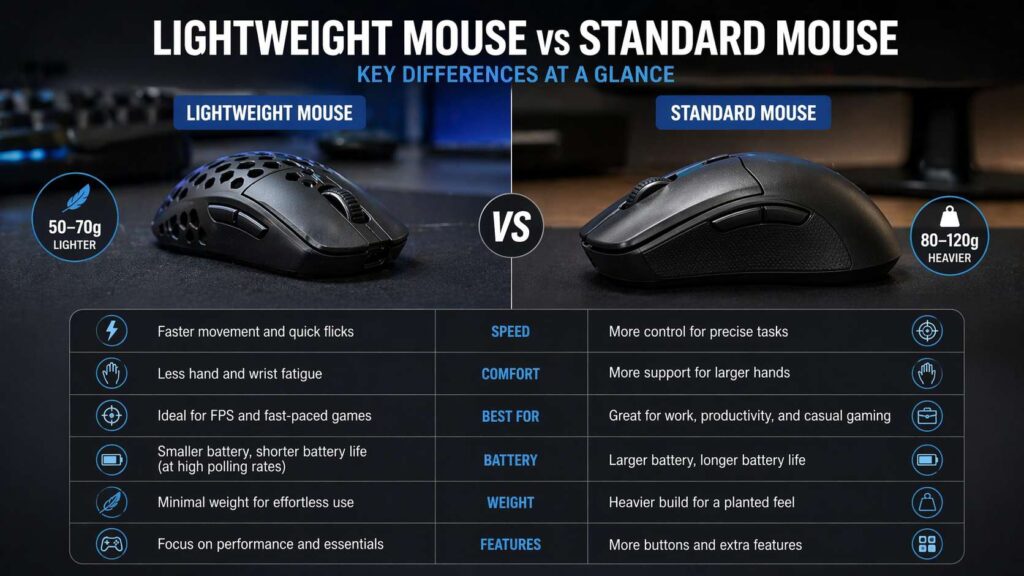
A lightweight mouse is usually a mouse that weighs under 70 grams. Some gaming models sit around 50 to 60 grams, and a few go lower. These mice feel quick, easy to lift, and simple to move across a desk or mouse pad.
A standard mouse often weighs around 80 to 120 grams. Some office mice and feature-rich gaming mice weigh more. That extra weight often comes from larger shells, bigger batteries, side buttons, scroll wheels, metal parts, or adjustable weight systems.
At first, the difference sounds tiny. After all, 30 or 40 grams does not look like much. Still, your hand notices it fast. A 55 gram mouse feels very different from a 105 gram mouse during long use.
A lighter mouse needs less effort to move. So, it can feel faster and less tiring. A heavier mouse feels more planted. It can give better control during slow cursor work.
The best choice depends on your hand size, grip style, desk space, mouse pad, games, and daily tasks. So, the right answer is not always “lighter is better.”
Why Lightweight Mice Became So Popular
Lightweight gaming mice became popular through competitive FPS games. Players in games like Counter-Strike 2, Valorant, Apex Legends, Fortnite, and Call of Duty often make fast swipes. So, a lighter mouse helps them move quickly with less strain.
Many newer lightweight mice now come with strong specs too. You can find models with high polling rates, accurate optical sensors, optical switches, and solid wireless performance. Because of that, buyers no longer need to accept poor performance just to get a lighter shell.
Older lightweight mice often used honeycomb bodies. That design reduced weight, but it also collected dust. Now, many brands use solid shells and still keep the weight low. That gives the mouse a cleaner feel.
Lightweight mice now appeal to more than esports players. Many office users like them too. After all, small mouse movements add up across a full workday. Less weight can make scrolling, clicking, dragging, and browsing feel easier.
Why Standard Mice Still Make Sense
Standard mice remain popular for clear reasons. A heavier mouse often feels smoother, calmer, and easier to control. That can help during office work, design tasks, photo editing, spreadsheets, browsing, and casual gaming.
Standard mice often include more features too. For example, many office models have side scroll wheels, silent clicks, Bluetooth pairing, extra thumb buttons, gesture buttons, and larger batteries. So, they can feel more useful during daily work.
A standard mouse can also fit palm grip users better. Larger shells fill the hand more fully. That can reduce finger tension for some people. Plus, the added height can support the hand during long sessions.
For work, comfort often matters more than speed. A heavier ergonomic mouse can feel better than a superlight gaming mouse during writing, coding, editing, or research. In fact, users who feel wrist strain from flat mice sometimes prefer ergonomic models, including vertical designs. Better Buy Base has a helpful explainer here: what is a vertical mouse.
Speed and Control
A lightweight mouse feels faster right away. It takes less force to start movement, stop movement, and lift the mouse. So, it works well for low-sensitivity gaming, where you move the mouse across more of the pad.
For FPS players, that speed can help with flick shots, target switching, and quick corrections. It can also reduce fatigue during long matches. After several hours, small weight savings can make a real difference.
A standard mouse gives more resistance. That extra resistance can help users avoid over-aiming. It feels stable during slow tracking, small cursor adjustments, and detailed work.
For strategy games, MMOs, MOBAs, editing tools, and office tasks, a heavier mouse can feel pleasant. It moves with more weight behind it, so the cursor can feel less jumpy.
So, the choice comes down to feel. Lightweight mice favor speed. Standard mice favor steadiness and features. A mouse around 70 to 85 grams sits in the middle.
Comfort During Long Sessions
Comfort comes from more than weight. Shape matters more. A light mouse with the wrong shape can still hurt your hand. A heavier mouse with the right shape can feel better all day.
Grip style plays a big role.
Palm grip users often prefer larger standard mice. The hand rests on the shell, so height and back support matter.
Claw grip users often do well with medium or lightweight mice. The fingers need room to pull the mouse back.
Fingertip grip users often prefer light mice. The fingers control most of the movement, so lower weight helps.
Hand size matters too. A small hand can struggle with a large standard mouse. A large hand can cramp on a tiny ultralight mouse. So, compare the mouse length and width with your own hand before buying.
For long office days, check wrist angle, button placement, side shape, and scroll wheel feel. For gaming, check lift control, grip security, and click response. Weight helps, but shape decides comfort.
Lightweight Mouse for Gaming
A lightweight gaming mouse works best for fast games. It suits players who use low or medium sensitivity and move the mouse a lot.
You will notice the benefit most in FPS games, battle royale games, arena shooters, fast third-person games, and aim trainers. In these games, quick movement matters. So, less weight can make the mouse feel more natural.
A lighter mouse can make aim feel freer. It can also help during long practice sessions. Less weight means less force through your wrist and forearm.
Still, a light mouse does not fix poor aim on its own. Sensor quality, mouse feet, mouse pad surface, sensitivity, and posture matter too. A 55 gram mouse on a rough pad can feel worse than an 85 gram mouse on a smooth pad.
For competitive gaming, look for stable wireless performance, low click latency, strong mouse feet, and a shape that fits your grip. After that, check the weight.
Standard Mouse for Work and Productivity
A standard mouse often wins for office use. The main reason is feature depth. Many work mice give you more buttons, better scrolling, multi-device support, and longer battery life.
A good standard mouse can speed up daily tasks. For example, a side scroll wheel helps in timelines and large spreadsheets. Extra buttons help with copy, paste, back, forward, mute, or app shortcuts.
Bluetooth plus 2.4 GHz wireless support also helps users who switch between a desktop, laptop, and tablet. So, a standard mouse can feel more practical than a stripped-down lightweight model.
Heavier mice can feel calm during cursor work. That helps in Excel, Figma, Photoshop, WordPress, coding tools, and browser-heavy research.
For a full workday, check the scroll wheel first. A poor wheel gets annoying fast. Then, check the side buttons. They should sit where your thumb rests naturally, not where you need to stretch.
Mouse Weight and Keyboard Setup
Your mouse choice can also depend on your keyboard setup. A low-profile keyboard often keeps your hands lower. A standard mechanical keyboard usually has a taller front edge. So, your wrist angle can change across the whole desk setup.
That matters for mouse comfort. A taller keyboard paired with a flat mouse can make your wrist feel awkward. A low-profile keyboard can feel easier next to a slim mouse. For a deeper look at typing height and feel, read this guide on low-profile vs standard mechanical keyboard.
Desk layout matters too. If your keyboard is wide, your mouse may sit farther from your shoulder. That can cause strain during long work sessions. A compact keyboard can bring the mouse closer, so your arm rests in a more natural position.
Because of that, do not judge the mouse alone. Think about the whole setup: chair height, keyboard height, mouse pad size, monitor distance, and desk space.
Battery Life and Wireless Performance
Lightweight wireless mice often use smaller batteries to cut weight. That can reduce battery life, mainly at higher polling rates. A mouse running at 8,000 Hz uses more power than one running at 1,000 Hz.
1,000 Hz feels smooth enough. Higher polling rates can help competitive players with high-refresh monitors, but they drain battery faster. They can also place more load on the system.
Standard wireless mice often last longer. Office models can run for weeks or months. Some use replaceable AA or AAA batteries. Others use built-in rechargeable batteries.
For gaming, 2.4 GHz wireless is usually better than Bluetooth. It gives lower latency. For office work, Bluetooth is fine and saves USB ports. The best setup often gives you both options.
Build Quality and Durability
A lighter mouse needs careful design. Thin plastic can creak if the shell lacks support. Some ultralight models feel hollow or flexible under pressure. Better models solve this with stronger internal structure.
A standard mouse has more room for stronger shells, bigger batteries, and extra controls. That does not always mean better quality, but it often gives a more solid feel.
Before buying, check for button wobble, scroll wheel noise, side button firmness, shell flex, mouse feet quality, coating grip, USB-C charging, and warranty length.
A mouse can look great online and feel wrong in hand. So, user reviews help, but your grip style matters more than another person’s opinion.
Mouse Pad and Desk Space Matter
A lightweight mouse feels best on a good mouse pad. Low-friction pads make fast movement easier. Control pads slow the glide and help with precision.
For FPS gaming, a large mouse pad is worth having. Low sensitivity needs space. A small pad forces you to lift the mouse often, and that can break your aim rhythm.
For office work, a medium pad is enough. The surface should feel smooth and stable. A rough desk surface can make any mouse feel scratchy or inconsistent.
Mouse feet matter too. Larger feet often feel smoother and more stable. Smaller feet can feel faster but less planted. After months of use, worn feet can make a good mouse feel worse. Fresh skates can bring back smooth movement.
Who Should Buy a Lightweight Mouse?
Choose a lightweight mouse if you play fast games, use fingertip or claw grip, prefer quick movement, and want less hand fatigue from repeated swipes.
It suits users who play FPS games often, use low or medium sensitivity, lift the mouse a lot, prefer smaller or medium shapes, want fast glide, dislike heavy mice, and use a large mouse pad.
A lightweight mouse can work for office use too. Still, pick one with a shape that supports your hand. Tiny esports shapes can feel sharp or cramped during long workdays.
If your hand feels tired from pushing a heavy mouse, a lighter model can help. If your hand cramps from small shells, choose a larger shape instead of chasing the lowest weight.
Who Should Buy a Standard Mouse?
Choose a standard mouse if you care more about comfort, features, battery life, and control. It suits office users, creators, casual gamers, and anyone who likes a more planted feel.
It suits users who use palm grip, want more buttons, need multi-device pairing, work in spreadsheets or editing apps, prefer a larger shell, want long battery life, and like a stable cursor feel.
A standard mouse can still game well. Many heavier gaming mice offer accurate sensors and low latency. They just feel slower to move than ultralight models.
For mixed use, a standard mouse around 80 to 95 grams can be a safe pick. It gives you enough control for work and enough speed for casual gaming.
Lightweight Mouse vs Standard Mouse for Wrist Pain
A lighter mouse can reduce the force needed for movement. That can help some users. But weight alone does not solve wrist pain.
Pain often comes from poor posture, a bad desk height, a tense grip, or a shape that bends the wrist. So, a vertical mouse or ergonomic standard mouse can feel better than a flat lightweight mouse for some users.
Try to keep your wrist straight. Move from the forearm, not only the wrist. Relax your grip. Use a smooth mouse pad. Take short breaks during long sessions.
For ongoing pain, stop using the mouse that triggers it. A different shape can help more than a lower weight.
Best Mouse Weight for Most People
Most users do well with a mouse between 60 and 90 grams. This range gives a good mix of speed, control, and comfort.
Under 60 grams works best for fast gaming and fingertip control. It can feel too light for some office work.
From 60 to 75 grams, you get a strong middle ground for gaming and daily use. Many popular wireless gaming mice sit here.
From 75 to 95 grams, the mouse feels more controlled. This range suits users who want a fuller shell and a steadier feel.
Over 95 grams, you usually get feature-rich office mice, MMO mice, ergonomic designs, and a more planted feel.
Do not chase the lowest weight just for the spec sheet. A 63 gram mouse with the right shape beats a 49 gram mouse that cramps your hand.
Buying Checklist
Start with shape. Match the mouse to your grip and hand size.
Then, choose the right weight range. Go lighter for speed. Go heavier for control and features.
Check the sensor. Modern optical sensors from known gaming brands usually perform well.
Look at polling rate. 1,000 Hz is enough. Higher rates matter more for competitive gaming.
Check battery life. Higher polling drains faster.
Look at buttons. Office users often need more. FPS players often prefer fewer.
Test the wheel if possible. A smooth, accurate wheel matters every day.
Check the software too. Simple settings, onboard memory, and clean profile control make setup easier.
Finally, read long-term user feedback. Early reviews can miss shell creak, coating wear, and scroll issues.
Final Verdict
A lightweight mouse is better for speed, fast aiming, and low-effort movement. It works best for FPS players, fingertip grip users, claw grip users, and anyone who wants a quick feel.
A standard mouse is better for comfort, control, features, and long work sessions. It works best for office users, creators, palm grip users, MMO players, and anyone who wants extra buttons or longer battery life.
For most people, the safest choice sits between both extremes. A 60 to 90 gram mouse with the right shape will feel good for work and gaming. Start with shape, then weight, then features. That order leads to a better buy.