A mouse can look great in photos and still feel wrong after one hour at your desk. Shape matters more than most people think. It affects your grip, your wrist angle, your finger reach, and how tense your hand feels at the end of the day. So, if you want a mouse that feels good for work, gaming, browsing, or editing, start with shape first.
Many shoppers focus on DPI, polling rate, button count, or brand. Those things matter, but they do not fix a bad fit. A mouse that matches your hand feels calmer. Your grip gets lighter. Your wrist stays straighter. Your fingers land in the right spots without effort. Then the mouse fades into the background, and that is exactly what you want.
Search interest shows the same pattern again and again. People look for terms like best mouse shape for hand size, ergonomic mouse for wrist pain, palm grip mouse, claw grip mouse, fingertip grip mouse, best mouse for small hands, and vertical mouse for office work. All of those searches point to the same goal. People want a mouse that feels natural and does not fight the hand.
Why Mouse Shape Matters More Than Fancy Specs
A mouse stays under your hand for hours. That is why shape has such a big effect on comfort. A poor shape forces you to squeeze harder, bend your wrist, or drag fingers across the desk. A better shape supports the hand and gives each finger a clear place to rest.
Good shape does not mean one universal design. It means the right match for your hand and your habits. A small, low mouse can feel fast and sharp for one person. The same mouse can feel cramped and tiring for someone else. A big ergonomic shell can feel stable and relaxed for long office work. That same shell can feel too bulky for quick gaming movements.
So the goal is not to find the best mouse shape for everyone. The goal is to find the best mouse shape for you.
Start With Hand Size
Hand size is the first filter, and it saves a lot of time.
A mouse that is too small often makes you pinch it. Your thumb presses harder. Your ring finger and little finger lose support. Your palm floats in the air. That setup can feel nimble at first, but it gets tiring fast.
A mouse that is too large causes a different problem. It spreads the hand too wide and makes the fingers stretch farther than they should. Clicks feel heavier. Fine control feels slower. Your wrist can shift into an awkward angle just to keep contact with the buttons.
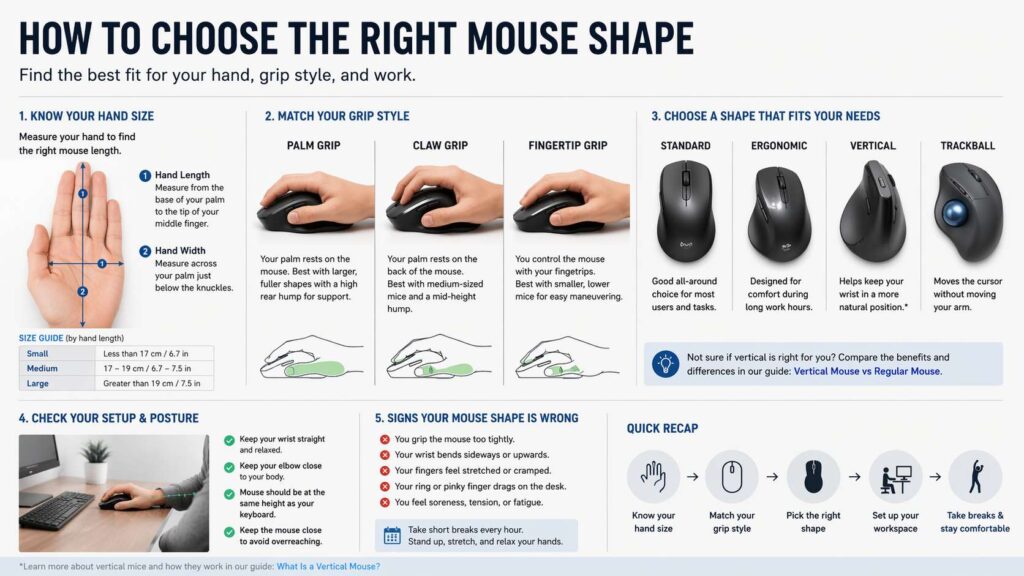
A simple measurement helps. Measure from the bottom of your palm to the tip of your middle finger. Then measure the width across your palm under the knuckles. You do not need lab-level precision. You just need a rough sense of small, medium, or large. That rough check is enough to rule out a lot of poor fits.
Small hands usually do better with shorter mice, lower button height, and slimmer sides. Medium hands fit the widest range of shapes. Large hands often need more length, more width, and a fuller rear section that supports the palm.
Now look at your current mouse. Does your palm hang off the back? Do your fingers extend too far past the front buttons? Does your thumb feel squeezed? Those clues tell you a lot.
Match the Shape to Your Grip Style
Grip style matters just as much as hand size. Most people fall into one of three groups: palm grip, claw grip, or fingertip grip.
Palm grip uses more contact across the whole hand. The palm rests on the shell, and the fingers lie flatter on the buttons. This grip likes a fuller body, a clear rear hump, and enough length to support the hand. A tiny mouse rarely feels good here.
Claw grip arches the fingers more. The palm touches the back area, but the fingers stay bent and ready for faster clicks. This grip often works best with a mouse that has a defined hump and a shorter front end. That shape gives the hand a solid anchor and keeps movement sharp.
Fingertip grip uses the least palm contact. The fingers guide the mouse, and the hand stays more open. This grip often prefers a smaller, lighter, and lower mouse. Too much bulk gets in the way. Too much hump can feel clumsy.
Many people buy the wrong shape by copying what a friend uses or what a popular review recommends. That shortcut often fails. Your hand does not care what works for someone else. It cares about support, reach, and control.
The Hump Changes the Whole Feel
The hump is the highest point on the mouse, and it changes more than people expect.
A rear hump gives palm support. That shape suits users who want the hand to rest on the mouse. It often feels better for office work, longer sessions, and slower, steady movement.
A centered hump gives the palm a contact point without filling the whole hand. That often suits claw grip well. The mouse feels planted, but it still feels quick.
A low hump leaves the hand more open. That style often suits fingertip grip and people who like fast repositioning.
Height matters too. A very tall shell can feel supportive on first touch, yet it can push the wrist into a bad angle. A very flat shell can feel quick, but it can leave the hand with little support. So do not chase extremes right away. A balanced shape usually works better for a first pick.
Side Shape and Finger Support Matter a Lot
The top of a mouse gets most of the attention in product photos. The sides deserve just as much attention.
A strong side shape gives the thumb a natural place to sit. It gives the ring finger and little finger a clear path too. That support lowers grip tension. Your hand does not need to clamp the shell just to keep control.
Bad side shape creates small problems that grow over time. Your little finger rubs the desk. Your ring finger curls inward. Your thumb presses too hard just to hold the mouse steady. None of that feels dramatic in the first ten minutes. After a few hours, it feels very real.
Button reach matters here too. The main clicks should sit under the fingers without stretch. The wheel should feel easy to reach without lifting the whole hand. Side buttons should sit close enough for natural use, but not so close that you hit them by mistake.
This is one reason some mice feel great in a store and worse at home. A short first touch does not reveal grip tension. Longer use does.
Pick a Shape That Matches Your Main Task
Not every mouse shape suits every job.
For office work, comfort usually matters most. You spend a lot of time on small movements, scrolling, clicking, and holding the mouse in one zone. A medium or larger ergonomic shape often works well here. It gives the hand more support and lowers grip strain over long sessions.
For gaming, control can matter more than full-hand support. Many players prefer a mouse that feels easier to lift, shift, and reset. That often means a lighter body and a shape that does not feel bulky. Still, the right gaming shape still depends on grip. A palm grip gamer and a fingertip grip gamer rarely want the same shell.
For editing, design, and detail work, shape and precision both matter. You need comfort for long sessions, but you need clean control too. A mouse with stable sides, well-placed buttons, and a wheel that feels easy to use often works best here.
Travel adds one more layer. Small travel mice save space in a bag. That does not make them a good full-time choice. A tiny mouse can work for short sessions in a café or airport. It often feels poor for six or eight hours at a desk.
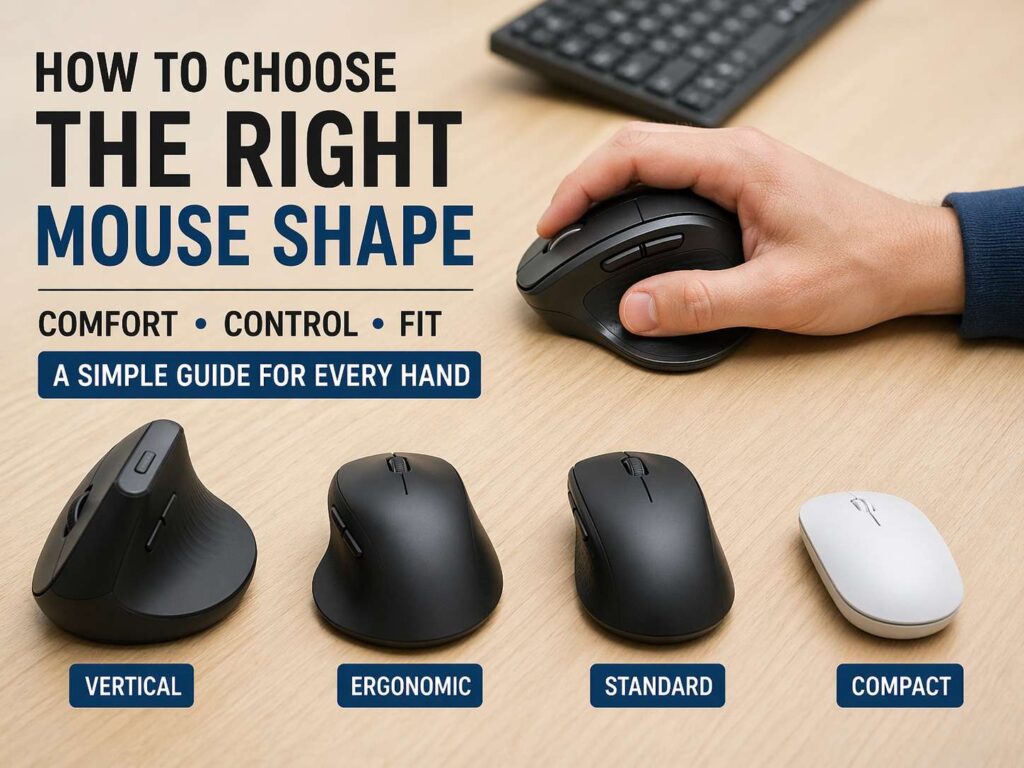
Standard Mouse, Vertical Mouse, or Something Else?
A standard mouse works well for a lot of people. That still holds true. The problem is not the standard layout itself. The problem is poor shape inside that layout.
Still, some users feel better with a different design. Vertical mice change forearm position and reduce the palm-down angle. That appeals to people who feel strain in the wrist or forearm during long workdays. The idea gets a lot of attention, and it makes sense to compare vertical mouse vs regular mouse before you buy.
The term vertical mouse gets used a lot, yet not everyone knows what it means in practice. This guide on what is a vertical mouse explains the basic shape and why some people switch to it.
Trackballs and centered mice sit in the same wider conversation. A trackball keeps the arm more still and shifts the work to the thumb or fingers. A centered mouse sits in front of the keyboard and reduces the reach to the side. Those designs suit some setups very well. They do not fit everyone, but they solve real problems for some users.
Your Desk Setup Still Matters
A better mouse shape helps, but it does not fix a bad setup on its own.
The mouse should sit close to the keyboard. Your shoulder should stay relaxed. Your elbow should rest near your side. Your wrist should stay close to straight, not bent upward and not pushed far out to the side. Those basics matter every day.
Take a quick look at your setup right now. Is the mouse far from the keyboard? Does your arm reach out too much? Does your shoulder lift to meet the mouse? That posture adds strain even with a good shell.
Desk height matters. Chair height matters. Arm support matters. So the best results come from pairing a good mouse shape with a sensible desk setup. One without the other still leaves comfort on the table.
Signs the Mouse Shape Is Wrong
Your body gives clear signals when the fit is bad.
You grip the mouse too hard. Your thumb presses into the side. Your wrist leans to one side. Your shoulder tightens. Your ring finger has nowhere to rest. Your little finger drags on the desk. You shift your hand every few minutes just to stay comfortable.
Pain does not always start in the wrist. Some people feel it in the forearm, elbow, shoulder, or even the neck. That is why comfort checks need to go beyond the hand alone.
Numbness, tingling, sharp pain, or night symptoms call for more attention. A new mouse is not a cure. It is a piece of the setup. Persistent symptoms deserve proper care and a real look at your daily posture, desk height, keyboard position, and work routine.
Breaks Matter More Than Most People Admit
Even the right mouse shape loses value during a poor routine.
The hand does not like staying locked in one position for hours. Short breaks help a lot. Stand up. Let the arms hang. Open and close the hand. Roll the shoulders. Then get back to work.
That reset sounds simple, and it works. A better shape lowers strain. Regular breaks keep strain from building up. Put both together, and daily comfort often improves a lot.
A Simple Way to Choose the Right Mouse Shape
So what is the fastest way to choose well? Start with hand size. Then check your grip style. Then look at hump position. Then study the sides. Then match the shape to your main task.
That order works. It cuts through the noise and keeps you focused on fit.
Pick a mouse that supports your hand without forcing it open too wide. Pick a shape that lets your fingers land on the buttons without stretch. Pick a shell that gives the thumb, ring finger, and little finger somewhere natural to sit. Then give it real desk time, not just a quick test in a shop.
Avoid buying by specs alone. Avoid buying by trend. Avoid buying the exact shape a reviewer loves just from one photo or one ranking list. Your comfort comes from fit, not hype.
The right mouse shape feels easy. Your hand relaxes. Your wrist stays calmer. The mouse feels steady without a tight grip. After a few hours, you stop thinking about it. That is the point. A good mouse should not demand attention. It should just feel right.
Final Thoughts
Choosing the right mouse shape is less about chasing the newest product and more about understanding your own hand. That is good news, since it makes the process simpler. You do not need ten confusing specs. You need the right size, the right grip match, and the right support in the places that matter.
Start there, and you avoid most bad picks.
If your current mouse leaves your hand tired, cramped, or tense, shape is the first thing to change. A better fit can make long workdays feel easier, gaming feel more controlled, and everyday browsing feel less annoying. That is a small upgrade with a very real payoff.