Quick answer
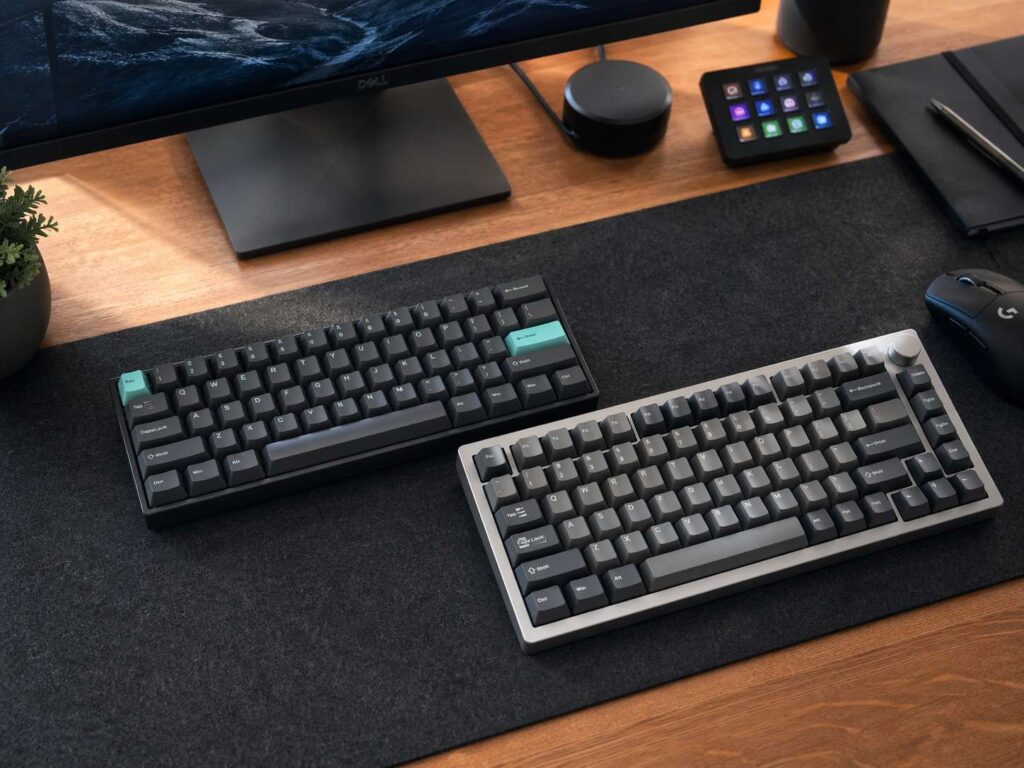
A 65% keyboard suits people who want a smaller desk setup, more mouse room, and a clean look. It keeps the arrow keys, but it removes the function row. So, F1 to F12 sit behind an Fn shortcut.
A 75% keyboard suits people who want a compact mechanical keyboard but still need the function row. It keeps the arrows, F keys, and a small navigation cluster. That makes it feel closer to a laptop keyboard or a trimmed-down TKL board.
The simple choice is this: pick 65% for space, travel, and gaming comfort. Pick 75% for daily work, shortcuts, coding, and mixed office use.
What is a 65% keyboard?
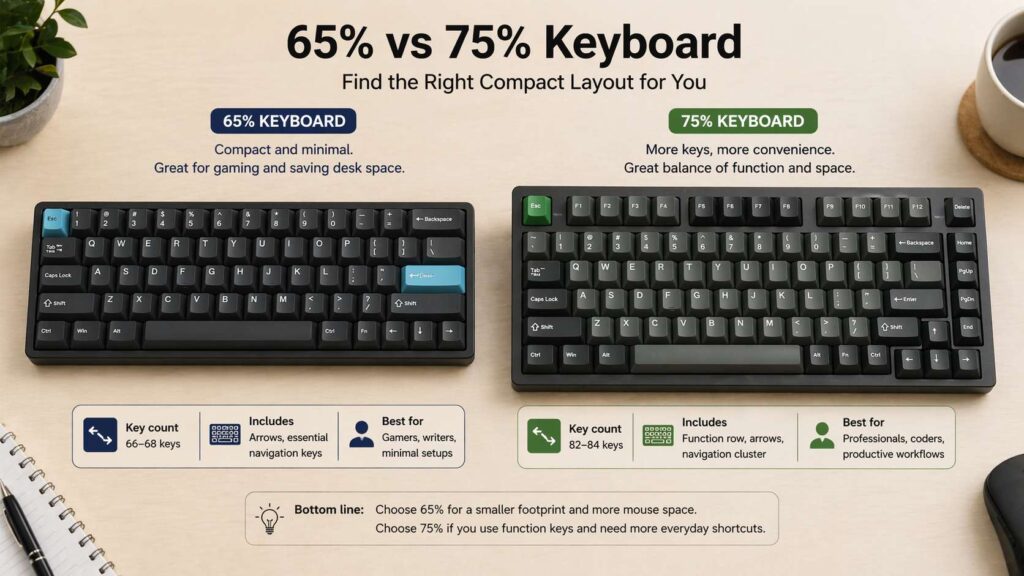
A 65% keyboard is a compact layout that keeps the main typing keys, number row, modifier keys, dedicated arrow keys, and a small set of navigation keys. Most 65% boards have around 67 or 68 keys, depending on the layout style.
The big change sits at the top. A 65 percent keyboard removes the dedicated function row. F1 to F12 still exist, but you reach them through the Fn key. For example, Fn + 1 often works as F1, Fn + 2 often works as F2, and the pattern keeps going.
That setup feels natural if you use letters, numbers, arrows, Enter, Backspace, Shift, and Ctrl far more often than F keys. So, the smaller shape feels worth it.
A 65% keyboard gives the mouse more room too. That helps with low-DPI gaming, small desks, and cleaner setups. It also feels more practical than a 60% keyboard, since a 60% keyboard removes the arrow keys from the main layout.
What is a 75% keyboard?
A 75% keyboard sits between a 65% keyboard and a TKL keyboard. It removes the number pad, but it keeps the function row. It also keeps the arrow keys and a small group of navigation keys.
Most 75% keyboards have around 82 to 87 keys. The exact number changes by brand, ANSI or ISO layout, and how the right-side keys are arranged.
This layout gives you a lot of control in a smaller body. You can press F1 to F12 without using an Fn shortcut. That matters for Excel, coding tools, browser shortcuts, media controls, game menus, and daily office work.
A 75% keyboard feels like the easiest compact layout to use. It saves space, but it does not remove too much. For a deeper layout breakdown, see this guide on what is a 75% keyboard.
65% vs 75% keyboard: the main difference
The function row creates the biggest split.
A 65% keyboard removes the F row. A 75% keyboard keeps it. That one detail changes how the board feels every day.
With a 65% keyboard, you use Fn shortcuts more often. That saves desk space, but it adds a small extra step for commands like refresh, rename, debug, mute, brightness, or game controls.
With a 75% keyboard, those commands get their own row. So, shortcut-heavy work feels faster. The board takes up more room than a 65% model, but it still stays much smaller than a full-size keyboard.
A full-size keyboard has a number pad, function row, arrows, navigation cluster, and main typing area. Both compact layouts cut that down. The 65% layout makes the sharper cut. The 75% layout keeps more direct controls.
Desk space and mouse room
A 65% keyboard wins for desk space. It removes the number pad, function row, and several navigation keys. That leaves more space on the right side for your mouse.
Gamers often notice this right away. A smaller keyboard gives the mouse pad more usable room. It can also help your shoulder position, since your mouse sits closer to your body.
A 75% keyboard still saves plenty of space compared with a full-size board. It drops the number pad and pulls the keys close together. Still, the function row adds height, so it needs more desk depth than a 65% keyboard.
For a tiny desk, a 65% board makes more sense. For a normal desk, a 75% board gives a better mix of space and function.
Typing feel and daily comfort
Typing comfort does not come from layout alone. Switches, keycaps, case angle, wrist position, and desk height matter too. Still, layout changes how often your fingers leave the main typing area.
A 65% keyboard keeps your hands close to the center. It feels tight, clean, and focused. Writers often enjoy that simple setup since it removes keys they rarely touch.
A 75% keyboard spreads the board out a little more. The F row adds height, and the navigation cluster gives you faster access to common commands. Office users often prefer that extra control.
For long typing sessions, both layouts can work well. Heavy shortcut use favors 75%. Pure writing, gaming, and simple browsing favor 65%.
Gaming use
A 65% gaming keyboard gives you more mouse room. That helps in shooters and fast games where wide mouse movement matters. The layout still keeps the main left-hand gaming zone, so WASD, Shift, Ctrl, Space, and number keys stay where you expect them.
A 75% gaming keyboard gives you more direct keys for game menus, media controls, macros, and shortcuts. Some games use F keys for camera tools, party commands, chat controls, or quick actions. With a 75% board, you can press those keys without a layer.
Competitive players often prefer 65% boards for space. Streamers, MMO players, and mixed-use gamers often prefer 75% boards for the extra controls.
Polling rate, latency, switch type, stabilizers, and firmware still matter more than size for raw gaming feel. The layout mainly changes comfort and desk movement.
Coding and productivity
Coding often feels easier on a 75% keyboard. Many developers use F keys for debugging, search tools, browser dev tools, refresh commands, and IDE shortcuts. A direct function row saves time and keeps your hands moving less.
A 65% keyboard can still work well for coding. You just need to learn the Fn layer. Once the shortcuts feel natural, the small layout can feel quick and clean.
For spreadsheets, 75% wins. It has no number pad, but it keeps the F row and navigation keys closer at hand. Users who enter lots of numbers should look at a separate numpad, TKL layout, or 96% keyboard. This 96 keyboard size guide explains that larger compact option in more detail.
For writing, emails, browsing, and school work, 65% often feels like enough. You type, move with arrows, delete text, and use common shortcuts without much trouble.
Portability and travel
A 65% keyboard travels better. It fits more bags, weighs less in many builds, and leaves more room on small tables. It pairs well with tablets, laptops, and compact monitor setups.
A 75% keyboard can travel too, but it feels more like a main desk board. It gives you more keys, but it takes up more bag space.
Wireless models can change the choice. A slim 75% keyboard can feel easier to carry than a heavy aluminum 65% board. So, check weight and case size before buying.
For mobile work, pick the smallest board that still gives you the keys you use daily. For many people, that means 65%. For shortcut-heavy users, 75% still makes more sense.
Keycaps, switches, and layout support
Both layouts work well with mechanical keyboard parts, but each layout can need special keycap sizes.
A 65% keyboard often uses a shorter right Shift key and a compact bottom row. A 75% keyboard can use tighter right-side keys and smaller navigation keys. So, always check the layout image before buying keycaps.
ANSI and ISO layouts matter too. ANSI is common in the United States. ISO is common in many European markets. The key count can change between the two versions.
Hot-swappable sockets help if you plan to change switches. Software support matters too. Boards with QMK, VIA, or strong brand software let you remap keys, build macros, and adjust layers. That matters more on a 65% keyboard, since you use Fn shortcuts more often.
65% keyboard pros and cons
A 65% keyboard gives you more mouse room. It looks clean, travels well, and keeps dedicated arrow keys. It suits gaming, writing, browsing, and light office work.
The smaller case leaves more room for a notebook, drawing tablet, large mouse pad, microphone arm, or desk mat. It also makes a setup look cleaner.
The main drawback is the missing function row. You need Fn shortcuts for F1 to F12. Some navigation keys sit behind layers too. That can slow you down during the first week.
75% keyboard pros and cons
A 75% keyboard gives you a strong balance of size and control. It keeps the function row, arrow keys, and useful navigation keys. It feels compact, but it still works well for daily work.
This layout suits people who want one keyboard for work and gaming. It saves space compared with a full-size board, but it avoids the bigger learning curve of a 65% layout.
The main drawback is size. It takes more room than a 65% keyboard. Some 75% boards also place keys very close together, so the right-side cluster can feel cramped at first.
Which compact keyboard should you buy?
Buy a 65% keyboard if you want the smallest practical layout with arrow keys. It fits gamers, writers, students, and laptop users who rarely press F1 to F12. It also works well for small desks and travel kits.
Buy a 75% keyboard if you use function keys often. It fits coders, office users, creators, and people who switch between work and games. It gives you a compact desk setup without hiding too many controls behind Fn layers.
Here is a quick test. Count how often you press the F row during one workday. If you use it many times, choose 75%. If you barely touch it, choose 65%.
Best choice for most people
A 75% keyboard is the safer pick for most buyers. It keeps more keys, needs less adjustment, and still saves desk space. It works well for Windows, macOS, coding, school, browsing, light gaming, and office work.
A 65% keyboard is the better pick for people who already know they want a smaller board. It feels cleaner and more focused. It also gives the mouse more space for gaming.
Neither layout is wrong. The better compact keyboard is the one that matches your habits. A 65% board cuts more keys. A 75% board keeps more control.
Final verdict
The 65% vs 75% keyboard choice comes down to one question: do you need a dedicated function row?
Choose 65% for a smaller footprint, more mouse room, and a clean compact keyboard layout. Choose 75% for easier shortcuts, better productivity, and a smoother move from a laptop or TKL keyboard.
For gaming and travel, 65% has the edge. For work, coding, and all-day mixed use, 75% feels safer. Both layouts keep arrow keys, both save space, and both can deliver a great typing experience with the right switches and keycaps.