A quick answer
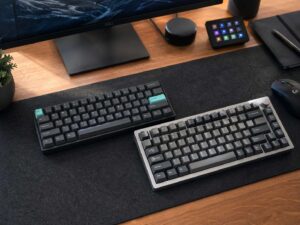
A 75% keyboard is a compact keyboard that keeps the main typing area, the function row, the arrow keys, and a few navigation keys, but drops the number pad. It takes up less space than a full-size keyboard, and it usually feels more complete than smaller layouts like 60% or 65%.
That is the sweet spot. You get a smaller board on your desk, but you do not give up the keys that still matter in daily use.
That balance is why interest in 75% keyboards keeps growing. People want more room for their mouse, a cleaner setup, and a keyboard that still feels practical for work, gaming, and normal typing.
What does 75% keyboard mean
The name sounds exact, but it is really a category label. It does not mean every board has the same number of keys. It means the keyboard keeps about three quarters of the space and function of a full-size layout.
In simple terms, you still get:
- the letter and number keys
- the function row
- arrow keys
- a small set of navigation keys like Delete, Page Up, or Page Down
You lose the number pad on the right side. Some extra keys move to a function layer too, so you press Fn plus another key to use them.
That is the main idea. A 75% keyboard tries to stay compact without feeling stripped down.
What keys are on a 75% keyboard
Most 75% keyboards keep the parts that people miss first on very small boards. You still get F1 to F12 at the top. You still get arrow keys. You still get a few keys for quick navigation.
That matters more than it sounds. You may use Delete all the time, lean on arrow keys for editing text, or rely on F keys in apps, games, spreadsheets, or coding tools.
A 60% keyboard cuts much more. A 65% keyboard gives you arrow keys, but it usually removes the full function row. A 75% board keeps both, so it often feels far easier to live with.
Laptop users often adapt to it fast. The layout feels compact, but not extreme. That makes it a strong upgrade for people who want a better typing feel without jumping to a huge desk setup.
How many keys does a 75% keyboard have
There is no single fixed key count. Many 75% keyboards land somewhere in the low 80s. You will often see 82-key, 84-key, or similar layouts.
That number changes from one brand to another. Some models add a knob. Others shift the navigation keys. A few boards keep one extra key on the right side. Another board might trim one out and place that function on a layer.
So the layout name helps, but the product image matters more. Two keyboards can both be called 75%, yet still feel a little different in daily use.
That is why smart buyers always check the exact layout before they buy.
Why people like 75% keyboards
Desk space is a big reason. A smaller keyboard leaves more room for your mouse, your notebook, or just empty space. That can make your setup feel cleaner right away.
Comfort is another reason. Your hands sit closer together on a compact board. For some people, that feels more natural over long sessions at a desk.
The layout still feels practical too. You keep the keys that disappear first on smaller boards, so the keyboard does not feel like a compromise every minute you use it.
Then there is style. Many 75% keyboards look neat, modern, and intentional. They fit clean desk setups very well, and they still work for serious daily tasks.
If you are comparing layouts, it helps to read guides like mechanical vs membrane keyboard and hall effect vs mechanical keyboard at the same time. Buyers often look at size, switch type, and feel together, not one by one.
75% keyboard vs full-size keyboard
A full-size keyboard gives you everything, including the number pad. That is useful for data entry, accounting work, and anyone who spends hours entering numbers.
A 75% keyboard cuts that section off. In return, it saves space and brings the mouse closer to the center of your body.
That trade can be worth it. The board looks cleaner. The desk feels less crowded. Typing still feels familiar.
Yet a full-size keyboard still makes more sense for some people. If you use the number pad every day, a 75% board will feel slower. That is the clearest downside.
75% keyboard vs TKL
TKL means tenkeyless. It removes the number pad, but it keeps wider spacing between the key groups. That makes it feel open and familiar.
A 75% keyboard keeps much of the same function set, but compresses the layout. The keys sit closer together, and the board takes up less width.
That leads to a simple choice.
Choose TKL if you want a layout that feels roomy and easy to switch to from a full-size board.
Choose 75% if you want a tighter shape and more free space on the desk.
It is easy to get torn between these two. They are close in use, but the shape changes the feel more than you might expect.
75% keyboard vs 65%
This comparison matters a lot. A 65% keyboard is smaller than a 75% keyboard. It usually keeps the arrow keys, but it removes the function row.
That makes the 65% layout great for people who want the smallest board they can still use comfortably.
The 75% layout adds the F keys back. That one change makes a big difference. It helps in work apps. It helps in some games. It helps in shortcuts too.
So the choice is simple.
Pick 65% if size matters most.
Pick 75% if you want compact size and fewer trade-offs.
Who should buy a 75% keyboard
A 75% keyboard fits a lot of setups.
It works well for students. It works well for office users. It works well for writers, coders, and gamers who want more room on the desk but still want the function row.
It is a strong fit for people who move from a laptop to a desktop setup. The layout feels familiar, but the typing experience usually feels better.
It suits buyers who want one keyboard for everything. That is a big reason the layout stays popular. You can type, game, browse, edit text, and do normal work without feeling boxed in.
Yet it is not the right fit for everyone. If you need a number pad for heavy spreadsheet work, full-size suits you better. If you just like wider spacing, TKL works too.
What to check before you buy
Start with the layout image. Do not trust the size label alone. Look at the right side of the keyboard. Check the placement of Delete, Page Up, Page Down, and arrow keys.
Next, look at the switch type.
Linear switches feel smooth from top to bottom. Tactile switches give a bump during the press. Clicky switches add a louder click. Each type changes the feel in a real way.
Then check if the board is hot-swappable. That feature lets you change switches later without soldering. That freedom helps, especially if you are still figuring out what feel you prefer.
Connection type matters too. Wired models keep things simple. Wireless models give you a cleaner desk and easier multi-device use.
Build quality counts as well. Good stabilizers, solid keycaps, sound dampening, and a strong case can make one keyboard feel far better than another, even if both use the same layout.

Is a 75% keyboard good for gaming
Yes, for most people it is.
You get more mouse space than a full-size board. That helps a lot in shooters and fast games. You still keep the function row and arrow keys too, so you do not lose much flexibility.
Some players still prefer 60% or 65% boards for the smallest footprint possible. That makes sense. Yet a 75% keyboard often feels like the easier choice for people who play games and do normal work on the same desk.
That is the real strength of this layout. It does not push you into a narrow use case.
Is a 75% keyboard good for typing and office work
Yes. In fact, this is where the layout makes a lot of sense.
You keep the keys that people use for editing text, jumping through documents, and using shortcuts. The board stays small enough to save space, but it does not feel cramped in the way tiny boards sometimes do.
That balance makes it easy to recommend for everyday use. It feels compact, but it still feels complete.
Common search terms people use for this topic
People do not always search with the same wording. Some want a basic definition. Others compare sizes or switch types before they buy.
Common searches around this topic include:
- what is a 75% keyboard
- 75 percent keyboard
- 75% keyboard layout
- 75% mechanical keyboard
- 75 vs TKL keyboard
- 65 vs 75 keyboard
- compact keyboard layout
- best 75% keyboard for typing
- best 75% keyboard for gaming
- hot-swappable 75% keyboard
Using those terms in a natural way helps readers find the guide they actually wanted.
Final thoughts
A 75% keyboard is one of the easiest compact layouts to recommend. It saves desk space, keeps the function row, keeps the arrow keys, and still feels practical for daily use.
That mix is the case for a 75% board. A full-size board gives you everything, but it takes up more room. A 65% board saves more space, but it asks for more compromise. A 75% keyboard sits right in the middle.
If you want a compact keyboard that still feels complete, this layout deserves a close look.