Quick answer
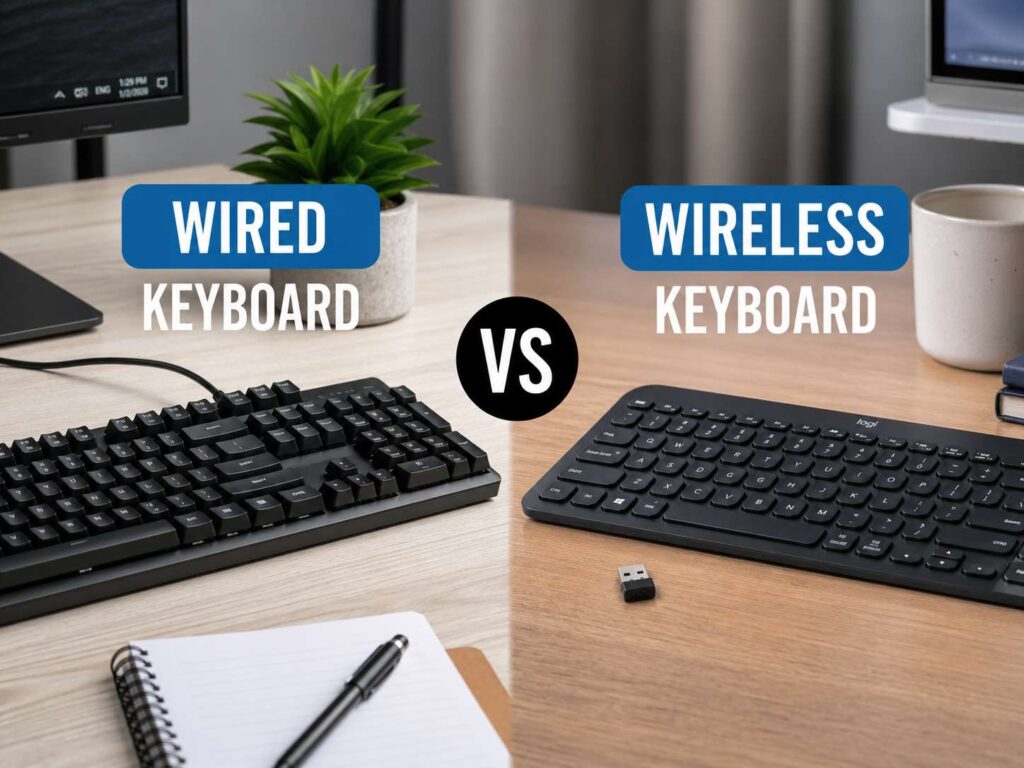
A wired keyboard is the better pick for people who want a simple setup, steady power, and no battery checks. It plugs into your computer and starts working right away. That makes it great for desktop PCs, gaming desks, shared workstations, and long work sessions.
A wireless keyboard is better for people who want a cleaner desk, fewer cables, and easier laptop use. It also works well for tablets, couch setups, compact desks, and people who switch between several devices.
So, which one should you buy? Most people will be happy with a good wireless keyboard. It looks cleaner, feels easier to move, and often works with more than one device. Still, a wired keyboard remains the safest choice for anyone who wants the fewest possible problems.
What is a wired keyboard?
A wired keyboard connects to your computer through a cable. Most modern models use USB-A or USB-C. Older keyboards sometimes use PS/2, but that connection is rare on newer computers.
The cable handles both power and data. That means the keyboard does not need batteries, charging, pairing, or a wireless receiver. You plug it in, and the computer reads each key press through the cable.
This simple design gives wired keyboards a strong reputation for reliability. They work well for office typing, gaming, data entry, coding, schoolwork, and general home use. They also suit people who dislike extra setup steps.
A wired keyboard can still look tidy. A detachable USB-C cable, a coiled cable, or under-desk cable clips can clean up the desk fast. So, the cable does not have to ruin the setup.
What is a wireless keyboard?
A wireless keyboard sends key presses without a cable. Most models use Bluetooth, a 2.4GHz USB receiver, or both.
Bluetooth keyboards pair directly with laptops, tablets, phones, and some smart TVs. They work well for travel and daily typing. Many Bluetooth keyboards also support device switching, so you can move from a laptop to a tablet with one shortcut.
A 2.4GHz wireless keyboard uses a small USB receiver. This type often feels faster and steadier than basic Bluetooth. For that reason, many wireless gaming keyboards use 2.4GHz mode.
Some wireless keyboards offer three modes: wired, Bluetooth, and 2.4GHz. These hybrid models give you the most freedom. You can use Bluetooth for a tablet, 2.4GHz for gaming, and USB-C when charging.
Wired vs wireless keyboard for input lag
Input lag is the delay between pressing a key and seeing the action on screen. For normal typing, both wired and good wireless keyboards feel fast. Email, browsing, spreadsheets, schoolwork, and writing do not demand extreme speed.
Gaming changes the story a little. Fast shooters, rhythm games, and competitive games reward quick input. A wired keyboard gives the most direct connection, so it remains a safe choice for serious players.
That said, good 2.4GHz wireless gaming keyboards now feel very close to wired models. Many players will not notice a clear delay. The receiver quality, polling rate, firmware, and connection stability matter more than the word “wireless” on the box.
Bluetooth works fine for office use and casual gaming. Still, it is not the best choice for competitive play. Pick wired or 2.4GHz wireless for a gaming desk.
Wired vs wireless keyboard for gaming
Gamers should look at latency, polling rate, key rollover, switch type, and connection stability.
A wired gaming keyboard gives you the least complicated setup. It draws power from the USB cable, so the battery never runs out. RGB lighting stays on without draining anything. The keyboard also works during long sessions with no charging breaks.
A wireless gaming keyboard gives you a cleaner desk and more freedom. It also pairs well with couch gaming, small rooms, and multi-device setups. Many newer models can switch between a gaming PC, laptop, and tablet.
For the best result, avoid cheap Bluetooth-only gaming keyboards. A proper gaming keyboard should include a strong 2.4GHz receiver, gaming mode, n-key rollover, anti-ghosting, and clear software controls.
A wired keyboard still wins for pure simplicity. A good 2.4GHz wireless keyboard wins for people who want a cleaner gaming setup without a messy cable.
Wired vs wireless keyboard for office work
Office users often gain more from wireless than gamers do. A wireless keyboard clears desk space and makes laptop docking easier. It also lets you place the keyboard in a more comfortable position.
This matters more than many people think. A better keyboard position can help your shoulders, wrists, and neck feel more relaxed during long workdays. The same idea applies to mice too, so many desk setups compare keyboard choice with wireless mouse vs wired mouse decisions.
Bluetooth keyboards are a strong fit for office use. They save USB ports and pair well with laptops. Multi-device models also help people who use a work laptop, personal laptop, tablet, or phone during the day.
A wired keyboard still makes sense for shared offices, reception desks, schools, and business PCs. It removes battery problems and pairing confusion. For teams, that simple setup can save time.
Battery life and charging
Wireless keyboards need power from batteries or an internal rechargeable cell. Battery life changes a lot from one model to another.
A slim Bluetooth keyboard with no backlight can run for months. A mechanical wireless keyboard with bright RGB lighting can drain much faster. High polling rates and 2.4GHz mode also use more power.
Rechargeable keyboards usually charge through USB-C. Many keep working during charging, so a low battery does not always stop your work. Still, it adds one more thing to remember.
Replaceable battery models use AA or AAA cells. They suit people who prefer fast swaps over charging cables. Keep spare batteries in a drawer, and you can fix a dead keyboard in seconds.
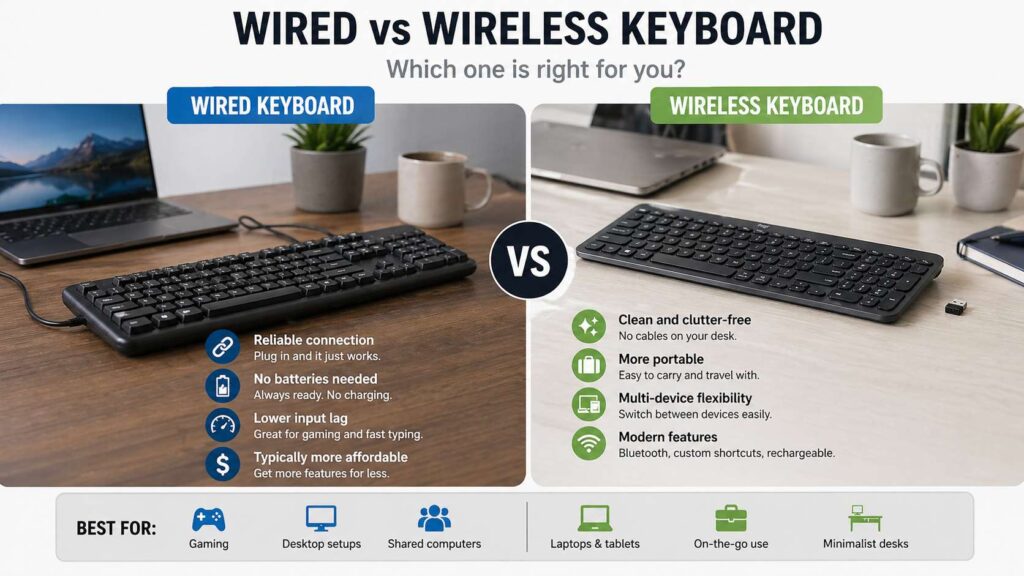
Wired keyboards win here. They never need charging, and they never need spare batteries.
Bluetooth vs 2.4GHz wireless keyboards
Bluetooth and 2.4GHz wireless are not the same. They both remove the cable, but they suit different users.
Bluetooth is best for laptops, tablets, phones, and clean travel setups. It does not need a USB receiver, so it works well with slim devices. It also makes multi-device switching easier.
2.4GHz wireless is better for speed and stability. It uses a USB receiver and often feels more responsive. This makes it a better pick for gaming, fast typing, and desktop setups.
The same rule often applies to mice. A 2.4GHz mouse usually suits gaming better, and Bluetooth suits travel better. For a closer look at that side of the setup, see this guide on Bluetooth vs 2.4GHz mouse in 2026.
For keyboards, the best all-round option is a model that supports both. Use Bluetooth for travel and 2.4GHz for your main desk.
Desk setup and cable clutter
Wireless keyboards make a desk look cleaner. One less cable can make a small desk feel larger. This helps with monitor arms, docking stations, standing desks, and minimalist setups.
They also make it easier to move your keyboard out of the way. You can clear space for a notebook, lunch break, video call, or drawing tablet.
Wired keyboards can still look good with cable management. A detachable cable helps a lot. You can replace the cable, route it behind the desk, or use a shorter cable for a cleaner setup.
The real question is simple: does the cable bother you every day? If yes, wireless feels better. If no, wired gives you a cheaper and simpler setup.
Reliability and connection problems
A wired keyboard has fewer things that can go wrong. The cable connects the keyboard to the computer. If the cable and port work, the keyboard works.
Wireless keyboards add extra parts. The battery can run low. Bluetooth pairing can fail. A USB receiver can get lost. Other wireless devices can crowd the same space.
Most modern wireless keyboards work well in normal homes and offices. Problems show up more often in crowded wireless areas, metal desks, USB hubs, and setups where the receiver sits far from the keyboard.
A simple fix helps: place the receiver closer to the keyboard. Use a front USB port or a short USB extension cable. This can reduce dropouts and missed key presses.
For repair work, BIOS access, shared desks, and public computers, wired still feels safer.
Portability and travel
Wireless keyboards are better for travel. They pack well, work with tablets, and keep laptop bags cleaner. A small Bluetooth keyboard can turn a tablet into a light writing setup.
Look for long battery life, a strong case, slim keys, and a layout that does not feel cramped. Some compact keyboards move keys into strange places, so check the layout before buying.
A wired keyboard can travel too, but the cable adds bulk. You also need the right port or adapter. USB-C makes this easier, but not every computer has the same ports.
For travel, Bluetooth wins. For LAN events, repair kits, and hotel gaming, a compact wired keyboard still makes sense.
Keyboard size and layout
Connection type matters, but keyboard size matters just as much.
A full-size keyboard includes a number pad. It works well for spreadsheets, accounting, data entry, and office tasks with lots of numbers.
A TKL keyboard removes the number pad but keeps the arrow keys and function row. It gives your mouse more room. Writers, gamers, and office users often like this size.
A 75% keyboard keeps most keys in a tighter body. It saves desk space but still keeps the function row.
A 65% keyboard removes the function row. It suits small desks and travel, but it asks you to use more shortcuts.
A 60% keyboard removes even more keys. It looks clean and saves space, but it takes time to learn.
Pick the size first, then pick the connection type. A comfortable layout matters more than a wireless badge.
Mechanical, membrane, and low-profile keyboards
Wired and wireless keyboards come in several switch styles.
Mechanical keyboards use separate switches under each key. They feel crisp and often last a long time. They can sound loud, soft, sharp, or quiet, based on the switch and case.
Membrane keyboards feel softer and usually cost less. Many office keyboards use this design. They work fine for basic typing, but they often feel less precise than mechanical boards.
Low-profile keyboards use shorter keys and a thinner body. They feel closer to laptop keyboards. Many people like them for fast typing and lower wrist angle.
For quiet offices, look for silent switches, low-profile keys, or dampened membrane designs. For gaming, look for low latency, good rollover, and a layout that leaves enough mouse space.
Price and long-term value
Wired keyboards usually cost less than similar wireless models. They do not need a battery, wireless chip, receiver, or charging circuit. That often means you get better switches or better build quality for the same money.
Wireless keyboards cost more, but they can feel worth it. You pay for freedom, multi-device support, cleaner desk space, and easier travel.
Budget buyers should start with wired. Office users who switch devices all day should look at wireless. Gamers should compare wired models with 2.4GHz wireless models, not basic Bluetooth boards.
A hybrid keyboard often gives the best long-term value. It works with a cable, Bluetooth, and a 2.4GHz receiver. That means it can fit more setups over time.
Which one should you buy?
Choose a wired keyboard if you want the simplest setup. It fits desktop PCs, gaming rigs, shared desks, school labs, public computers, and repair benches. It also suits people who hate charging devices.
Choose a wireless keyboard if you want a clean desk, better laptop support, tablet pairing, or multi-device switching. Pick Bluetooth for travel and office work. Pick 2.4GHz for gaming and faster response.
Choose a hybrid keyboard if you want both. This is the safest pick for many people. You get wireless freedom most of the time, plus a cable backup during charging or gaming.
For most home and office users, a good wireless keyboard with USB-C charging and multi-device support makes the most sense. For serious gaming on a fixed PC, wired or 2.4GHz wireless gives the best experience.
Final verdict
The wired vs wireless keyboard choice no longer has one winner for everyone. Wired keyboards still lead for simplicity, steady power, and low-risk reliability. Wireless keyboards now offer clean setups, long battery life, multi-device use, and strong speed on better models.
Buy wired for a fixed gaming PC, shared workstation, repair setup, or budget build. Buy wireless for laptop work, travel, clean desks, tablets, and flexible setups. Buy a hybrid model if you want one keyboard that handles both roles.