Mouse shape matters more than many buyers expect. It changes how your hand rests, how your wrist bends, how your fingers reach the buttons, and how much control you feel during daily use.
For that reason, the choice between a symmetrical mouse and an ergonomic mouse should not come down to looks alone. A symmetrical mouse gives you a balanced shape with flexible grip control. An ergonomic mouse gives you a shaped body that supports one hand position more clearly.
So, which one should you buy? For fast gaming, a symmetrical mouse often feels easier to move and lift. For office work, an ergonomic mouse can feel calmer during long days. For wrist comfort, the best pick depends on your grip, desk setup, hand size, and daily habits.
This guide explains the real difference in plain language, so you can choose a mouse that fits your hand better.
What Is a Symmetrical Mouse Shape?
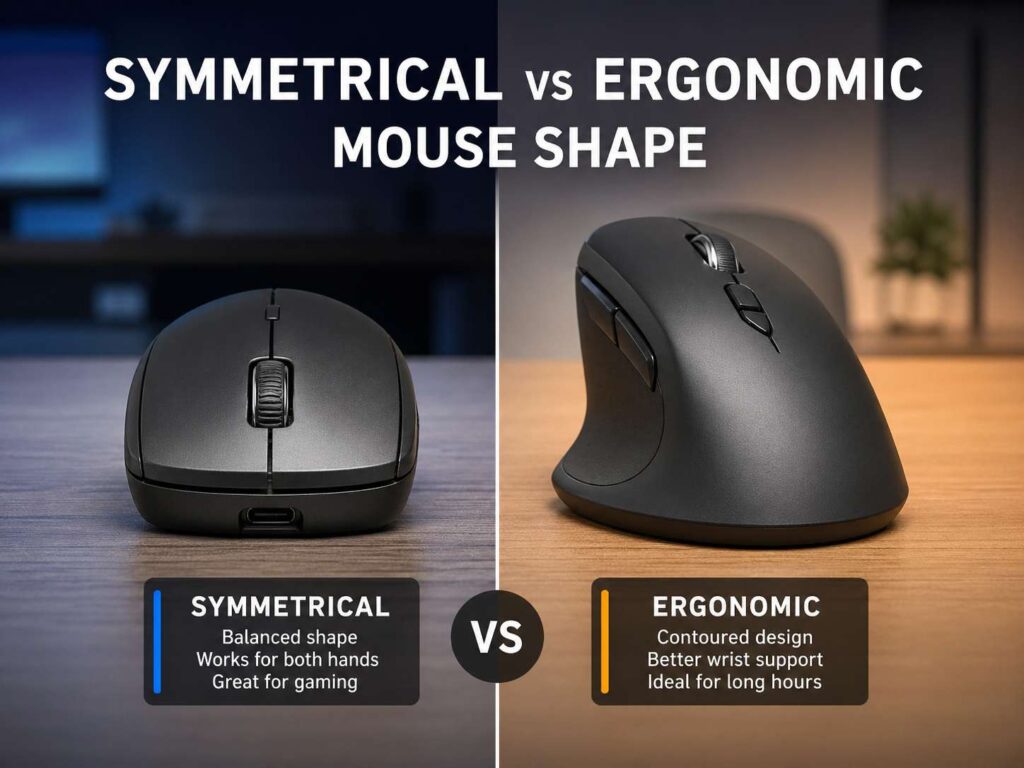
A symmetrical mouse has a balanced left and right side. The shell looks almost the same on both sides, at least from the top. Many people call this an ambidextrous mouse, but that is not always accurate.
A true ambidextrous mouse works well for left-handed and right-handed users. It usually has side buttons on both sides, or it lets you change the button layout. A standard symmetrical mouse can still have thumb buttons only on the left side. In that case, right-handed users get the better experience.
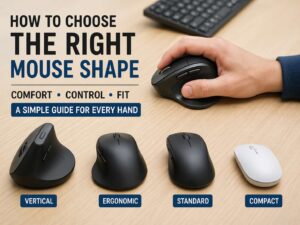
This shape feels familiar to most people. Many gaming mice, travel mice, and basic office mice use a symmetrical design. The hand sits on top, the fingers land straight ahead, and the mouse does not force the thumb into a deep groove.
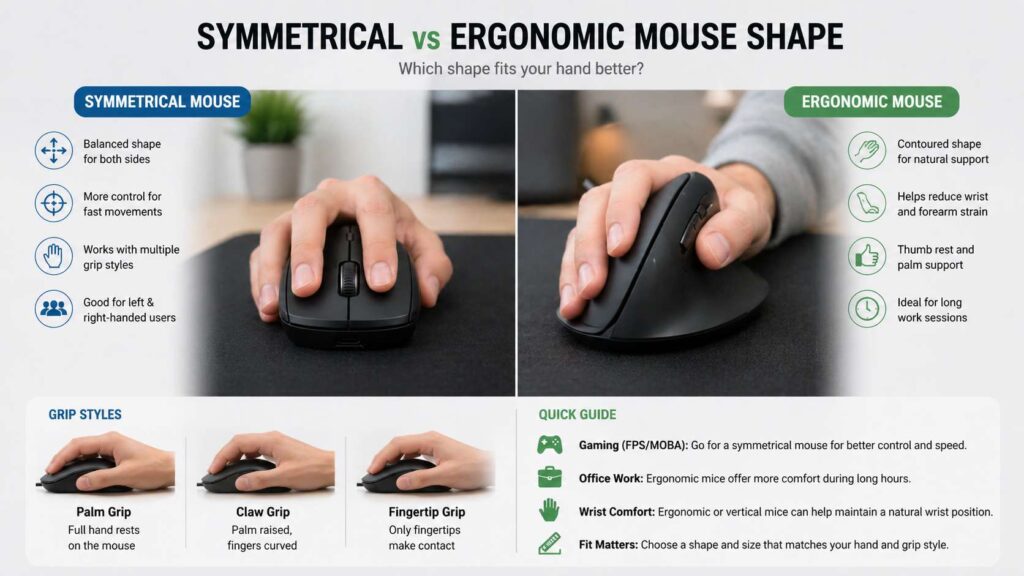
For gaming, that balanced shape can feel very natural. You can use palm grip, claw grip, or fingertip grip. You can shift your fingers during play. You can lift the mouse often without fighting a large thumb rest.
But there is a trade-off. A flatter symmetrical mouse can keep your palm more turned down toward the desk. Some users feel fine with that posture. Others feel wrist or forearm strain after long sessions.
What Is an Ergonomic Mouse Shape?
An ergonomic mouse has a shaped shell made for comfort and support. It often has a raised palm area, a thumb groove, a wider body, and a slope that tilts the hand slightly inward.
Some ergonomic mice look close to normal mice. Others use a vertical shape that places the hand closer to a handshake position. That vertical style can reduce the feeling of forearm twist for some users.
For office work, this design can feel more relaxed. Your hand has a clear place to rest. Your thumb does not need to squeeze as much. Your palm gets more support. Then the mouse starts to feel less like a tool you grip and more like something your hand rests on.
At the same time, ergonomic mice are not perfect for everyone. A large ergonomic mouse can feel bulky. A deep thumb rest can feel restrictive. A full vertical mouse can take time to learn, especially for users who need fast pointer control.
So, the shape needs to fit your hand. Good ergonomics start with fit, not marketing claims.
Symmetrical Mouse Shape: Main Benefits
A symmetrical mouse gives you freedom. Your hand can move forward, backward, and sideways without the shell forcing one position. That helps users who change grip during the day.
Gamers often like this shape for fast movement. A balanced mouse can feel easier to lift, reset, and aim. It also works well on large mouse pads, where wide arm movement matters.
For claw grip, a symmetrical mouse can feel sharp and controlled. For fingertip grip, it can feel light and quick. For palm grip, a larger symmetrical mouse with a higher hump can still feel comfortable.
Another benefit is simple sharing. A symmetrical mouse works better on a shared desk than a strong right-handed ergonomic shape. Left-handed users also get more options, though they still need to check the side button layout.
The main downside is support. A symmetrical mouse does not guide the hand as much. It can feel less comfortable after long spreadsheet, browser, or editing sessions. For users who grip the sides tightly, the flat shape can create finger tension.
Ergonomic Mouse Shape: Main Benefits
An ergonomic mouse gives your hand more structure. The thumb has a resting area. The palm gets more contact. The fingers often sit at a softer angle.
For long office days, that can make a real difference. Less gripping means less hand fatigue. A mild slope can make the wrist feel more relaxed. A wider base can make the pointer feel steady during detailed work.
This is why many users move to an ergonomic mouse after discomfort from a flat mouse. The change does not fix every problem, but it can reduce strain from awkward posture and tight gripping.
For example, someone who edits documents for seven hours per day may care more about comfort than fast lifts. A user who works in spreadsheets may want a wider mouse with a smooth scroll wheel. A designer may prefer extra buttons and a stable palm rest.
Still, an ergonomic mouse can feel slower at first. The shape tells your hand where to sit. That helps comfort, but it can limit quick grip changes. For fast games, some users prefer the freedom of a symmetrical shell.
Which Shape Is Better for Gaming?
For most gamers, a symmetrical mouse is the safer first pick. It fits more grip styles and gives more freedom during fast movement.
FPS players often want low weight, clean side walls, and a shape that supports quick lifts. A symmetrical mouse gives that. It lets you aim with your arm, wrist, and fingers without locking your hand into one position.
For claw grip, look for a shorter body and a rear hump that supports the base of your palm. For fingertip grip, choose a smaller, lighter mouse with clean sides. For palm grip, choose a longer body with enough height to fill your hand.
Ergonomic gaming mice still make sense for many players. A right-handed sloped mouse can feel great for relaxed aim, MMOs, strategy games, and long casual sessions. The extra palm support can reduce hand fatigue.
But a full vertical mouse is rarely the best choice for fast competitive games. It can feel tall, slower to lift, and less precise for fingertip control. For office work mixed with light gaming, it can still be a smart choice.
For a deeper comparison, see this guide to ergonomic mouse vs gaming mouse.
Which Shape Is Better for Office Work?
For office work, ergonomic mice often feel better over long sessions. The reason is simple. Office tasks repeat the same small movements for hours. A shaped mouse can help the hand rest instead of grip.
Email, spreadsheets, web apps, design tools, and coding all ask for steady pointer control. They do not always need fast lifts or rapid grip changes. So, palm support and wrist comfort matter more than raw speed.
A symmetrical mouse still works well for many office users. It is often cheaper, smaller, and easier to adjust to. A medium symmetrical mouse with a soft hump can serve general browsing, writing, and light editing very well.
For that reason, the best office mouse is not always the most dramatic ergonomic model. A mild sloped mouse can offer the best balance. It supports your hand but still feels familiar.
Desk setup matters too. Keep the mouse close to the keyboard. Let your elbow rest near your body. Move the mouse with your arm, not only your wrist. Then the shape has a better chance to help.
Which Shape Is Better for Wrist Comfort?
For wrist comfort, start with posture. A mouse should not force your wrist to bend sideways, twist hard, or stay tense all day.
An ergonomic mouse can help some users by placing the hand at a softer angle. A vertical mouse can reduce the palm-down position. A sloped ergonomic mouse can give a middle ground between a flat mouse and a full vertical design.
Still, pain can come from many causes. A mouse that is too large can stretch your fingers. A mouse that is too small can make you claw your hand. A high desk can raise your shoulder. A far-away mouse can pull your arm outward.
So, do not blame shape alone. Check the full setup. Your shoulder should feel relaxed. Your wrist should stay near straight. Your fingers should reach the buttons without effort.
For many users, the best path starts with a mild ergonomic shape. Then, test a vertical mouse only if the flat or sloped shape still feels wrong. This step-by-step change makes adjustment easier.
Hand Size and Grip Style Matter More Than Labels
A mouse can have great reviews and still feel wrong in your hand. Size, grip style, and shell height decide comfort.
For palm grip, your palm should rest on the mouse without forcing your fingers past the front edge. A longer mouse often works best.
For claw grip, the rear hump matters more. Your palm touches the back of the mouse, but your fingers arch over the buttons. A shorter mouse with a clear rear hump often feels better.
For fingertip grip, low weight and clean sides matter most. Your palm barely touches the mouse, so the body should not feel too tall or wide.
Hand width matters too. A narrow mouse can make your thumb and ring finger squeeze. A wide mouse can spread your hand too much. Both problems can create tension.
A quick fit test helps. Rest your hand on the mouse without clicking. Your fingers should land naturally on the buttons. Your thumb should sit without pressure. Your wrist should stay close to straight. Then move the mouse in small circles. The motion should feel easy, not forced.
For more help with fit, read this guide on the best mouse shape for your hand.
Symmetrical vs Ambidextrous Mouse: Know the Difference
A symmetrical mouse and an ambidextrous mouse are not always the same thing.
A symmetrical mouse has a balanced shell. An ambidextrous mouse supports both left-handed and right-handed use. That means the buttons, side controls, and software settings need to work for both hands.
Many mice look symmetrical from above, but they place thumb buttons only on the left side. Right-handed users get full control. Left-handed users lose those buttons or have to use them awkwardly.
So, check the button layout before you buy. If you are left-handed, look for side buttons on both sides, removable side buttons, or a dedicated left-handed model.
This small detail can change the whole experience. Shape matters, but button placement matters too.
How to Choose the Right Mouse Shape
Start with your main use. For fast gaming, start with a symmetrical mouse. For office work, start with a sloped ergonomic mouse. For wrist twist or forearm tension, test a vertical mouse. For shoulder reach issues, a trackball or centered mouse can make sense.
Next, match the mouse to your grip. Palm grip needs support. Claw grip needs a clear rear hump. Fingertip grip needs a small, light body with clean sides.
After that, check the size. Length matters, but height and grip width matter too. A mouse can look small on paper and still feel tall in the hand. A wide thumb rest can change the fit more than the total length.
Weight also changes the feel. A heavy ergonomic mouse can feel stable during work. A light symmetrical mouse can feel faster during games. Very light mice can feel twitchy for some users, so pointer speed matters too.
Button placement deserves attention. Side buttons should sit under your thumb without a stretch. The scroll wheel should feel easy to reach. Main clicks should not force your fingers forward.
Then check the surface under the mouse. Poor glide can make any shape feel tiring. A good mouse pad, smooth feet, and a cable that does not drag can reduce effort right away.
Quick Picks by User Type
For FPS gamers, choose a light symmetrical mouse with clean sides and a shape that suits claw or fingertip grip.
For office users, choose a medium ergonomic mouse with a mild slope, thumb support, quiet clicks, and a smooth scroll wheel.
For left-handed users, choose a true ambidextrous mouse with side buttons on both sides, or pick a dedicated left-hand ergonomic mouse.
For wrist comfort seekers, test a sloped ergonomic mouse first. Then try a vertical mouse if forearm twist still bothers you.
For small hands, avoid tall ergonomic shells with large thumb rests. A compact symmetrical mouse or small ergonomic mouse will often feel better.
For large hands, look for a longer body, wider grip width, and enough palm support. A tiny mouse can create too much finger tension.
For travel, choose a small symmetrical mouse. It packs easily and works on many desk types.
For creative work, choose comfort and button layout over extreme gaming specs. A wider ergonomic mouse can feel better during long editing sessions.
Common Mistakes to Avoid
Do not buy a mouse only for its DPI number. Most modern mice track well enough for normal work. Shape, size, and comfort matter more for daily use.
Do not assume vertical means better for every person. A vertical mouse changes your hand angle, but it also changes control. Test it with real tasks before switching fully.
Do not ignore desk height. A poor desk setup can make even a great mouse feel bad. Keep the mouse close and keep your shoulder relaxed.
Do not grip harder for control. A mouse should move easily under the hand. Lower pointer speed can help if you tense up during precise work.
Do not buy a mouse that is too large. Oversized ergonomic mice often look comfortable, but they can stretch the thumb and fingers.
Do not forget the scroll wheel. Office users touch the wheel constantly. A bad wheel can ruin an otherwise good mouse.
Final Verdict: Which Mouse Shape Should You Pick?
Choose a symmetrical mouse shape if you want speed, grip freedom, easy lifting, and flexible control. It suits FPS gaming, claw grip, fingertip grip, travel setups, shared desks, and many left-handed users.
Choose an ergonomic mouse shape if you want better palm support, a calmer hand position, and more comfort during long work sessions. It suits office work, palm grip, right-handed comfort, and users who dislike flat mouse posture.
For many people, the best middle option is a sloped ergonomic mouse. It still feels close to a normal mouse, but it gives the hand more support. That makes it easier to adjust and easier to use for full workdays.
The right mouse is the one that fits your hand, your grip, and your desk. Start with shape. Then check size, weight, buttons, scroll feel, and glide. That order gives you a better chance of buying a mouse that feels right after the first week, not only during the first five minutes.