Most keyboards look familiar for a reason. The rows sit straight, the spacebar sits in the center, and your hands follow a pattern you learned years ago. That makes a standard keyboard easy to use from the first minute.
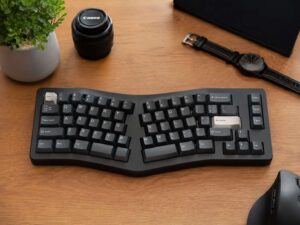
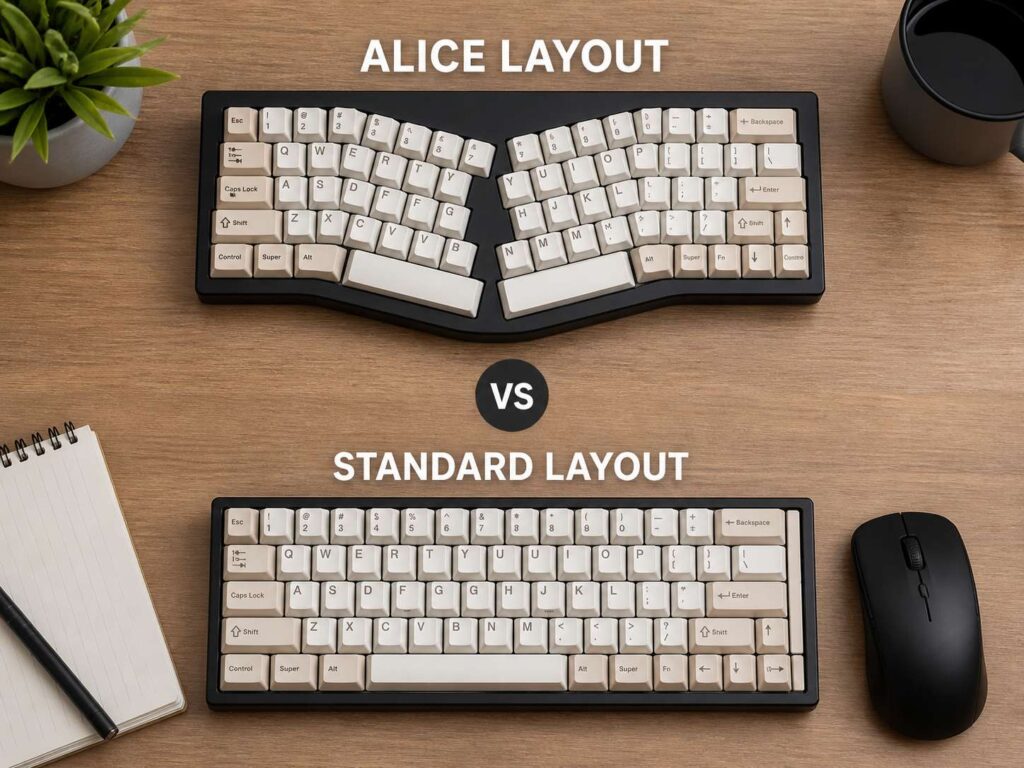
An Alice layout changes that shape. It splits the main typing area into two angled halves, so your wrists sit in a more open position. Many Alice keyboards also use two smaller spacebars and extra thumb keys.
So, which one feels better? For many people, an Alice keyboard feels more relaxed during long typing sessions. Still, a standard keyboard wins for gaming, shared desks, office use, and anyone who wants a simple plug-and-play setup.
What Is an Alice Keyboard Layout?
An Alice keyboard uses a split, angled layout. The left and right typing areas tilt away from each other. For that reason, your hands can rest at a wider angle instead of pointing straight ahead.
At first glance, the layout looks strange. The keys curve slightly toward the center. The spacebar area often has two small bars instead of one long bar. Some boards place the B key only on the left side. Other models add a second B key, which makes the change easier.
Over time, the design starts to make sense. Your wrists do not need to bend inward as much. Your thumbs can take on more work too, since many Alice boards let you map thumb keys to space, enter, backspace, or layer access.
In practice, an Alice keyboard sits between a standard keyboard and a full split ergonomic keyboard. It feels different, but it does not feel as extreme as two separate keyboard halves.
What Is a Standard Keyboard Layout?
A standard keyboard uses straight rows and a familiar key layout. You see it on full-size keyboards, tenkeyless boards, 75% boards, 65% boards, and most laptop keyboards.
That familiarity is its biggest strength. You sit down, place your hands on the home row, and start typing. Your shortcuts work the way you expect. Your gaming keys feel normal. Your keycap choices are easier too.
Standard keyboards also come in far more styles. You can buy a cheap office keyboard, a quiet low-profile board, a premium mechanical keyboard, or a fast gaming model. For a closer look at height and typing feel, this guide on low-profile vs standard mechanical keyboard gives useful context.
So, the standard layout still has a strong case. It works for most people, most desks, and most tasks.
Alice Layout vs Standard Layout: The Main Difference
The main difference comes down to hand angle.
On a standard keyboard, both hands sit close together. That can feel fine. Yet for some typists, the wrists bend outward too much during long work sessions.
An Alice keyboard spreads the typing zones apart and tilts them. This puts your wrists in a more open position. As a result, the layout can feel less cramped.
Still, an Alice keyboard is not the same as a full split ergonomic keyboard. A full split board lets you move each half apart, rotate each side, and set the distance to match your shoulders. An Alice board keeps both halves inside one fixed case.
So, think of Alice as a softer ergonomic step. It keeps much of the normal keyboard feel, but it changes the hand angle enough to matter.
Comfort and Ergonomics
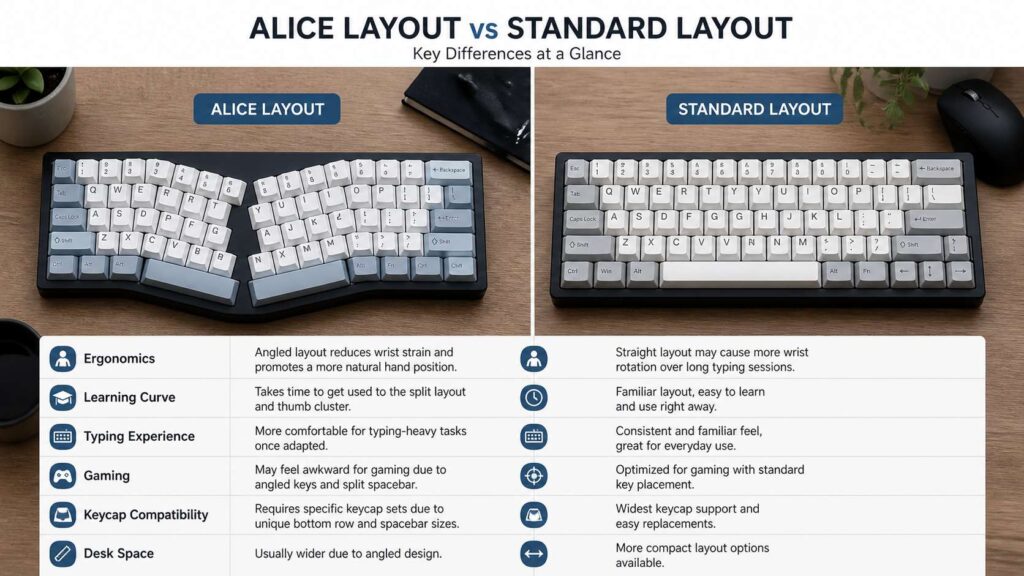
Comfort is the main reason people search for Alice keyboards. The angled shape can reduce wrist twist and make long typing feel easier.
For example, writers and programmers often sit at a keyboard for hours. A small change in wrist angle can feel noticeable after a full workday. The split spacebar can help too, since your thumbs can handle more actions.
Still, the keyboard shape is only one part of comfort. Desk height matters. Chair height matters. Switch weight matters. Wrist rest height matters too.
A standard keyboard can feel good with the right setup. Keep it close to your body. Let your shoulders relax. Keep your elbows near your sides. Then, use a board with a low front edge or a wrist rest that does not lift your hands too high.
An Alice board can help if your main issue comes from wrist angle. It will not fix every desk comfort problem on its own.
Learning Curve and Typing Speed
A standard keyboard wins right away. Your fingers already know the layout. You do not need to slow down or think about each key.
An Alice layout takes a bit of practice. At first, you may hit the wrong side of the split. The B key can feel odd. The split spacebar can feel strange too.
After a few days, many typists start to settle in. Then, the new angle feels less unusual. After a week or two, typing often feels natural again.
The best way to learn is simple. Use the Alice keyboard for normal work and give your hands time to adapt. Switching back and forth all day can slow the process.
The early speed drop is usually temporary. Accuracy can fall at first, but it often returns once your muscle memory catches up.
Gaming on Alice vs Standard Keyboards
For gaming, the standard layout still feels safer. WASD sits where players expect it. Shift, Ctrl, number keys, and the spacebar feel normal. That matters in fast games.
An Alice keyboard can work for casual gaming. Still, the angled left side can feel odd during quick movement. Some game controls near the center of the keyboard may feel harder to reach.
For competitive shooters, MMO keybinds, or shared gaming setups, a standard keyboard makes more sense. It keeps the layout predictable.
By comparison, an Alice board suits typing more than gaming. If you still want one for games, pick a model with key remapping. Then, you can move awkward controls to better spots.
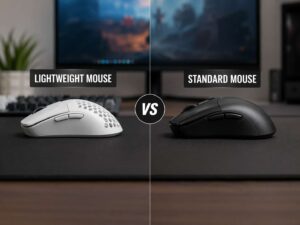
Desk space matters here too. A wide keyboard can limit mouse movement. For that reason, gamers should also think about mouse weight and desk room. This guide on lightweight mouse vs standard mouse helps explain why that choice matters during long sessions.
Work, Coding, and Writing
Alice keyboards often shine during typing-heavy work. Writers, developers, editors, students, and office users can benefit from the wider hand angle.
For coding, the layout can work well. Yet you should check the exact key placement before buying. Some compact Alice boards move brackets, symbols, arrows, or function keys behind layers. That can slow you down if you use those keys all day.
A 75% Alice keyboard is often the safer choice for work. It keeps more daily-use keys and still gives you the angled typing area. A 65% Alice board looks cleaner, but it asks for more layer use.
For office work, the answer is simple. If you type emails, documents, and chat messages all day, Alice can feel more relaxed. If you share your desk or move between many devices, a standard keyboard causes fewer surprises.
Keycap and Switch Compatibility
Standard keyboards win on compatibility. Most keycap sets fit standard layouts with little trouble. You can buy a set and expect the main keys to work.
Alice keyboards need more attention. Many use smaller spacebars. Some have unusual modifier sizes. Some move keys around the bottom row. For that reason, a basic keycap kit may not fit every key.
Before buying an Alice keyboard, check the exact key sizes. Look closely at both spacebars, Shift, Backspace, Enter, and the bottom row. Then, check if the keycap set includes those sizes.
Switch choice depends on the board, not the layout. Many Alice and standard keyboards support mechanical switches. Some models are hot-swappable, so you can change switches without soldering.
For long typing, lighter switches often feel better. Heavy switches can sound nice and feel firm, but they can tire your fingers over time.
Desk Space and Keyboard Size
An Alice keyboard can take more desk space than expected. The angled halves make the case wider. Even a compact Alice board can feel broad on a small desk.
A standard compact keyboard saves space more easily. A 75% or 65% standard board keeps the keys tight and straight. That leaves more room for your mouse.
Full-size standard keyboards give you a number pad, arrow keys, function row, and navigation cluster. That helps with spreadsheets, finance work, and data entry.
Alice keyboards rarely focus on full-size layouts. So, number pad users may need a separate numpad. That works fine, but it adds cost and desk clutter.
Alice Layout Pros
An Alice keyboard can feel more relaxed during long typing sessions. The angled halves help your wrists sit in a more natural position.
The split spacebar can also become useful. You can map one side to space and the other side to backspace, enter, or a function layer. That gives your thumbs more work and reduces finger travel.
Plus, many Alice boards feel premium. You will find aluminum cases, gasket mounts, hot-swap sockets, wireless modes, and custom firmware on many models.
For people who enjoy keyboard tuning, the Alice layout gives more room to personalize the typing feel.
Alice Layout Cons
The learning curve is real. You will likely mistype during the first few days. The split area takes time, and the B key can annoy some users.
Keycap shopping takes more care too. Not every set includes the smaller spacebars and bottom-row keys you need.
Gaming can feel less natural on Alice boards. The angled left side changes your hand position, and compact models can hide useful keys behind layers.
Also, Alice boards are fixed. You cannot move the two halves apart like you can with a full split ergonomic keyboard.
Standard Keyboard Pros
A standard keyboard is easy to use. Your typing speed stays steady. Your shortcuts feel familiar. Other people can use it without asking questions.
You also get more buying options. Budget boards, office boards, gaming boards, silent boards, low-profile boards, and premium boards all come in standard layouts.
Keycaps are easier to find. Replacement parts are easier to match. For gaming, standard layouts still feel more natural.
That practical value can matter more than the angled shape of an Alice board.
Standard Keyboard Cons
A standard keyboard can place your wrists at a tight angle. Some users feel strain after long typing sessions.
The straight shape does not suit every body type. Broad shoulders, a narrow desk, or a high keyboard position can make the layout feel cramped.
Standard boards also give your thumbs less work. Most actions stay on your fingers, so you lose some of the thumb-key benefits found on Alice layouts.
Who Should Buy an Alice Keyboard?
Buy an Alice keyboard if you type for long hours and want a more relaxed hand angle. It suits writers, coders, editors, students, and office workers who want better comfort without moving to a full split board.
It also suits people who enjoy custom keyboards. If you like remapping keys, testing switches, and choosing keycaps, Alice boards can feel fun and practical.
For a first Alice keyboard, a 75% layout makes the most sense. It keeps arrows and useful keys, so the change feels less harsh.
Who Should Stay With a Standard Keyboard?
Stay with a standard keyboard if you game often, share your setup, or dislike relearning key positions.
It is also the better choice for strict office setups. Standard keyboards are easy to replace, easy to explain, and easy to use across different computers.
Pick a standard layout if you rely on a number pad. Full-size and 96% boards give you that without extra gear.
If you want the safest choice, standard still wins.
Buying Tips Before You Choose
Start with size. A 65% Alice board looks neat, but it can hide too many keys behind layers. A 75% Alice board often works better for mixed work.
Next, check the spacebar sizes. This matters for future keycap upgrades.
Then, choose switches that match your typing style. Lighter switches can help during long writing sessions. Quieter switches suit shared rooms.
After that, check remapping support. VIA-style tools or strong brand software make Alice boards much easier to adjust.
Finally, check the return policy. Keyboard comfort is personal. A board that feels perfect to one person can feel awkward to another.
Final Verdict: Alice Layout or Standard Layout?
Choose an Alice layout if comfort matters more than instant familiarity. It gives your wrists a wider angle, adds thumb-key options, and can feel better during long typing sessions.
Choose a standard layout if you want simple use, gaming comfort, easy keycap support, and no learning curve.
For writing, coding, and office typing, Alice deserves a serious look. For gaming, shared desks, and simple daily use, a standard keyboard still makes the most sense.