A good keyboard for all-day typing should feel easy from the first hour to the last. It should not make your fingers work too hard. It should not push your wrists into a bent position. And it should not force your shoulders to reach across the desk all day.
Keyboard size, switch color, lighting, and brand are easy to look at first. Those details matter, but comfort matters more. The right keyboard makes long writing sessions, office work, coding, research, email, and document editing feel smoother. A poor one can leave your hands tired before the work is done.
So what makes a keyboard good for typing all day? The answer comes down to key feel, layout, height, wrist position, build quality, and how well the keyboard fits your daily work.
Start With Hand Comfort, Not Keyboard Hype
A keyboard can look great and still feel bad after two hours. That is why comfort should come before style, lighting, or extra buttons.
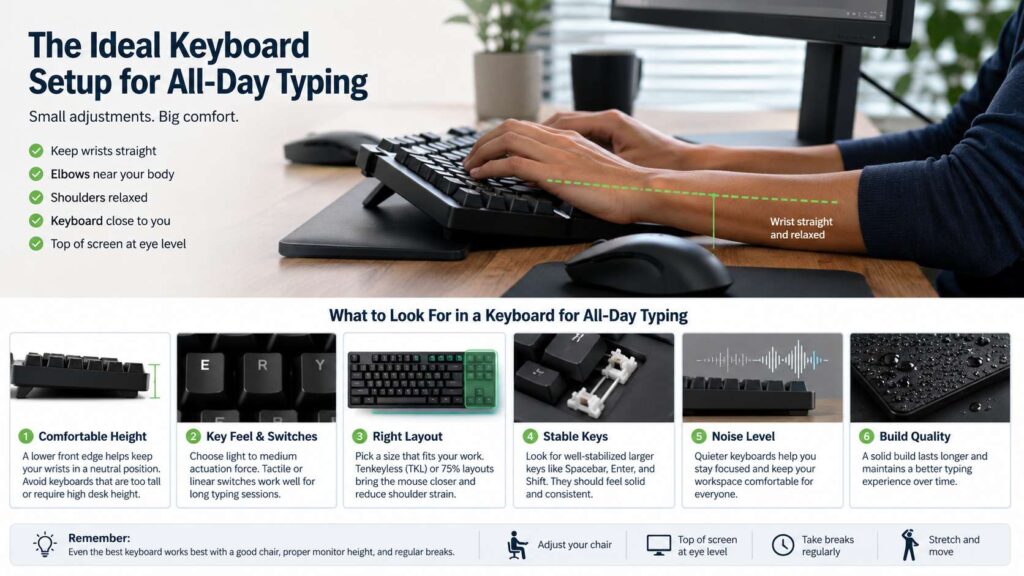
A comfortable typing keyboard keeps your hands relaxed. Your wrists should stay close to straight. Your elbows should sit near your body. Your shoulders should not lift or stretch forward. If your hands feel tense, the setup needs a change.
Key pressure matters here. Heavy keys can feel satisfying at first, but they can tire your fingers during long sessions. Very soft keys can cause more mistakes. A good middle ground feels light, clear, and controlled.
The keyboard should let you type without thinking about each press. After all, the best typing tools do not fight you. They stay out of the way.
Key Feel Makes a Big Difference
Key feel is one of the biggest reasons people love or hate a keyboard. It affects speed, accuracy, finger fatigue, and even typing confidence.
For all-day typing, light or medium key resistance works best. The keys should press down smoothly, then bounce back with a clear return. That helps you keep a steady rhythm without pounding the board.
Mechanical keyboards often give the most choice. Tactile switches add a small bump during each press. Many writers and office users like that feel, since it confirms the key press without needing a loud click. Linear switches feel smooth from top to bottom. They can feel fast, but it is easy to press them too hard. Clicky switches give strong feedback, yet they can become loud in shared spaces.
Scissor-switch keyboards feel short, crisp, and familiar. Many laptop users prefer them for long typing sessions. Membrane keyboards can work too, but cheap models often feel soft and unclear.
A good keyboard should not make you guess. Each key press should feel clear, steady, and easy to repeat.
Keyboard Height Can Reduce Wrist Strain
Keyboard height affects wrist comfort too. A tall keyboard can tilt your hands upward. That angle may feel small at first, but it can become tiring during a full workday.
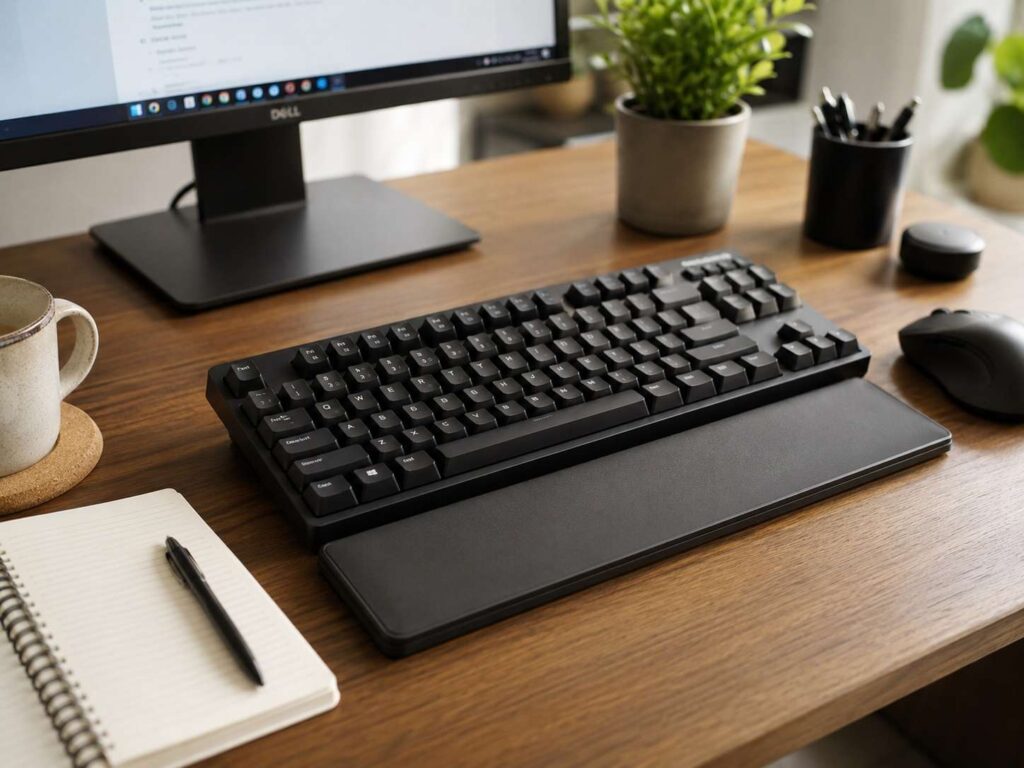
Low-profile keyboards help keep your wrists flatter. Standard mechanical keyboards can still feel comfortable, but they often need better desk height, a proper chair position, or a wrist rest.
A wrist rest can help during pauses. Still, it should not hold your wrists down as you type. Rest your palms lightly between typing bursts. During active typing, your hands should move freely.
Flat or slightly negative keyboard tilt often feels better than rear feet that lift the back edge. It is easy to flip out those feet by habit, then wonder why your wrists feel tight. Try the keyboard flat for a few days. You may feel a clear difference.
The Right Layout Keeps Your Mouse Closer
Keyboard size has a direct effect on shoulder comfort. A full-size keyboard includes a number pad, so it works well for spreadsheets, accounting, data entry, and finance tasks. But it also takes more desk width.
That extra width pushes your mouse farther to the side. After hours of work, that reach can bother your shoulder or neck.
A tenkeyless keyboard removes the number pad and keeps the main typing area familiar. For many writers, editors, programmers, and office users, this size feels more balanced. It saves space, and it brings the mouse closer.
A 75 percent keyboard keeps many useful keys in a smaller body. You still get function keys, arrows, and navigation keys, but the layout feels tighter. If you want a smaller keyboard without losing too many controls, read this guide on what a 75% keyboard is. It explains the layout in plain terms and shows why this size has become popular for desk work.
A 60 percent keyboard looks clean, but it hides many keys behind shortcuts. That can work for some users. For long office days, it can slow down editing, navigation, and shortcut-heavy work.
Choose the layout that matches your real tasks. A smaller keyboard is not always better. A wider one is not always worse. The best choice saves movement without hiding keys you use every hour.
Ergonomic Keyboards Can Help the Right User
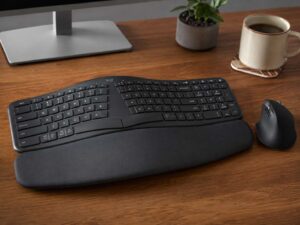
Ergonomic keyboards change the way your hands sit. Some split the left and right sides. Others curve the key area. A few models let you angle each half to match your shoulder width.
These designs can help people who feel strain from straight keyboards. They can reduce wrist twisting and help the arms sit in a more natural position. But they take practice.
A split keyboard often feels strange during the first week. Your typing speed may drop. Then your hands learn the new spacing, and the layout can start to feel more relaxed.
Curved ergonomic keyboards can feel easier on the hands. They keep the keys in a familiar shape but guide the hands into a softer angle.
The key point is fit. An ergonomic keyboard should not force your arms too far apart. It should not make your shoulders tense. It should make your desk posture feel calmer.
Mechanical Is Not Always Better
Mechanical keyboards get a lot of attention, and many of them feel excellent. Still, a mechanical keyboard is not automatically the best keyboard for typing all day.
Some mechanical boards are tall. Some use stiff switches. Some sound great for five minutes but feel loud after five hours. So the question is not only whether a keyboard is mechanical. The question is whether its size, switch type, sound, and height fit your work.
If you are unsure, this guide on whether you really need a mechanical keyboard can help. It compares the real benefits with the tradeoffs, so you can avoid buying one just for the trend.
Mechanical keyboards work best for users who care about switch feel, repair options, and long-term typing quality. Scissor-switch keyboards work best for people who like short travel and a thinner desk setup. Membrane keyboards suit basic use, but quality varies a lot.
Pick the feel that helps you type longer with fewer mistakes. That matters more than the category name.
Noise Level Matters More Than You Think
Keyboard sound affects your focus and the people around you. A loud clicky keyboard can feel fun at first. After a full day, it may feel sharp or distracting.
In shared offices, quiet keys are a better choice. The same applies to home offices with video calls, sleeping children, or thin walls.
Silent mechanical switches can help. So can dampened keycaps, desk mats, and heavier keyboard cases. Low-profile scissor keyboards often stay quiet too.
Sound should feel pleasant, not tiring. A keyboard for long typing sessions should match your space. If you take calls often, avoid loud clicky switches. If you write alone and enjoy strong feedback, a louder board may still work.
Stable Keys Improve Accuracy
A keyboard that rattles or wobbles can make typing feel cheap and tiring. Stable keys help your fingers land cleanly. They also make larger keys feel more predictable.
Check the spacebar, shift, enter, and backspace keys. These keys should press evenly, even if you hit them off-center. If they rattle badly, the keyboard may annoy you during long work sessions.
Keycap shape matters too. Slightly curved keycaps help your fingers find the center of each key. Flat keys can still work, but they need good spacing and clear edges.
Readable legends help in dim rooms. Backlighting can help as well, but it should not glare through the keycaps. Bright, uneven lighting can distract you during night work.
A great typing keyboard feels steady. It gives your fingers a clear target and keeps mistakes low.
Wired and Wireless Both Work for Long Typing
A wired keyboard gives simple, steady use. You plug it in, and it works. There is no charging, no pairing, and no battery warning during a busy day.
Wireless keyboards keep the desk cleaner. They are useful for laptop setups, tablet setups, and multi-device work. Many models can switch between a desktop, laptop, and tablet with one button.
For all-day typing, battery life matters more than tiny latency numbers. A wireless keyboard should wake fast, reconnect fast, and hold a stable connection. If it drops input or sleeps too quickly, it will break your flow.
Bluetooth works well for many users. A 2.4 GHz receiver often feels more stable in crowded wireless areas.
Choose wired for simple desk work. Choose wireless for a cleaner setup and easy device switching.
Desk Setup Still Shapes the Experience
A good keyboard cannot fix a bad desk setup by itself. Chair height, monitor position, mouse placement, and desk depth all affect typing comfort.
Place the keyboard directly in front of you. Keep it close enough that your elbows stay near your sides. Your forearms should feel relaxed, not stretched. The mouse should sit close to the keyboard, not far out to the side.
Your screen should sit high enough that you do not bend your neck down all day. Your chair should support your lower back. Your feet should rest flat on the floor or on a footrest.
Small changes can help fast. Move the keyboard closer. Lower the rear feet. Bring the mouse in. Raise the chair a little. Then type for one work session and notice what feels better.
Comfort comes from the full setup, not one product alone.
Best Keyboard Choices by Type of Work
Writers need comfort, accuracy, and a layout that supports editing. A tenkeyless or 75 percent keyboard with light tactile switches often works well.
Office workers need a keyboard that matches their daily tools. Full-size boards suit number-heavy work. Tenkeyless boards suit email, documents, meetings, and browser tasks.
Programmers often need easy access to arrows, symbols, function keys, and shortcuts. Compact boards can work, but too many hidden keys can slow common tasks.
Students need a keyboard that feels comfortable, portable, and quiet. A low-profile wireless keyboard can be a strong choice for study rooms and shared spaces.
People with wrist discomfort should look at keyboard height first. Then they can compare low-profile, split, and curved ergonomic keyboards. A better mouse position can help too.
Common Mistakes to Avoid
Choosing a keyboard on looks alone can lead to a poor fit.
Do not buy a full-size keyboard if you never use the number pad. It may push your mouse too far away. Do not buy a 60 percent keyboard if you use arrow keys and shortcuts all day. It may slow your work.
Avoid very stiff switches for long typing sessions. They can tire your fingers. Avoid loud clicky switches for shared rooms. They can distract everyone nearby.
Do not assume the rear feet improve comfort. They often raise the back of the keyboard and bend your wrists upward.
Try not to judge a keyboard after five minutes. A real test takes at least one full work session. Better yet, use it for two days.
What Makes a Keyboard Good for Typing All Day?
A good all-day typing keyboard has a comfortable height, clear key feel, stable keys, and a layout that fits your work. It keeps your wrists straight and your mouse close. It feels easy during hour six, not just hour one.
The best keyboard for most people is not the flashiest model. It is the one that reduces effort. It helps you type faster with fewer mistakes. It keeps your hands relaxed through long documents, emails, spreadsheets, chats, and research.
A quiet tenkeyless or 75 percent keyboard gives the best balance. It saves space, keeps useful keys, and brings the mouse closer. For number-heavy work, a full-size keyboard still makes sense. For wrist strain, a low-profile or ergonomic model may feel better.
The right keyboard should make long typing feel normal, not tiring. That is the real sign of a good typing keyboard.