A good office chair can change how your workday feels. It supports your back, helps your posture, and keeps your body in a better position during long desk sessions. A bad chair does the opposite. It can leave you with sore hips, tight shoulders, stiff legs, and lower back pain after only a few days.
It is tempting to buy an office chair based on looks, thick padding, or a low price. That sounds fine at first. Still, comfort in a store photo does not always mean comfort after six or eight hours at a desk. A chair can look premium and still fit your body badly.
The right office chair should match your height, weight, desk setup, and daily routine. It should let your feet rest flat, keep your arms relaxed, and support your lower back without forcing you into a stiff position. Plus, it should feel stable, quiet, and easy to adjust.
This guide walks you through the main things to check before buying an office chair. It covers fit, support, materials, armrests, seat depth, tilt, wheels, budget, and common buying mistakes.
Start With Your Daily Sitting Time
Your daily sitting time matters a lot. A chair for short laptop sessions does not need the same build as a chair used for full-time work.
For light use, a basic task chair can work well enough. For daily remote work, you need better lumbar support, stronger foam, and more adjustment. For long sessions, the chair should support small posture changes during the day.
Use this simple guide:
- 1 to 3 hours per day: basic task chair with seat height adjustment
- 3 to 6 hours per day: ergonomic office chair with lumbar support
- 6 to 9 hours per day: adjustable chair with seat depth, armrests, and tilt control
- 9+ hours per day: higher-quality ergonomic chair with better materials and warranty
So, before you look at color or design, think about your real workday. A cheap chair can make sense in a guest room. For daily work, it often becomes uncomfortable fast.
Choose a Chair That Fits Your Body
Office chairs are not one-size-fits-all. A chair that feels great for a tall person can feel too deep for a shorter person. A chair that works for a narrow frame can feel tight for someone with wider hips.
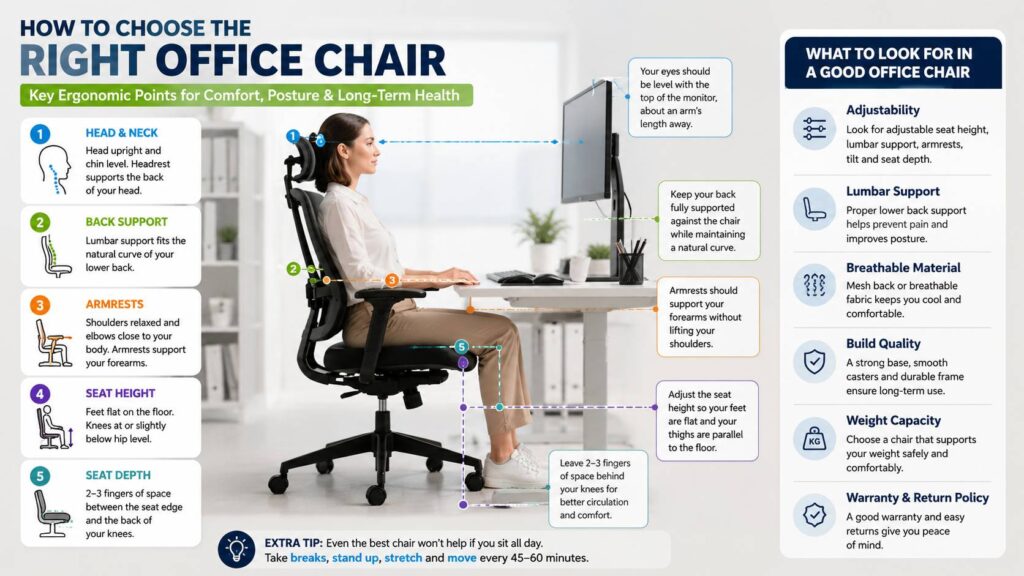
The chair should let you sit fully back against the backrest. Your feet should rest flat on the floor. Your thighs should feel supported, but the front edge of the seat should not press behind your knees.
Check these fit points:
- Your knees sit close to a 90-degree angle
- Your feet stay flat on the floor or on a footrest
- Your lower back touches the backrest
- Your hips fit comfortably on the seat
- Your arms rest close to your body
- The chair slides close enough to your desk
For example, a shorter user may need a chair with a lower seat height range. A taller user may need more seat depth and a higher backrest. For that reason, body fit should come before brand name.
Get the Seat Height Right
Seat height affects more than your legs. It changes your shoulder position, wrist angle, desk fit, and screen level.
A good seat height lets your feet sit flat on the floor. Your thighs should stay roughly level. Your shoulders should feel relaxed, and your elbows should sit near your sides.
Many office chairs offer a seat height range around 16 to 21 inches. That range works for many adults, but it will not fit everyone. So, check the lowest and highest height before you buy.
A chair that sits too high can make your feet hang. Then pressure builds under your thighs. A chair that sits too low can push your knees up and make your back round forward. Neither position feels good for long.
Pay Attention to Seat Depth
Seat depth is one of the most ignored office chair features. Still, it has a big effect on comfort.
A deep seat can press into the back of your knees. A shallow seat can leave your thighs poorly supported. The right seat depth gives your legs support but leaves a small gap behind your knees.
A good target is two to three fingers of space between the seat edge and the back of your knees. You should still sit fully back against the chair.
Seat depth adjustment helps a lot in shared workspaces. It also helps people with longer or shorter legs. Next, check the front edge of the seat. A rounded front edge usually feels better than a hard, sharp edge.
Look for Proper Lumbar Support
Lumbar support helps your lower back keep a natural curve. Without it, you can slowly slide forward or round your back. Then the lower back takes more strain.
A good office chair should support the lower back without pushing too hard. The support should feel steady, not aggressive. A big lumbar bump can feel nice at first, but it may become annoying after an hour.
Look for one of these options:
- Fixed lumbar curve built into the backrest
- Adjustable lumbar height
- Adjustable lumbar depth
- Flexible backrest that follows your spine
Adjustable lumbar support works better for most people. It lets you place the support where your back needs it. Plus, it helps if more than one person uses the same chair.
Avoid loose lumbar pillows that slide out of place. They often look comfortable in photos, but many move too much during real use.
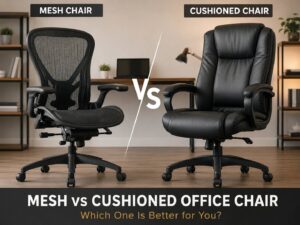
Pick the Best Material for Your Room
The chair material affects heat, cleaning, comfort, and wear. Do not choose material by looks alone.
Mesh chairs feel cooler. They suit warm rooms and long desk sessions. Good mesh gives firm support and lets air move through the backrest. Cheap mesh can feel stiff, rough, or saggy.
Fabric chairs feel warmer and softer. They work well in cooler rooms. They can stain faster, so darker colors are often safer for everyday use.
Leather-style chairs look clean and feel smooth at first. Still, PU leather can crack, peel, or trap heat. It may look premium in product photos, then age poorly after heavy use.
For most home offices, a mesh back with a padded fabric seat offers a good balance. You get airflow for your back and comfort under your legs.
Do Not Treat Armrests as a Small Detail
Armrests can help or hurt your posture. The wrong armrests can lift your shoulders, block your desk, or push your elbows too wide.
Good armrests should support your forearms without raising your shoulders. They should sit close enough to your body. They should also let the chair move near your desk.
Look for height adjustment at minimum. Better chairs offer width, depth, and angle adjustment. These features help you set the arms for typing, reading, and calls.
Avoid fixed armrests if your desk has limited clearance. They may stop the chair from sliding under the desk. For some setups, foldable or removable armrests work better.
Understand Tilt, Recline, and Movement
A chair should let you move a little during the day. A fixed sitting position can feel tiring, even with good posture.
Tilt control helps you lean back during calls or short breaks. Recline support can reduce pressure for a few minutes between focused tasks. Still, deep recline matters less than good upright support for desk work.
Look for these features:
- Tilt tension control
- Upright lock
- Smooth recline
- Stable back support
- Seat that stays comfortable during movement
A synchro-tilt mechanism is a good feature on better office chairs. It moves the backrest and seat together in a more natural way. Simple rocking chairs can feel less controlled.
The goal is not to lounge all day. The goal is to change position without losing support.
Match the Chair to Your Desk Setup
Even a great chair can feel wrong with the wrong desk. Your chair, desk, monitor, keyboard, and mouse must work together.
After you set the chair at your desk, check these points:
- Your elbows stay close to your body
- Your wrists stay straight
- Your shoulders stay relaxed
- Your screen sits near eye level
- Your feet stay flat
- Your chair rolls close to the desk
For example, a desk that sits too high can force your shoulders up. You may raise the chair to fix your arms, but then your feet hang. In that case, a footrest can help.
A chair should not carry the whole ergonomic setup alone. It works best as part of a better desk layout.
Office Chair or Gaming Chair?
Gaming chairs are the obvious alternative to office chairs. Gaming chairs often look bold and sporty. They usually have tall backs, firm seats, and side bolsters. Some people like that shape. Others find it too narrow or too stiff for work.
Office chairs usually make more sense for daily desk work. They focus more on seat fit, armrest movement, lumbar support, and breathable materials.
If you are torn between the two, read this full office chair vs gaming chair comparison before you buy. It can help you avoid paying for a style that does not match your workday.
My honest opinion: choose an ergonomic office chair for full-time work. Pick a gaming chair only if you enjoy the shape and have tested a similar seat for long sessions.
Check Build Quality Before You Buy
A chair should feel stable and solid. Weak parts become annoying fast. Squeaks, wobble, loose arms, and sagging foam can ruin the experience.
Check for:
- Five-point base
- Smooth casters
- Clear weight rating
- Strong gas lift
- Firm adjustment levers
- Seat foam that returns to shape
- Stable backrest
- Good warranty
- Replacement part support
Weight rating matters, but it does not tell the full story. Seat width, frame strength, and foam quality matter too. Read real user complaints and look for patterns. If many buyers mention the same weak armrest or sinking gas lift, take it seriously.
Think About Wheels and Floor Type
Chair wheels seem minor, but they affect daily comfort and floor wear. Standard plastic casters work on many carpets. On hard floors, they can scratch or roll poorly.
Soft rollerblade-style wheels usually glide better on wood, laminate, vinyl, and tile. Still, they can roll too easily on very smooth floors.
A chair mat can protect the floor and make movement easier. Use a hard-floor mat for hard surfaces. Use a carpet mat for carpet. The wrong mat can slide, crack, or feel unstable.
Small details like wheels and mats can make your setup feel much better day to day.
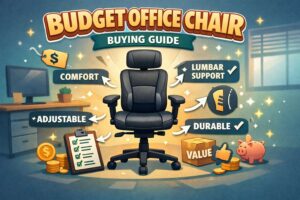
Set a Smart Budget
Office chair prices vary a lot. A higher price does not always mean a better fit, but very cheap chairs often cut corners.
Here is a practical budget guide:
- Under $100: short use, guest rooms, basic sitting
- $100 to $250: part-time home office use
- $250 to $500: strong range for daily work
- $500 to $1,000: better adjustment, materials, and warranty
- $1,000+: premium build and long-term support
For many people, the best value sits in the $250 to $500 range. You can get real ergonomic features without paying only for a famous name.
If you need a lower-cost option, this best affordable office chair guide for 2026 is a good place to compare budget-friendly picks.
Read the Return Policy Before Ordering
A chair needs real use before you know if it fits. A five-minute test does not reveal much. A full workday gives a clearer answer.
Before you buy, check:
- Return window
- Return shipping cost
- Restocking fees
- Original packaging rules
- Warranty length
- Part replacement terms
Keep the box until you feel confident. Office chair returns can be difficult due to the size and weight.
Common Office Chair Mistakes to Avoid
Watch for these mistakes. The good news: most are easy to avoid.
Do not buy only by looks. Do not choose thick padding over proper support. Do not ignore seat depth. Do not assume every “ergonomic” chair is well designed.
Watch out for these problems:
- Seat too deep
- Armrests too high
- Backrest too stiff
- Weak lumbar support
- Poor foam quality
- Chair too large for your body
- Wheels that do not match your floor
- No clear return policy
Still, no chair feels perfect for every person. Your goal is a good body fit, strong support, and easy adjustment.
Final Buying Advice
The right office chair should make sitting feel easier, not more complicated. Your feet should stay planted. Your shoulders should relax. Your lower back should feel supported. Your arms should reach the keyboard without strain.
Start with your sitting time and body size. Then check seat height, seat depth, lumbar support, armrests, tilt, materials, and build quality. After that, match the chair to your desk and floor type.
A good office chair will not replace movement breaks. It will not fix a poor monitor height or bad keyboard position either. But it can reduce daily strain and make long work sessions more comfortable.
Buy the chair that fits your body and your workday. That choice will matter more than the logo on the backrest.