A webcam can change the way people see you online. That sounds basic, but it matters. A clear face, balanced light, and steady image make video calls feel smoother. A dark, noisy, or washed-out picture can make even a good webcam look cheap.
That is why the choice between a webcam with ring light and a standard webcam is not only about resolution. Light plays a huge role. A 4K webcam can still look poor in a dim room. At the same time, a simple 1080p webcam can look clean with the right lamp in front of you.
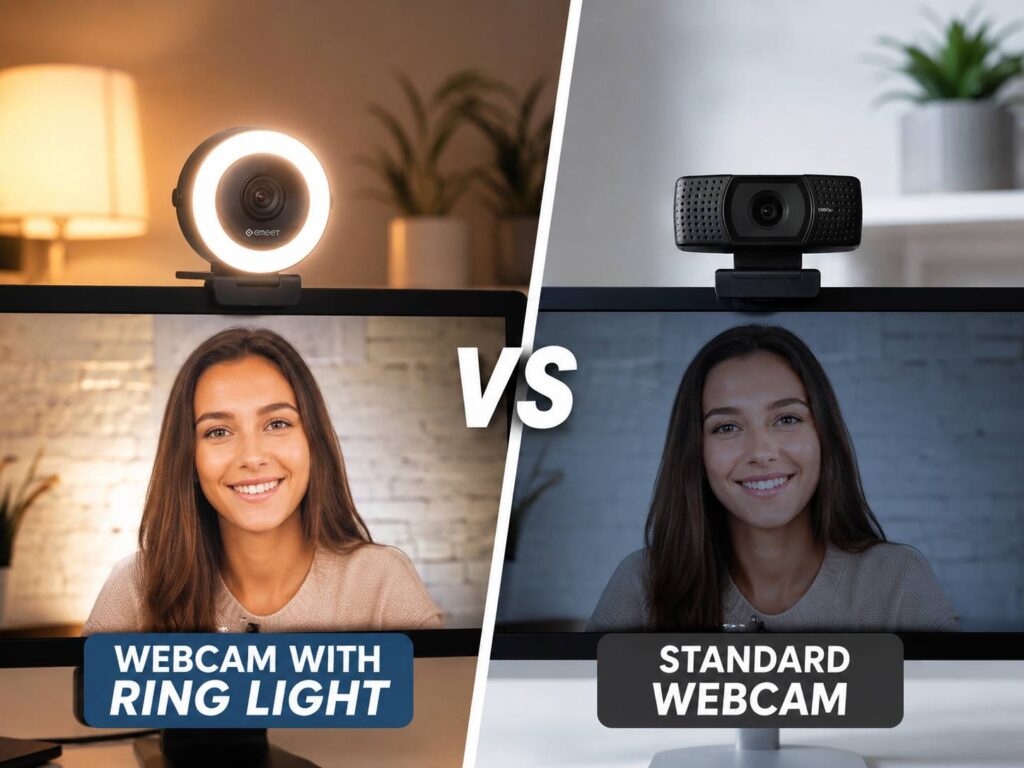
A webcam with ring light gives you built-in front lighting. A standard webcam relies on your room, a window, a desk lamp, or a separate light. Both choices can work well. Still, they solve different problems.
This guide explains the real differences, the common issues people run into, and the better choice for work calls, online classes, video interviews, streaming, and home office setups.
What Is a Webcam With Ring Light?
A webcam with ring light has small LED lights built around the lens or near the camera body. The light points toward your face, so it helps brighten your image during calls or recordings. Most models let you change the brightness through a button, touch control, dial, or software setting.
The main appeal is simple setup. You do not need a separate lamp or LED panel on the desk. You plug in the webcam, turn on the light, and your face looks brighter right away.
This type of webcam can help a lot in small rooms, bedrooms, dorms, and darker home offices. It is also handy for people who move between desks and do not want to carry extra lighting gear.
Still, the built-in light is usually small. It can brighten your face, but it will not act like a large studio light. It works best at close range, usually when you sit about an arm’s length from the monitor.
What Is a Standard Webcam?
A standard webcam does not include a built-in ring light. It focuses on the camera itself. That means the sensor, lens, autofocus, field of view, frame rate, microphone, and software controls matter more.
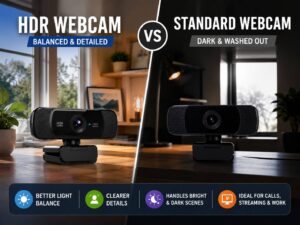
Some standard webcams are basic 1080p models for daily calls. Others are premium webcams with 4K resolution, better low-light performance, HDR, better autofocus, and stronger image processing. If you are comparing picture quality across different camera types, this guide on HDR webcam vs standard webcam can help explain another key difference.
A standard webcam needs better room lighting. That light can come from a window, a desk lamp, a monitor light bar, a ring light, or a small LED panel. With good lighting, a standard webcam can look more natural than a small built-in ring light webcam.
That is why many remote workers, streamers, and creators use a standard webcam with a separate light. It takes more space, but the image often looks cleaner.
Webcam With Ring Light vs Standard Webcam: The Main Difference
The main difference is control.
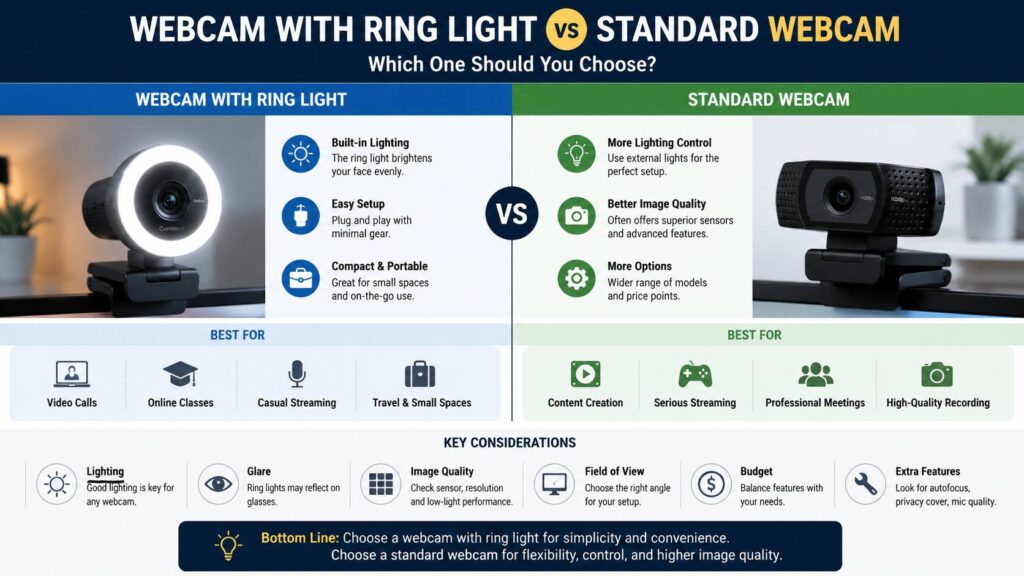
A webcam with ring light gives you a quick lighting fix. It helps when your face looks too dark, and it keeps the setup simple. For daily work calls, online classes, and quick meetings, that may be enough.
A standard webcam gives you more freedom. You can place a separate light above the monitor, to the side, or slightly behind the camera. You can make the light softer. You can reduce glare on glasses. You can also balance your face and background better.
Here is the simple breakdown:
- A webcam with ring light is better for quick setup.
- A standard webcam is better for flexible lighting.
- A standard webcam with a separate light often gives the best final image.
- A built-in ring light helps most in darker rooms.
- A ring light webcam can create glare on glasses.
- A standard webcam can look poor without enough light.
So, the better choice depends on your room, not just the webcam name.
Why Lighting Matters More Than Resolution
It is natural to look at resolution first. Labels like 1080p, 2K, and 4K are easy to compare. Still, resolution does not fix poor lighting.
A webcam needs light to capture detail. In a dark room, the camera raises exposure and gain. Then the image can look grainy, soft, or flat. Skin tones can shift too. Movement may look worse, and the background may become muddy.
That is why a webcam with ring light can beat a standard webcam in a dim room. It gives the camera more light to work with. The face becomes brighter, and the image may look clearer.
In a bright room, the result can change. A better standard webcam may produce a more natural image, mainly if it has a better sensor and lens.
This is also why 4K is not always the answer. A 4K webcam can look sharper in good light, but it will not fix a bad room by itself. For a deeper look at resolution, read this guide on whether a 4K webcam is worth it.
When a Webcam With Ring Light Makes Sense
A webcam with ring light makes sense if you want a clean and easy setup. It is a strong pick for people who want better lighting without buying extra gear.
It works well for:
- Remote work meetings
- Online classes
- Job interviews
- Family video calls
- Telehealth calls
- Casual streaming
- Small desks
- Rooms with weak light
- Users who want less cable clutter
A ring light webcam can also help if your face often looks too dark. For example, you may sit near a bright window that sits behind you. The camera sees the bright window and darkens your face. A front light helps balance the image.
Still, it is better to move the light source when possible. Face the window, or place it to the side. A built-in ring light helps, but good room placement helps even more.
When a Standard Webcam Is the Better Choice
A standard webcam is the better choice if you already have decent lighting or plan to add a separate light. It is also better if you care about a natural look, fewer reflections, and stronger control.
Choose a standard webcam if:
- You already use a desk lamp or LED light.
- You wear glasses and dislike ring reflections.
- You record videos often.
- You stream for longer sessions.
- You want better camera software controls.
- You want a more natural skin tone.
- You need a cleaner look for work presentations.
A separate light can sit higher than the camera or slightly to one side. That placement gives your face more shape. A built-in ring light sits very close to the lens, so the lighting can look flat.
For office calls, flat light is not always bad. It can look clean and safe. For YouTube videos, streaming, or product demos, separate lighting usually looks better.
Common Issues With Ring Light Webcams
Ring light webcams are helpful, but they are not perfect.
The first issue is glare. People who wear glasses often see bright circles or white spots in the lenses. This can distract viewers. You can lower the brightness, raise the webcam, tilt it slightly, or move your head angle. Still, some glare may remain.
The second issue is shiny skin. A small light placed close to the lens can make the forehead and nose look oily, even when they are not. Medium brightness often looks better than full brightness.
The third issue is limited power. Built-in lights work best when you sit close. If you sit far from the monitor, the light may not do much.
The fourth issue is color. Some built-in ring lights look too blue or too yellow. Then skin can look pale, red, or warm in a strange way. Manual white balance can help, but not every webcam gives you full control.
The fifth issue is background balance. A ring light brightens your face, but the room behind you may still look dark. That can create a cut-out look, especially in night calls.
Common Issues With Standard Webcams
Standard webcams have their own problems too.
The most common issue is poor low-light quality. In a dim room, the camera tries to brighten the image through software. That often adds grain and reduces detail.
Another issue is auto exposure. A bright window, lamp, or monitor in the frame can confuse the camera. Your face may turn too dark, even though the room feels bright to your eyes.
Autofocus can be annoying too. Some webcams refocus during calls when you move your hands, lean closer, or hold an object near the lens. Manual focus helps if you sit in one fixed spot.
A standard webcam may also need extra gear. A good webcam plus a separate light costs more than a basic ring light webcam. It can take more desk space too.
So, a standard webcam can look better, but it asks for a better setup.
Best Choice for Video Calls
For video calls, the best setup is simple. Put soft light in front of your face, keep the camera near eye level, and avoid a messy background.
A webcam with ring light works well here. Start with medium brightness. Then check the preview before joining the call. If your face looks shiny, lower the light. If your glasses reflect too much, tilt the camera or reduce brightness.
A standard webcam can look just as good with a lamp behind the monitor. A lamp with a shade gives softer light than a bare bulb. A small LED panel works even better if it has brightness and color temperature controls.
Avoid these common mistakes:
- Sitting with a bright window behind you
- Using only monitor light in a dark room
- Placing a lamp below your face
- Turning the ring light to maximum brightness
- Sitting too close to a wide-angle webcam
- Leaving harsh overhead lights as the only light source
Small changes can make a cheap webcam look much better.
Best Choice for Streaming
For streaming, a standard webcam with separate lighting is usually the stronger setup. It gives you more control over your face, background, and overall look.
A webcam with ring light can still work for beginner streamers. It keeps the setup simple, and it works fine for gaming streams, live chats, and casual content.
After some time, many streamers want more control. They may add a side light, background light, or larger soft light. At that point, the built-in ring light matters less.
For streaming, look for these features:
- Clean 1080p video
- 60 fps support if you want smoother motion
- Reliable autofocus
- Manual exposure
- Manual white balance
- Good mounting options
- A field of view that fits your desk
- Decent low-light performance
A 4K webcam can help for cropping and recording. For live streaming, strong lighting and stable image quality often matter more.
Built-In App Lighting Tools Can Help, But Only So Much
Video apps now offer tools that can brighten your image. Zoom, Google Meet, and Microsoft Teams include camera adjustment features that can improve low-light video.
These tools can help in a dark room, but they do not replace real light. Software brightening often lifts the whole image. That can make your face easier to see, but it can also add grain and soften detail.
Real light gives the webcam more detail to capture. So, fix the physical lighting first. Then use app settings as a final touch.
What to Check Before Buying
Before buying a webcam with ring light or a standard webcam, check more than the headline resolution.
Resolution: 1080p is enough for most calls. 4K helps with cropping and sharper recordings.
Frame rate: 30 fps is fine for meetings. 60 fps looks smoother for streaming and movement.
Autofocus: Useful if you move a lot. Manual focus is better if autofocus keeps pulsing.
Field of view: A narrow view works well for one person. A wide view helps for groups, but it shows more background.
Low-light quality: A better sensor gives a cleaner image in weaker light.
White balance controls: These help fix odd skin tones.
Exposure controls: Manual exposure helps stop brightness changes during calls.
Mounting: A tripod thread gives you more placement options.
Privacy cover: Useful for work setups and shared rooms.
Microphone: Webcam microphones work for basic calls. A separate USB mic usually sounds better.
Real Buying Advice
Buy a webcam with ring light if your room is dark and you want the fastest fix. It is easy, compact, and practical.
Buy a standard webcam if you already have good light or plan to use a separate lamp. You will get more control and a more natural image.
Choose a ring light webcam if you move your setup often. It keeps your gear simple.
Choose a standard webcam if you record videos, stream often, or care about the best image you can get for the money.
If you wear glasses, be careful with ring light webcams. Reflections can become annoying. A separate light placed higher and slightly to the side usually works better.
My honest view: a built-in ring light is a good convenience feature, not a full lighting setup. It helps a bad room look better. A good standard webcam with proper lighting still wins for the cleanest result.
Simple Tips to Improve Any Webcam
Try these fixes before you replace your webcam:
- Raise the camera to eye level.
- Face a window or place a lamp in front of you.
- Avoid bright windows behind your chair.
- Clean the webcam lens.
- Lower ring light brightness if your face looks shiny.
- Move the webcam farther back if your face looks distorted.
- Turn off strong beauty filters.
- Set white balance manually if colors look strange.
- Use a simple background.
- Add a small lamp behind the camera for night calls.
These steps help both webcam types. In many cases, they matter more than the webcam model.
Final Verdict: Webcam With Ring Light or Standard Webcam?
Choose a webcam with ring light if you want a simple setup for work calls, online classes, interviews, and casual streaming. It is the better pick for small desks and dim rooms.
Choose a standard webcam if you want more control, better long-term value, and a more natural look. It is the stronger choice for creators, streamers, and anyone willing to use a separate light.
For the best image, use a good standard webcam with soft front lighting. For the fastest upgrade, choose a webcam with built-in ring light and keep the brightness at a natural level.
The better choice comes down to your room. A ring light webcam fixes weak lighting quickly. A standard webcam gives better results when you build the setup around it.