An all-in-one printer looks like the safe choice at first. It can print, scan, copy, and sometimes fax from one device. For a busy home, student desk, or small office, that sounds useful. One machine takes care of several paper tasks, and you do not need a separate scanner on the desk.
Still, not every buyer needs one. Some people print a return label twice a month and never scan anything. Others deal with school forms, invoices, signed documents, medical papers, ID copies, and receipts every week. Those two users should not buy the same printer.
The real question is not whether an all-in-one printer has more features. The better question is whether those features will save you time. A cheap printer can become expensive after ink replacements. A feature-packed model can feel annoying if the app is slow, the Wi-Fi drops, or the scanner takes too long.
This guide explains who should buy an all-in-one printer, who should skip one, and which features matter most. It also covers real problems buyers face, including dry ink, paper jams, high cartridge costs, slow scanning, and wireless setup issues.
What Is an All-in-One Printer?
An all-in-one printer combines several office tasks in one machine. Most models print, scan, and copy. Some models add fax, automatic two-sided printing, mobile printing, cloud printing, and an automatic document feeder.
You may also see these printers called multifunction printers or MFPs. The name changes based on the store, brand, or target buyer. Home models usually use “all-in-one printer.” Office models often use “multifunction printer.”
The main appeal is convenience. You can print a form, sign it, scan it, and send it back without leaving your desk. You can copy an ID, scan a school document, or print a shipping label in a few minutes.
That convenience can be worth the money. But it only matters if you use the extra tools. A scanner that never opens and a copier button that never gets pressed do not add real value.
Who Actually Needs an All-in-One Printer?
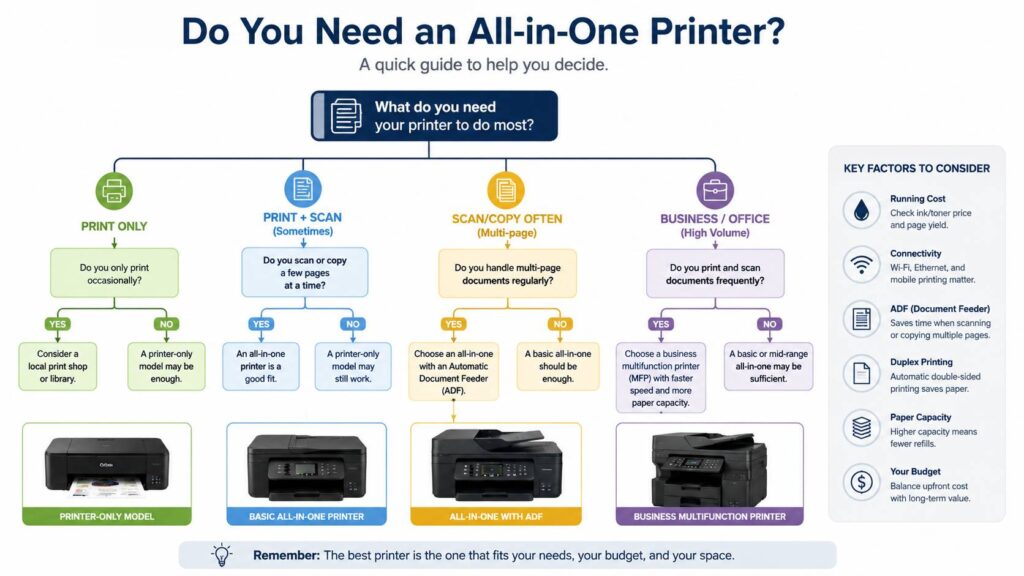
An all-in-one printer makes sense for people who still handle paper at home or at work. That includes parents, remote workers, freelancers, teachers, students, small business owners, and anyone who prints forms often.
Parents can get real use from one. Schools still send documents that need printing, signing, scanning, or copying. A phone scan works in some cases, but a flatbed scanner gives cleaner results for forms, IDs, certificates, and small text.
Remote workers may need one too. Many jobs run online, but paper has not disappeared. Contracts, tax files, onboarding forms, invoices, and signed documents still appear. A printer with a scanner can save a trip to a copy shop.
Small business owners can benefit even more. Receipts, labels, supplier documents, return slips, and local paperwork can pile up quickly. A good all-in-one printer keeps those tasks in one place.
You can skip one if you print only a few pages each year. In that case, a library, print shop, or office printer may cost less. A phone scanning app may be enough for very light document work.
All-in-One Printer vs Printer-Only Model
A printer-only model prints and stops there. That can be perfect for buyers who never scan or copy. It may cost less upfront, take less space, and feel simpler to use.
An all-in-one printer adds more flexibility. The scanner can be useful for signed paperwork, receipts, old photos, school forms, and ID copies. The copier can help with forms that need quick duplicates.
The choice comes down to real use. A printer-only model works well for basic document printing. An all-in-one model works better for people who handle paperwork from both sides, print and scan.
For a deeper comparison, read this guide on the all-in-one printer vs printer-only model. It helps you decide whether the extra functions are worth the space and cost.
My honest opinion: most homes are better served by an all-in-one printer, but only if the scanner gets used. If printing is your only task, a simple printer can be the smarter buy.
Inkjet or Laser All-in-One Printer?
Inkjet and laser printers feel very different in daily use.
Inkjet all-in-one printers are common in homes. They usually cost less upfront and handle color pages, school projects, basic photos, return labels, and mixed documents. Ink tank models can reduce running costs, but the printer price is often higher.
The main problem with inkjet printers is dried ink. This happens after long gaps between print jobs. A printer that sits untouched for two months can waste ink during cleaning cycles. In some cases, the cartridge may clog or fail before it is empty.
Laser all-in-one printers work better for text-heavy printing. They use toner instead of liquid ink, so long idle periods are less stressful. A black-and-white laser all-in-one printer is a strong choice for forms, invoices, labels, shipping documents, and office paperwork.
Color laser models exist, but they cost more. Photo quality usually falls behind a good inkjet photo printer. For sharp text and fewer ink problems, choose laser. For color variety and occasional photos, choose inkjet.
The Scanner May Become Your Favorite Feature
Printing is the obvious reason to buy, but the scanner can end up being the feature you use most.
A flatbed scanner is the glass surface under the lid. It works well for ID cards, passports, receipts, book pages, certificates, old documents, and fragile papers. It gives cleaner results than a quick phone photo in poor lighting.
An automatic document feeder, often called an ADF, is the top tray that pulls in multiple pages for scanning or copying. This feature matters if you scan contracts, tax forms, school packets, medical records, or business documents.
Budget models often skip the ADF. That is fine for one-page scans. It gets annoying fast with a 12-page document. You stand there lifting the lid, replacing pages, and checking alignment.
Duplex scanning is another useful upgrade. It scans both sides of a page. Home users can live without it, but offices and paperwork-heavy users should look for it.
Print Costs Matter More Than the Sale Price
A cheap all-in-one printer can look like a bargain. Then the first ink replacement costs almost as much as the printer. This is one of the most common buyer complaints.
Before buying, check cartridge or toner prices. Then check page yield. Page yield tells you how many pages a cartridge or toner should print under standard test conditions. Real use can differ, but the number still helps with comparison.
Ink subscription plans can help steady users. They make less sense for people who print in bursts, then print nothing for weeks. Some users like the predictability. Others dislike being tied to a plan.
Ink tank printers can lower the cost per page for families and home offices that print often. They cost more upfront, but the refill bottles usually last longer than small cartridges.
Laser printers can save money for black-and-white documents. Toner costs more per cartridge, but it often lasts longer. For text-heavy use, a mono laser all-in-one printer can be a very practical long-term choice.
A low price tag should not be the only reason to buy. The real cost includes ink, toner, paper, maintenance, replacement parts, and time lost to printer errors.
Common Problems With All-in-One Printers
All-in-one printers can be useful, but they can still test your patience. The most common complaints come from Wi-Fi, ink, paper handling, scanning speed, and software.
Wi-Fi setup can feel messy. Some printers connect quickly, then disappear from the network later. Others struggle with router settings, weak signals, or app-based setup. A printer with Ethernet can save stress in a home office.
Printer apps can feel heavy. Some brands push accounts, cloud features, subscriptions, notifications, and extra setup screens. If you only want the print and scan buttons to work, that gets in the way.
Paper jams still happen. Thin paper, curled pages, overfilled trays, and mixed paper sizes can cause trouble. A better tray helps, but careful loading still matters.
Dry ink remains a real issue for inkjet owners. A small test print every couple of weeks can reduce the risk. Still, people who rarely print may prefer laser.
Scanning can feel slow on cheap models. Some budget scanners produce soft text or washed-out colors. That may be fine for a school form. It may not be good enough for archiving family photos or detailed documents.
Features Worth Paying For
Some printer features sound useful in ads but do little in real life. Others make a clear difference every week.
Look for these features if they match your routine:
- Automatic document feeder for multi-page scans and copies
- Duplex printing for two-sided documents
- Duplex scanning for larger paperwork jobs
- Ethernet for a more stable office connection
- Mobile printing for phones and tablets
- Clear ink or toner pricing
- High-capacity paper tray for regular use
- Refillable ink tanks for frequent color printing
- Mono laser printing for low-cost text pages
- Energy-saving certification for lower power use
For home use, the ideal mix is simple: print, scan, copy, Wi-Fi, duplex printing, and a flatbed scanner. For a home office, add an ADF. For a small business, look for Ethernet, better speed, stronger paper handling, and larger trays.
Fax is rarely needed at home now. Some medical, legal, and government processes still use it, so check whether you need it before paying for it.
Features You Can Skip
Not every extra feature deserves your money. A color touchscreen looks nice, but physical buttons can work well. Voice assistant support sounds modern, but printing still starts from a phone, laptop, or desktop.
Borderless photo printing only matters if you print photos at home. A large paper tray helps in an office, but it may waste space in a small bedroom or apartment.
Cloud printing can help some users, but it can add account setup and extra steps. Very fast print speed sounds great, but it means little if you print five pages at a time.
The best all-in-one printer is not the model with the longest feature list. It is the model that handles your normal tasks with the least friction.
Best All-in-One Printer Type by User
Light home users should look at compact inkjet all-in-one printers. They handle simple printing, scanning, and copying without taking over the desk. Cartridge cost still needs checking.
Families should look at ink tank printers if color printing happens often. School projects, worksheets, recipes, and craft pages can use a lot of ink over a year.
Remote workers should consider laser all-in-one printers. A black-and-white laser model is often enough for contracts, tax records, invoices, and return labels.
Small businesses should look at business-class multifunction printers. These models usually have better trays, faster printing, Ethernet, ADF support, and stronger scanning features.
Photo users should pick an inkjet model with strong photo output. Still, a dedicated photo printer may do a better job if photos are the main reason for buying.
Rare users should think twice. A printer that sits unused can become another device to maintain. For very low print volume, local printing may be easier and cheaper.
Should You Buy an All-in-One Printer for a Home Office?
A home office is one of the strongest reasons to buy an all-in-one printer. Even digital jobs still create paper tasks from time to time. Tax records, signed agreements, invoices, ID scans, and shipping labels all become easier with the right printer.
A home office printer should feel dependable. Look for stable wireless support, Ethernet if possible, duplex printing, and an ADF. These features reduce small delays during the workday.
A black-and-white laser all-in-one printer is often the safest pick for document-heavy work. It prints sharp text, handles idle time better than inkjet, and usually costs less to run for plain pages.
Color printing is worth paying for only if you need it often. Color laser printers can be expensive. Ink tank models can work well for charts, handouts, and mixed-color documents.
Should You Buy an All-in-One Printer for School or College?
Students and parents can get good value from an all-in-one printer. A small inkjet model can print worksheets, labels, notes, and forms. The scanner helps with signed papers, ID copies, and class documents.
For college students, space matters. A compact printer fits better in a dorm or shared room. Campus printing may still cost less for students who print rarely.
The strongest argument for owning one is timing. Printers usually matter most right before a deadline. Having one nearby can save a late-night trip, a queue at the library, or a broken public printer.
For families with school-age children, an all-in-one printer is often useful. For one student with light print needs, it may not be worth the space.
How to Avoid Buying the Wrong Printer
Printer mistakes are easy to make. A low price, a good discount, or a nice product photo can push buyers toward the wrong model.
Start with your monthly print volume. Then decide whether your pages are mostly black-and-white or color. Next, think about scanning. A person who scans one receipt per month does not need the same scanner as a person who scans contracts every week.
Check the running cost before you buy. Look at ink, toner, page yield, and replacement parts. Read user complaints about Wi-Fi setup, app issues, paper jams, and cartridge errors.
For a full buying checklist, use this guide on how to choose the right printer without wasting money on the wrong one. It walks through the main choices before you spend money.
My practical advice is simple: pay for reliability, not just features. A printer that connects every time is better than a cheaper model with constant setup problems.
Final Verdict: Do You Need an All-in-One Printer?
You need an all-in-one printer if you print, scan, or copy at least a few times per month. It is a practical buy for families, home offices, freelancers, teachers, students, and small businesses that still deal with paper.
You probably do not need one if you rarely print, scan everything with your phone, or live close to a low-cost print shop. In that case, ownership can bring more maintenance than value.
For most people, the best choice is not the cheapest model. A good all-in-one printer should have fair running costs, simple scanning, reliable wireless support, and duplex printing. Add an automatic document feeder if paperwork is common.
My honest view: buy an all-in-one printer only if the scanner and copier will see real use. If you only need printing, a regular printer may be enough. But if paper tasks keep interrupting your day, an all-in-one printer can save time, desk space, and stress.