A sharp webcam makes a big difference in video calls. Your face looks clearer, your setup feels more professional, and small details look less muddy. That matters during job interviews, client calls, online classes, webinars, and recorded videos.
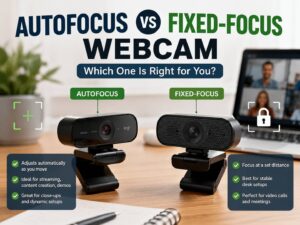
Autofocus is one of the most talked-about webcam features. It is not always a must-have, and a fixed-focus webcam can be fine if you stay at one distance from it.
You need an autofocus webcam if you move often, show objects on camera, use a standing desk, record tutorials, or sit at different distances from the screen. A fixed-focus webcam still works well for simple desk calls, mainly when you sit in the same place each time.
So, should you pay extra for autofocus? For many users, yes. For basic calls, not always. The better choice depends on your desk setup, camera distance, lighting, and how often you use video.
What Autofocus Means on a Webcam
Autofocus lets the webcam adjust sharpness on its own. The camera reads the subject in front of the lens, then changes focus to keep the image clear.
This sounds simple, but it affects daily use more than it seems. You lean back in your chair. Then you move closer to read a message. A few minutes later, you hold a product near the lens. A fixed-focus webcam treats all of those moments as part of one general focus zone. An autofocus webcam reacts to distance changes.
A webcam with autofocus works best for:
- Work calls where you move often
- Product demos
- Online teaching
- Desk tutorials
- Whiteboard sessions
- Streaming
- Content creation
- Close-up shots
- Standing desk setups
- Shared family or office computers
Autofocus does not fix every image issue. Bad lighting can still make video look grainy. Low-quality sensors can still look dull. Weak internet can still reduce call quality. Still, focus plays a major role. A sharp 1080p image often looks better than a soft 4K image.
Fixed Focus vs Autofocus: The Difference That Matters
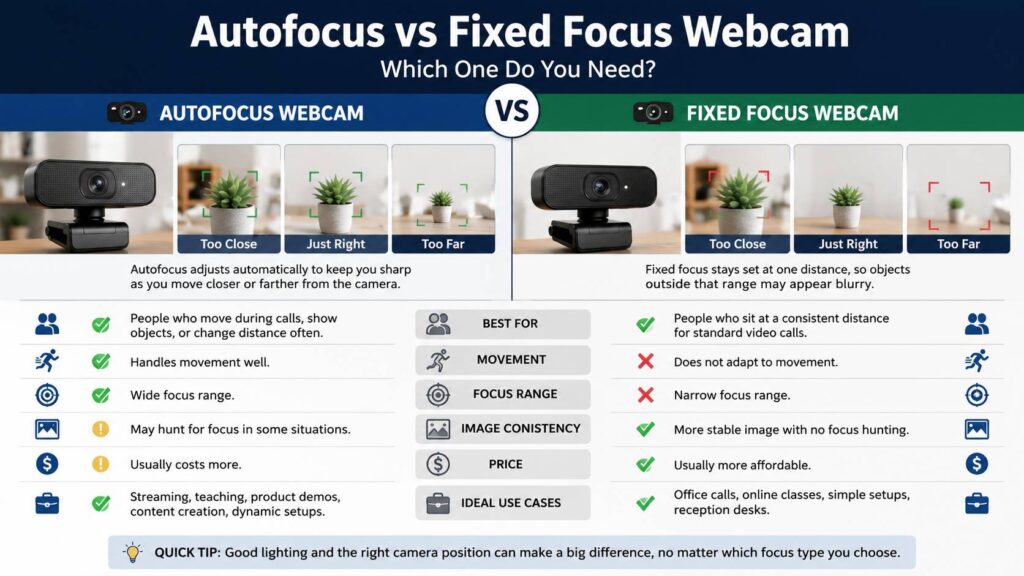
A fixed-focus webcam stays locked to one focus range. It does not adjust each time you move. This can work well for people who sit at a normal desk distance, usually around 50 to 90 cm from the camera.
An autofocus webcam changes focus as the subject moves closer or farther away. That makes it more flexible. It can keep your face sharp during calls and help with objects held near the lens.
Still, not every autofocus system works well. Cheap autofocus can pulse, hunt, or lock onto the wrong item. A microphone arm, bright lamp, chair, or shelf behind you can confuse the camera. Your face then looks soft, even though the webcam has autofocus.
A fixed-focus webcam can feel calmer. It does not shift focus during a call. That matters in formal meetings, where focus pulsing can distract people.
For a deeper comparison, read this guide on autofocus vs fixed focus webcam. It explains the trade-offs in more detail and helps you match the focus type to your setup.
Who Needs an Autofocus Webcam?
Autofocus makes the most sense for people who use video often and do more than sit still.
Remote workers can benefit from autofocus during long meetings. You may lean forward, check notes, stand up, or move to a second screen. A good autofocus webcam keeps the image clearer through those small changes.
Teachers and trainers get even more value from it. They often show papers, books, tools, or screens during lessons. A fixed-focus webcam can struggle with these close-up moments. Autofocus gives more room to work.
Creators and streamers should treat autofocus as a serious feature. Product shots, desk shots, hand movements, and face framing all need sharper focus. A soft image can make even a good setup look cheap.
Autofocus is useful for:
- Online teachers
- Streamers
- YouTubers
- Remote workers
- Coaches
- Product reviewers
- Sales teams
- Tech support agents
- Designers showing physical samples
- Students who present projects online
People who share one webcam at home or work can benefit too. One person may sit close to the monitor. Another may sit farther back. Autofocus handles those changes better than a basic fixed-focus model.
Who Can Skip Autofocus?
Not everyone needs autofocus. A fixed-focus webcam can work perfectly well for simple calls.
You can skip autofocus if you sit in one spot, use the same monitor, and only join normal meetings. Many budget webcams look decent in this kind of setup, mainly with good lighting.
Fixed focus works well for:
- Basic Zoom calls
- Microsoft Teams meetings
- Google Meet calls
- School lessons
- Family video chats
- Reception desks
- Simple office setups
- Users who dislike focus shifting
A fixed-focus model can even feel more stable. It does not search for focus during a call. Once you sit in the right range, the image stays consistent.
My honest view: do not buy autofocus just for the feature name. Buy it only when your use case benefits from it. For a person who takes two short calls per week, better lighting brings more value than autofocus.
Why Autofocus Matters More on 4K Webcams
A 4K webcam captures more detail than a 1080p webcam. That extra detail makes soft focus easier to notice. A small focus issue can look minor at 720p or 1080p, but it stands out more in 4K.
Many 4K webcams support cropping, digital zoom, and auto-framing. Those features can make focus errors even more visible. Once the camera crops into the image, every blur looks larger.
That does not mean every 4K webcam beats every 1080p webcam. A high-quality 1080p webcam with a good lens can look cleaner than a cheap 4K model with weak autofocus. Lens quality, light handling, sensor size, frame rate, and software controls all matter.
For most office users, 1080p at 30 frames per second is enough. For smoother motion, 1080p at 60 frames per second feels better. For creators, product demos, and sharper recordings, 4K can make sense.
This 1080p vs 4K webcam guide breaks down the resolution choice in more detail. It can help you avoid paying for 4K when a better 1080p camera fits your needs.
Common Autofocus Problems in Real Use
Autofocus sounds helpful, but real use can expose weak spots.
The most common issue is focus hunting. The camera keeps searching for the subject. Your face looks sharp, then soft, then sharp again. This often happens in dim rooms or in scenes with too much background detail.
Another common issue is background focus. The webcam may focus on a bookshelf, plant, microphone, lamp, or chair behind you. Your face then loses detail.
Close-up focus can be tricky too. Some webcams cannot focus well on items held very close to the lens. Product labels, small parts, and handwritten notes can look blurry at the exact moment you want clarity.
Low light makes autofocus worse. A camera needs contrast to judge focus. A dark room gives it less detail to read.
You can reduce autofocus problems with a few simple steps:
- Place a soft light in front of you.
- Keep bright windows out of the frame.
- Clean the webcam lens.
- Sit near the center of the image.
- Remove busy objects behind your head.
- Turn off auto-framing if it causes focus shifts.
- Use webcam software to lock focus during important calls.
- Keep the camera steady on a monitor mount or tripod.
A dirty lens causes more blur than people think. Fingerprints and dust can make a good webcam look cheap.
Autofocus vs Auto-Framing
Autofocus and auto-framing are not the same thing.
Autofocus controls sharpness. Auto-framing controls the crop. It moves or zooms the frame to keep your face centered.
Some webcams include both. Others include only one. This matters during buying, since auto-framing does not mean the webcam has autofocus.
For most people, autofocus gives more practical value than auto-framing. A centered but blurry face still looks bad. A sharp image with simple framing looks better in most calls.
Auto-framing helps more for presenters, teachers, and people who move around the room. For a normal desk call, it can crop too tightly or move too often. In that case, a stable frame with good focus works better.
Autofocus vs Manual Focus
Some webcams let you control focus manually through software. This gives more control and fewer surprises.
Manual focus works best in a fixed setup. Streamers often use it this way. They sit in the same chair, at the same distance, under the same lights. Locked focus stops pulsing during a stream.
Autofocus works better for flexible setups. Teachers, reviewers, and remote workers often move more. They need the camera to react.
The best webcams give you both options. You can use autofocus for casual calls, then lock focus for recordings, interviews, or webinars.
This matters more than people expect. A focus lock can save an important meeting. You set the camera once, then it stops searching.
What to Check Before Buying
Do not choose a webcam only by the word autofocus. Look at the full camera package.
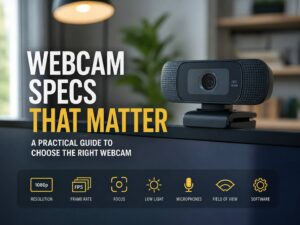
Check these details before buying:
- Resolution: 1080p works for most calls. 4K helps with cropping and recordings.
- Frame rate: 30 fps is fine for meetings. 60 fps looks smoother.
- Field of view: 65 to 78 degrees feels natural for one person. 90 degrees shows more room.
- Low-light quality: Weak lighting can ruin focus and detail.
- Software controls: Focus lock, exposure, zoom, and color controls matter.
- Mounting: A stable clip or tripod thread helps the image stay steady.
- Privacy shutter: Useful for laptops, workstations, and shared rooms.
- Microphone quality: Fine for casual use, but a separate mic usually sounds better.
- Minimum focus distance: Important for close-up shots and product demos.
A good webcam should give you control. Auto settings are helpful, but manual settings help during difficult calls.
Best Situations for an Autofocus Webcam
Autofocus gives the clearest benefit in active setups.
For work calls, it helps when you lean toward the screen, check notes, or switch between sitting and standing. For job interviews, it can help you look sharper and more prepared.
For online lessons, autofocus helps with books, worksheets, crafts, tools, and whiteboards. Teachers often bring items close to the lens, then move back to speak. Fixed focus can struggle there.
For product demos, autofocus can make the difference between a clear label and a blurry mess. This matters for sellers, reviewers, repair guides, and tech tutorials.
For streaming, autofocus helps during movement. It can track your face and desk activity through longer sessions. Still, many streamers prefer locked manual focus once they set the camera position.
Is Autofocus Worth Paying Extra For?
Autofocus is worth the extra cost for frequent video users. It makes the webcam easier to live with. You get more freedom to move, show items, and adjust your desk setup.
Casual users can save money. A good fixed-focus webcam with decent lighting can handle weekly calls without trouble. Spend part of the budget on a small desk light first. Better lighting often improves video more than any focus feature.
For professional use, autofocus deserves a higher place on the buying list. Client calls, webinars, interviews, remote sales, online teaching, and recorded content all benefit from sharper video.
A simple rule works well: fixed desk and fixed distance, choose fixed focus. Moving setup and close-up use, choose autofocus.
How to Make Any Webcam Look Sharper
Before replacing your webcam, fix the basics.
Start with lighting. Put a soft light in front of your face, slightly above eye level. Avoid a bright window behind you. Backlight makes your face dark and can confuse autofocus.
Next, raise the camera to eye level. This gives a better angle and helps the webcam read your face.
Clean the lens next. Use a microfiber cloth. Do not use rough paper or harsh cleaner.
Open the webcam settings after that. Reduce digital zoom if the image looks soft. Turn off beauty filters that smear skin detail. Try manual exposure if the brightness changes too much.
Tidy the background. A busy shelf, bright lamp, or moving fan can pull focus away from your face. A simple background helps the camera behave better.
Final Buying Advice
You do not always need autofocus on a webcam. You need it when your camera has to adapt.
Fixed focus works well for simple calls. It can look stable, clean, and natural in a basic desk setup. Autofocus works better for movement, close-ups, teaching, streaming, standing desks, and product demos.
A good autofocus webcam should focus fast, avoid pulsing, handle normal room light, and give you software controls. A weak autofocus webcam can feel worse than a fixed-focus model.
Buy for your real habits, not for a spec sheet. Sit still most of the time? Fixed focus can work well. Move often, show objects, teach, present, or record content? Choose an autofocus webcam.