A standing desk can change the way your workday feels. It gives you more freedom than a fixed desk, and it helps you move between sitting and standing without leaving your workspace. Still, the type of desk you choose matters.
The main choice comes down to this: electric standing desk vs manual standing desk. Both can raise your work surface. Both can help you build a healthier desk routine. Yet they feel very different once you use them every day.
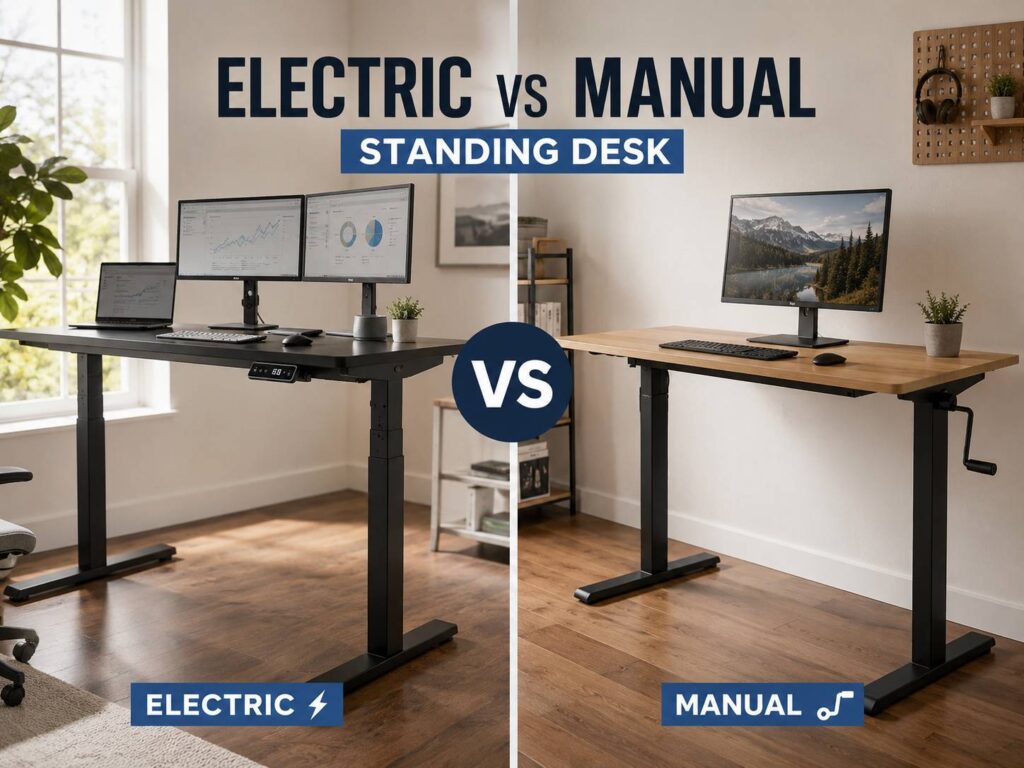
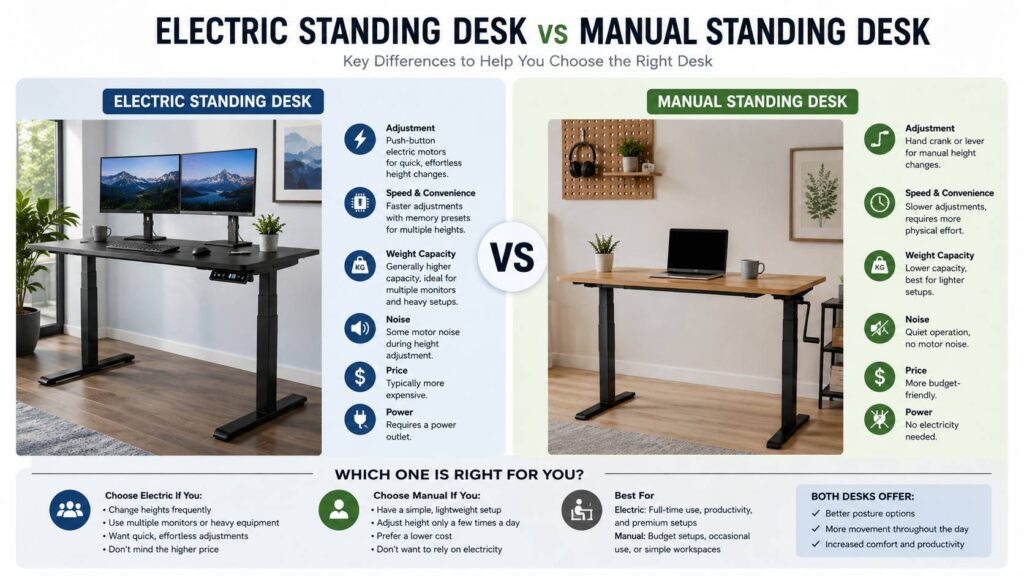
An electric standing desk uses motors. You press a button, and the desk moves up or down. A manual standing desk uses a crank, lever, gas lift, or hand adjustment system. It costs less, but it asks for more effort.
So, which one fits a home office better? For most full-time desk users, an electric standing desk makes more sense. It feels smoother, adjusts faster, and makes sit-stand changes easier to repeat. A manual standing desk still works well for lighter setups, smaller budgets, and users who adjust the desk only once or twice per day.
What Is an Electric Standing Desk?
An electric standing desk has a powered frame with one or more motors. Most models include a small keypad under the desktop. You press a button, then the desk moves to your chosen height.
Many electric desks include memory presets. That means you can save your sitting height and standing height. Some models save three or four positions, which helps if more than one person uses the desk.
This type of height adjustable desk works well for modern home offices. It can handle dual monitors, laptop docks, speakers, lights, and large desktops. Better models use dual motors, so each desk leg moves with more control.
The biggest benefit is ease. You do not need to turn a crank or lift the desk by hand. You press one button and get back to work. That small detail makes a real difference during a long day.
Electric standing desks fit people who:
- Work at a desk for 6 to 8 hours per day
- Use two monitors or a heavy monitor arm
- Switch between sitting and standing often
- Share a desk with another person
- Want memory presets
- Prefer a smoother daily setup
The downside is cost. Electric desks usually cost more than manual desks. They also need a power outlet, and the motor system adds parts that can fail later. Still, a good electric desk often feels worth the extra money if you use it every workday.
What Is a Manual Standing Desk?
A manual standing desk changes height without electricity. The most common version uses a hand crank. You turn the crank to raise or lower the desktop. Other models use a lever, gas lift, or simple pin-lock system.
Manual desks keep things simple. They do not need power. They have fewer electronic parts. They often cost less, so they appeal to buyers who want a budget standing desk.
This type of desk works best with lighter setups. A laptop, keyboard, mouse, and one monitor fit it well. Once you add heavy screens, large speakers, and a thick desktop, adjustment can feel slower.
Manual standing desks suit people who:
- Want a lower price
- Use a simple home office setup
- Adjust the desk only a few times per day
- Do not want motors or cables
- Work in a room with few outlets
- Need a basic sit-stand desk
The main problem is effort. A crank desk is not hard to adjust once. Yet the process becomes annoying if you do it many times per day. As the novelty wears off, it is easy to leave the desk at one height. Then the sit-stand benefit drops.
Gas lift models feel faster, but they can struggle with heavy gear. If the load is not balanced, the desk may rise or lower unevenly. So, manual desks need a bit more care when you plan the setup.
Electric Standing Desk vs Manual Standing Desk: Key Differences
The biggest difference is not only the price. It is daily behavior.
An electric desk makes movement easy. You press a button, and the desk moves. A manual desk makes movement possible, but it asks for effort. That effort affects how often you use the desk.
For example, an electric standing desk can move from sitting to standing in seconds. Many models let you save your preferred height, so you do not need to guess. A manual desk takes more time, and each change needs physical effort.
Here is the practical difference:
- Electric desks feel better for frequent height changes.
- Manual desks cost less and suit basic use.
- Electric desks handle heavier gear better.
- Manual desks need no outlet.
- Electric desks work better for shared spaces.
- Manual desks appeal to buyers who prefer simple furniture.
If you want help with size, height range, frame strength, and setup details, this guide on how to choose the right standing desk is a useful next read.
Which Desk Feels Better for Daily Work?
An electric standing desk feels better for most daily users. The reason is simple. It removes friction.
You can stand during a video call. You can sit for writing. You can raise the desk after lunch. You can lower it again for focused typing. The desk moves without interrupting your flow.
That matters. A standing desk only helps if you use it. If the adjustment feels like a chore, you will avoid it. Manual desks often lose here.
A manual crank desk can work well, but the experience feels slower. You must stop, turn the crank, check the height, then continue. That is fine once or twice. It feels less appealing after a busy morning.
Real opinion: an electric desk does not make you healthier by itself. It simply makes better habits easier. You still need breaks, movement, and a proper chair. Yet the smoother adjustment helps you change posture more often.
Which Desk Is Better for Ergonomics?
Both desk types can support good ergonomics. The better choice depends on how easily you can reach the right height.
At sitting height, your elbows should sit close to your body. Your shoulders should feel relaxed. Your wrists should stay straight. Your feet should rest flat on the floor or on a footrest.
At standing height, your elbows should stay near a right angle. Your keyboard and mouse should sit low enough to keep your shoulders relaxed. Your screen should sit near eye level, so your neck does not bend down all day.
An electric desk makes these changes easier. Presets help you land on the same height every time. With a manual desk, you often need to adjust by feel. That can work, but it is less exact.
Standing all day is not the goal. Sitting all day is not ideal either. The better routine is a mix of sitting, standing, short walks, and light stretching.
Try this simple rhythm:
- Sit for focused typing.
- Stand for short calls.
- Walk for a few minutes each hour.
- Change position before discomfort starts.
- Use an anti-fatigue mat for longer standing sessions.
- Keep your monitor and keyboard at the right height.
If you are still comparing a standing desk with a regular desk, this guide on standing desk vs standard desk explains the bigger comfort trade-offs.
Price and Long-Term Value
Manual standing desks usually win on price. They skip motors, control boxes, power cables, and memory keypads. That makes them cheaper to buy and simpler to repair.
Electric standing desks cost more. In return, they give you faster adjustment, smoother movement, stronger lift systems, and better support for daily sit-stand use.
The best value depends on how often you change height.
A manual desk can offer great value if you work part-time from home or use a simple laptop setup. It can also suit a guest room, student room, or small apartment.
An electric desk gives better value for full-time work. If you spend 40 hours per week at your desk, small daily comforts matter. One-button adjustment saves time and removes effort. Over months and years, that matters more than the first purchase price.
Think of it this way: a cheaper desk that you rarely adjust is not a great deal. A more expensive desk that supports better habits every day can feel like the smarter buy.
Stability and Wobble
Stability matters a lot with standing desks. At standing height, even small movement becomes more visible. Your monitor may shake when you type. Your coffee may wobble. Your desk may feel less solid than expected.
Electric desks often feel stronger, mainly in mid-range and higher-end models. Dual motor frames can lift heavy setups with less strain. They also tend to move more evenly from side to side.
Manual desks vary more. Some crank desks feel solid. Others feel light and shaky. Budget models can wobble at full height, mainly with monitor arms attached.
Before buying, check these details:
- Steel frame
- Wide feet
- Strong desktop
- Good weight rating
- Smooth lift movement
- Low wobble at standing height
- Height range that fits your body
- Clear warranty terms
Do not judge only by weight capacity. A desk can lift the listed weight and still feel shaky. User reviews often reveal this better than product pages. Search for comments about wobble, monitor shake, and stability at full height.
Real opinion: stability should matter more than fancy extras. A desk with memory buttons still feels poor if it shakes each time you type.
Weight Capacity and Desk Gear
Your desk gear affects the choice more than you may think.
A simple laptop setup weighs very little. A manual standing desk can handle that well. Once you add two monitors, monitor arms, speakers, lights, a microphone, and a thick desktop, electric starts to look better.
Electric desks usually support heavier loads. Better dual motor models can raise large workstations without strain. That makes them a better fit for developers, designers, editors, streamers, and anyone with a full desktop setup.
Manual desks can still work with a monitor and basic gear. Yet heavy equipment makes adjustment slower. The crank takes more effort, and gas lift systems may feel less smooth.
Before buying, add up your gear:
- Desktop surface
- Monitors
- Monitor arms
- Laptop dock
- Speakers
- Keyboard and mouse
- Desk lamp
- Cable tray
- Under-desk drawer
- Microphone or camera gear
Then choose a desk with extra capacity, not one that barely reaches the total. A stronger frame feels better and lasts longer.
Noise, Power, and Cable Management
Electric standing desks make some noise. Most good models produce a low motor hum during movement. It lasts only a few seconds. In a quiet office, you will hear it. During normal work, it rarely feels like a major problem.
Manual desks make less noise. A crank can squeak or click, but there is no motor sound. Gas lift models often move quietly.
Power is another point. Electric desks need an outlet. That means one more cable under the desk. It also means your cable setup needs planning.
A moving desk can pull on monitor cables, laptop chargers, speaker wires, and dock connections. Leave enough slack for the highest standing position. A cable tray helps. A cable spine helps too. Test the desk at full height before you trust the setup.
Manual desks avoid the power issue, but they still need cable slack. Any height adjustable desk can tug on cables if you route them too tightly.
Common Problems People Notice After Buying
It is easy to focus on the desk frame and forget daily annoyances. Those small issues decide if the desk feels good after the first week.
Common electric desk issues include:
- Motor noise during movement
- Wobble on cheaper frames
- Cable clutter under the desk
- Control box placement
- Need for a nearby outlet
- Higher repair cost after warranty
Common manual desk issues include:
- Slow crank adjustment
- More effort with heavy gear
- Handle placement feels awkward
- Less exact height control
- Fewer comfort features
- Lower chance of frequent use
None of these problems ruin the desk by default. They just matter during real work. A buyer with a laptop may never care about weight capacity. A buyer with three monitors will care right away.
Which One Should You Choose?
Choose an electric standing desk if you work from home most days. It fits full-time desk users, heavy setups, shared workstations, and people who want quick sit-stand changes. It costs more, but it feels easier to use.
Choose a manual standing desk if you want to save money. It works well for simple setups, light gear, and occasional standing. It also suits people who prefer furniture with no motors or power cables.
Here is a simple guide:
- Best for full-time work: electric standing desk
- Best for tight budgets: manual standing desk
- Best for dual monitors: electric standing desk
- Best for simple laptop use: manual standing desk
- Best for shared desks: electric standing desk
- Best for low maintenance: manual standing desk
- Best for frequent posture changes: electric standing desk
For most home offices, electric is the better long-term choice. It helps you change position more often, and it takes less effort. For a spare room or light work setup, manual still makes sense.
Final Verdict
An electric standing desk beats a manual standing desk for daily comfort, speed, and ease of use. It works better for full-time home office users, heavier setups, and people who want to move between sitting and standing many times per day.
A manual standing desk wins on price and simplicity. It needs no outlet, has fewer electronic parts, and suits lighter setups. The trade-off is effort. If raising the desk feels annoying, you will stop doing it.
The best desk is the one you will use every day. For most people, that means electric. For budget buyers with simple gear, manual still offers good value.