Choosing between a matte vs glossy monitor sounds simple. One screen looks smooth and shiny. The other looks softer and less reflective. Yet this small detail can change how your monitor feels every day.
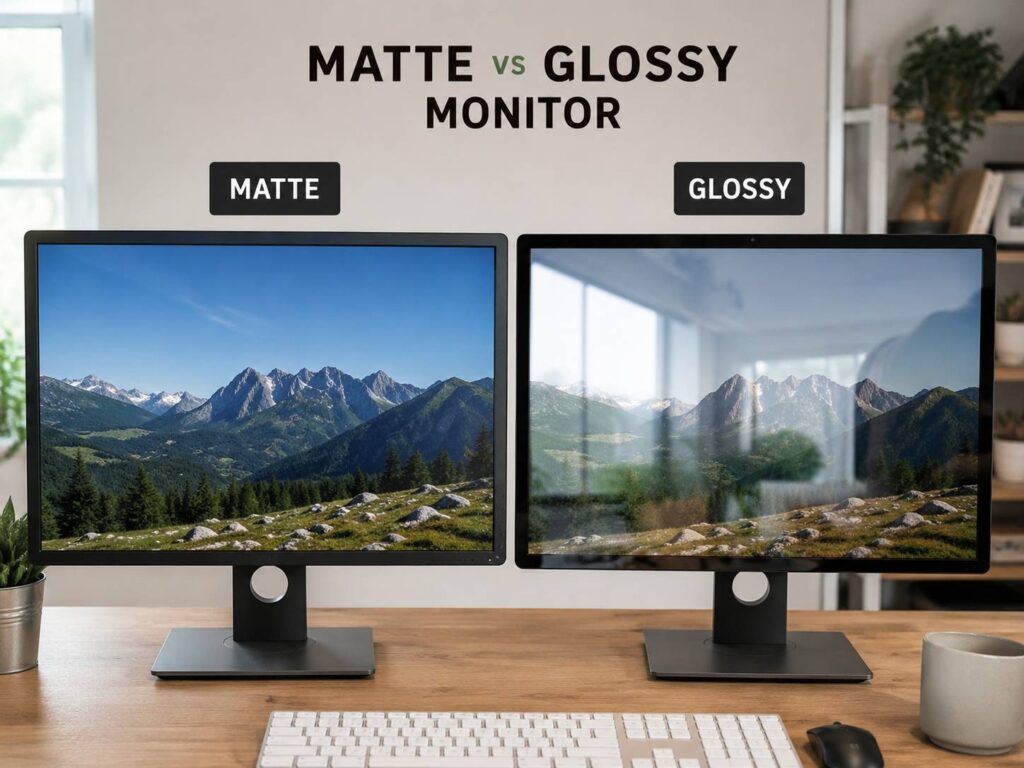
A glossy screen can make colors look deeper. Blacks can look richer, and text can look very clean in the right room. A matte screen, by comparison, feels calmer in a bright office or bedroom with windows nearby. It cuts down mirror-like reflections from lamps, sunlight, and light-colored walls.
The best choice is not always the one that looks better in a store photo. It is the one that fits your room, your desk, and your daily use. A gamer in a dark room may love a glossy OLED monitor. A writer working beside a window may regret that same screen within one afternoon.
What Is a Matte Monitor?
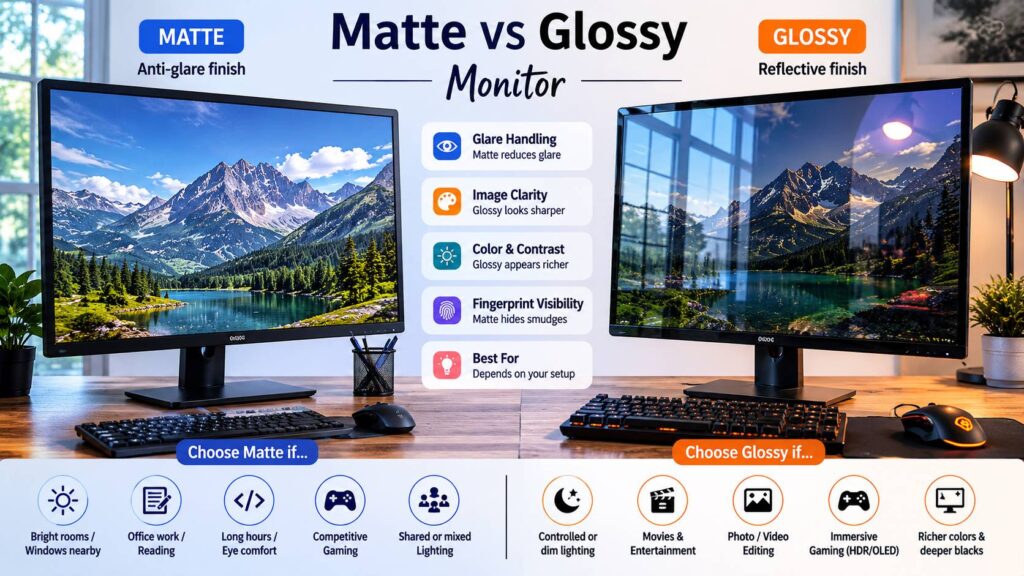
A matte monitor uses an anti-glare coating on the screen surface. This coating spreads incoming light instead of reflecting it straight back at you. So, instead of seeing a clear reflection of your window or lamp, you see a softer glow.
That makes matte monitors popular for offices, schools, shared rooms, and home workspaces. They are practical. They do not look as dramatic as glossy screens at first glance, but they stay easier to read in more lighting conditions.
Most business monitors, budget monitors, and many gaming monitors use a matte finish. That makes sense. People use monitors under overhead lights, near windows, and in rooms they cannot fully control.
Still, matte screens have flaws. Some coatings make white pages look slightly grainy. Fine text can lose a little crispness. Cheap matte coatings can even make the image look dusty, even after you clean the screen.
What Is a Glossy Monitor?
A glossy monitor has a smoother and more reflective screen surface. It does not scatter light as much, so the image can look cleaner and sharper. Colors often appear richer. Blacks can look deeper. Text can feel more direct, especially on high-resolution displays.
This is why many phones, tablets, laptops, TVs, and premium displays use glossy glass. In a dim room, glossy screens can look fantastic. Movies, games, photos, and colorful web pages have more punch.
The problem starts once a bright light hits the screen. A glossy monitor can reflect your face, keyboard, window, lamp, or wall art. Dark scenes make this even more obvious. Black areas on the screen can turn into a mirror.
That is the main risk. Glossy can look better, but it demands better room control.
Matte vs Glossy Monitor: Main Difference
The biggest difference is how each screen handles light.
A matte monitor spreads reflections across the surface. A glossy monitor keeps reflections sharper and clearer. This affects comfort, contrast, sharpness, color depth, and daily usability.
Here is the simple version:
- Matte screens reduce glare better in bright rooms.
- Glossy screens look clearer in darker rooms.
- Matte screens work better for long office sessions.
- Glossy screens can look better for movies, gaming, and photo viewing.
- Matte coatings can soften the image slightly.
- Glossy coatings can show distracting reflections.
A quick test helps. Turn the monitor off during the day. Look at the screen. If you can clearly see your face or room, the screen is glossy or semi-glossy. If reflections look blurred and washed out, it is matte.
Which One Is Better for Eye Comfort?
Matte usually feels easier during long work sessions. The reason is simple. Reflections distract your eyes. They make text harder to read, especially on white documents, spreadsheets, code editors, and browser pages.
A glossy screen can still feel comfortable in a dark or controlled room. If you keep windows behind the monitor and use soft lighting, it can work well. Yet not every desk allows that kind of setup.
For daily work, matte is the safer choice. It is less flashy, but it creates fewer problems. You can sit down, open your laptop or desktop, and get to work without fighting sunlight or ceiling lights.
Eye comfort is not only about screen finish, though. Brightness matters. Text size matters. Room lighting matters. Viewing distance matters. A matte monitor set too bright can still feel harsh. A glossy monitor in a dark room with balanced brightness can feel perfectly fine.
Which One Looks Better?
Glossy usually wins in a controlled room. The image looks cleaner. Colors have more depth. Blacks look richer. Text can look sharper. This is the reason glossy screens often impress people at first.
Matte screens look more practical. They reduce glare, but they can make the picture look a little flatter. Some matte displays show a faint sparkle effect on bright backgrounds. This bothers some users more than others.
My honest opinion: glossy gives the better first impression, but matte often gives the better workday. That matters if you use the monitor for eight hours, not just for a five-minute demo.
If your desk gets daylight, matte will probably make you happier. If your room has curtains, soft lighting, and no bright reflections, glossy can feel more premium.
Matte vs Glossy Monitor for Office Work
For office work, a matte monitor is usually the better pick. Emails, documents, spreadsheets, dashboards, web apps, and video calls need steady readability. You do not need the deepest black levels to edit a spreadsheet. You need a screen that stays clear at noon.
A matte screen helps in shared spaces too. It hides fingerprints better. It handles desk lamps better. It reduces distractions in rooms with bright walls or windows.
This matters a lot for writers, programmers, students, accountants, customer support teams, and remote workers. Reading text all day on a reflective screen can get tiring.
Glossy still has a place in office work, but only in the right setup. A designer using a glossy display in a controlled studio may prefer the extra clarity. A casual office user near a window will likely prefer matte.
If you are still setting up your workspace, screen shape matters too. A curved display can reduce edge glare for some desk layouts, but it is not always the right choice. For a deeper comparison, read this guide on flat or curved monitor.
Matte vs Glossy Monitor for Gaming
Gaming depends on your room and the games you play.
A glossy gaming monitor can look amazing in a dark room. HDR scenes, colorful games, and OLED panels can look more intense. Single-player games, movies, and cinematic titles benefit from that clean surface.
A matte gaming monitor works better in brighter rooms. It keeps reflections under control during daytime play. It also helps in dark game scenes where glossy reflections can cover details.
For competitive gaming, matte makes more sense. Fewer reflections mean fewer distractions. You want to see enemies, movement, and dark corners without seeing your room on the screen.
For story games, racing games, RPGs, and media use, glossy can be more enjoyable. Just make sure you control the light behind you. A bright window behind your chair can ruin the whole experience.
Matte vs Glossy for OLED Monitors
OLED monitors make this choice even more interesting. OLED panels can show true black at the pixel level, but room light still changes what your eyes see.
A glossy OLED can look stunning in a darker room. Blacks look deep. Colors feel rich. Fine details look clean. That is the dream setup for movies, gaming, and photo viewing.
A matte OLED is more practical in a bright room. It reduces sharp reflections, but it can spread light across dark parts of the image. This can make blacks look less deep during the day.
So, the coating changes the OLED experience. It does not change the panel technology, but it changes how the image feels in real use.
Panel type matters here too. If you are comparing display technologies, this guide on OLED vs IPS monitor will help you understand the bigger picture.
Matte vs Glossy for Photo and Video Editing
Photo and video editing need accurate viewing conditions. The screen finish matters, but it is not the only factor.
A glossy monitor can make photos look richer. This is nice for previewing images, but it can also make edits feel more dramatic than they really are. Reflections can interfere with dark tones, skin tones, and shadow detail.
A matte monitor gives a more stable view in normal workspaces. It may not look as punchy, but it is easier to judge content across a full day. Many creative users prefer a high-quality matte or low-reflection display for this reason.
For editing, look beyond the finish. Check resolution, color coverage, brightness, contrast, uniformity, calibration support, and panel type. A good matte monitor beats a poor glossy monitor. A good glossy monitor in a controlled room can beat a cheap matte display too.
Common Problems People Notice After Buying
Glossy monitors can disappoint during the day. The screen looks amazing at night, then the morning sun exposes the problem. Reflections show up on dark websites, games, movies, and black app themes.
Matte monitors can disappoint for the opposite reason. You expect sharp text, then notice haze or grain. This is more common on cheaper anti-glare coatings. It can bother people who work with text all day.
Here are the most common complaints:
- Glossy screens show windows, lamps, and faces.
- Glossy screens need better light control.
- Matte screens can look less sharp.
- Matte coatings can reduce image depth.
- Heavy matte coatings can show grain on white pages.
- Bright rooms can still wash out both screen types.
The lesson is simple. Do not judge a monitor finish from product photos. Think about your room first.
How to Choose the Right Screen Finish
Choose matte if your room has bright light, windows, or overhead lamps. It is the better choice for office work, study, coding, writing, and general browsing. It is also better for shared rooms where you cannot control every light source.
Choose glossy if your room lighting is controlled. It is better for movies, gaming, photos, OLED displays, and rich visuals. It works best at night or in rooms with curtains and soft lighting.
Choose a premium low-reflection finish if you want a middle ground. Some higher-end monitors use better coatings that reduce glare without making the image look too soft. These screens cost more, but they can be worth it for daily users who care about both comfort and image quality.
Here is a quick guide:
- Best for office work: matte
- Best for bright rooms: matte
- Best for gaming in daylight: matte
- Best for movies in a dark room: glossy
- Best for photo viewing: glossy or premium low-reflection
- Best for mixed daily use: matte
- Best for OLED in controlled lighting: glossy
- Best for fewer reflections: matte
Setup Tips for Better Results
A good setup can improve any monitor finish.
Place your screen so windows sit to the side, not directly behind you. Avoid placing a bright lamp behind your chair. Use curtains or blinds during strong daylight. Keep the monitor clean. Dust and fingerprints make glare worse, especially on glossy screens.
Set brightness to match your room. A monitor that is too bright can feel harsh at night. A screen that is too dim can feel hard to read during the day. Try to match the screen to the room instead of leaving brightness at the factory setting.
Use soft lighting behind or around the desk. This helps reduce the contrast between the monitor and the room. It can make long sessions feel more comfortable.
For glossy monitors, control reflections first. For matte monitors, reduce direct light hitting the screen. Matte does not remove glare completely. It spreads glare, so too much light can still wash out the picture.
Best Choice for Most People
Most people should choose a matte monitor. It is the practical option. It works in more rooms, handles daylight better, and keeps text easier to read during long sessions.
Glossy is better for people who care most about image quality and have a room that supports it. If you can control reflections, glossy can look cleaner and more premium.
My real-world recommendation is this: choose matte for work and mixed use. Choose glossy for entertainment and controlled lighting. If you are buying one monitor for everything, matte gives fewer surprises.
Final Verdict
The matte vs glossy monitor debate comes down to your room and your use case. Matte screens reduce glare and work better for long sessions. Glossy screens look sharper and richer, but they reflect more light.
For office work, studying, coding, writing, and daytime use, matte is the smarter choice. For movies, gaming, photo viewing, and OLED setups in darker rooms, glossy can look better.
Before buying, look at your desk during the brightest part of the day. Check where the windows and lamps sit. That quick check will tell you more than most product listings.